The LevelBlue SpiderLabs team identified phishing emails in January 2026 that use Microsoft Application Registration Redirect URI’s to abuse trust relationships and bypass spam filters to redirect users to phishing websites.
Through the many Business Email Compromise (BEC) incidents that LevelBlue investigates every year, our team is able to observe threat actors who use a variety of techniques to craft legitimate-looking phishing emails. Regularly, these techniques involve using common services and trust relationships to lure potential victims to websites designed to steal sensitive information, such as their credentials.
One of the recent techniques we have observed saw threat actors leveraging Microsoft Application Registrations to create URLs that look genuine but redirect users to arbitrary websites. See the example below:
hxxps[:]//login.microsoftonline.com/common/oauth2/v2.0/authorize?client_id=2c031e61-eae0-4e15-bfb9-600b22dccad1&scope=openid+profile+https%3A%2F%2Fgraph.microsoft.com%2FUser.Read&prompt=none
From just looking at this proof-of-concept URL, users cannot tell the actual page to which they will be redirected because there is no reference to any redirects within the URL parameters. For example, if you click on the URL above, you will be redirected to https://www.levelblue.com/services, which tells you about all the different services LevelBlue has to offer.
Technique Deep Dive
Let’s break down the URL to understand the behavior:
-
The /common/oauth2/v2.0/authorize endpoint of the domain login.microsoftonline.com is part Microsoft’ identity platform OAuth 2.0 flow. This URL sends users to their respective tenants to authenticate, and it then returns the authentication code. The commonpart of the endpoint indicates that the application is designed for multitenant authentication. Multitenant authentication allows the application to be registered in a threat actor-controlled tenant and the victims to interact with the link from their own corporate tenants or personal accounts. The client_id is the application identifier assigned to your application when it is registered in Microsoft Entra ID and is used for obtaining further information regarding the application. For this example, we created the demo application and got “2c031e61-eae0-4e15-bfb9-600b22dccad1” as our assigned application/client ID.
-
The scope is the list of permissions the application will request the user consent to if not already authorized. While the scope parameter is required in the OAuth2 flow, the value in this parameter does not change the observed redirecting behavior.
-
Finally, the prompt parameter is set to none, which hides any interactive prompts for the user to authenticate and attempts to complete SSO silently. Because of this parameter, the request fails or succeeds immediately and returns the user to the page defined in the application registration’s redirect URI. The user is not required to actually authenticate during the redirect process.
Supporting this URL is the application registration that we created. Only two things were configured in the registration for this proof-of-concept:
-
The application name (which is required for any registration)
-
A redirect URI of type Single-page application with the desired redirect link
While the proof-of-concept in this blog only contains three query parameters for it to work, the phishing URLs that we reviewed contained over 100 parameters. Some of these parameters are used by threat actors to track their phishing campaigns and make the sign-in process personalized to the receiving user.
This technique has some interesting implications:
-
This functionality of the OAuth2 authentication flow allows threat actors to create phishing links that appear to be from a legitimate Microsoft domain, and at the same time, hide their malicious domain until the users are redirected.
-
If the malicious domain the threat actors control is taken down or seized, they can just update the application registration with a new redirect URL. Consequently, links sent before the domain take down would still be valid as they check for the current redirect URL from the registration.
-
This technique would bypass spam filters that do not perform a deep URL analysis that follows the page redirects.
LevelBlue’s analysis of the phishing links that leverage this technique show some common factors:
-
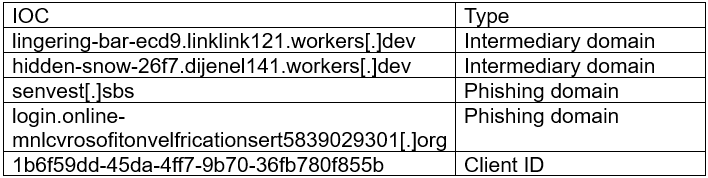
All the URLs had the same client id “1b6f59dd-45da-4ff7-9b70-36fb780f855b”
-
All used techniques to avoid automated detections such as using intermediary pages hosted in workers.dev domains. (Please see our blog post “It’s Raining Phish and Scams – How Cloudflare Pages.dev” and “Workers.dev Domains Get Abused” for more details on workers dormains) and CAPTCHAs before presenting the fake login page to the user.
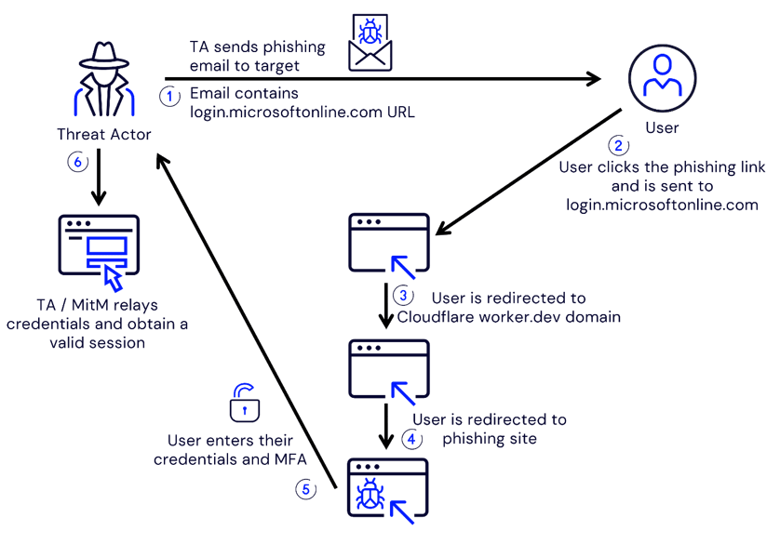
After the users click on the malicious link and move past the CAPTCHA challenges, they are presented with a phishing page designed to mimic the Microsoft 365 sign-in page.
In the examples we analyzed, this phishing page was a component of a Man-in-the-Middle (MitM) attack where the page captures the credentials and multifactor authentication information inputted by the user. It then relays this data to the Microsoft servers to obtain a valid session.
Threat actors can subsequently use this session to access the Microsoft account of the impacted users and attempt to perform further malicious activities commonly seen in BECs such as espionage or wire fraud.
The following diagram shows the main steps of this phishing technique, leading to the capture of a valid user session.
Mitigation and IOCs:
What Can Security Admins Do?
-
Ensure your spam filters capture or alert on emails containing links that use this technique, for example, links with the domain and endpoint “https://login.microsoftonline[.]com/common/oauth2/v2.0/authorize”
-
Implement general MitM mitigations, such as phishing-resistant authentication or administrator-facilitated device registration requirements.
-
Provide training to users to help them improve their detection of fake login pages and phishing emails.
-
Search for URL Click events in your security tools for similar URLs to the one discussed in this blog post to hunt for previously unidentified compromise.
-
Look into performing a proactive compromise assessment of your Microsoft 365 environment.
Here are some of the IOCs from recent investigations: