
During a DFIR engagement, LevelBlue was asked to assist with reverse engineering a Linux malware sample detected in a client’s environment. After reverse-engineering most of the malware sample, I wanted to create tooling to easily decrypt its command-and-control (C2) traffic. This post covers part of the methodology used for reversing the related routines as well as the tool created to decrypt the C2 traffic.
Malware Binary Overview
A little bit about the malware sample before we begin. Although we were unable to identify the malware sample exactly, based on early dynamic analysis and EDR metrics, strong indicators suggested it was a new version of SysUpdate.
After further analysis, this was confirmed to a high degree of confidence. The malware sample was a packed ELF64 that is dynamically linked with no section header. The packer was obfuscated and unknown, and the code is C++. The malware would masquerade as a system service, and if not presented with certain arguments, would execute the GNU/Linux ID command and return its output. The malware binary would also communicate over the network in an encrypted manner over multiple protocols.
Tooling of Choice
My weapons of choice for reverse engineering the binary are:
- Binary Ninja
- GDB
- Unicorn Engine (Rust Bindings)
All of the decompilation shown is the High Level Intermediate Language (HLIL) view in Binary Ninja. All of my emulator code is using the Unicorn Engine.
However, this blog post is about defeating C2 encryption, so let’s get into it. I have already marked up and annotated the routines that will be shown.
Overview of the Target Routines
I use a mix of dynamic and static analysis to quickly find the encryption routines. Syscall tracing and/or catching syscalls related to network socket IO, along with static analysis of memory that looks to be cryptographic constants. Also, counting the density of complex and/or bitwise instructions can help quickly identify references or values that are cryptographically involved.
The first routine we will look at is the highest-level routine that wraps around the key generation and the encryption/decryption routines.
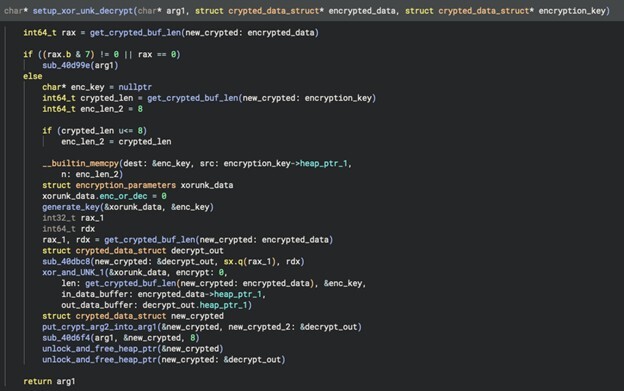
The important things to note about this routine are the data flows of xorunk_data and enc_key, as well as the arguments to two specific calls. The first call that is important, I have named generate_key. The generated key call takes an address to a data structure and an address to a plaintext encryption key.

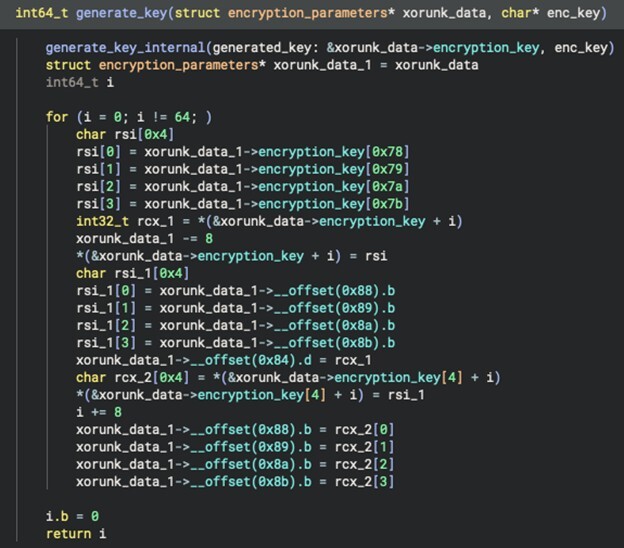
Taking a look within the generate_key function Intermediate Language (IL), we can see it first calls a function I have named generate_key_internal. After that, there appears to be 64 iterations of “writes” to the encrypted key data.
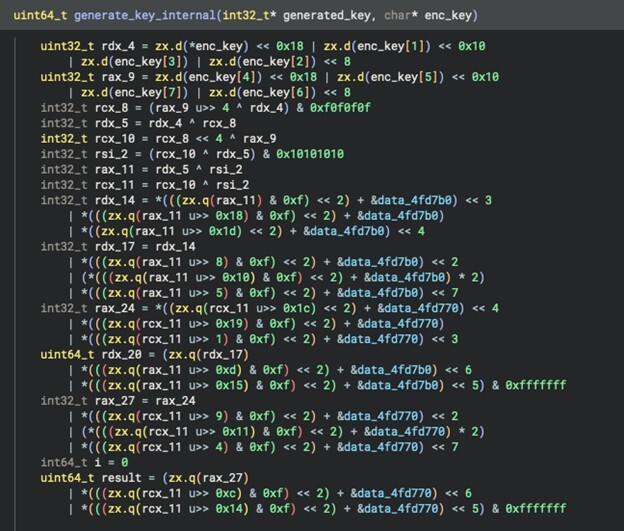
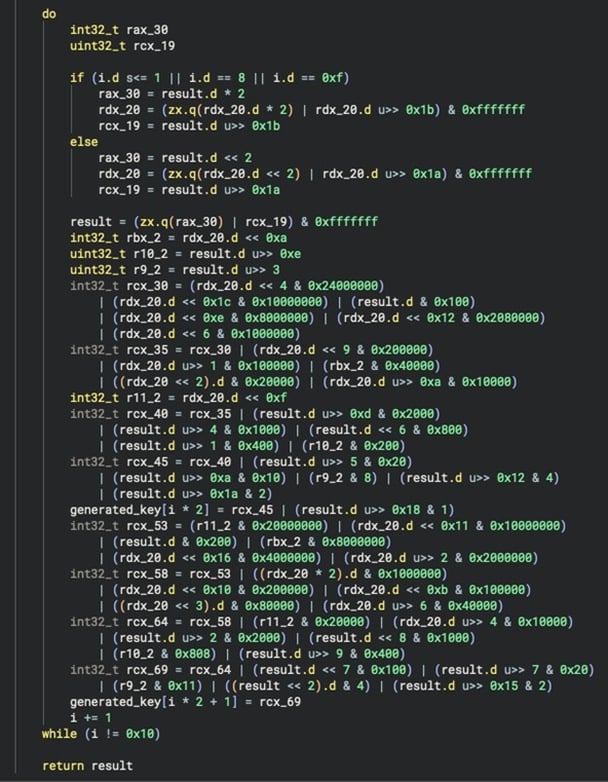
The last routine for the key generation piece is the generate_key_internal function. This routine performs the various operations for key generation and, therefore, is not important to understand. However, there is one important piece we need to take note of here. Notice the odd integer values and the references to data &data_*, we will need to keep these in mind for later.
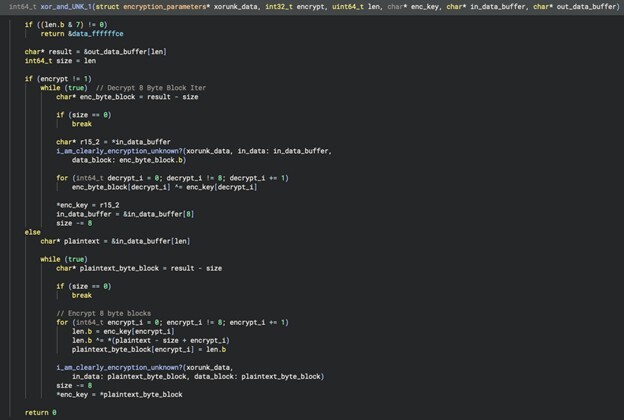
The next important call I named xor_and_UNK_1, a few arguments are passed to it. The first argument is a pointer to the stack-allocated structure encryption_parameters. The second is a signed integer flag that signifies whether to encrypt or decrypt. The third is the size of the incoming encrypted or decrypted buffer. The fourth is a char pointer to an 8-byte key. The last two arguments are two data buffer pointers that are used differently depending on the encrypt flag.

Looking inside xor_and_UNK_1, we can see the first thing it does is check that the buffer length is aligned to 8 bytes. Depending on the value of the encrypt parameter, the flow will branch to the decrypt block if the encrypt parameter is not holding the value 0x1.
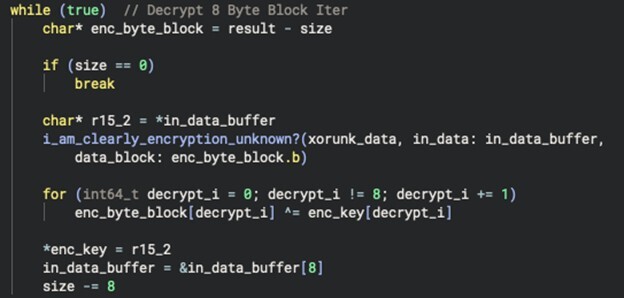
Within the decrypt block, execution enters a while loop until the size reaches the value 0. What is essentially happening here is an 8-byte block is passed through the i_am_clearly_encryption_UNK? function via the enc_byte_block pointer. Next, the enc_byte_block has all 8 bytes mutated by the plaintext key via XOR. The enc_key pointer is then set to the next 8-byte block in the encrypted blob. It then continues incrementing by 8 bytes until the entire data buffer has been decrypted.
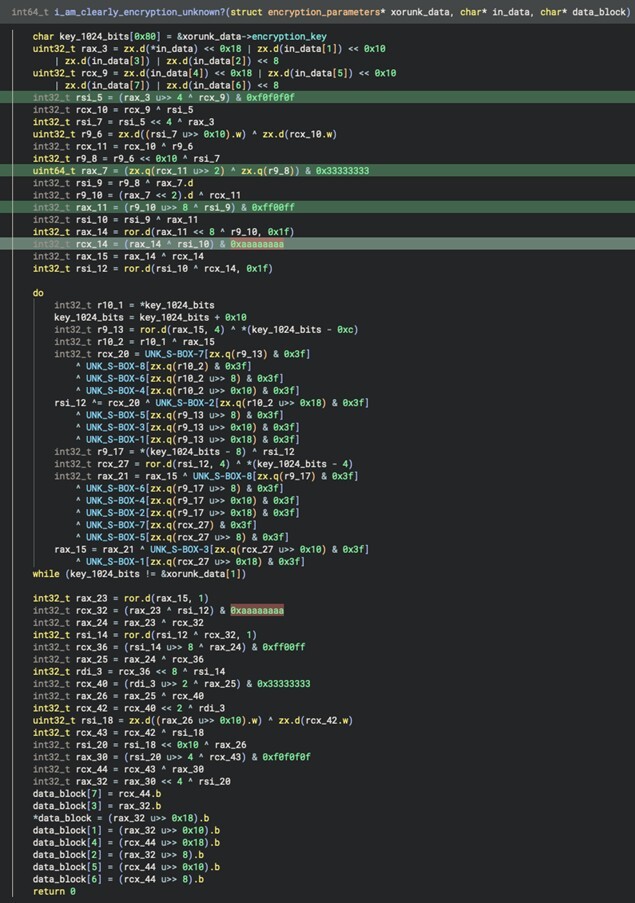
The last routine we need to look at is the perfectly named i_am_clearly_encryption_unknown? function. There are a couple things to take note of within this function when trying to identify possible cryptographic functionality. First, notice all the weird constants laying around: 0xf0f0f0f, 0x33333333, 0xff00ff, as well as the data references to what look like some sort of S-Boxes. This is likely a decryption/encryption algorithm due to these factors.
Defeating an Unknown Encryption Algorithm
Now that we have completed a quick overview of the target routines, we can begin the work on creating tools to defeat them.
How are we going to do that, you ask? With emulation, of course!
I am a really big fan of the Unicorn emulation framework, and that is what I use to emulate complex code I don’t have time to understand and/or completely reverse engineer.
When creating an emulator to transform assembly code into tooling for any kind of code, it is important to use as little code as possible while keeping the target functionality reusable. The reason for this is that it keeps logic organized and modular, making it easier to work within emulation. In my case, I wanted to be able to reuse this tooling for all discovered malware samples. By encapsulating the encryption and key generation logic within an emulation layer, we can work with it in various ways.
A few things I needed to create an emulator around these routines:
-
Machine code bytes
-
Any global data used by the target logic
-
Heap data
-
Depending on the target code’s heap usage, I will usually pick and choose what data I want from it and then write it into an arbitrary RW data segment. In this post, let’s call it the “false heap".
-
-
The stack state
-
Only need the stack state if there are data references from the target code
-
-
CPU State (Registers)
First, I find a place in execution where I get the functionality I want from the target code. Then I will set a breakpoint there in GDB and continue execution until it breaks at the target's starting point. Next, I need to carve out the needed memory states and CPU state from process memory and turn them into binary files per segment and/or useful data blobs.
There are many ways to carve out process memory. I did this in two ways. First, I got any data I could from Binary Ninja, like the Data sections of what appear to be SBOX-like data, etc. For CPU state-related data, however, I prefer to use the dump command in GDB because it is simple and straightforward. The command looks like this: dump binary memory filename start_addr end_addr. I then dump any memory I need from the various process segments and separate them into .bin files to be used by my emulator. It is also important to note down the addresses of each artifact in memory and/or the memory segment if I copy entire segment data, etc. Once I have my memory segments in files and CPU state recorded, I begin writing my emulator.
Before we get into it... Yes, I am using Rust... Why? Because I love Rust and it makes me happy :). I am using the Unicorn Engine Rust bindings found here: Unicorn Rust Bindings.
Unknown Key Generation Emulator
When creating an emulator, it is my experience that it is a good practice to keep the same memory mapping addresses. This makes it easier when dealing with code that jumps or calls nearby functions, as well as making it easier to peek back into Binary Ninja and GDB for reference. The code is the constants in use in the key generation emulator:
const STACK_ADDR: u64 = 0x7ffffffde000;const STACK_SIZE: usize = 0x21000;const STACK_START: u64 = 0x7fffffffdae8;const UNK_DATA_MAPPING_ADDR: u64 = 0x4fd000;const UNK_DATA_ADDR: u64 = 0x4fd3f9;const UNK_DATA_SIZE: usize = 0x1000;const HEAP_ADDR: u64 = 0x1393000;const HEAP_SIZE: usize = 0x2f000;const ENC_KEY: u64 = HEAP_ADDR; //0x1393000const GEND_KEY_P: u64 = HEAP_ADDR + 0x1000; //0x1394000const GEND_KEY_CON: u64 = HEAP_ADDR + 0x2000;//const GEND_KEY_CON_SIZE: usize = 0x1000;const CODE_MAPPING_ADDR: u64 = 0x40c000;const CODE_ADDR: u64 = 0x40c595;const DEC_CODE: u64 = 0x40cc10;const CODE_SIZE: usize = 0x2000;const CODE_START: u64 = 0x40c595;
Next, let’s look at the main flow of our emulator. We will go through the logic bit by bit and understand each part.
In function main(), I start with initializing the Unicorn emulator. I set the architecture to X86 in 64-bit mode. Then I get a handle to the emulator.
let mut unicorn = Unicorn::new(Arch::X86, Mode::MODE_64, 0).unwrap();let mut emu_handle = unicorn.borrow();
Next, I set up my memory mappings and pass a mutable reference to the handle.
setup_memory_mappings(&mut emu_handle);
Within the setup_memory_mappings() routine is where I set up the various memory mappings that our emulated code needs.
First, I set up the stack by passing the STACK_ADDR and the STACK_SIZE with read and write permissions.
// Stacku.mem_map(STACK_ADDR, STACK_SIZE, Permission::READ | Permission::WRITE) .expect("Failed stack mapping.");
Next, I set up the needed page from the data segment that holds the weird crypto-like constants. I basically just selected an aligned address from before the cryptographic-related constants and then pulled 0x1000 bytes from there, which encompasses the needed crypto data.
// Unknown crypto boxes / whatever Datau.mem_map(UNK_DATA_MAPPING_ADDR, UNK_DATA_SIZE, Permission::READ) .unwrap();
Next is the heap; in this case, I don’t need much from the heap. I actually craft my heap manually; I don’t need to care about where the mapping is mapped here either. I will just write heap pointers into registers.
// Heap Valuesu.mem_map(HEAP_ADDR, HEAP_SIZE, Permission::READ | Permission::WRITE) .expect("Failed Heap mapping.");
Last, but not least, I create the code mapping. This mapping is just an aligned address before the target key generation routines. Notice I said “routines” — multiple routines are being written to this mapping contiguously. There are two that I care about, and they are split up with a bunch of routines I do not care about. This is why the size of this mapping is 0x2000.
// Codeu.mem_map( CODE_MAPPING_ADDR, CODE_SIZE, Permission::READ | Permission::EXEC,).expect("Failed code mapping.");
My memory mappings are created. Time to populate them with their respective data.
write_memory_mappings(&mut emu_handle);
Let’s dive into write_memory_mappings(). In this routine, I initialize the actual data within my mappings created above. I first write the stack state from the point at which execution would start. Next, I write the crypto-like constants into the data segment.
After that, I craft the important heap values for my emulated code. First, fill it with zeros, then write the encryption key at the beginning. This encryption key is extracted from the malware’s heap at runtime. The last thing to do is write the two routines needed for key generation. Notice I only extracted the bytes from the two needed routines, as the machine code in between the two routines is not needed; however, the memory offset is important! The first routine inside the file UNK_key_gen.bin is the machine code for the generate_key_internal() routine. The next routine in the UNK_decrypt_key_gen.bin file is written last and is the machine code for generate_key().
fn write_memory_mappings(u: &mut UnicornHandle<i32>) { // Write Stack let stack_bytes = fs::read(UNK_STACK_FP).unwrap(); u.mem_write(STACK_START, &stack_bytes).unwrap(); // Write Data // 0x4fd3f9 let data_bytes = fs::read("../crack_mal_enc/UNK_data.bin").unwrap(); u.mem_write(UNK_DATA_ADDR, &data_bytes).unwrap(); // Write Heap let mut zeros = Vec::with_capacity(HEAP_SIZE); zeros.fill(0); // Zero heap u.mem_write(HEAP_ADDR, &zeros).unwrap(); // Enc key // !2#4Wx62 u.mem_write(ENC_KEY, "!2#4Wx62".as_bytes()).unwrap(); // Code // 0x40cd49 let code_bytes = fs::read("../crack_mal_enc/UNK_key_gen.bin").unwrap(); u.mem_write(CODE_ADDR, &code_bytes).unwrap();
let dec_code_bytes = fs::read("../crack_mal_enc/UNK_decrypt_key_gen.bin").unwrap(); u.mem_write(DEC_CODE, &dec_code_bytes).unwrap();}
The last thing to set up before letting the emulator execute is to set up the rest of the CPU state, AKA the registers.
setup_registers(&mut emu_handle);
In this emulator, register setup is quite simple: only four registers need to be created. Dynamic analysis tells me what these values should be, as well as which registers do not matter. I begin by setting the EFLAGS first. Next, set up the stack with the STACK_START value into RSP. After that, RAX, RBX, RCX, RDX, can all be set to NULL. Next, the first argument (SYSV ABI) is going to be in RDI, this will be a pointer to my generated key buffer on my crafted heap. Then RSI, the second argument is the pointer to the encryption key stolen from the malware, again on the crafted heap. Now, the rest of the registers can be set to NULL (R8, R9, R10, R11, R12, R13, R14, R15).
fn setup_registers(u: &mut UnicornHandle<i32>) { // EFLAGS u.reg_write(RegisterX86::EFLAGS as i32, 0x10216).unwrap();
// RSP - Stack u.reg_write(RegisterX86::RSP as i32, STACK_START).unwrap();
// RAX - NULL u.reg_write(RegisterX86::RAX as i32, 0).unwrap();
// RBX - NULL u.reg_write(RegisterX86::RBX as i32, 0x0).unwrap();
// RCX - NULL u.reg_write(RegisterX86::RCX as i32, 0x0).unwrap();
// RDX - NULL u.reg_write(RegisterX86::RDX as i32, 0).unwrap(); // RDI - Generated key buffer u.reg_write(RegisterX86::RDI as i32, GEND_KEY_P).unwrap(); // RSI - Encryption Key u.reg_write(RegisterX86::RSI as i32, ENC_KEY).unwrap(); // R8 - Pointer to unencrypted data u.reg_write(RegisterX86::R8 as i32, 0).unwrap(); // R9 - Pointer to resulting encrypted data u.reg_write(RegisterX86::R9 as i32, 0).unwrap();
// R10 - NULL u.reg_write(RegisterX86::R10 as i32, 0).unwrap(); // R11 - NULL u.reg_write(RegisterX86::R11 as i32, 0).unwrap();
// R12 - NULL u.reg_write(RegisterX86::R12 as i32, 0).unwrap(); // R13 - NULL u.reg_write(RegisterX86::R13 as i32, 0).unwrap(); // R14 - NULL u.reg_write(RegisterX86::R14 as i32, 0).unwrap(); // R15 - NULL u.reg_write(RegisterX86::R15 as i32, 0).unwrap();}
Now that our emulator state is all set up to execute the target routines, we can start execution. We start execution by specifying the start address DEC_CODE, and the address at which to stop executing, so we can examine the memory state to grab the generated key.
emu_handle.emu_start(DEC_CODE, 0x40cc58, 0, 0).unwrap();
After execution, we want to pull out the generated key from the crafted heap. Then write it to the file gend_key.bin.
let out_data = emu_handle.mem_read_as_vec(GEND_KEY_P, 132).unwrap();fs::write("./gend_key.bin", out_data).unwrap();
Let’s try it!
$ ./target/debug/mal_unk_key && xxd gend_key.bin
Executing the command above results in the following output:
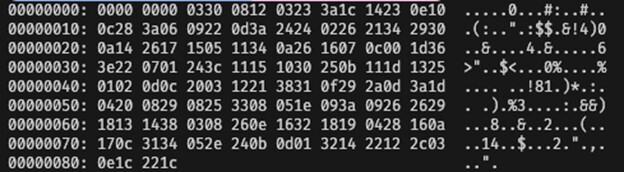
There is the key, generated by using the malware’s own key generation logic against itself! I validated this by successfully decrypting the encrypted blob shown later.
Unknown Decryption Emulator
The decryption emulator will be wrapping the xor_and_UNK_1() routine that is called after the generate_key() routine. Like the key generation emulator, I have split the decryption emulator into the same pieces.
First, define memory segment addresses and sizes, etc.
const STACK_ADDR: u64 = 0x7ffffffde000;const STACK_SIZE: usize = 0x21000;const STACK_START: u64 = 0x7fffffffdae8;const UNK_DATA_MAPPING_ADDR: u64 = 0x4fd000;const UNK_DATA_ADDR: u64 = 0x4fd3f9;const UNK_DATA_SIZE: usize = 0x1000;const HEAP_ADDR: u64 = 0x1393000;const HEAP_SIZE: usize = 0x2f000;const HEAP_IN_DATA: u64 = HEAP_ADDR; //0x1393000const HEAP_OUT_DATA: u64 = HEAP_ADDR + 0x1000; //0x1394000const HEAP_ARG_ENC_KEY: u64 = HEAP_ADDR + 0x3000; //0x1396000const HEAP_XORUNK: u64 = HEAP_ADDR + 0x5000; //0x1398000const CODE_MAPPING_ADDR: u64 = 0x40c000;const CODE_ADDR: u64 = 0x40cd49;const CODE_SIZE: usize = 0x2000;const CODE_START: u64 = 0x40cfe2;
The main() code structure is the same except for the setup_registers() routine has been given arguments regarding key and encrypted data input.
fn main() { let mut unicorn = Unicorn::new(Arch::X86, Mode::MODE_64, 0).unwrap(); let mut emu_handle = unicorn.borrow(); setup_memory_mappings(&mut emu_handle); write_memory_mappings(&mut emu_handle); setup_registers( &mut emu_handle, 0x0, 0xa8, HEAP_ARG_ENC_KEY, HEAP_IN_DATA, HEAP_OUT_DATA, ); emu_handle.emu_start(CODE_START, 0x40d02a, 0, 0).unwrap(); let out_data = emu_handle.mem_read_as_vec(HEAP_OUT_DATA, 168).unwrap(); fs::write("./DECRYPTED.bin", out_data).unwrap();}
For setup_memory_mappings(), I set up my segments the exact same as the key generation emulator.
fn setup_memory_mappings(u: &mut UnicornHandle<i32>) { // Stack u.mem_map(STACK_ADDR, STACK_SIZE, Permission::READ | Permission::WRITE) .expect("Failed stack mapping."); // UNK Data u.mem_map(UNK_DATA_MAPPING_ADDR, UNK_DATA_SIZE, Permission::READ) .unwrap();//.expect("Failed UNK mapping."); // Heap Values u.mem_map(HEAP_ADDR, HEAP_SIZE, Permission::READ | Permission::WRITE) .expect("Failed Heap mapping."); // Code u.mem_map( CODE_MAPPING_ADDR, CODE_SIZE, Permission::READ | Permission::EXEC,}
)
.expect("Failed code mapping.");
You might ask, “But what about the stack state?” Well, if we look at the HLIL routine in Binary Ninja for the key gen and decrypt logic in setup_xor_unk_decrypt(), we can see that the stack will end up in the same state for both target routines (i.e., generate_key() & xor_and_UNK_1()).
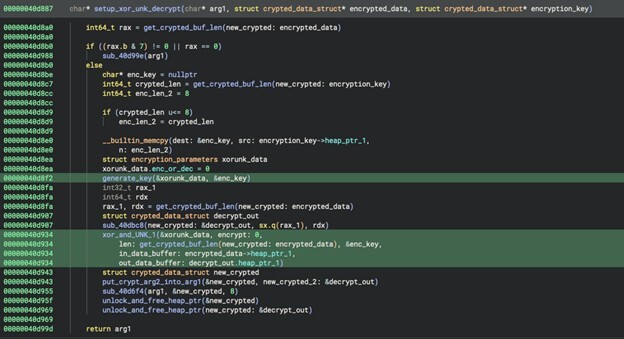
Next, within the write_memory_mappings() routine, I populate the mappings by writing the required data to each segment. The first segments I write to are the stack and data segments. I am using the same stack and data as the first emulator.
// Write Stacklet stack_bytes = fs::read("./stack.bin").unwrap();u.mem_write(STACK_START, &stack_bytes).unwrap();// Write Data// 0x4fd3f9let data_bytes = fs::read("./UNK_data.bin").unwrap();u.mem_write(UNK_DATA_ADDR, &data_bytes).unwrap();
The heap will be a bit different in this emulator. The heap will contain four different buffers that will be passed into the decryption routine. First, the encrypted network traffic was intercepted from the malware’s C2 communication. Second, the buffer where the decrypted data will be written to. Third, the same plaintext key was extracted from the malware sample; lastly, the generated key bytes from the first emulator. To initialize the heap, we will write only the encrypted network data, plaintext key, and generated key.
// Write Heaplet mut zeros = Vec::with_capacity(HEAP_SIZE);zeros.fill(0);// Zero heapu.mem_write(HEAP_ADDR, &zeros).unwrap();// IN datalet mut enc_data = fs::read("./net_unk.enc").unwrap();u.mem_write(HEAP_IN_DATA, &enc_data).unwrap();// Plaintext encryption keyu.mem_write(HEAP_ARG_ENC_KEY, "!2#4Wx62".as_bytes()).unwrap();// Generated key byteslet xorunk_decrypt_bytes = fs::read("../mal_unk_key/gend_key.bin").unwrap();u.mem_write(HEAP_XORUNK, &xorunk_decrypt_bytes).unwrap();
The code segment for this emulator is comprised of two routines that are touching each other, so it’s just a small contiguous code block… How nice! :) These two routines are i_am_clearly_encryption_unkown?() and xor_and_UNK_1(). Yes, I know my function names are fantastic.
// Code// 0x40cd49let code_bytes = fs::read("UNK_code.bin").unwrap();u.mem_write(CODE_ADDR, &code_bytes).unwrap();
Now that my memory mappings are set up, we can move on to register setup. Unlike my key generation emulator, this emulator has a different setup_registers() signature. This version takes a few more arguments:
-
enc_or_dec: Encrypt mode (1) or Decrypt mode (0)
-
data_length: Length of the encrypted data
-
encryption_key_address: Address of the plaintext encryption key on the false heap
-
address_of_encrypted_data: Address of the encrypted data on the false heap
-
address_of_decrypted_data: Address where the decrypted data will be written to on the false heap
Setting up the registers has a bit more to it in this emulator. First, set up the EFLAGS and stack. Next, important values are a stack pointer to the plaintext encryption key (also in the false heap), put in RCX. Then the data length in RDX and a pointer to the address of the generated key in RDI. After that, the encrypt-or-decrypt flag is set to 0 for the decrypt logic branch. The last important registers are R8, the address of the encrypted data, and R9, the address of the decrypted data to write to. All the other registers, RAX, RBX, R10, R11, R12, R13, R14, and R15, can all be set to NULL.
fn setup_registers( u: &mut UnicornHandle<i32>, enc_or_dec: u64, data_length: u64, encryption_key_address: u64, address_of_encrypted_data: u64, address_of_decrypted_data: u64,) { // EFLAGS u.reg_write(RegisterX86::EFLAGS as i32, 0x10202).unwrap(); // RSP - Stack u.reg_write(RegisterX86::RSP as i32, STACK_START).unwrap();
// RAX - doesn't matter (Left over value that is the length of data) u.reg_write(RegisterX86::RAX as i32, 0).unwrap(); // RBX - doesn't matter u.reg_write(RegisterX86::RBX as i32, 0) .unwrap(); // RCX - Pointer to encryption key (on stack) - 0x7fffffffdb00 u.reg_write(RegisterX86::RCX as i32, 0x7fffffffdb00) .unwrap(); // RDX - Encrypt buffer length u.reg_write(RegisterX86::RDX as i32, data_length).unwrap();
// RDI - Address of the generated key u.reg_write(RegisterX86::RDI as i32, HEAP_XORUNK).unwrap(); // RSI - 1 for encrypt 0 for decrypt u.reg_write(RegisterX86::RSI as i32, enc_or_dec).unwrap(); // R8 - Pointer to encrypted data u.reg_write(RegisterX86::R8 as i32, address_of_encrypted_data) .unwrap(); // R9 - Pointer to resulting decrypted data u.reg_write(RegisterX86::R9 as i32, address_of_decrypted_data) .unwrap(); // R10 - doesn't matter u.reg_write(RegisterX86::R10 as i32, 0) .unwrap(); // R11 - doesn't matter u.reg_write(RegisterX86::R11 as i32, 0).unwrap();
// R12 - doesn't matter - 0x7fffffffdc68 u.reg_write(RegisterX86::R12 as i32, 0) .unwrap(); // R13 - doesn't matter - 0x7fffffffdc40 u.reg_write(RegisterX86::R13 as i32, 0) .unwrap();
// R14 - doesn't matter - Some heap address u.reg_write(RegisterX86::R14 as i32, 0).unwrap(); // R15 - doesn't matter u.reg_write(RegisterX86::R15 as i32, 0).unwrap();}
The last thing to do is start the emulation and read out the decrypted data written into the heap. Start execution at CODE_START (xor_and_UNK_1()) and end at its last instruction.
Then, read the length of data, which can be derived from the encrypted network packets and/or the size passed into the xor_and_UNK_1() routine in the RDX register. In this case, 0xa8 (168) bytes from the HEAP_OUT_DATA address in the crafted heap are written to DECRYPTED.bin.
emu_handle.emu_start(CODE_START, 0x40d02a, 0, 0).unwrap();let out_data = emu_handle.mem_read_as_vec(HEAP_OUT_DATA, 168).unwrap();fs::write("./DECRYPTED.bin", out_data).unwrap();
Let’s see the decrypted C2 data!
$ ./target/debug/crack_mal_enc && xxd ./DECRYPTED.bin
Executing the command above results in the following output:
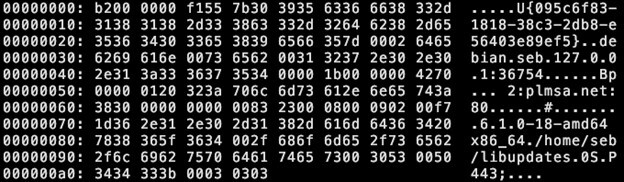
The malware’s C2 encryption has been owned! These emulators can be rewritten into tooling that owns all versions of the malware deployed in this case. For example, another sample from the threat actor with a new encryption key just needs to be reversed and the key extracted to decrypt its traffic.
I hope you enjoyed my methodology for owning unknown complex logic with Binary Ninja and Unicorn Engine! These emulators were created on the fly, as quickly as possible, during a live incident in an environment being investigated by our DFIR team.


