

- Assess your external cybersecurity posture with LevelBlue Security Colony’s Vendor Risk Assessment tool, designed to identify publicly visible security risks before threat actors do.
- Monitor vendor risk and third-party exposure by analyzing domains, email configurations, and web applications using OSINT-driven techniques.
- Improve cyber hygiene without requiring system access by continuously evaluating SSL/TLS, DNS, email security (SPF/DMARC), and exposed internet services.
Self-evaluation in any area, especially cybersecurity, can be difficult, but in an age when supply chains are long and third-party attacks are common, understanding your vendor’s cybersecurity posture is key.
To address this cybersecurity challenge, LevelBlue Security Colony, a service founded under the legacy Trustwave brand, offers a Vendor Risk Assessment tool. It enables organizations to hold a mirror up to their online presence and see how it appears to others, particularly threat actors.
LevelBlue provides several tiers for the Vendor Risk Assessment tool. The first level is free, like much of the content available through Security Colony, and allows organizations to assess their own domains.
The second level is available to Security Colony subscribers and allows assessing a set number of vendor domains, with additional slots available for purchase. Three packages are offered. Startup evaluates one registered domain. Core includes 10 domains. Enterprise expands coverage to 100 domains, with optional add-ons if more are needed.
How the Vendor Assessment Tool Works
Scanning is, in fact, a bit of colloquialism; Security Colony does not really "scan" anything. Instead, we monitor and report on publicly available information published by a client on their website and by third parties.
To do this, we use a variety of sources such as BreachSense, Pastebin, GHOSTBIN, Shodan, server fingerprinting using JARM, plus other tests that we have developed ourselves to collect information published on the website we are reviewing.
This process entails assessing security misconfigurations and vulnerabilities related to server configuration, including:
- Whether an organization has a strong process for correctly configuring all its encryption (SSL/TLS) certificates
- Whether an organization has insecure (ie, unencrypted) ports open to the Internet
- DNS server configuration.
There is also an email component with our tool checking for security misconfigurations and vulnerabilities related to email system configuration, including:
- Whether an organization uses strong email security technology (SPF and DMARC)
- Whether employees of an organization have used their corporate email addresses on external accounts, and whether they have then been the subject of a data breach.
The last aspect involves evaluating security misconfigurations and vulnerabilities in critical web applications.
Unlike other security checks, such as penetration testing, the Security Colony Vendor Assessment does not require access to an organization's system. Instead, we can gather all we need from publicly available sources.
The Vendor Assessment Process
LevelBlue realizes that this is a self-assessment tool, so we built the feature to make it as simple as possible for even a novice to get started. Essentially, when entering a domain to review, you enter the primary domain, an email domain, if different, and an application domain.
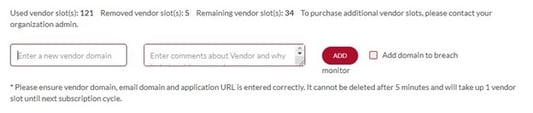
Entering a domain simply requires filling in these two slots.
Once the tool completes its assessment, a report is generated along with a corresponding list of recommendations.
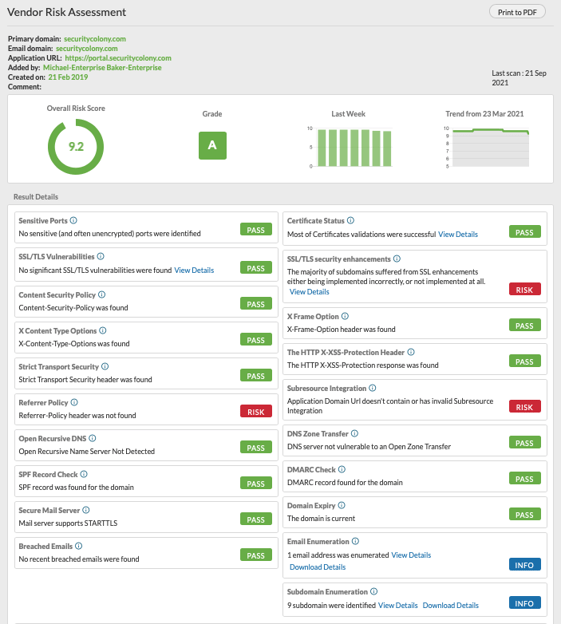
A generic example of a typical report generated using the Vendor Assessment tool.
For example, the tool checks for sensitive ports. This check determines whether your Primary Domain exposes any potentially sensitive services, such as administrative interfaces or database endpoints. If a problem is found, it is highlighted in the report with the following recommendations:
“If this check is marked as ‘RISK’ and this is your domain, we recommend that you review whether there is a need to expose these interfaces to the Internet and shut them down where possible.”
The Vendor Assessment tools use the same process for all the assessed areas, such as certificate status, SSL/TLS Vulnerabilities, etc.
If the recommended actions are beyond the user’s ability, LevelBlue can step in and help. A client can request via email, and LevelBlue will respond within 24 hours.
Once the client creates an assessment in the system, it generates a monthly report and sends it to the client.
The Security Colony Vendor Assessment Credo
Security Colony is built on the idea that the best tools to share with others are trusted, battle-tested, and ready to use, rather than starting from scratch each time. This thought process not only enables those in need of a cybersecurity consultation but also helps them obtain that information quickly and cost-effectively.
To learn more or to take an assessment, just click here.


