
A new proof of concept called BigDiskBuster, published on GitHub on September 19, 2026, by the actor known as MSNightmare, shows that Defender doesn't need to be disabled to stop receiving updates, it just needs a much simpler dependency: disk space.
Unlike ShieldCrash, which relied on a Windows path-resolution flaw, BigDiskBuster requires no vulnerability. It watches the C:\ volume for Defender update activity and, when an update begins, creates a hidden file that claims essentially all available free space. The update runs out of room and fails. Defender cleans up the staging directory, the space becomes available again, and BigDiskBuster repeats the process on the next attempt.
The important part is what does not happen. Defender's service keeps running, and real-time protection remains active. There is no obvious product failure — only an update process that quietly stops keeping the endpoint current.
At the time of publication, BigDiskBuster has no assigned CVE, available patch, or Microsoft advisory.
What We Reproduced
The PoC was run against a live Defender platform update. The observed behavior matched the author's documented description.
When the Defender staging directory appeared, the tool created a GUID-named hidden file under %TEMP% with AllocationSize equal to the volume's current available free space. It then spawned additional allocation threads in response to subsequent FILE_ACTION_MODIFIED notifications until the update failed and the staging directory was removed.
No corresponding alert appeared on the endpoint during or after the attack window. The Windows Security Protection Updates pane showed only the resulting stale security-intelligence version and error code 0x80070643. This is a generic fatal installation error that can occur across a range of unrelated installer and update failures and provides no indication that disk exhaustion or an external process caused the failure.
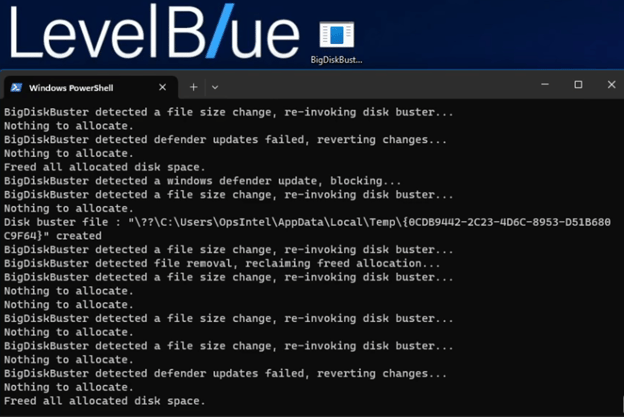
Figure 1. BigDiskBuster console output from our lab. The tool detects a Defender update attempt, creates a GUID-named hidden file in %TEMP% sized to the remaining free space on C:\, re-arms on every size-change event, and releases the allocation the moment the update staging directory is removed.
The result is a silent detection gap. Defender's service remains active, its engine reports healthy, and monitoring based on service state or product health shows no obvious anomaly. Security intelligence becomes stale without generating a corresponding alert, while the only visible artifact is an error code that is otherwise indistinguishable from routine transient failures.
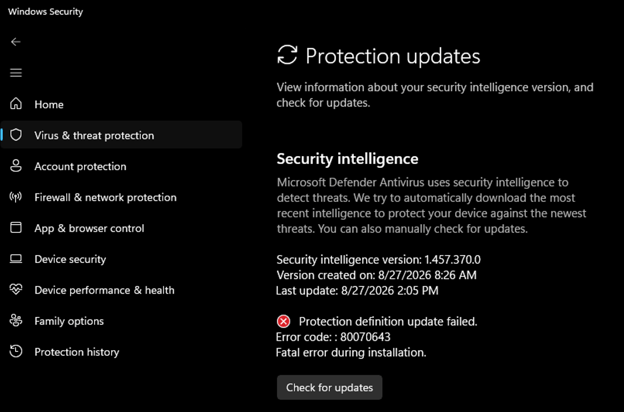
Figure 2. Windows Security Protection Updates pane following a blocked update cycle.
In the running process list, BigDiskBuster also presented no immediately distinguishing characteristics. It appeared alongside legitimate Windows processes under a standard executable name, with no obvious indicator in the process name or parent chain alone.

Figure 3. Process tree captured during the attack window. BigDiskBuster.exe (PID 9564) appears alongside standard system processes. No immediate indicator distinguishes it from a benign user-space executable based on the process listing alone.
The targeted update chain is the standard Defender platform update sequence: svchost → wuauclcore → UpdatePlatform.amd64fre → MpSigStub → MpRecovery. BigDiskBuster acts when the Defender staging directory first becomes visible on the filesystem.

Figure 4. Standard Defender platform update process chain. BigDiskBuster's filesystem watcher triggers when the staging directory is created, before the update chain completes.
At the I/O layer, the activity is easier to distinguish. Process Monitor captured a sustained burst of file operations attributed to BigDiskBuster's PID, including repeated IRP_MJ_CREATE operations against multiple GUID-named temporary files. The pattern reflects the tool's re-arm loop, which creates new allocation handles as previous ones are released.
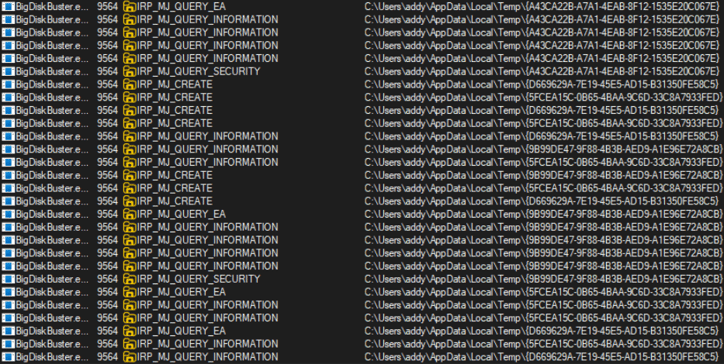
Figure 5. Process Monitor I/O events from BigDiskBuster.exe (PID 9564): repeated IRP_MJ_CREATE, IRP_MJ_QUERY_EA, and IRP_MJ_QUERY_INFORMATION operations against multiple GUID-named files under AppData\Local\Temp, representing successive allocation attempts as the re-arm loop responds to size-change notifications.
Dissecting the Technique: What the Source Code Actually Does
The PoC contains approximately 300 lines of C++. It uses no memory corruption, privilege-escalation primitive, or kernel-mode component. Instead, it combines four standard Windows mechanisms: a raw device handle, a relative file open, a recursive volume watch, and an oversized allocation. Their interaction is what prevents Defender's updates from completing.
Two Handles, Held for the Process Lifetime
Before monitoring Defender activity or taking any action, the tool opens two file handles through NtCreateFile and holds them for the lifetime of the process. The calls are made directly at the NT syscall layer rather than through the Win32 CreateFile wrapper.

Figure 6. The tool opens the C:\ volume as a raw device via NtCreateFile — the NT layer directly, not the Win32 CreateFile wrapper most defensive tooling monitors by default. This handle is held open for the entire lifetime of the process.

Figure 7. MRT.exe is opened relative to the volume handle above — hvol is passed as the RootDirectory field of the object attributes rather than being left NULL. This relative-path-through-device pattern surfaces differently in ETW telemetry than a direct file open and is the detail most likely to slip past tooling tuned for standard CreateFile calls.
For threat hunters: a process holding both of these handles simultaneously has no ordinary reason to exist on a stock Windows endpoint. That combination is the highest-confidence signal in the whole technique.
Recursive Filesystem Watch on the Volume Root
With both handles established, the tool issues ReadDirectoryChangesW with bWatchSubtree = TRUE against the volume handle. This registers a recursive change notification covering the entire C:\ volume.

Figure 8. The second argument TRUE sets bWatchSubtree— the watch is recursive across the entire volume, not scoped to a specific folder. The tool filters this firehose itself, acting only on changes under Defender's Platform and Definition Updates paths. For definition updates it goes a step further, calling CLSIDFromString to confirm the subdirectory name is a valid GUID before treating it as a trigger.
As a tripwire buried inside Windows' own filesystem notification system, it costs almost nothing to run, generates no detectable I/O of its own, and wakes up precisely when Defender starts staging an update.
When the Tripwire Fires: Claiming Every Free Byte in One Call
The moment a matching Defender directory appears, the tool measures the exact free space on the volume and immediately claims all of it:

Figure 9. GetFreeVolumeSize queries the volume via NtQueryVolumeInformationFile with FileFsFullSizeInformation (a direct NT syscall) and returns the precise number of bytes currently available. That value is passed straight into the next call as the allocation target.
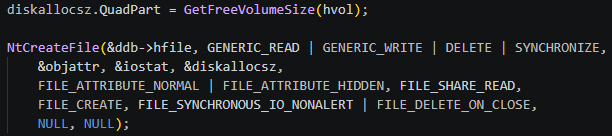
Figure 10. The buster file is created in %TEMP% under a freshly generated GUID name, with AllocationSize set to the value returned above — claiming all remaining free space in a single call without writing any data. FILE_ATTRIBUTE_HIDDEN keeps it out of standard directory listings. FILE_DELETE_ON_CLOSE means the file vanishes the instant the handle is released, leaving no artifact for a post-execution scanner to find.
The tool also re-arms continuously. Every size-change event on the watched Defender paths spawns another allocation thread:

Figure 11. On every FILE_ACTION_MODIFIED notification while an update is in progress, the tool spawns a fresh DoBustDisk thread to reclaim any space that may have opened up since the last allocation. This is the re-arm loop that makes a one-time "free up some disk space" response insufficient as a countermeasure — the tool races to refill any gap the moment it appears.
The result is a continuous race. When Defender or the operating system frees space during an active update attempt, the tool attempts to reclaim that space immediately.
Detection Guidance
The two handles opened at startup (the C:\ volume device and MRT.exe through a relative path) are structural components of the technique. Removing either would fundamentally change how the tool operates, making them useful detection anchors in the absence of a patch.
The volume device handle alone has low specificity. Legitimate Windows processes, including svchost, SearchIndexer, dllhost, and TiWorker, can hold the same type of handle during normal operation, as confirmed in our baseline telemetry.
The MRT.exe handle is more restrictive. Legitimate holders are limited to Defender service processes and TrustedInstaller in the tested environment. A process outside those contexts that holds the handle persistently therefore warrants investigation.
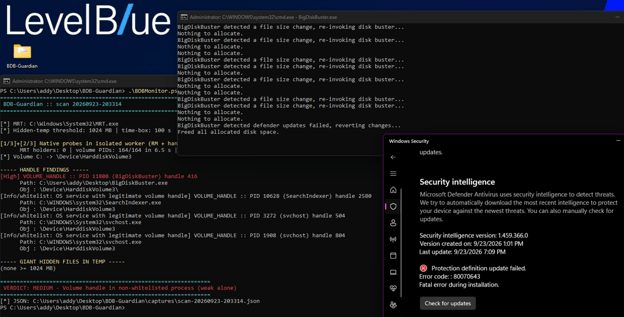
Figure 12. Our detection run confirmed same-PID correlation as the strongest signal. PID 11808 (BigDiskBuster.exe) appeared simultaneously in the MRT.exe holder set and the volume-device holder set. Legitimate OS-service holders of the volume handle were excluded through the allowlist.
The Defender update process chain provides another layer of context. When UpdatePlatform.amd64fre, MpSigStub, and MpRecovery appear through the expected parent chain and the sequence ends in failure, correlation with a near-total reduction in free space on C:\ during the same time window provides a basis for retrieving handle telemetry.
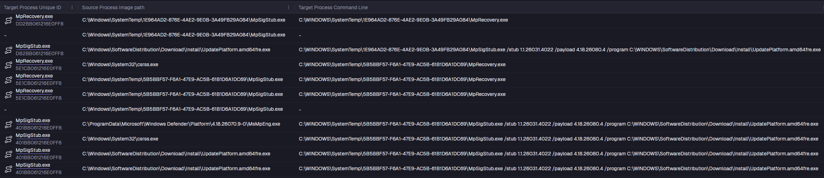
Figure 13. Process creation telemetry within SentinelOne console showing the Defender update chain: MpSigStub and MpRecovery spawned through the expected parent hierarchy. When this chain initiates and fails without completing a successful update (particularly when correlated with an abrupt free-space event on C:\) the combination provides an actionable investigative trigger.
Detection Summary
|
Signal |
Confidence |
Action |
|
Volume handle on \Device\HarddiskVolumeN from a non-OS process |
Low |
Noise without corroboration |
|
MRT.exe handle from any non-Defender / non-TrustedInstaller process |
High |
Investigate immediately |
|
MRT handle + volume handle in the same non-allowlisted PID |
Critical |
Contain and investigate |
|
GUID-braced hidden files briefly created and removed in %TEMP% during Windows Defender update failures. |
High |
Confirmed BigDiskBuster behavior. Verify the source processes creating the files in %TEMP%. |
|
Recurring 0x80070643 Defender update failures, no installer activity |
Prompt |
Pull handle telemetry — file is gone, handles may not be |
SentinelOne Query Example
This query seeks to find braced GUID-based filenames being created in %TEMP% and MpRecovery.exe being executed within a short period of time, returning the process responsible for the file creation. This activity was common across detonations. The following example is looking for these two events occurring within 30 seconds, but the timeframe can be adjusted using the delay_seconds filter.
 | join
a = (event.type = 'File Creation' AND tgt.file.path matches ":\\\\Users\\\\[^\\\\]+\\\\AppData\\\\Local\\\\Temp\\\\{[a-fA-F0-9]{8}-[a-fA-F0-9]{4}-[a-fA-F0-9]{4}-[a-fA-F0-9]{4}-[a-fA-F0-9]{12}}$"
| let Temp\ File\ Created = strftime(timestamp)
 | let ftime = (tgt.file.creationTime / 1000)
 | columns ftime, Temp\ File\ Created, agent.uuid, src.process.user, src.process.image.path, tgt.file.path),
b = (event.type = 'Process Creation' AND tgt.process.image.path matches ":\\\\Windows\\\\SystemTemp\\\\[a-fA-F0-9]{8}-[a-fA-F0-9]{4}-[a-fA-F0-9]{4}-[a-fA-F0-9]{4}-[a-fA-F0-9]{12}\\\\MpRecovery\\.exe"
| let ptime = (src.process.startTime / 1000)
| columns ptime, agent.uuid, tgt.process.name)
on agent.uuid | let delay_seconds = abs(ftime - ptime)
| filter delay_seconds <= 30
| columns Temp\ File\ Created, agent.uuid, src.process.user, src.process.image.path, tgt.file.path, delay_seconds, tgt.process.name
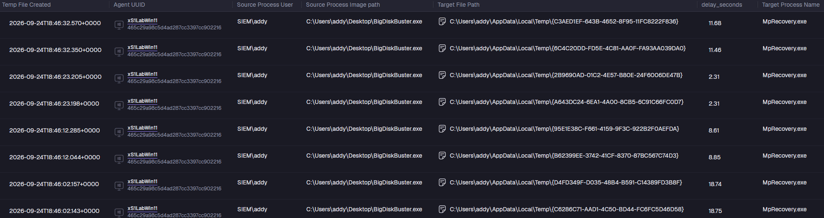
Figure 14. Example of results returned from our testing environment.
Conclusion
BigDiskBuster is a useful reminder that Defender can be undermined without stopping the Defender service itself. By racing the update process and temporarily exhausting available disk space, the tool leaves the engine running while silently preventing security intelligence from being refreshed.
For defenders, the key takeaway is to look beyond “Is Defender running?” and monitor whether its protection content is actually staying current. Repeated Defender update failures, especially 0x80070643, combined with unusual handle activity or hidden disk-allocation behavior, can provide the signal needed to identify this type of attack before it becomes operationally significant.


