
 This blog post continues with the topic of setting "
HoneyTraps" within your web applications to catch attackers. Please review the previous posts for more examples:
This blog post continues with the topic of setting "
HoneyTraps" within your web applications to catch attackers. Please review the previous posts for more examples:
Recipe 3-4: Adding Fake Hidden Form Fields
This recipe will show you how to add fake hidden form field data to existing forms and alert if the data is ever manipulated.
Ingredients
- SecStreamOutBodyInspection Directive
- SecContentInjection Directive
- STREAM_OUTPUT_BODY Variable
- @rsub Operator
Hidden Form Fields
HTML hidden form field are just like normal form fields except for one distinct different; they are not displayed by the browser to the user. Hidden fields are used as a mechanism to pass data from one request to another and their contents are not supposed to altered. Web developers often make the mistake of believing that hidden parameter data cannot be manipulated however this is not the case. While the browser does hide these form fields, the data is still accessible by the client. They can either simply choose to view the source or use a browser plug-in. Figure 3-6 shows an example of using the Groundspeed plug-in for the FireFox browser in order to view hidden form fields on the Twitter login page.
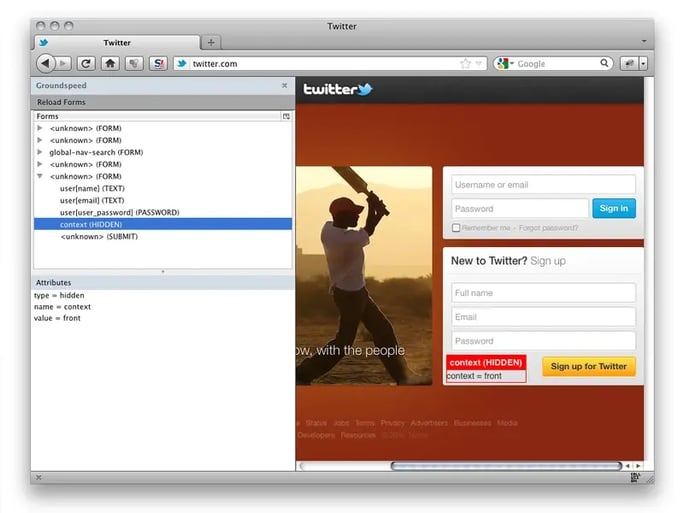
Figure 3-7: Hidden Form Fields on Twitter's Login Page
The Groundspeed plug-in's main benefit is that you are able to correlate the raw html elements of a page to the actual user interface. In Figure 3-6, we see that there is a hidden form field named "context" with a value of "front" within the Sign Up form. This is how the raw html hidden form field looks in the source:
When the user clicks on the submit button, the hidden form field data will be sent along with all of the normal fields that accepted direct user input. Here is how the request looks being sent back to the web application:
POST /signup HTTP/1.1Host: twitter.comUser-Agent: Mozilla/5.0 (Macintosh; Intel Mac OS X 10.6; rv:10.0.2) Gecko/20100101 Firefox/10.0.2Accept: text/html,application/xhtml+xml,application/xml;q=0.9,*/*;q=0.8Accept-Language: en-us,en;q=0.5Accept-Encoding: gzip, deflateDNT: 1Connection: keep-aliveReferer: http://twitter.com/Cookie: pid=v1%3A1328144669186587529055; guest_id=v1%3A132922623466696969; js=1; __utma=43838368.1969980750.1329226294.1329235683.1331320055.3; __utmz=43838368.1329226294.1.1.utmcsr=(direct)|utmccn=(direct)|utmcmd=(none); k=10.34.252.138.1331320050314838; _twitter_sess=BAh7CToMY3NyZl9pZCIlNmU3YmYyOTQ3ZDIzZjY0NzNhNzMzN2ZkOWI2NmIw%250AY2YiCmZsYXNoSUM6J0FjdGlvbkNvbnRyb2xsZXI6OkZsYXNoOjpGbGFzaEhh%250Ac2h7AAY6CkB1c2VkewA6D2NyZWF0ZWRfYXRsKwiO0tv4NQE6B2lkIiUyZmNl%250AMTNlY2E0NThjN2QyZWY3NmY2YWI0MGNmYTZlZA%253D%253D--e0ad2fef301aa20cc0af4431d0e9f365cc0a92e2; original_referer=4bfz%2B%2BmebEkRkMWFCXm%2FCUOsvDoVeFTl; __utmb=43838368.1.10.1331320055; __utmc=43838368Content-Type: application/x-www-form-urlencodedContent-Length: 105 user%5Bname%5D=Bob+Smith&user%5Bemail%5D=bob%40email.com&user%5Buser_password%5D=B1gB0b1199&context=front
Notice the bolded context parameter data at the end of the request body? That is the hidden form field data. By looking at this data, there is no way to know that this parameter data originated within a hidden form field. Attacker's can easily manipulate this data once they are outside the confines of the web browser just like any other input field.
Adding Fake Hidden Form Fields with ModSecurity
Just as we did previously with adding in the fake HTML comments, we can use the same methodology to inject fake HTML hidden form fields. The key to this technique is key on the closing HTML form tag and inject our honeytrap data just before it. The following rule will accomplish this task:
## Add a fake "debug" hidden parameter to forms.## Here are some examples of parameter names/values that could be used:## - debug=false# - debug=0# - role=user# - role=1# - admin=false# - admin=0## Make sure that your settings here match the detection rules above.#SecRule STREAM_OUTPUT_BODY "@rsub s/<\/form>/>\/form>/" "id:'999009',phase:4,t:none,nolog,pass"
With this rule in place, all HTML forms will have this honeytrap hidden parameter data injected into it. Figure 3-7 shows the updated Groundspeed data, which highlights our honeytrap hidden field data.
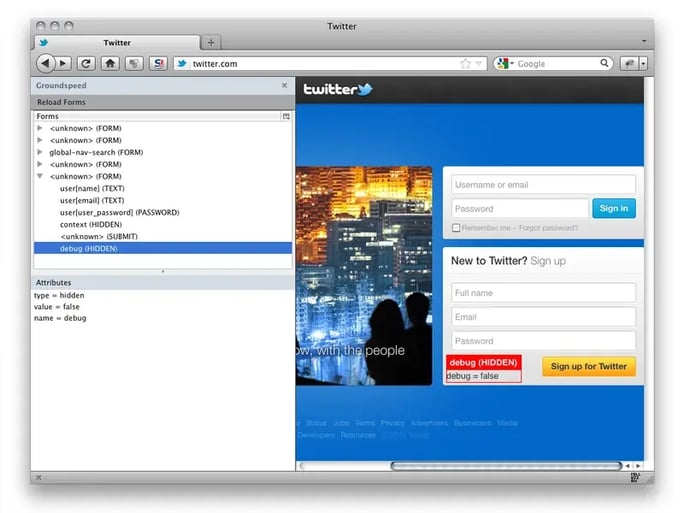
Figure 3-8: Groundspeed Displays Honeytrap Hidden Form Field Data
Just as before, we next to implement a rule that will trigger if this data is ever manipulated. Here is an example rule:
SecRule ARGS:debug "!@streq false" \"id:'999010',phase:2,t:none,log,block,msg:'HoneyTrap Alert: Fake HIDDEN Form Data Manipulated.',setvar:ip.malicious_client=1"
Conclusion
Attackers will quite often attempt to manipulate form fields in attempts to tamper with the web application logic. By setting bogus hidden form field data, we can quickly identify malicious clients and take appropriate defensive actions.


