
Since April 2026, LevelBlue SpiderLabs’ Cyber Threat Intelligence team has tracked a series of public zero-day disclosures targeting Microsoft Windows, attributed to an anonymous actor operating under the names Chaotic Eclipse and Nightmare Eclipse. The activity spans multiple areas of the Windows security model, including recent disclosures such as GreenPlasma, MiniPlasma, and YellowKey.
Each of these highlights a different aspect of the attack surface. GreenPlasma focuses on privilege escalation through Windows internals, MiniPlasma revisits a previously addressed kernel vulnerability in the Cloud Files filter driver, and YellowKey targets the Windows Recovery Environment (WinRE), demonstrating a method to bypass BitLocker protections.
On May 12, 2026, Chaotic Eclipse published a working proof of concept demonstrating a zero-day BitLocker bypass affecting Windows 11, Windows Server 2022, and Windows Server 2025. The technique requires approximately 60 seconds of physical access and a standard USB device, enabling a SYSTEM-level command shell with full access to a BitLocker-protected volume, without the need for a password, recovery key, or specialized tooling. At the time of writing, no patch is available, and no CVE has been assigned.
Microsoft has since assigned CVE-2026-45585 to this issue and released official mitigation guidance, with a security update pending. The vulnerability is classified as a BitLocker Security Feature Bypass requiring physical access.
This report analyzes the published YellowKey payload, explains the exploit mechanism at the file-structure level, and provides detection and mitigation guidance. MiniPlasma is examined in a dedicated section for its distinct attack surface and implications for privilege escalation chaining. While prior coverage has focused on the broader business impact of these disclosures, this analysis focuses on the underlying exploit mechanics and derives practical detection opportunities from publicly released proof-of-concept (PoC) artifacts.
Background and Context
Historically, physical attacks against BitLocker required specialized techniques such as TPM bus sniffing, cold boot extraction, or PXE-based infrastructure. While effective, these approaches imposed operational constraints that limited their use outside controlled environments.
YellowKey represents a shift in that model. The technique removes the requirement for specialized tooling and operates entirely through native Windows functionality. It requires only brief physical access and does not introduce persistent hardware artifacts. As a result, it becomes viable across a wider range of real-world scenarios, including device theft, border inspections, insider access, and supply chain exposure.
This shift is further reinforced by the disclosure of GreenPlasma, which demonstrates a method for privilege escalation through Windows object manager behavior. The PoC creates an arbitrary memory section object within a directory object writable by SYSTEM, effectively placing attacker-controlled objects in locations typically assumed to be protected. This is achieved by leveraging object manager symbolic links and interactions with CTF-related namespaces, allowing controlled redirection of trusted paths.

Figure 1 . Screenshot shared by the disclosure actor showing the CSRSS_TEST_SECTION object created by the GreenPlasma PoC within the BaseNamedObjects namespace, confirming successful arbitrary section object placement.
In the context of YellowKey, this reinforces how initial access to a decrypted volume can be extended into full system control through follow-on techniques. Together, these disclosures illustrate a complete attack chain spanning physical access, recovery environment abuse, and runtime privilege escalation without reliance on conventional exploit delivery mechanisms.

Figure 2. Public GitHub profile associated with the disclosure actor, showing repositories used to distribute GreenPlasma, YellowKey, and other artifacts.
The disclosure actor has also publicly claimed that similar techniques may exist for TPM+PIN configurations and indicated that such methods may be released in future disclosures. In accompanying statements, the actor asserts that the underlying issue remains exploitable even when additional pre-boot authentication is enabled but has not released a supporting PoC.
However, this claim directly contradicts current vendor guidance. Microsoft has confirmed as part of CVE-2026-45585 that systems configured with TPM+PIN are not vulnerable to the YellowKey technique. The exploit, as observed in public PoC artifacts, relies on TPM-only configurations where the volume master key is automatically released during early boot, enabling access within the Windows Recovery Environment (WinRE) without additional authentication.

Figure 3. Excerpt from the actor’s blog discussing YellowKey’s behavior and the limitations of TPM+PIN as a mitigation.
Subsequent posts by the disclosure actor provide additional technical context and reference independent validation efforts from independent researchers. These analyses identified a WinRE component, commonly referred to as autofstx.exe, responsible for enumerating available volumes and processing Transactional NTFS (TxF) logs during early boot. The actor further suggested that this component may also be present in Windows Update-related recovery workflows, potentially expanding the attack surface.
Microsoft has since confirmed the central role of this component, attributing the vulnerability to the execution of autofstx.exe via the BootExecute registry value within the WinRE environment. This behavior enables cross-volume TxF transaction replay in a high-privilege early boot context, forming the core mechanism behind the YellowKey exploit.

Figure 4. Follow-up post describing additional research into YellowKey and GreenPlasma, including references to autofstx.exe and potential cross-context impact.
The claim that similar behavior may occur in Windows Update recovery workflows, while technically plausible, has not been independently verified at the time of writing and should be treated as unconfirmed.
From a defensive perspective, this evolution is significant. Techniques that rely exclusively on native system components and leave minimal conventional artifacts require a shift in detection strategy. Effective visibility must extend beyond process execution and focus on filesystem artifacts, recovery environment behavior, and early boot telemetry, with an emphasis on correlating subtle deviations rather than relying on single-point indicators.
Technical Analysis: YellowKey Payload
The published YellowKey archive expands to approximately 22MB and consists entirely of data files, with no executables, scripts, or compiled binaries present.
The payload consists of a crafted set of Transactional NTFS (TxF) artifacts encoded using Microsoft’s Common Log File System (CLFS) format. TxF, introduced in Windows Vista, provides transactional semantics for file operations, allowing groups of modifications to be committed or rolled back atomically. Although deprecated in Windows 8, the implementation remains present and functional in current Windows systems.
When initialized, TxF creates a working directory under:
System Volume Information\FsTx\{Resource-Manager-GUID}\
Within this directory, CLFS logs track transaction state and operations. The YellowKey payload replicates this structure in a fully valid and internally consistent form, encoding a single pending transaction.
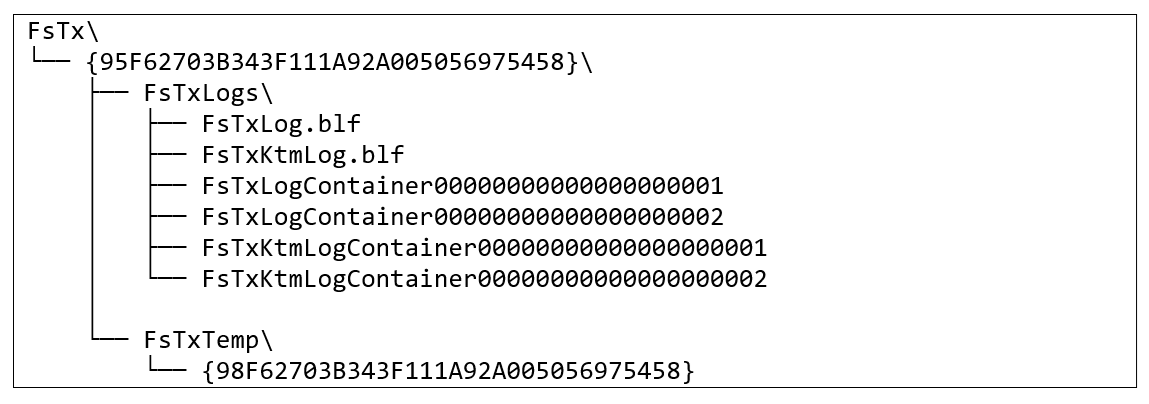
The .blf files act as index structures referencing the underlying container files that store transaction data. Each file begins with the CLFS node type identifier (15 00 01 00), confirming structural validity. Only the primary container holds active transaction data, while additional containers are allocated but unused, consistent with CLFS behavior.
Further inspection of the payload reveals that the Resource Manager GUID embeds a MAC address component, as it is generated using UUID version 1. Decoding the value provides:
GUID: {0327F695-43B3-11F1-A92A-005056975458}MAC suffix:
00:50:56:97:54:58Vendor: VMware, Inc.
This VMware Organizationally Unique Identifier (OUI) is consistently present across all GUIDs within the payload structure, indicating that it was generated in a virtualized environment. From a forensic perspective, this provides a high-confidence detection opportunity. Such identifiers are not expected to appear in legitimate TxF activity on physical endpoints.
Exploit Logic at the Transaction Level
The functional core of the exploit is contained in a single CLFS transaction record embedded within the primary container. Analysis of UTF-16LE encoded strings reveals two kernel-mode paths:
\??\C:\Windows\win.ini\??\X:\Windows\System32\winpeshl.ini
These paths define a single file overwrite operation:
-
The source file, C:\Windows\win.ini, is a legacy artifact present on all Windows installations and contains no functional configuration data. Its relevance lies solely in its guaranteed presence and predictable contents.
-
The destination file, X:\Windows\System32\winpeshl.ini, controls shell initialization within WinRE. The X: volume represents the in-memory ramdisk used by the recovery environment during boot.
The transaction replaces winpeshl.ini with the contents of win.ini. Because the resulting file is not a valid configuration, the WinRE shell loader fails to parse it and defaults to launching cmd.exe. At this stage in the boot sequence, the BitLocker volume has already been unlocked by the TPM. The result is a SYSTEM-level command shell with unrestricted access to the decrypted drive. This behavior aligns with Microsoft’s analysis, which identifies early-boot execution of autofstx.exe in WinRE as the mechanism enabling transaction replay in a trusted context.
This behavior translates directly into the following execution flow:
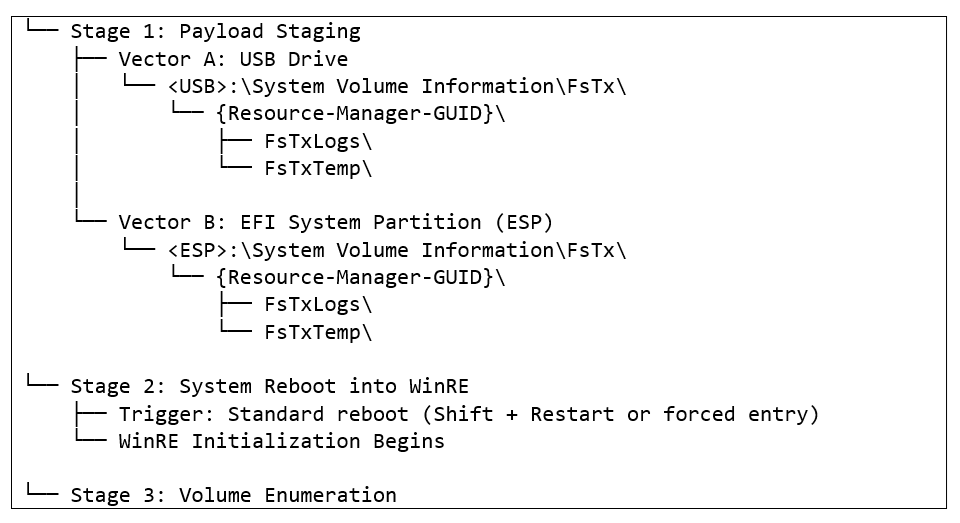
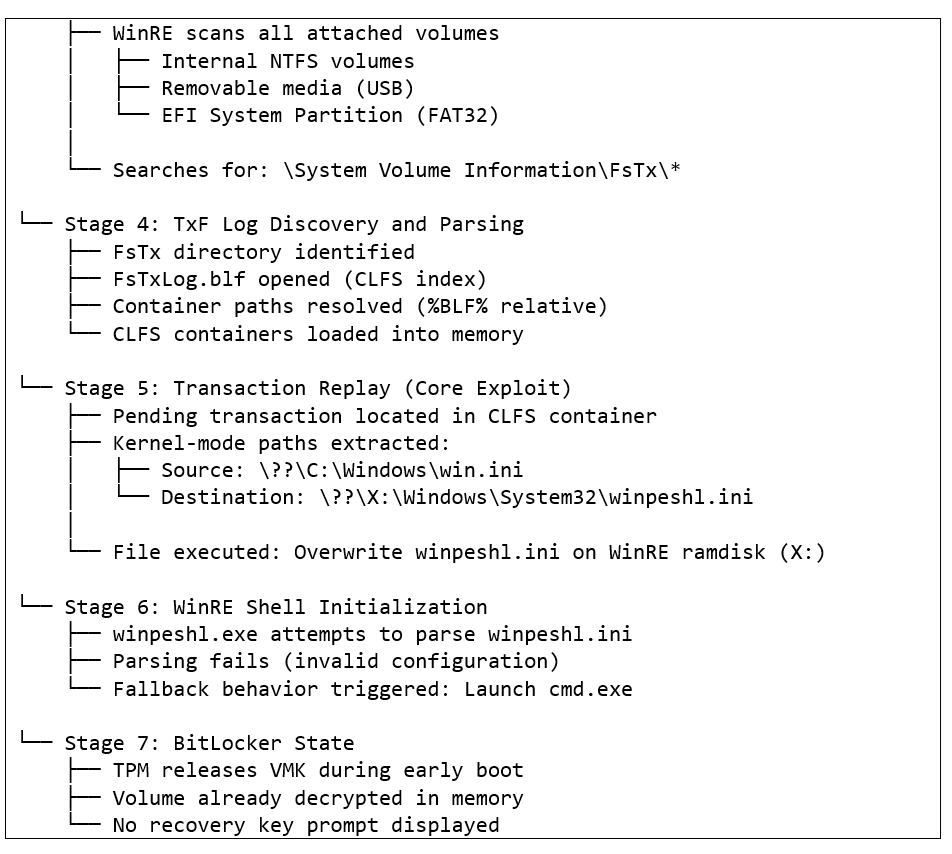
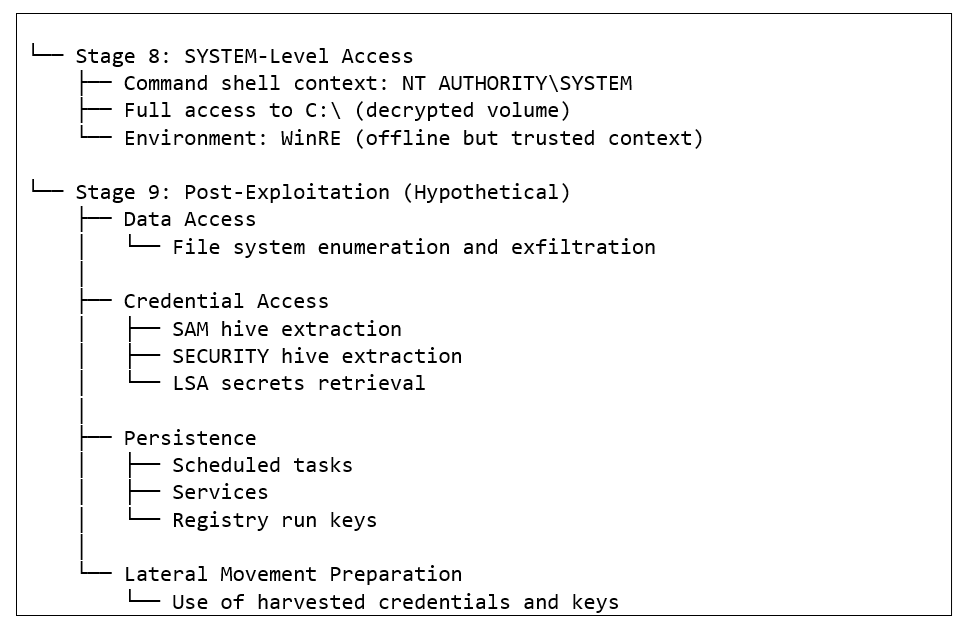
Two staging vectors are viable. The payload may reside on removable media, requiring attacker presence at execution time, or on the EFI system partition, allowing delayed execution without additional physical access. In both cases, the effectiveness of the technique depends entirely on how WinRE processes external TxF data during initialization.
This behavior does not appear to extend to Windows 10 systems. The distinction lies in differences within the WinRE implementation and how transaction replay is handled. In Windows 10 environments, external TxF log sets are not processed in the same manner, and the component associated with volume-wide TxF replay, commonly identified as autofstx.exe, is either absent or behaves differently. As a result, cross-volume transaction execution does not occur, and modification of the WinRE ramdisk is not observed.
From a detection standpoint, this execution flow highlights multiple observation points, particularly during transaction replay and WinRE initialization, where deviations from expected behavior can be identified through telemetry and forensic artifacts.
Detection and Hunting Opportunities: YellowKey
The technique does not introduce traditional malware artifacts and does not rely on execution of custom code. As a result, effective detection depends on correlating signals across filesystem activity, recovery behavior, and post-boot activity rather than relying on any single indicator.
Detection
The most relevant signals fall into three primary categories.
Filesystem Indicators (Hunting – Early Stage):
-
Presence of \System Volume Information\FsTx\ directories
-
Creation of CLFS log files such as FsTxLog.blf
-
CLFS container data referencing: \Windows\System32\winpeshl.ini
Forensic Indicators:
- TxF GUIDs embedding VMware MAC OUI values (00:50:56) on physical endpoints. The consistent use of a VMware OUI within TxF-related GUIDs provides a high-confidence forensic marker. While not guaranteed across all variants, this artifact is unlikely to occur during legitimate TxF activity on physical endpoints and can be leveraged for anomaly-based detection.
Behavioral Indicators (Execution Phase):
-
Unscheduled or unexplained entry into WinRE
-
Presence of autofstx.exe in the BootExecute value within the WinRE offline SYSTEM hive
-
Absence of BitLocker recovery prompts during recovery sessions
-
Short-duration WinRE sessions followed immediately by a normal system boot
Mitigation
Microsoft has released official mitigation guidance for CVE-2026-45585, focusing on modification of the Windows Recovery Environment to prevent vulnerable transaction replay behavior. The following measures reduce exposure and align with Microsoft’s official mitigation guidance:
-
Apply Microsoft WinRE mitigation: Remove autofstx.exe from the BootExecute registry value within the WinRE image. This prevents execution of the component responsible for cross-volume TxF replay during early boot, directly disrupting the exploit chain.
-
Disable WinRE (fallback control): Previously considered a primary mitigation, but now secondary to Microsoft’s recommended fix. Disabling WinRE removes the execution path but also impacts recovery capabilities.
-
Restrict external boot and firmware access: Disable external boot options and enforce UEFI/BIOS passwords. This reduces the likelihood of USB-based staging but does not fully prevent EFI partition modification from offline environments.
-
Review BitLocker configuration: TPM-only deployments remain vulnerable. Microsoft confirms that TPM+PIN configurations are not exploitable and should be considered where operationally feasible.
These controls introduce trade-offs. Disabling recovery features can impact system maintainability, while additional authentication requirements may affect usability at scale. In environments with automated update workflows, administrators should also consider potential interactions between mitigations and system update processes, as recovery components may be invoked outside standard user-driven scenarios. As a result, mitigation should be approached as a layered strategy rather than a single control.
MiniPlasma: Privilege Escalation Technique from the Same Disclosure Series
While YellowKey operates at the boundary between physical access and disk encryption, MiniPlasma operates entirely within the running operating system, targeting a vulnerability in the Windows Cloud Files filter driver to achieve local privilege escalation to SYSTEM. MiniPlasma targets a race condition in cldflt.sys, the kernel-mode driver responsible for managing placeholder files in OneDrive and other cloud-synchronized directories. The vulnerable function, HsmOsBlockPlaceholderAccess, is invoked during hydration operations — the process of downloading a cloud-resident file to local storage.
The vulnerability was originally identified by James Forshaw of Google Project Zero and assigned CVE-2020-17103. Microsoft issued a patch at the time, but the actor claims the same code path remains exploitable in current Windows builds. The original PoC code reproduces the issue without modification.
Exploit Mechanism
The published PoC is a .NET assembly that coordinates a multi-stage exploitation sequence. It uses the CfAbortOperation API, exposed via cldapi.dll, to interrupt in-progress hydration operations. The core of the technique is a race condition: by aborting a hydration while simultaneously forcing thread token state to change between a valid and an anonymous impersonation token, the kernel-mode handler can be reached in a context where its access check logic behaves unexpectedly.
Below is a simplified breakdown of the exploit’s core logic (extracted from the PoC):
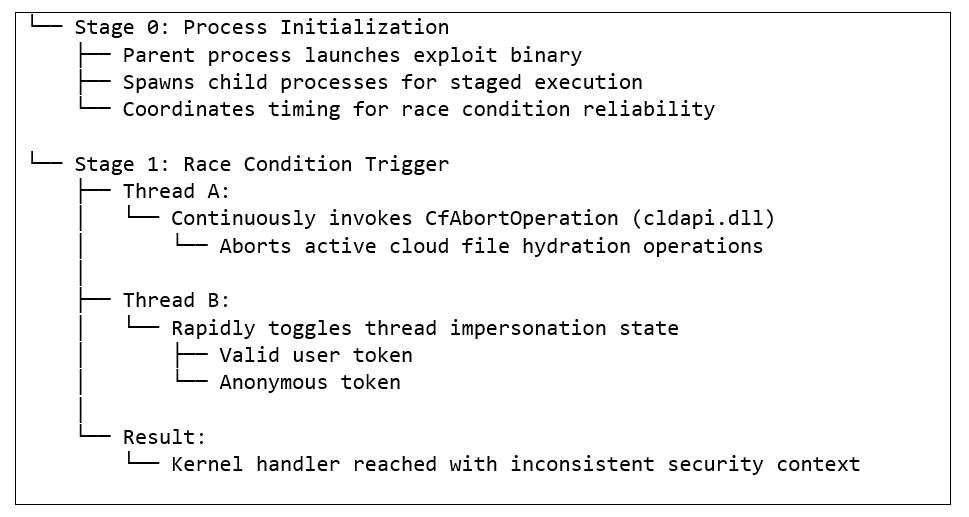
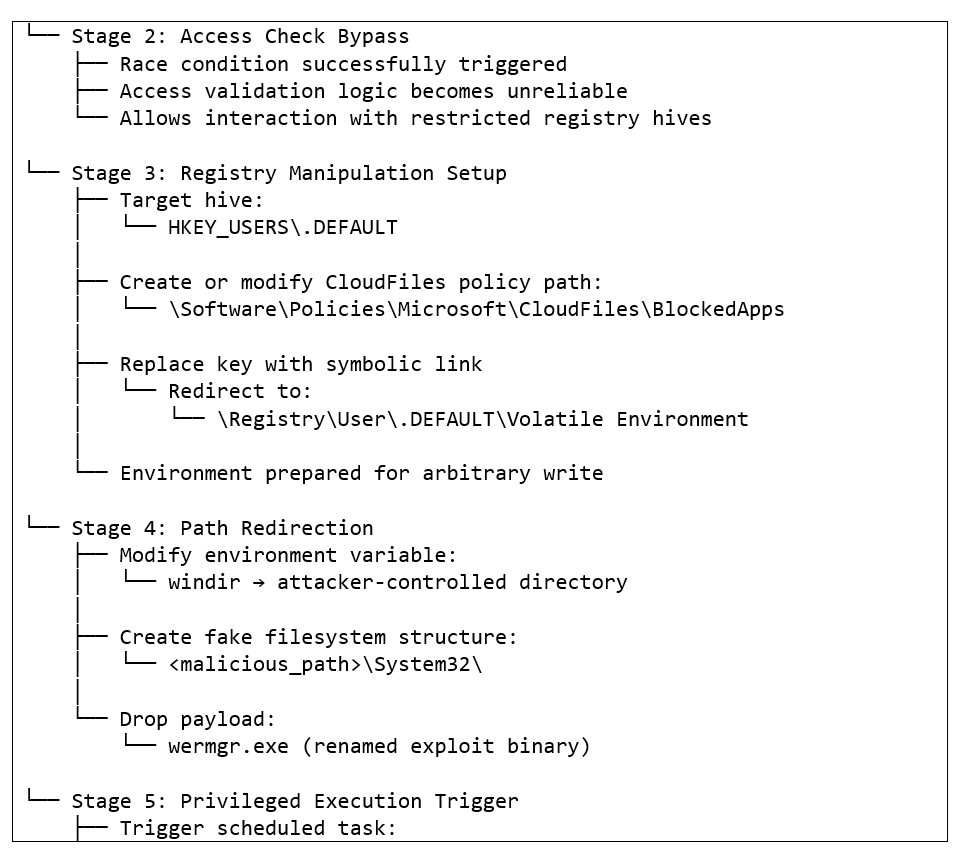
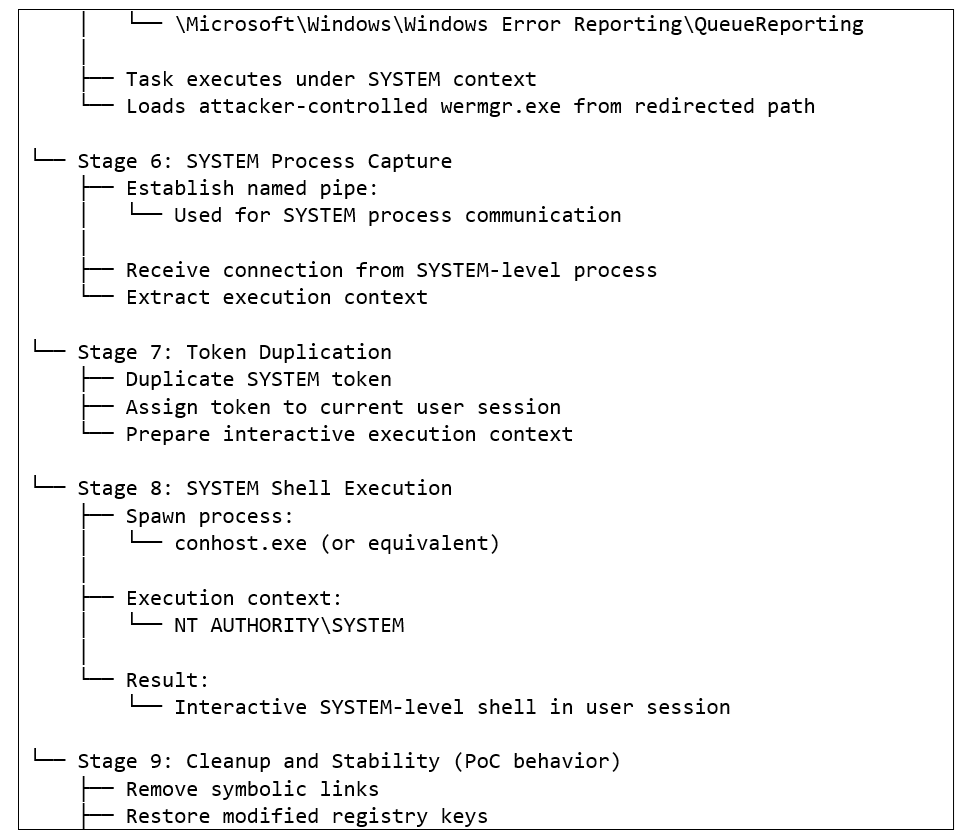

The technique does not require elevated privileges to initiate and does not rely on any user interaction beyond execution of the exploit binary. Because the race condition outcome is non-deterministic, success rate may vary across systems and configurations. The exploit includes cleanup logic that attempts to remove the symbolic link, restore modified registry keys, and delete the fake wermgr.exe after execution is completed.
Detection and Hunting Opportunities: MiniPlasma
While YellowKey is now tracked as CVE-2026-45585 with mitigation guidance available, no patch is currently available at the time of writing. In contrast, YellowKey provides a path from physical access to decrypted disk content, MiniPlasma represents a practical follow-on technique for privilege escalation within the operating system.
Detection
From a hunting perspective, it introduces detectable registry, scheduled task, and process execution anomalies that can be correlated into a broader attack chain.
Registry Indicators:
-
Creation of a registry symbolic link at: HKEY_USERS\.DEFAULT\Software\Policies\Microsoft\CloudFiles\BlockedApps redirecting to: \Registry\User\.DEFAULT\Volatile Environment
-
Modification of the windir value under HKEY_USERS\.DEFAULT\Volatile Environment to a non-standard path outside \Windows
-
Creation of a \System32 directory within an unexpected or user-controlled path, particularly when correlated with the above registry activity.
Scheduled Task and Process Indicators:
-
Execution of the Windows Error Reporting task: \Microsoft\Windows\Windows Error Reporting\QueueReporting outside its normal operational context
- Subsequent execution of wermgr.exe from a non-standard directory
- Spawning of conhost.exe under a SYSTEM token within an interactive user session
Named Pipe Indicator:
Creation of a named pipe with the identifier MiniPlasmaWERPipe is a direct artifact of the published PoC and can be monitored through Object Manager auditing or EDR pipe creation telemetry.
For detection engineering, this behavior introduces a new class of signals centered around abnormal object manager activity and unexpected interactions between trusted processes and attacker-controlled memory sections.
From a mitigation standpoint, no compensating control directly addresses the race condition at the kernel level without a vendor patch. Auditing and alerting on registry modifications to the CloudFiles policy key and the Volatile Environment of non-interactive accounts provides an early warning layer. Organizations should also consider restricting manual triggering of Windows Error Reporting scheduled tasks in environments where this capability is not operationally required.
Conclusion
YellowKey (CVE-2026-45585) demonstrates that BitLocker protections on modern Windows systems can be bypassed by abusing WinRE behavior through early-boot transaction replay mechanisms linked to autofstx.exe. This shifts the risk model away from cryptographic strength and toward trust in recovery workflows and early boot processes.
For enterprise environments, the implications are significant. Most corporate deployments rely on TPM-only BitLocker for usability and transparent boot. Microsoft has confirmed that these configurations remain exposed to this technique, whereas TPM+PIN prevents exploitation by requiring user interaction before key release.
The impact extends beyond initial access. GreenPlasma and MiniPlasma introduce additional practical paths to escalate privileges within the operating system, enabling SYSTEM-level control once a foothold is established.
The consistency, pace, and evolution of these disclosures suggest that further research and additional exploit releases from the same actor are likely. Current findings also indicate that weaknesses are not isolated to a single component but instead reflect broader assumptions in how Windows enforces access control across recovery and runtime contexts.
For defenders, the key takeaway is not only the existence of individual techniques, but the increasing feasibility of chaining them into complete attack paths that span pre-boot, filesystem, and runtime contexts. Effective detection requires visibility across these layers and the ability to correlate subtle anomalies rather than relying on single-point indicators. The availability of an official mitigation shifts the defensive priority from purely detection-focused strategies to direct modification of WinRE behavior, making remediation both actionable and immediately impactful.
Appendix A: Indicators of Compromise
|
Source |
Type |
Value |
Confidence |
Notes |
|
YellowKey |
Registry (WinRE offline hive) |
BootExecute contains "autofstx.exe" |
High |
Core execution dependency per Microsoft CVE-2026-45585 |
|
YellowKey |
Directory path |
\System Volume Information\FsTx\95F62703B343F111A92A005056975458\ |
High |
PoC-specific GUID |
|
YellowKey |
GUID (canonical) |
{0327F695-43B3-11F1-A92A-005056975458} |
High |
PoC-specific |
|
YellowKey |
File path (any volume) |
*\FsTxLogs\FsTxLog.blf in System Volume Information\FsTx* |
High |
Anomalous on modern Windows systems |
|
YellowKey |
UTF-16LE string (CLFS) |
\??\X:\Windows\System32\winpeshl.ini |
High |
Direct payload indicator |
|
YellowKey |
File hash – FsTxLog.blf |
6ac1febd94d0582c259ef5e89b1059bf307d5cddbb7bf935ef23b9700f8e2067 |
High |
PoC-specific artifact |
|
YellowKey |
Event ID |
1074 (source: winre.exe), unscheduled, short duration |
Medium |
Requires contextual correlation |
|
YellowKey |
GUID MAC suffix |
005056975458 in any FsTx GUID on physical hardware |
Medium |
Variant-resilient |
|
MiniPlasma |
Registry path |
HKEY_USERS.DEFAULT\Software\Policies\Microsoft\CloudFiles\BlockedApps |
High |
Symbolic link creation required for exploit |
|
MiniPlasma |
Registry link target |
\Registry\User.DEFAULT\Volatile Environment |
High |
Core redirection used in exploit |
|
MiniPlasma |
Named pipe |
MiniPlasmaWERPipe |
High |
PoC-specific artifact |
|
MiniPlasma |
File artifact |
wermgr.exe executed from non-standard path |
Medium |
Scheduled task execution pivot |
|
MiniPlasma |
Scheduled task |
\Microsoft\Windows\Windows Error Reporting\QueueReporting (unexpected execution) |
Medium |
Key trigger for SYSTEM execution |
|
MiniPlasma |
Process behavior |
conhost.exe spawned with SYSTEM token in user session |
Medium |
Post-exploitation indicator |
|
MiniPlasma |
API usage |
CfAbortOperation invoked by non-OneDrive process |
Medium |
Unusual API usage pattern |
Appendix B: YARA Rules
rule YellowKey_TxF_Payload
{
meta:
description = "Detects YellowKey
      BitLocker bypass payload - TxF CLFS log container"
author = "LevelBlue SpiderLabs Threat Intelligence
      Team"
date = "2026-05"
tlp = "WHITE"
strings:
$winpeshl_path = {
5C 00 3F 00 3F 00 5C 00 58 00 3A
      00 5C 00
57 00 69 00 6E 00 64 00 6F 00 77 00 73 00 5C 00
53 00 79 00 73 00 74 00 65 00 6D 00 33 00 32 00 5C
      00
77 00 69 00 6E 00 70 00 65 00 73 00 68 00 6C 00
2E 00 69 00 6E 00 69 00
}
$clfs_header = { 15 00 01
      00 }
$vmware_mac_guid = { 00 50 56 97 54 58 }
condition:
$clfs_header and
($winpeshl_path or
      $vmware_mac_guid)
}
rule MiniPlasma_Cldflt_LPE_PoC
{
meta:
description = "Detects MiniPlasma
      privilege escalation PoC targeting cldflt.sys (CVE-2020-17103)"
author = "LevelBlue SpiderLabs Threat
      Intelligence Team"
date = "2026-05"
tlp = "WHITE"
strings:
/* Core registry manipulation paths
      */
$cloudfiles_path = "Software\\Policies\\Microsoft\\CloudFiles\\BlockedApps" wide ascii
$volatile_env = "
      \\Registry\\User\\.DEFAULT\\Volatile Environment" wide ascii
$policies_system =
      "Software\\Microsoft\\Windows\\CurrentVersion\\Policies\\System" wide ascii
/* Exploit-specific execution chain
      */
$wermgr = "wermgr.exe" ascii wide
$queue_task = "Windows Error Reporting\\QueueReporting" wide
      ascii
/* Named pipe artifact */
$pipe = "MiniPlasmaWERPipe" ascii wide
/* API / behavior indicators
      */
$cfabort = "CfAbortOperation" ascii wide
$cldapi = "cldapi.dll" ascii wide
/* Object manager /
      CTF-related namespace */
$ctf = "CTF.AsmListCache" ascii wide
$basenamed = "\\BaseNamedObjects\\" ascii
      wide
condition:
3 of
      (
$cloudfiles_path,
$volatile_env,
$policies_system,
$wermgr,
$queue_task,
$pipe,
$cfabort,
$cldapi,
$ctf,
$basenamed
)
}


