
In early 2026, phishing attacks are still among the top contributors to the true positive detections in security operation centers (SOCs). Adversaries constantly come up with new ways of luring users into traps, concealing their actual intents and stacking anti-detection features. LevelBlue’s Global Threat Operations (GTO) team continuously tracks those behaviors and analyzes how the attacks evolve over months. One of the most recent investigations led to the identification of a previously unseen, niche attack vector that can lead to user account compromise.
This analysis covers the abuse of Microsoft’s implementation of the OAuth 2.0 Device Authorization Grant (Device Code Flow) in order to acquire account access tokens. Obtained tokens will either allow attackers to directly achieve their end goal or facilitate further attacks from within the organization.
OAuth 2.0 Device Code Flow
This analysis requires a brief overview of the mentioned protocols, their purpose, and utilized mechanisms. The Device Authorization Grant (also “Device Flow”) is an OAuth 2.0 protocol extension described in IETF RFC8628. This protocol was designed for clients on devices that lack an internet browser or have constrained input capabilities, such as smart TVs, printers, etc. Its intended purpose was to allow such clients to obtain user authorization to access protected resources. Access is granted with the use of a secondary device that possesses the required components and enables the user to authenticate himself and authorize the initial request (e.g., a PC or a smartphone).
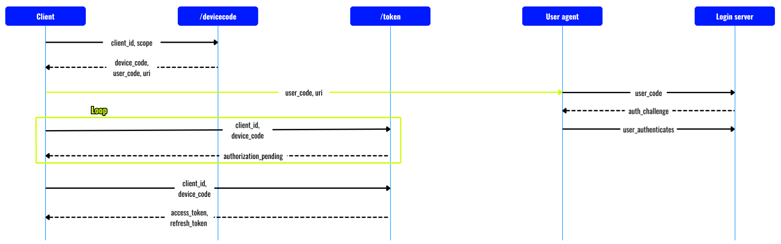
Figure 1. Microsoft Device Code Flow.
Microsoft implemented this protocol in its Identity Platform under the name Device Code Flow. The process starts with the client sending a request to the /devicecode endpoint, specifying the tenant, its identifier value, and the requested permission scope.

Figure 2. Device authorization request.
Following a successful request, the client receives a JSON object that most notably consists of user_code and device_code — the first being the code that the user shall provide in the specified URI, and the latter being a session identifier used by the client to request an access token from the authenticating server.
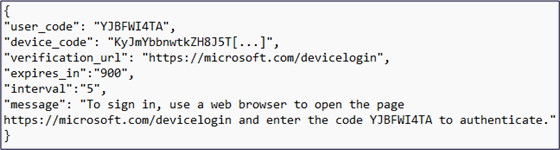
Figure 3. Device authorization response.
From this point, the user has 15 minutes to navigate to the verification URL, provide the code obtained from the client, and authorize the request. In the meantime, the client is continuously polling the /token endpoint in order to verify whether the request was authorized by the user. Once the authorization is granted, the authenticating server responds with the final JSON object.

Figure 4. Successful authorization response.
The obtained tokens allow the client to access the requested resources with the specified permission scope during the lifetime of an issued token.
Investigation
LevelBlue’s GTO initiated the investigation following a detection of a suspicious URL, which was detected within an email message. The observed domain name is associated with Mailchimp’s paid add-on — a transactional email service, which in this case was used to bypass initial mail security controls. After uncovering the actual destination URL, we decided that it required a closer inspection.

Figure 5. Suspicious URL detected in email.
Mailchimp’s Mandrill (Mandrillapp.com) links are structured in a way that end users are not aware of the exact destination address to which they will be redirected. The destination domain is plainly visible; however, the complete URL is hidden in a Base64-encoded parameter.
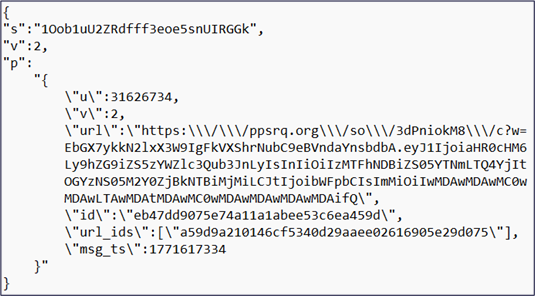
Figure 6. Payload embedded in Mandrill URL parameter.
Decoding the value allowed us to retrieve a JSON object that consists of various IDs (session, user, and version, among others) as well as the aforementioned URL. The website exposes an endpoint ppsrq[.]org/so/3dPniokM8/c, which provides a redirection functionality in the web application. Parameter “w” accepts a dot-separated string, which was established to consist of an HMAC-SHA256 token and a JSON payload, both encoded in Base64 URL. The assumed structure of the parameter is as follows:
Base64Url(HMAC-SHA256(json_payload | secret)).Base64Url(json_payload)
The token’s purpose is to prevent redirection functionality abuse by accepting authenticated payloads exclusively. The ppsrq.org domain is associated with a US-based LGBTQ+ non-profit organization, which utilized this endpoint to create redirection URLs to various events related to its activities. Considering the findings made within the scope of this investigation, it is suspected that either the secret or the entire server was compromised by threat actors, which allowed them to craft a valid malicious URL. The final URL, along with additional parameters of uncertain purpose, was eventually identified in the decoded JSON object.
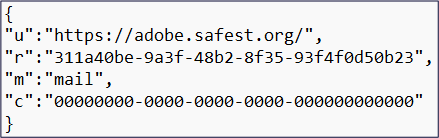
Figure 7. Final JSON payload.
This observation finally led to the disclosure of a fake Adobe-themed website, which offers to grant users access to a file named “important_update.pdf” after they successfully accomplished the authentication process.
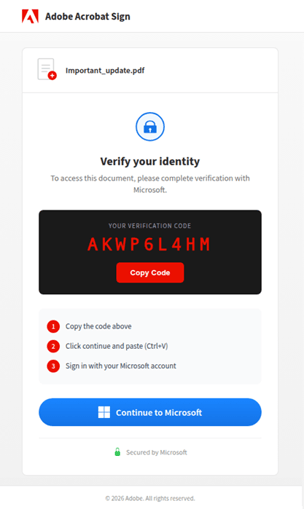
Figure 8. Destination phishing website.
Threat Analysis
The phishing website contains an embedded JavaScript code. Once the HTML document is fully parsed, which is checked by DOMContentLoaded event generation, the script executes the sf function after a brief delay.
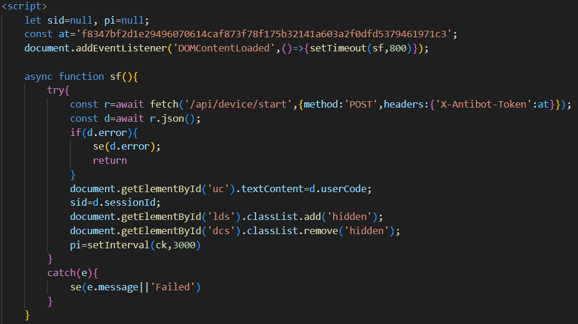
Figure 9. Variable initialization and starting function.
The function sends an HTTP POST request to the /api/device/start endpoint and includes the antibot token value in the headers. The alphanumerical string authenticates the request and allows it to pass through server-side filtering. The server then responds with a JSON object that contains session ID used for internal tracking purposes. It also responds with a user code, which is generated after a server-initiated request to Microsoft’s /devicecode endpoint. The URI and expiration time values are not used in the script itself; however, their presence confirms a Device Code Flow attack.
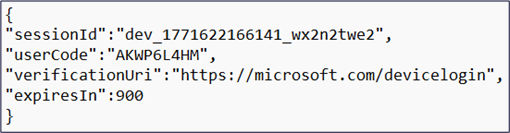
Figure 10. Response from /api/device/start endpoint.
The server’s interaction with Microsoft services is hidden from the user, and the contents of the actual request remain unknown. Sending a request for device code generation does not require recipient-specific information. As discussed earlier, the device code request shall be filled in with tenant, client, and scope information.

Figure 11. An example of a device code request.
The tenant field, apart from specific IDs, can also be filled in with values appropriate for multi-tenant applications:
• /common – For both organizational and personal accounts (any Entra directory)
• /consumers – For personal Microsoft accounts
• /organizations – For organizational accounts
Using the /common tenant will hence work for virtually any targeted user account.
The client ID value shall be associated with an application object registered in the Entra ID directory of the respective target. While this would normally increase the complexity of conducting this type of attack, there are certain circumstances that make the operation significantly easier:
-
Non-GUID identifiers – Certain applications registered in the Entra ID directory will be identified by the same object ID across different tenants
-
FOCI (Family of Client IDs) – Officially undocumented group of first-party public client apps that share a common refresh token, known as a Family Refresh Token (FRT), which can be used to retrieve a valid access token for other applications within the group
Examples of applications with IDs shared across tenants that allow for potential lateral movement upon compromising one of them are shown below:
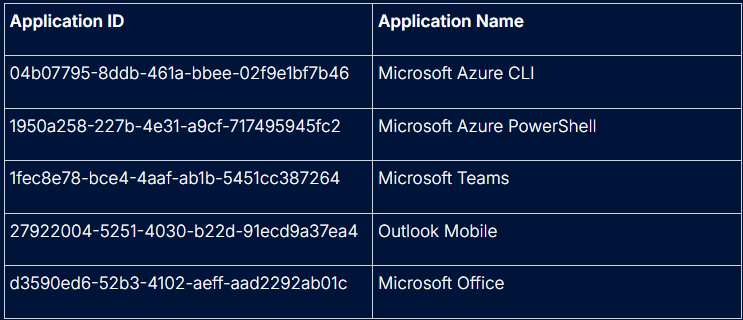
Table 1. Examples of applications with IDs shared across tenants.
In the above example of a device code request, the client_ID value of “04b07795-8ddb-461a-bbee-02f9e1bf7b46” was used, which corresponds to Microsoft Azure CLI.
Finally, the scope parameter indicates the web-hosted resource and permissions, which will be granted via the authorization process. The Microsoft Identity Platform supports both resource-specific permission scopes and well-defined OpenID Connect scopes. This architecture enables clients to request permissions in both granular and open-ended ways:
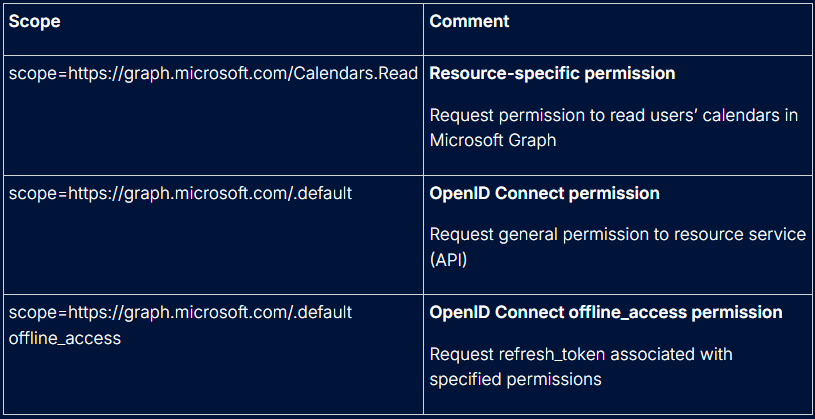
Table 1. Scopes.
According to the documentation, clients can utilize versatile resource-based requests without narrowing down the permission scope and allowing persistent access through the long-lived refresh_token, which is issued when the offline_access scope is included. While access tokens are valid for only an hour, the refresh tokens can be used for as long as 90 days. Based on the presented information, the initial device code generation request does not require infrastructure- or target-specific knowledge and can potentially lead to persistent access to critical resources.
After this short digression, let’s go back to the previously analyzed sf function. The retrieved userCode is written into the contents of the webpage to display to the victim, and the sessionId value is saved for later use. This function, and the rest of the script, utilizes the se function to catch potential errors that may occur, and uses classList methods to manage the displayed contents on the page to reflect various stages of the user verification process.
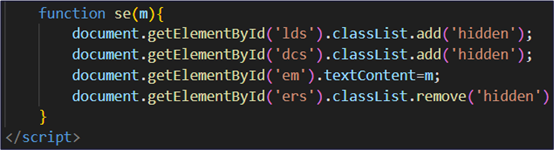
Figure 12. Error management function.
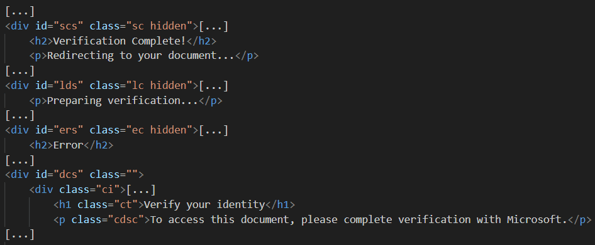
Figure 13. Stages of the verification dynamically managed by the script’s functions.
The sf function concludes its execution with the initiation of a ck function calling an interval. This function polls the /api/device/status endpoint, specifying previously obtained session identifiers in the path parameter. Again, the server uses this information internally to correlate web application status with the underlying polling to Microsoft’s /token endpoint.
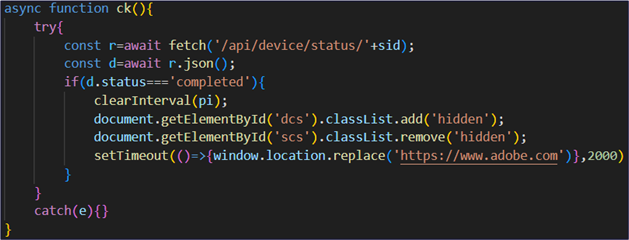
Figure 14. Authorization status polling function.
In the meantime, the user takes the generated code and clicks on the “Continue to Microsoft” button, which will trigger the execution of another function in the script - gm. The function calls the cc function that will inject the device code to the user’s clipboard, in case the user did not click on the “Copy code” button up to this point. The User Agent header and device screen width are evaluated afterwards to determine whether the access was made from a mobile device.
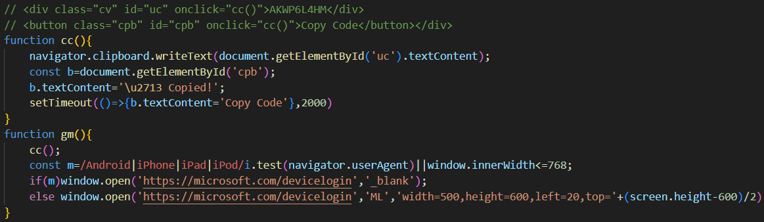
Figure 15. Functions linked to Copy and Authentication buttons.
If the script detects a mobile device, then https://microsoft.com/devicelogin will be simply opened in a new browser tab. If the specified criteria are not met, the script will open the page in a pop-up view, which resembles legitimate Microsoft authorization processes on PCs and makes the process more trustworthy for the victim.
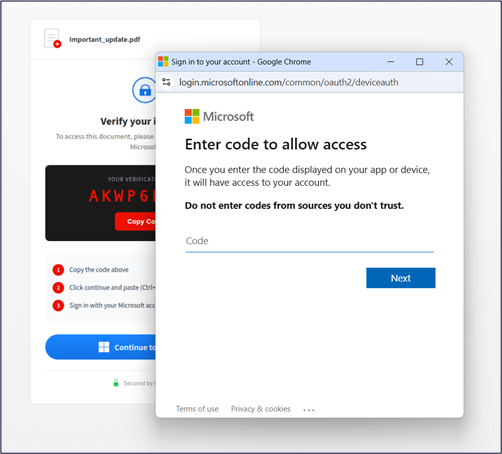
Figure 16. Pop-up authorization window.
Entering the delivered device code and fulfilling the authorization request would eventually compromise the user’s account and grant the threat actor access and (most likely) refresh tokens. As shown in the ck function, the user would be redirected to the main Adobe webpage to initially avoid arousing the user's suspicion.
Technique Evaluation
This technique may be highly effective, especially against non-technical users in corporate environments, as it abuses legitimate Microsoft authentication and authorization mechanisms. The device code authorization process is rarely seen and utilized in most organizations, and thus, may reinforce the victim’s belief that Microsoft will actually validate the request to access the “protected resources”.
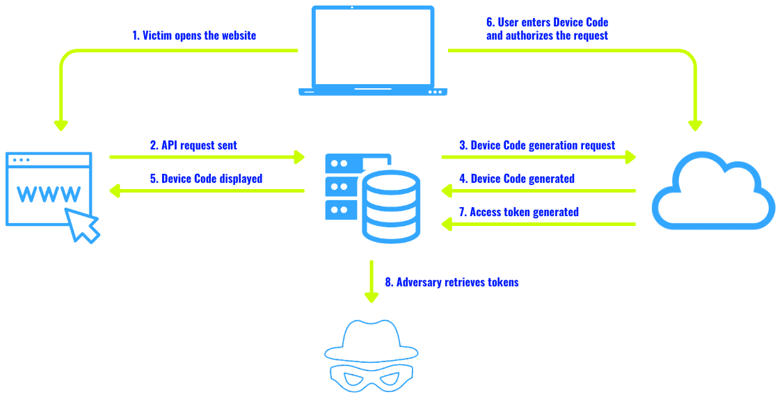
Figure 17. Device code attack overview.
The careful selection of the client_id value will also influence the final consent request that the victim sees. Picking an application such as Microsoft Office wouldn’t raise additional concerns on the user’s side.
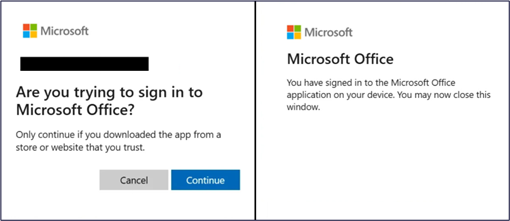
Figure 18. Application authorization confirmation.
The attack’s impact is significant as it grants relatively stealthy and, most importantly, persistent delegated access to various crucial resources. For instance, Graph API access may allow the adversary to:
-
Manage groups and users within the organization
-
Create channels and send channel messages within Microsoft Teams
-
Read, manage, and send messages within Microsoft Outlook
-
Manage site pages on an organization’s SharePoint
The list of possibilities is long and undertaking further actions will depend on the compromised user privileges as well as the intended attack structure and goals.
Looking at this matter globally allowed us to distinguish between two approaches. The first one, described in this article, lures the user into a phishing website and uses external infrastructure in order to communicate with Microsoft services. In this scenario, the trouble lies in successfully delivering the phishing email to the victim and forcing him to visit the website, while avoiding triggering protection mechanisms and raising the user’s suspicions. The advantage of that technique is that the device code is generated dynamically, upon visiting the website, which ensures that the user will have the time to follow the desired path. Moreover, the adversary-controlled infrastructure allows threat actors to perform redirections, display messages and errors, which may make the process more believable for the victim.
The other commonly seen scenario avoids the utilization of external infrastructure and solely relies on the phishing message. These attacks include fake invitations to Microsoft Teams meetings, reviewing shared SharePoint files, joining Microsoft Teams channels, and so on. A Microsoft Teams meeting invitation variant, as shown below, is particularly interesting as it does not stand out from a legitimate invitation, which also consists of meeting ID and a passcode.
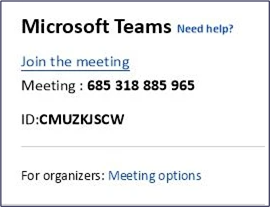
Figure 19. Device code phishing example.
Even a cautious user could assume that the requirement to input the code on an actual Microsoft website is simply a part of joining a password-protected meeting. Lack of external infrastructure utilization, combined with the only requirement of crafting a legitimate-looking email that will pass all security checks, is a great advantage of this approach. The attack isn’t very obvious, but it’s time constrained as the device code is only valid for 15 minutes since its generation, so its success heavily relies on the user’s swift actions.
Prevention
This attack can be directly prevented by blocking the device code authentication in Conditional Access Policies. Most organizations do not use this flow as a part of their well-documented processes, and hence, the general recommendation is to restrict it globally. If this flow is required in very specific use cases, those users/resources should be explicitly excluded from the policies. The permitted usage of this flow shall be continuously audited and revoked as soon as it’s no longer necessary.
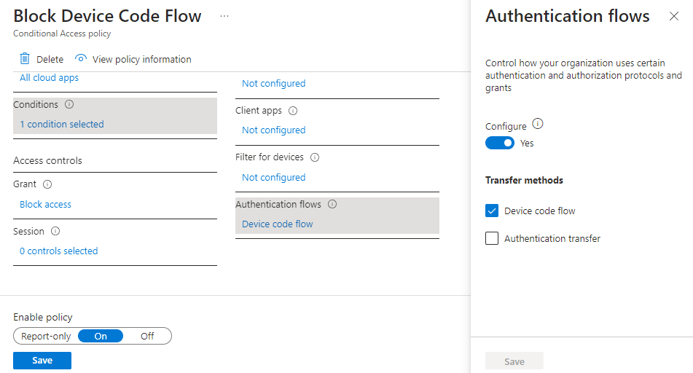
Figure 20. Conditional Access Policies - blocking Device Code Flow.
- Navigate:
- https://entra.microsoft.com/
- Entra ID > Conditional Access > Policies
- Specify:
- Users (recommended: All users)
- Target Resources (recommended: All resources)
- Configure:
- Conditions > Authentication flows > Device code flow
- Access controls > Grant > Block access
Detection
From a threat hunting perspective, there are certain KQL queries that can be run in attempt to identify device code attacks. Sign-in logs filtering can be made with the AuthenticationProtocol value set to “deviceCode", which yields initial requests associated with the flow, as well as OriginalTransferMethod set to “deviceCodeFlow ”, to identify further sessions related to authentications performed previously with device code.
SigninLogs| where TimeGenerated > ago(30d)| where AuthenticationProtocol == "deviceCode" orOriginalTransferMethod == "deviceCodeFlow"| extend device = parse_json(DeviceDetail)| project TimeGenerated, UserPrincipalName, AppDisplayName, AppId,Location, IPAddress, device.deviceId, device.displayName,device.isCompliant, device.isManaged| order by TimeGenerated desc
Device code attacks may also be identified, with lower fidelity, through hunting queries, by looking for URLs that are associated with device code endpoints:
- aka.ms/devicelogin
- microsoft.com/devicelogin
- login.microsoftonline.com/common/oauth2/deviceauth
The queries can look through events generated upon users clicking on the hyperlink in desktop applications (such as Outlook, Teams, etc.) or clicks performed within potential phishing messages.
UrlClickEvents| project Click_Time = TimeGenerated, NetworkMessageId,Clicked_Url = Url, Url_Chain = UrlChain, ActionType,IsClickedThrough| join kind=leftouter EmailEvents on NetworkMessageId| project NetworkMessageId, Delivery_Time = TimeGenerated, Click_Time,Clicked_Url, Url_Chain, ActionType, IsClickedThrough,RecipientEmailAddress, SenderFromAddress, SenderDisplayName,SenderMailFromAddress, Subject, AttachmentCount, UrlCount| where Url_Chain has_any ("aka.ms/devicelogin","microsoft.com/devicelogin","login.microsoftonline.com/common/oauth2/deviceauth")
DeviceEvents| where TimeGenerated > ago(30d)| where ActionType == "BrowserLaunchedToOpenUrl"| where RemoteUrl has_any ("aka.ms/devicelogin","microsoft.com/devicelogin","login.microsoftonline.com/common/oauth2/deviceauth")| project TimeGenerated, DeviceName, InitiatingProcessAccountUpn,RemoteUrl, InitiatingProcessFileName, InitiatingProcessSHA256
Results from those queries (or lack thereof) shall be treated as supporting evidence in a broader investigation that considers other circumstances associated with security breaches and technical constraints. For instance, in the attack described in this article, microsoft.com/devicelogin was not present in the Url_Chain field due to a lack of immediate redirection to this service from the phishing URL. Therefore, it would not be included in the query results.
Mitigation
Confirmed account compromise can be addressed in various ways, depending on the organization’s infrastructure. The general recommendation is to revoke established sign-in sessions, which can be achieved through:
- Microsoft Graph API call – revokeSignInSessions
- Defender MXDR – Require user to sign in again
- Microsoft Entra ID:
- Cmdlet – Revoke-MgUserSignInSession
- UI – Revoke sessions
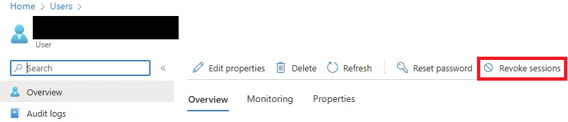
Figure 21. Revoking the user's sessions in Entra ID.
Indicators of Compromise (IOCs)
URLs:
References
-
https://learn.microsoft.com/en-us/entra/identity-platform/v2-oauth2-device-code
-
https://learn.microsoft.com/en-us/entra/identity-platform/scopes-oidc
-
https://learn.microsoft.com/en-us/entra/identity-platform/v2-protocols
-
https://learn.microsoft.com/en-us/entra/identity/conditional-access/policy-block-authentication-flows#device-code-flow-policies
-
https://www.huntress.com/blog/oh-auth-2-0-device-code-phishing-in-google-cloud-and-azure
-
https://github.com/secureworks/family-of-client-ids-research?tab=readme-ov-file#which-client-applications-are-compatible-with-each-other


