
In Part 4, we stole every document from every index, planted a rogue superuser account, created credential-independent API keys, and planted three persistence mechanisms that survive password rotations. Everything was logged. Now we answer two final questions: how much worse could it get, and how do we put everything back?
This post demonstrates RAVEN's destructive capabilities, the triple-gated safety system that prevents accidental damage, and the cleanup module that reverses every action logged across the entire engagement. The tone shifts here. Parts 1 through 4 were about proving what an attacker can do. Part 5 is about proving that the tool was built by someone who understands the line between testing and damage.
All demonstrations use RAVEN's lab environments with seeded test data. No production systems were touched.
The Safety System
Before demonstrating anything destructive, it is important to understand what prevents these capabilities from being triggered accidentally. RAVEN enforces a tiered safety architecture that scales with the severity of the operation.
-
Tier 1: `--confirm-writes` gates all operations that modify the target. API key creation, data exfiltration, CVE exploitation, persistence. Any module that writes data requires this flag. Without it, the module refuses to execute.
-
Tier 2: `--confirm-destroy` DESTROY gates operations that cause irreversible damage. Index deletion, document wiping, mapping corruption, Meow simulation. The flag requires the literal token `DESTROY` as its argument. This is not a boolean toggle. The operator must type the word, which is a deliberate friction point that prevents muscle memory from accidentally arming a destructive command.
-
Tier 3: `--scope-file` restricts the blast radius to authorized targets. A scope file contains the list of IP addresses or hostnames that the operator is authorized to test. Destructive operations check the target against this list and refuse to proceed if the target is not in scope.
Additionally, `--dry-run` previews any operation without executing it. The operator sees exactly what would happen, confirms the plan, and re-runs without the flag to execute.
As shown in Figure 1, running `raven-es -t localhost destroy --index users` without the safety gates produces an immediate refusal.
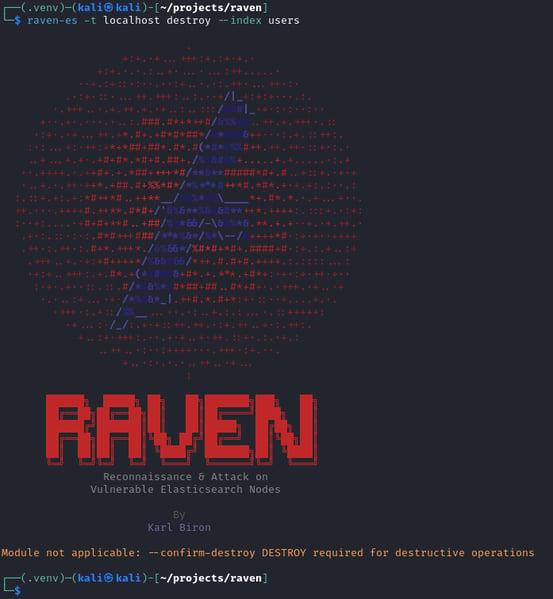
Figure 1. Safety gate enforcement: destructive operation refused without --confirm-destroy.
Now we arm the gates and demonstrate the impact. We create a scope file with `echo "localhost" > scope.txt`, spin up a disposable test index with `curl -s -X PUT http://localhost:9200/test_disposable -H "Content-Type: application/json" -d '{"settings":{"number_of_replicas":0}}'`, and execute the same command with the required safety flags by running `raven-es --quiet -t localhost destroy --index test_disposable --confirm-destroy DESTROY --scope-file scope.txt`. As shown in Figure 2, the operation succeeds only when all three gates are satisfied.

Figure 2. All three safety gates armed: scope file, disposable target, and successful destruction with full confirmation.
There are three layers of confirmation before any data is destroyed. An offensive tool without guardrails is not a tool. It is a liability.
Index Deletion
The simplest destructive operation: delete an entire index. As shown in Figure 3, running `raven-es --quiet -t localhost indices` confirms all four indices are present before the operation.
.png?width=522&height=262&name=Figure%203.%20Index%20listing%20before%20deletion%20four%20indices%20present%20(users%2c%20orders%2c%20logs%2c%20config).png)
Figure 3. Index listing before deletion: four indices present (users, orders, logs, config).
As shown in Figure 4, running `raven-es --quiet -t localhost destroy --index users --confirm-destroy DESTROY --scope-file scope.txt` removes the target index.

Figure 4. Index deletion executed: delete_index SUCCESS for users.
As shown in Figure 5, running `raven-es --quiet -t localhost indices` again confirms the users index is gone.

Figure 5. Index listing after deletion: three indices remain, but the users index is permanently gone.
The `users` index and every document in it are permanently gone. On a production cluster, this would be irrecoverable without backups. The before-and-after demonstrated in Figures 3 through 5 is exactly how a penetration test report should present destructive findings: the index existed, the command was executed, the index no longer exists.
Delete by Query
Full index deletion is a sledgehammer. Sometimes a scalpel is more appropriate. The `--delete-by-query` flag removes documents matching a specific query while leaving the index structure intact.
As shown in Figure 6, running `raven-es --quiet -t localhost search --sample 1 --index orders` verifies documents exist in the `orders` index before the operation.
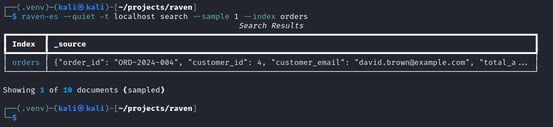
Figure 6. Before: orders index contains 10 documents with real order data.
Without the `--query` flag, the default is `match_all`, wiping every document while preserving the index structure. As shown in Figure 7, running `raven-es --quiet -t localhost destroy --delete-by-query --index orders --confirm-destroy DESTROY --scope-file scope.txt` removes all documents.

Figure 7. Delete by query executed: 10 documents wiped, index structure preserved.
As shown in Figure 8, running `raven-es --quiet -t localhost search --sample 1 --index orders` again confirms the index is now empty.

Figure 8. After: the orders index still exists but contains zero documents.
The `orders` index still exists. Its mappings are intact. But every document is gone. This is particularly insidious because monitoring systems that track index count will not detect the data loss. The index is still there. It is just empty.
Mapping Poison
Even subtler than document deletion. The `--poison-mapping` flag corrupts an index's field mappings by injecting dozens of garbage fields with dynamic mapping. The index still exists. The documents are still there. But the mapping is polluted beyond recognition.
As shown in Figure 9, running `raven-es --quiet -t localhost indices --mappings` before the attack shows the `logs` index with clean, legitimate field mappings.
.png?width=553&height=256&name=Figure%209.%20Before%20logs%20index%20with%20legitimate%20field%20mappings%20(api_endpoint%2c%20api_key%2c%20customer_id%2c%20etc.).png)
Figure 9. Before: logs index with legitimate field mappings (api_endpoint, api_key, customer_id, etc.).
As shown in Figure 10, running `raven-es --quiet -t localhost destroy --poison-mapping logs --confirm-destroy DESTROY --scope-file scope.txt` injects 51 garbage fields into the mapping.

Figure 10. Mapping poison executed: poison_mapping SUCCESS for the logs index.
As shown in Figure 11, running `raven-es --quiet -t localhost indices --mappings` again reveals the damage.
.png?width=553&height=265&name=Figure%2011.%20After%20logs%20index%20dominated%20by%20%60_raven_poison_*%60%20garbage%20fields%2c%20original%20mappings%20buried%20under%20(+77%20more).png)
Figure 11. After: logs index dominated by `_raven_poison_*` garbage fields, original mappings buried under (+77 more).
The data is still there. It just no longer makes sense. The original 36 fields are buried under 51 injected garbage fields. Applications that depend on predictable field types break. Dashboards built on those fields display garbage. The fix requires reindexing the entire dataset with corrected mappings, a process that can take hours on large indices. A subtle attacker who poisons mappings and leaves could cause days of operational disruption before anyone identifies the root cause.
Meow Simulation
The nuclear option. The `--meow-sim` flag simulates the Meow Attack that corrupted over 12,000 Elasticsearch databases in 2020. In my earlier research (Feline Hackers Among Us, The Cat's Out of the Bag), I analyzed and simulated this attack using MAD-CAT. RAVEN brings the same capability into a unified framework.
The real Meow Attack did not delete indices. It corrupted them. Every document in every exposed index was wiped and replaced with a random alphanumeric string appended with "-meow." The indices still existed. The document count changed. But every piece of real data was gone.
As shown in Figure 12, running `raven-es --quiet -t localhost search --sample 5` against each index confirms real data exists across all four indices before the attack.

Figure 12. Before: real data across all four indices — orders, config, logs, and users with legitimate content.
As shown in Figure 13, running `raven-es --quiet -t localhost destroy --meow-sim --confirm-destroy DESTROY --scope-file scope.txt --dry-run` previews the blast radius without executing.

Figure 13. Dry-run preview: 4 indices targeted for corruption with document counts. No changes made.
Every non-system index is marked for corruption. The `--dry-run` flag shows the blast radius without pulling the trigger. This is the preview that a penetration tester reviews before deciding whether to demonstrate the full impact.
As shown in Figure 14, running `raven-es --quiet -t localhost destroy --meow-sim --confirm-destroy DESTROY --scope-file scope.txt` executes the simulation.
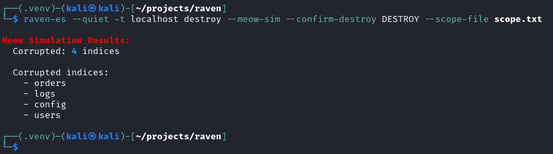
Figure 14. Meow simulation executed: 4 indices corrupted with meow markers.
As shown in Figure 15, running `raven-es --quiet -t localhost search --sample 1` against each index reveals the corruption.
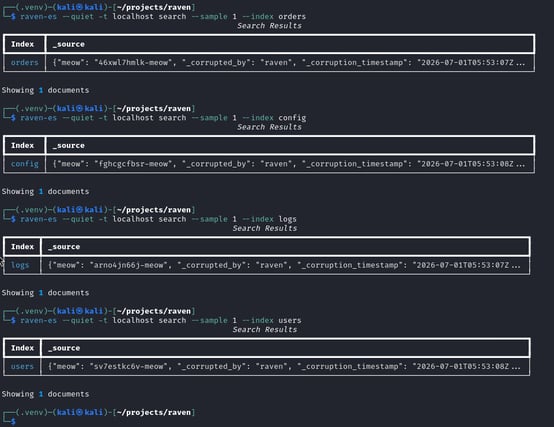
Figure 15. After: every index contains a single meow corruption marker. All real data is gone.
The indices still exist. They all still contain a document. But the real data is gone, replaced by a random string ending in "-meow." Every index in the cluster received the same treatment. This is the attack that corrupted 12,000 databases in 2020. RAVEN simulates it in a single command, against a scoped target, with triple-gated safety, and full activity logging for cleanup.
Denial of Service
RAVEN's `dos` module provides five resource exhaustion modes, each targeting a different bottleneck in the Elasticsearch architecture. Like all destructive operations, it requires `--confirm-destroy DESTROY` and `--scope-file`.
Mapping Explosion: Death by a Thousand Fields
Most people think of denial of service (DoS) as a volume attack. Send enough requests to overwhelm the target. Mapping explosion takes a different approach entirely. Elasticsearch tracks every unique field name in an index as part of its cluster state. The cluster state is a data structure that every node must hold in memory and that must be synchronized across the cluster on every update. By creating documents with thousands of unique dynamically generated field names, an attacker can bloat the cluster state until state synchronization becomes the bottleneck.
First, we establish a baseline. As shown in Figure 16, with Lazydocker monitoring the container's resource usage, the cluster sits idle at approximately 1% CPU with minor periodic spikes from background maintenance tasks.
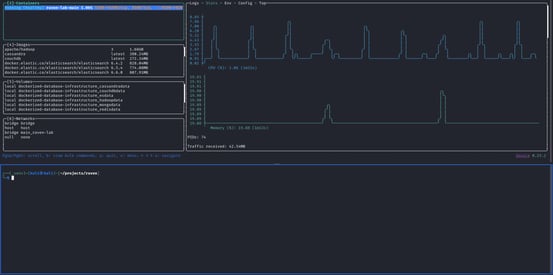
Figure 16. Baseline: cluster idle at ~1% CPU before the mapping explosion attack.
As shown in Figure 17, running `raven-es --quiet -t localhost dos --mode mapping_explosion --duration 60 --target-index logs --confirm-destroy DESTROY --scope-file scope.txt` drives CPU to approximately 50% as 238 new fields are injected into the cluster state.

Figure 17. Mapping explosion attack: CPU spikes to ~50% as 238 fields are permanently registered in the cluster state.
The CPU graph tells the story. The cluster's processing power is consumed by metadata operations as each new field is permanently registered in the cluster state. Unlike query-based attacks, this impact scales identically regardless of data volume. A cluster with 10 documents and a cluster with 10 million documents are equally vulnerable.
The effects compound. Cluster state updates slow down. New index operations take longer because the updated state must propagate to every node. On a multi-node cluster, the state synchronization overhead can make the cluster unresponsive to normal queries even though no traffic is being sent. The attack creates damage that persists after the attacker disconnects.
The fix is reindexing: creating a new index with clean mappings, copying the documents, and deleting the poisoned index. On a large production index, this process can take hours. A sixty-second attack that creates hours of recovery work. That is the asymmetry that makes mapping explosion the most interesting DoS mode in RAVEN's arsenal.
The Other Four Modes
`expensive_agg` sends deeply nested aggregation queries that force Elasticsearch to scan and compute across entire indices. In our lab with 20 documents, this mode peaked at approximately 25% CPU, as shown in Figure 18. The impact scales directly with data volume. On production indices with millions of records, the same queries would saturate CPU for seconds per request, and concurrent aggregations would queue until the thread pool is exhausted. This is the mode most likely to cause visible service degradation on data-heavy clusters.

Figure 18. expensive_agg: ~25% CPU peak. Impact scales with data volume, minimal on a 20-document lab.
`deep_pagination` targets memory rather than CPU. It opens concurrent scroll contexts, each holding an in-memory snapshot of the index state. In our lab testing, CPU barely reached 15%, as shown in Figure 19, because 20 documents produce trivially small scroll snapshots. On production indices, each scroll context would consume megabytes of JVM heap. Enough concurrent scrolls push the heap toward its limit, triggering aggressive garbage collection pauses and eventually OutOfMemoryError crashes that take the node offline entirely.
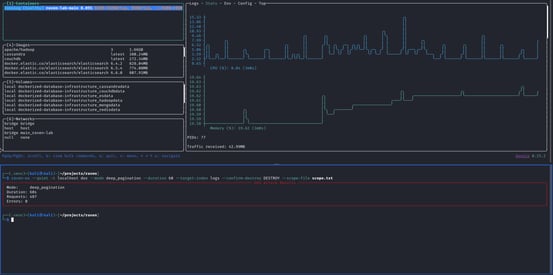
Figure 19. deep_pagination: ~15% CPU. Targets memory, not CPU. Devastating on large indices.
`shard_flood` creates many small indices in rapid succession. Each index requires at least one primary shard, and each shard consumes file descriptors, memory, and cluster state overhead. As shown in Figure 20, this mode spiked to 55% CPU during the initial burst as Elasticsearch processed index creation requests and allocated shards. The CPU then dipped as the cluster's shard allocation throttle engaged, queuing new allocations to protect stability. The dip itself is the evidence of impact. The cluster became so congested with pending shard operations that it could no longer process new ones efficiently. The 73 orphaned indices created during testing persist as a lasting resource drain even after the attack stops.
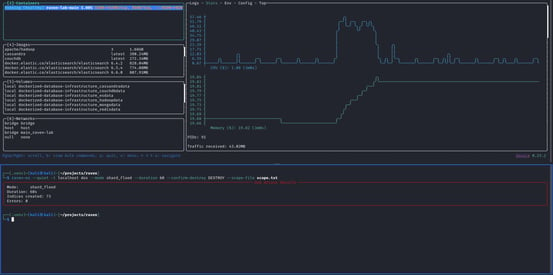
Figure 20. shard_flood: 55% CPU spike then throttle. 73 orphaned indices created in 60 seconds.
`bulk_hammer` floods the indexing pipeline with bulk write requests. As shown in Figure 21, in 60 seconds of testing this mode indexed 58,100 documents in 581 bulk requests, peaking at 52% CPU. The spike-and-dip pattern reflects Elasticsearch's internal response to sustained write pressure: after the initial indexing burst, Lucene triggers background segment merges that throttle new indexing to prevent I/O starvation. The translog flushes periodically, and JVM garbage collection pauses occur as bulk parsing generates significant short-lived objects. The second-half CPU represents the cluster spending resources on recovery work from the initial burst.

Figure 21. bulk_hammer: 52% CPU peak, 58,100 documents indexed. Segment merges cause the mid-attack dip.
Five modes, five different resource exhaustion vectors. The metadata-based attacks (`mapping_explosion` and `shard_flood`) produce consistent impact regardless of data volume. The query-based attacks (`expensive_agg` and `deep_pagination`) scale with data size and are devastating on production clusters. `bulk_hammer` combines both: it creates new data while consuming CPU and I/O. A comprehensive DoS assessment tests all five because a cluster hardened against one mode may be vulnerable to another.
Cleanup
The payoff. Every action from Parts 2 through 5 was recorded in RAVEN's activity log. The `clean` module reads that log and reverses every recorded action.
We demonstrate the full cleanup lifecycle using a fresh activity log: create three reversible resources, preview the plan, execute the cleanup, and verify each reversal. On a real engagement, the log would contain every state-changing action from the entire assessment.
First, we create three resources. As shown in Figure 22, running `raven-es --quiet -t localhost apikey --create --name "test_cleanup_key" --confirm-writes -u elastic -P changeme` creates an API key.
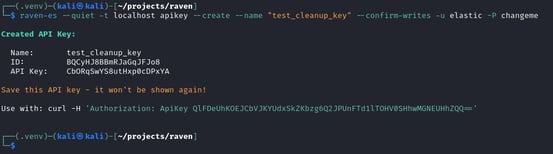
Figure 22. API key created for cleanup demonstration.
As shown in Figure 23, running `raven-es --quiet -t localhost persist --create-user --backdoor-username cleanup_demo_user --backdoor-password 'Demo123!' --confirm-writes --scope-file scope.txt -u elastic -P changeme` creates a rogue user.

Figure 23. Rogue user "cleanup_demo_user" created with superuser role.
As shown in Figure 24, running `raven-es --quiet -t localhost snapshot --register-repo --repo-path /tmp/cleanup_repo --confirm-writes -u elastic -P changeme` registers a snapshot repository.

Figure 24. Snapshot repository registered at /tmp/cleanup_repo.
As shown in Figure 25, running `raven-es --quiet -t localhost clean --dry-run -u elastic -P changeme` previews the cleanup plan before execution.

Figure 25. Cleanup dry-run: 3 planned reversals, 0 skipped. Every logged action has a reversal path.
Every logged action has a planned reversal. API keys will be invalidated. Rogue users will be deleted. Snapshot repositories will be unregistered. The `--dry-run` output is the cleanup plan that goes into the penetration test report alongside the findings.
As shown in Figure 26, running `raven-es --quiet -t localhost clean -u elastic -P changeme` executes the cleanup.
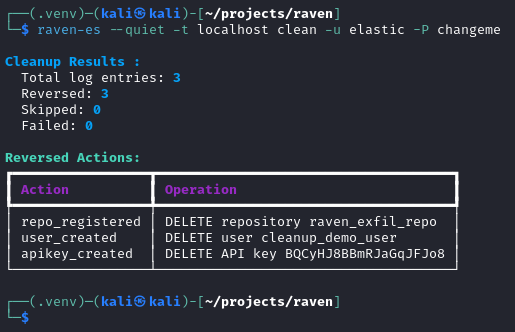
Figure 26. Cleanup executed: 3 reversed, 0 skipped, 0 failed.
We verify each reversal independently. As shown in Figure 27, running `curl -s "http://localhost:9200/_security/api_key?owner=true" -u elastic:changeme` with a Python formatter confirms the API key is invalidated.
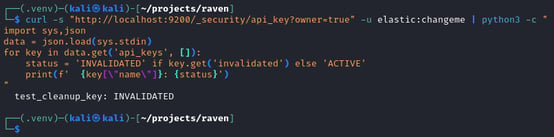
Figure 27. API key status: INVALIDATED.
As shown in Figure 28, running `curl -s http://localhost:9200/_security/user/cleanup_demo_user -u elastic:changeme` returns an empty result, confirming the user was deleted.

Figure 28. User verification: empty response confirms cleanup_demo_user was deleted.
As shown in Figure 29, running `curl -s http://localhost:9200/_snapshot/ -u elastic:changeme` returns an empty result, confirming the repository was removed.

Figure 29. Repository verification: empty response confirms snapshot repository was removed.
Every action reversed. The API key is invalidated, the rogue user is deleted, the snapshot repository is removed. The target is returned to its pre-engagement state.
However, not every action can be reversed. Destructive operations like index deletion, document wiping, mapping corruption, and Meow simulation are inherently irreversible. Deleted data cannot be recreated from a log entry. When the cleanup module encounters these entries, it marks them as "skipped" with a clear explanation: "cannot auto-restore." This is by design. The activity log preserves a complete record of what was done, even when undoing it is impossible. For a penetration test report, the log entry that says "index 'users' deleted at 14:01:47 UTC" is evidence regardless of whether the action can be automated in reverse. The distinction between reversible and irreversible actions is surfaced in the dry-run preview, giving the operator visibility into what cleanup can and cannot accomplish before executing.
The `--log-file` flag allows specifying a custom activity log path if the default `~/.raven/activity.log` was overridden during the engagement. Running cleanup multiple times is safe. Already-reversed actions are detected and skipped without error, meaning a second cleanup run against the same log produces zero reversals and zero failures. This matters on real engagements where multiple team members may run cleanup independently, or where the operator wants to verify that a previous cleanup completed successfully.
RAVEN logs every action it takes. Then it offers to undo everything it can.
The Journey Complete
Over six posts, we traced the complete arc of an Elasticsearch offensive security engagement:
-
Part 0 introduced RAVEN and the gap it fills. No comprehensive offensive security tool existed for Elasticsearch and Kibana. RAVEN was built to change that.
-
Part 1 demonstrated first contact. From a single open port, we fingerprinted the cluster, mapped its data, hunted for secrets, cracked credentials, and analyzed privilege escalation paths. Seven reconnaissance modules turning an IP address into a complete target profile.
-
Part 2 exploited the cracks. Legacy scripting engines gave us root-level code execution. Snapshot traversal read files from the host filesystem. Version-based CVE detection identified vulnerabilities across a decade of Elasticsearch releases.
-
Part 3 put Kibana under siege. Local File Inclusion disclosed files through error logs. Timelion prototype pollution achieved remote code execution through a novel browser-trigger automation that no other tool provides. Saved objects revealed organizational intelligence.
-
Part 4 proved the business impact. Entire databases exfiltrated to disk. Persistent access was established through rogue accounts, API keys, and Watcher-based backdoors that survive password rotations. Three planted persistence mechanisms that survive the most common incident response actions.
-
Part 5 demonstrated the destructive ceiling and the discipline that keeps it in check. Index deletion, document wiping, mapping corruption, Meow simulation, and five denial-of-service modes, all gated behind triple-confirmation safety controls and all logged for accountability. The cleanup module reversed every reversible action from the engagement, returning the target to its pre-engagement state.
Nineteen modules. Eight CVEs. Nine lab environments. A complete offensive security framework for Elasticsearch and Kibana, built by a security researcher for security researchers.
RAVEN is open-source and available now:
- GitHub: `github.com/karlvbiron/raven`
- PyPI: `pip install raven-es`
For questions, contributions, or responsible disclosure, reach out through the GitHub repository.
For authorized security testing only.
The wings are folded. The engagement is complete.
This is Part 5 of the "Release the RAVEN" series. Read Part 4: Data Heist and Persistence for post-exploitation or start from Part 0: Introduction for the full series.


