
This is a collaborative follow-up to our original post, developed jointly with Emmanuel C., a security researcher not affiliated with LevelBlue, who contributed additional infrastructure and tooling findings based on an analysis of the same GitHub staging account.
Our first investigation established a simple but effective malware delivery setup: a GitHub account was being used to host pieces of a malicious loader, allowing the operator to hide part of the operation behind a legitimate service.
The obvious next question was: who was operating that account, and what else was happening behind it? The answer did not come from the malware itself. It started with something much simpler: an email address left behind in GitHub's own commit metadata.
From that address, we followed a chain of independent clues into a leaked stealer log — a record of an infected computer's browsing history, saved credentials, and local files. What we found on that machine provided a much broader picture of the operation: RAT-building tools, phishing templates, bulk-email software, infrastructure records, and evidence of repeated efforts to make malicious files harder for security software to detect.
There is an unusual twist to the story. The machine appears to have been compromised by an unrelated commodity infostealer — the same general type of malware that Blind Eagle uses to steal information from victims. In other words, the trail began when an apparent attacker-side workstation was itself exposed by someone else's malware. What follows is that trail, step by step.
From a GitHub Commit to an Email Address
Our original investigation focused on the cabeto850128 GitHub account and the repositories it used to stage malware. One useful detail was hiding in plain sight. GitHub's raw commit view exposes the email address associated with a commit author. No specialized malware analysis was required: opening the patch metadata was enough to reveal the address used by the account.

Figure 1. GitHub's raw commit-patch view exposing the commit-author email address directly in the patch metadata.
That gave us our first pivot: an email address that could be searched independently of GitHub. The account was created on November 25, 2024, initially with a placeholder repository named test. The account then showed no visible activity for approximately 18 months before becoming active again on May 25, 2026, when it created the comicsam repository used in our original investigation. The gap between account creation and subsequent activity is notable, although the available evidence does not indicate why the account remained dormant during that period.
Activity continued into August, including additional file uploads. On August 6, another repository, jacobo, appeared with an archivo.zip file containing different content. That mattered for one reason: the account was still being used after our original investigation. We therefore had both a useful identifier and an active account to follow.
The Email Appears in a Stealer Log
The next pivot produced a much more interesting result. Searching the email address in stealer log aggregators returned a hit in a collection associated with a Telegram channel called ALIEN TXTBASE.

Figure 2. A lookup against the ALIEN TXTBASE collection returning two credential entries for the email address, with passwords redacted.
A stealer log is essentially a snapshot of what an information-stealing malware program can collect from an infected computer. Depending on the malware, that can include browser history, saved passwords, cookies, autofill information, and local files.
The collection was enormous, and after duplicate and known fake entries were removed, it still contained a substantial number of unique records. These included email addresses, phone numbers, IP addresses, plaintext passwords, and information about the websites and applications where those credentials were used.
The email address from the GitHub account appeared twice, and both entries were associated with saved passwords. That was an important lead, but a leaked credential by itself does not prove that the person behind an email address is the person operating a malware campaign.
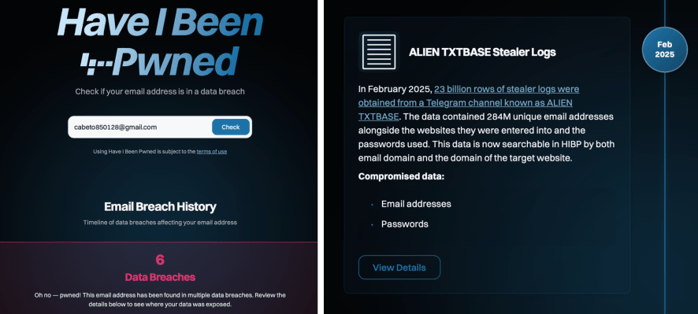
Figure 3. Have I Been Pwned confirms the address across six breaches, including the ALIEN TXTBASE stealer log collection.
Have I Been Pwned independently corroborates the same collection — the address comes back across six breaches, one of which is the ALIEN TXTBASE stealer log set itself.
Confirming the Infection
A second intelligence source provided that confirmation. Hudson Rock's Email Compromise Analysis tool independently identified the address as having been exposed by an infostealer. It also returned two useful pieces of information about the compromised system: its hostname, “Ghost,” and an approximate infection date.

Figure 4. Independent compromise intelligence confirming the infected device and returning the hostname “Ghost” and an approximate infection date.
This changed the nature of the investigation. We were no longer following an email address that happened to appear in a leaked database. We had evidence that the address was associated with a compromised computer. The next question was much more interesting: What was actually on that computer?
Inside the Recovered Log
To answer that, we accessed the underlying stealer log archive through IntelX. The archive contained the usual browser-related material, but it also exposed something far more valuable for this investigation: the computer's local directory structure.
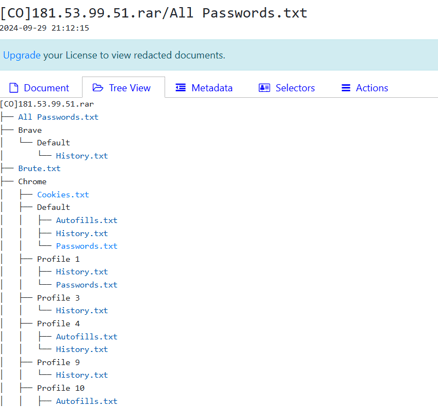
Figure 5. The recovered stealer log archive and its browser directory structure.
At this point, the investigation moved beyond what ordinary public searches could reveal. The stealer log gave us a window into the machine itself, including files, folders, browsing activity, and operational artifacts. And one folder immediately stood out. It was simply called: Rats.

Figure 6. Local directory structure recovered from the associated device, showing per-family RAT build folders.
This was a much broader toolkit than the AutoIt/GitHub loader from what our original investigation suggested. Instead of relying on one malware family, the operator appeared to maintain several options and switch between them as needed.
The GitHub repository was not the operation. It was only the part we could see from the outside. The recovered machine showed what was happening behind it: malware builds, phishing templates, sender identities, delivery tools, hosting accounts, and infrastructure records. What had looked like a single GitHub repository was starting to look like a small production pipeline.
The Remcos folder provided another clue. It contained a systeminfo directory holding many text files named after different hostnames and labels.
We are not publishing those contents because the filenames refer to other infected systems, but the structure and volume are consistent with material collected during previous RAT activity rather than a single test installation.
Taken together, the files point to a machine being used for malware operations — not simply a computer on which someone happened to download a RAT.
The Phishing Material Was Being Built There, Too
The machine contained more than malware. It also contained ready-to-use phishing material: HTML and Word templates designed to impersonate Colombian government and judicial institutions. The themes included judicial notifications and traffic violations.
The basic trick is familiar. A victim receives a message that appears to come from a legitimate institution, is directed to a website, and is told to download a password-protected archive. The password is provided as part of the message.

Figure 7. A locally stored phishing template impersonating Colombia's Consejo Superior de la Judicatura.
One of the templates referenced consultanotificacionesjuridicas[.]site, a domain using the same judicial notification theme identified in our original investigation. Another domain, simpmit[.]co, appeared alongside it.
This was significant because it connected two previously separate parts of the investigation. The phishing infrastructure was not merely something the operator had visited or linked to. The templates themselves were being stored and prepared on the same machine.
Making the Fake Sender Look Real
The operator was also paying attention to something less technical: appearances. The browser history showed searches for generic law-firm imagery, including searches for “abogados logo.” Soon afterward, a Google account profile picture was changed to an image featuring scales of justice.

Figure 8. Image search results for “abogados logo.”
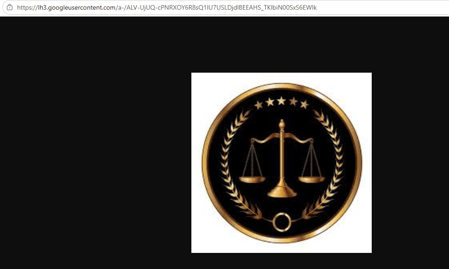
Figure 9. The scales of justice image subsequently used as a Google account profile picture.
That might seem like a minor detail, but it illustrates how the campaign was assembled. The operator was not simply creating a malicious attachment and sending it out.
There was a sequence: create the lure → give it an institutional appearance → create a matching sender identity → prepare the delivery infrastructure → send the campaign.
Testing the Mailing Operation
The machine also contained evidence of the delivery process itself. SendBlaster, a desktop bulk-email application, was configured with an external SMTP relay. Its logs showed a completed test send before a larger campaign.
One of the test recipients was the same operational email address associated with the GitHub account. That provided another useful connection between the GitHub activity and the phishing infrastructure.
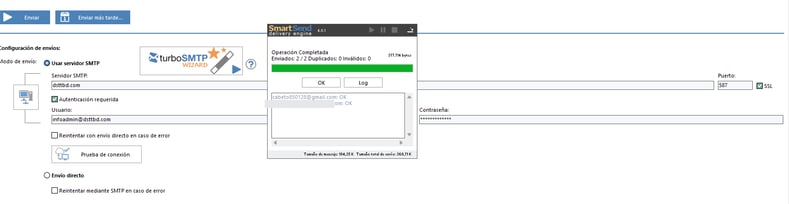
Figure 10. SendBlaster configured with an SMTP relay and showing a completed test send.
The surrounding browser history reinforced the picture. The machine repeatedly accessed legitimate email-marketing services and hosting providers, including Brevo, Mailrelay, HubSpot, DreamHost, HostGator, and Firebase. The same machine was being used to research or manage email delivery, hosting, domains, malware, and file storage. The operator was effectively assembling a small production environment.
Evasion Shopping
The most revealing part of the browsing history may have been the search for tools designed to make malicious software harder to detect. The machine showed activity involving commercial crypters and protectors.
The history included research into several such services, including FUD Crypter, MI6 Crypter, PolyCrypt, and Cassandra Protector. In at least one case, the evidence indicates that a paid subscription was completed. There was also a Discord server being used for file storage, alongside paste and cloud storage services.
The table below summarizes what we found.
|
Service / Artifact |
What it is |
|
|
data-encoder[.]com |
"FUD Crypter 2024" commercial crypter service |
Purchased/researched to lower AV detection rates |
|
MI6 Crypter |
Subscription crypter ("Order Completed: MI6 Crypter 1 Month") |
Confirms an active paid tooling budget, not just free tools |
|
PolyCrypt |
Runtime crypter covered in a BlackFog writeup on cybercrime-forum sales |
Competing product research alongside an active purchase |
|
"Roda" / Roda-Modder |
Alias tied to a crypter developer referenced in public reporting |
Surfaced via a Skype notification-themed phishing email |
|
Cassandra Protector |
.NET obfuscation / anti-analysis tool |
Registered account found in browsing artifacts |
|
Discord: respaldojunio13 |
Discord server used as file storage |
Low-cost staging pattern for build artifacts |
|
paste[.]ee / Google Drive |
Paste + cloud storage services |
Matches infrastructure tied to prior Blind Eagle campaigns |
Table 1. Crypter, protector, and file storage services identified in the recovered browsing history. Compiled from stealer log artifacts, not a screenshot of any single tool.
One particularly interesting clue involved the alias “Roda” / “Roda-Modder.” The reference appeared through an otherwise ordinary-looking Skype notification email and corresponds to an alias publicly associated with crypter development in previous threat intelligence reporting.
On its own, this is weak evidence and does not identify the operator. Its significance comes from the surrounding evidence: the same machine showed active interest in commercial crypters and contained multiple RAT builds.
We therefore treat the reference as a supporting clue, not an attribution.
The GitHub Loader, Revisited
By this point, the investigation had produced evidence from several different sources:
- GitHub commit metadata
- Stealer log data
- Browser history
- Local files and directories
- Phishing templates
- Email-sending software
- Domain and hosting activity
- Malware samples
- Infrastructure records
These sources reveal a much clearer structure.
The GitHub account was being used to stage files. A separate domain was used for payload delivery. DuckDNS provided command-and-control (C2) infrastructure. Phishing domains supported the initial delivery. Email software handled bulk distribution. Cloud and file storage services provided additional places to move or stage files.

Figure 11. Infrastructure map reconstructed from GitHub, stealer log, and browsing history artifacts.
What stands out is the combination. The same operational trail connects multiple delivery methods, multiple malware families, and multiple staging locations — all centered around an account that remained active. The infrastructure could change its front door without changing the underlying workflow.
This also puts our original finding into better context. The comicsam repository was being used as a staging location for two components: a legitimate AutoIt interpreter and a separate file containing the actual script logic.
Keeping those components separate gives the operator a useful advantage. The interpreter can remain unchanged while the script can be replaced or updated independently. That means the GitHub repository does not need to contain an obviously modified executable every time the campaign changes.

Figure 12. Thecomicsam repository showing the AutoIt interpreter and separate script logic files.
Seen alongside everything recovered from the infected workstation, it looks more like one step in a larger, repeatable process.
Sample Verification and the Execution Chain
We obtained the three self-extracting RAR samples referenced in the operator's build records and independently checked their file types, SHA-256 hashes, archive contents, and embedded payload information. Those checks matched the characteristics previously reported for the campaign.
The samples use a multi-stage delivery process involving VBScript, PowerShell, and a trusted Windows utility. Based on the documented static and behavioral indicators (the RAR/VBScript dropper structure, the PowerShell obfuscation pattern, the abuse of InstallUtil.exe, and the AsyncRAT SSL-certificate fingerprint) — the reconstructed execution chain looks like this:
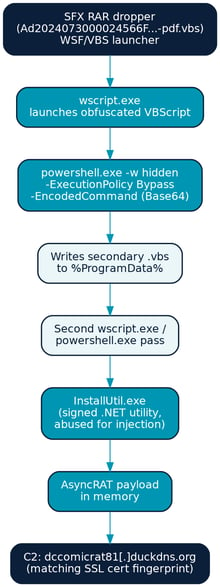
Figure 13. Reconstructed execution chain for the dropper.
It's a fairly clean example of a living-off-the-land chain: wscript.exe launches a PowerShell command with a Base64-encoded payload, that stage copies a .vbs file into %ProgramData%, a second wscript/PowerShell pass follows, and execution ultimately lands in InstallUtil.exe — a signed .NET utility frequently abused for process injection precisely because it's trusted by default.
The traffic this build generates has previously been tied to an SSL certificate belonging to AsyncRAT and a C2 connection to dccomicrat81[.]duckdns.org, consistent with the broader RAT inventory found on the operator's own device.
That hostname provides another interesting connection. Its name combines “comic,” echoing the comicsam GitHub repository, with “rat,” echoing DcRat, one of the RAT families found in the recovered Rats directory. That is not proof of personal identity. It is something more modest, but useful: a naming convention linking the staging account to the operational infrastructure.
Another Piece of the Delivery Infrastructure
The same analysis also identified creainovada[.]xyz. Unlike a domain appearing only in network traffic, this one had a corresponding tracking file on the recovered machine: NUEVO4343.txt. The file functioned like a simple internal delivery list, pairing short build names with URLs.
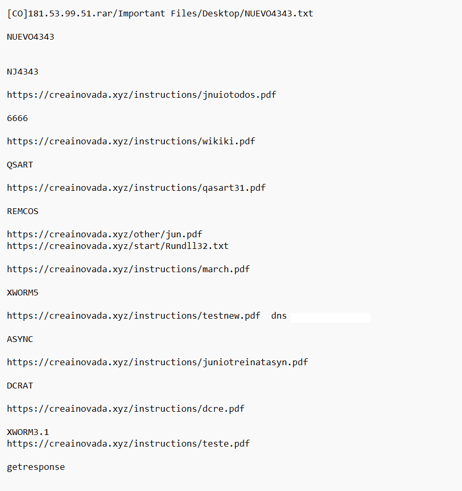
Figure 14. NUEVO4343.txt, showing the relationship between malware builds and delivery URLs.
Each entry follows the same pattern: a short build label (NJ4343, QSART, REMCOS, XWORM5, ASYNC, DCRAT, XWORM3.1) next to one or more creainovada[.]xyz/instructions/ or /start/ URLs. That's consistent with a lightweight internal dispatch sheet (which payload URL corresponds to which build) rather than anything a victim would ever see.
Detonation of a related sample independently confirms creainovada[.]xyz was live and serving a payload (creainovada[.]xyz/instructions/Wscript.txt, 200 OK) at scan time, alongside a Bitbucket-hosted path and a pre-signed AWS S3 URL following the identical “img_test.jpg” naming pattern — the same bare-file-on-a-trusted-CDN technique documented for GitHub in our original post, replicated across three additional platforms.
Put together, GitHub, Bitbucket, an S3 bucket, and creainovada[.]xyz all appear to serve the same functional role at different points: disposable, trusted-looking file hosts for a loader chain that never changes its core mechanics, only its front door.
The Traffic Violation Lure
One of the most revealing files in the recovered Rats directory was caratsimithtml.txt. It contained the source of a complete traffic violation phishing lure.
The template impersonates Bogotá's Secretaría Distrital de Movilidad and directs the recipient toward simpmit[.]co. It also provides a password for the archive the victim is instructed to download.
NOTIFICACIÓN: RADICACIÓN DE COMPARENDO N.º 2024-1707000-052407
Le informamos que se ha registrado una infracción de tránsito a su nombre...
El archivo se encuentra protegido con la clave: A2024
<a href="https://simpmit[.]co/">https://notifaciones/ifraccionessimmit/2024</a>
*Nota: se recomienda usar una PC o laptop, una vez ejecutado el archivo...
Two details are particularly revealing. First, the URL displayed to the victim does not match the actual destination. The visible text is designed to look like a specific government-related web address, while the underlying link points somewhere else. Second, the message tells recipients to use a PC or laptop.
That is a small but telling detail. It suggests the lure was designed around the expected behavior of the payload: the attacker wanted the recipient on a Windows computer, not a phone. These details show the phishing material being refined around how victims are expected to interact with it.
What We Actually Learned
The original investigation showed that GitHub was being abused as a low-cost staging point for a malware loader. This follow-up shows what was behind that staging point. The GitHub account was connected through its commit metadata to an email address that also appeared in an infostealer dataset. Independent intelligence confirmed that the address was associated with a compromised machine. The recovered log then exposed the machine's files, browser history, and operational artifacts.
Those artifacts revealed a much larger workflow:
- RATs were being collected and organized.
- Phishing templates were being written locally.
- Sender identities were being dressed up to look legitimate.
- Bulk mail software was being tested.
- Domains and hosting services were being managed.
- Detection-evasion tools were being researched and purchased.
- Multiple delivery locations were being tracked.
The important finding is therefore not one file, one domain, or one GitHub repository. It is the workflow connecting them. The GitHub loader was one visible part of a much larger operation.
There is a broader lesson here as well. Attackers often leave their strongest clues outside the malware they distribute.
- A commit author can expose an email address.
- A browser can remember a domain.
- A workstation can retain an old build folder.
- A phishing template can reveal how a campaign was designed.
- A test email can connect an account to an infrastructure operation.
In this case, those pieces turned a single GitHub staging account into a view of the production pipeline behind it.
And there is an uncomfortable irony at the center of the story: an operator involved in stealing information from other people's computers appears to have had their own operational machine compromised by an unrelated infostealer. That mistake exposed precisely the kind of information defenders usually have to work very hard to obtain.
Detection and Defense Recommendations
The loader chain and delivery tradecraft documented above are consistent across this actor's campaigns and give defenders several concrete places to detect and disrupt the chain.
Email and initial delivery
- Flag or block inbound mail containing password-protected archives where the extraction password is delivered in the message body — a strong signal regardless of theme, since it exists specifically to defeat attachment scanning.
- Treat lures impersonating Colombian judicial, tax (DIAN), or traffic violation notices as a known theme for this actor; user awareness training should specifically cover this pattern for Colombia-based organizations.
- Watch for disguised container formats — files with a .vbs, .pdf, or .html extension that are actually RAR/SFX archives or other executables, detectable via file-signature (magic-byte) inspection rather than extension alone.
Endpoint and process monitoring
- Alert on wscript.exe or cscript.exe spawning powershell.exe with -WindowStyle Hidden and -ExecutionPolicy Bypass — a high-fidelity combination rarely seen in legitimate scripts.
- Alert on InstallUtil.exe executing outside a software-deployment context, particularly when it follows a PowerShell or WScript parent process — this LOLBin is not commonly invoked directly by end users.
- Monitor for script files being written to %ProgramData% by a scripting-host or Office process.
- An AutoIt3.exe interpreter running alongside an unrelated, non-standard data file (e.g., a mislabeled .html/.data file) is itself a detectable pattern, independent of whether the interpreter binary is flagged.
Network
- Block or alert on the specific indicators listed below; DuckDNS-registered domains in particular warrant elevated scrutiny given how frequently this actor and similar commodity RAT operators rely on them for C2.
- Don't rely on domain or file hosting reputation alone: this actor routinely abuses GitHub, Bitbucket, AWS S3, and similar trusted platforms as bare-file CDNs, so allowlisting by domain reputation without content inspection will miss this technique.
- Egress filter outbound connections from endpoints to raw.githubusercontent.com and similar raw content domains where feasible, or at minimum alert on unusual processes (wscript.exe, powershell.exe) initiating those connections.
Hunting
- Hunt for the file hashes and C2 domains in the Indicators table below across email gateway, proxy, and EDR telemetry, and pivot on any hits to identify additional staging infrastructure.
- For Colombia-based organizations or those with Colombian business units, prioritize detection engineering around this actor's specific lure themes (judicial notifications, traffic infractions, tax/DIAN-themed content) alongside generic RAT detections.
MITRE ATT&CK Alignment
The activity observed across the GitHub repositories, phishing infrastructure, recovered stealer log artifacts, and validated malware samples aligns with several ATT&CK techniques associated with commodity RAT deployment and phishing-driven intrusion activity.
|
Tactic |
Technique |
ID |
Evidence in Investigation |
|
Initial Access |
Phishing: Spearphishing Attachment |
T1566.001 |
Judicial notification and traffic violation lures delivering password-protected archives |
|
Initial Access |
Phishing: Spearphishing Link |
T1566.002 |
Victims directed to actor-controlled phishing domains hosting payloads |
|
Resource Development |
Acquire Infrastructure: Domains |
T1583.001 |
Registration and operation of phishing and staging domains |
|
Resource Development |
Acquire Infrastructure: Web Services |
T1583.006 |
Abuse of GitHub, Bitbucket, AWS S3, Discord, Paste.ee, and cloud-hosting platforms |
|
Command and Control |
Dynamic Resolution: DNS Calculation |
T1568.003 |
Use of DuckDNS infrastructure for RAT C2 |
|
Command and Control |
Application Layer Protocol |
T1071 |
RAT communications conducted over common web protocols |
|
Command and Control |
Ingress Tool Transfer |
T1105 |
Retrieval of payloads and configuration files from GitHub and other staging services |
|
Defense Evasion |
Obfuscated Files or Information |
T1027 |
Base64-encoded PowerShell stages and use of crypters/protectors |
|
Defense Evasion |
Masquerading |
T1036 |
Payloads disguised as PDFs, archives, and legitimate-looking documents |
|
Defense Evasion |
System Binary Proxy Execution: InstallUtil |
T1218.004 |
Execution chain abusing InstallUtil.exe as a trusted Windows binary |
|
Execution |
Command and Scripting Interpreter: PowerShell |
T1059.001 |
Multi-stage PowerShell execution observed in reconstructed infection chain |
|
Execution |
Command and Scripting Interpreter: Visual Basic |
T1059.005 |
VBScript-based execution stages delivered through SFX archives |


