

In Part 1, we covered onboarding Microsoft-native agents and SaaS AI platforms — the paths that need configuration, not code. Now we look at connecting agents that have no native integration — self-built frameworks and agents you build and run yourself.
If an agent is missing from the M365 admin center inventory and the import-agents feature doesn’t support it, then the Microsoft Agent 365 SDK may be needed. That may include custom agents on Azure, developer and CLI agents on workstations, and any vendor framework without a native connector (example use cases to follow).
This post is lessons learned from lab work — I created a custom Claude-powered agent - built, registered, and monitored end to end against the live Agent 365 backend — and is not a comprehensive guide, just lessons learned.
See the official Agent 365 SDK documentation for more detailed setup guidance. This is a ‘conceptual companion’ to the official quickstart (the quickstart has the code). Bring this as context when you build your own agent to help with the development cycle.
What this covers:
- the SDK identity model (the Entra objects you'll be asked to consent to)
- one-time tenant enablement,
- registering an agent
- use case: a Teams AI teammate powered by Claude
- use case: a Claude usage collector feeding Sentinel
- Telemetry formats Agent 365 enforces
- validating the result
- a security review checklist.
One concept up front: Agent 365 records agent activity as OpenTelemetry traces — trees of timed operations called spans, named by Microsoft’s gen_ai convention. The terms recur throughout the post; the full format is in section 06.
01 – The SDK identity model
Before running any tooling, know what objects it creates, as everyone one of them is an Entra object that a security or identity administrator will govern later.
|
Object |
What it is |
Why it matters to the admin |
|
"Agent 365 CLI" app |
A well-known public client application the Agent 365 CLI authenticates through |
One per tenant; created and admin-consented during enablement. Its presence = the tenant is enabled. |
|
Blueprint |
An application object — the parent definition an agent is created from |
Permissions granted here are inherited by every agent created from it. Least-privilege review starts at the blueprint. |
|
Agent identity |
A service principal of type ServiceIdentity — the agent's directory identity |
This is what appears in Entra ID > Agents, holds the observability permission, and is the target for Conditional Access. |
|
Registration |
The record that lists the agent in the M365 admin center inventory |
Registration alone produces no activity data — it is inventory presence only. |
|
Instance (optional) |
A running copy of an AI-teammate agent that users chat with |
Created only after admin approval; instance invocations populate the sessions and active-user counts. |
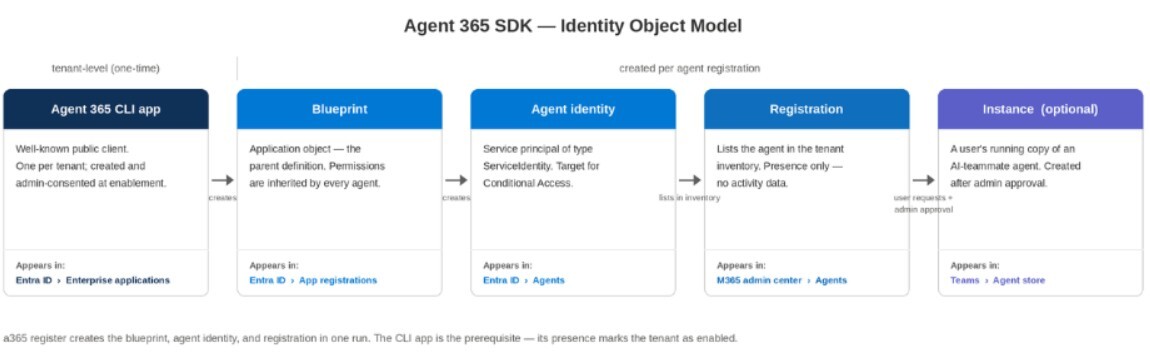
Figure 1. The Agent 365 SDK identity model: the tenant-level CLI app, then blueprint → agent identity → registration → instance, with the portal where each object appears.
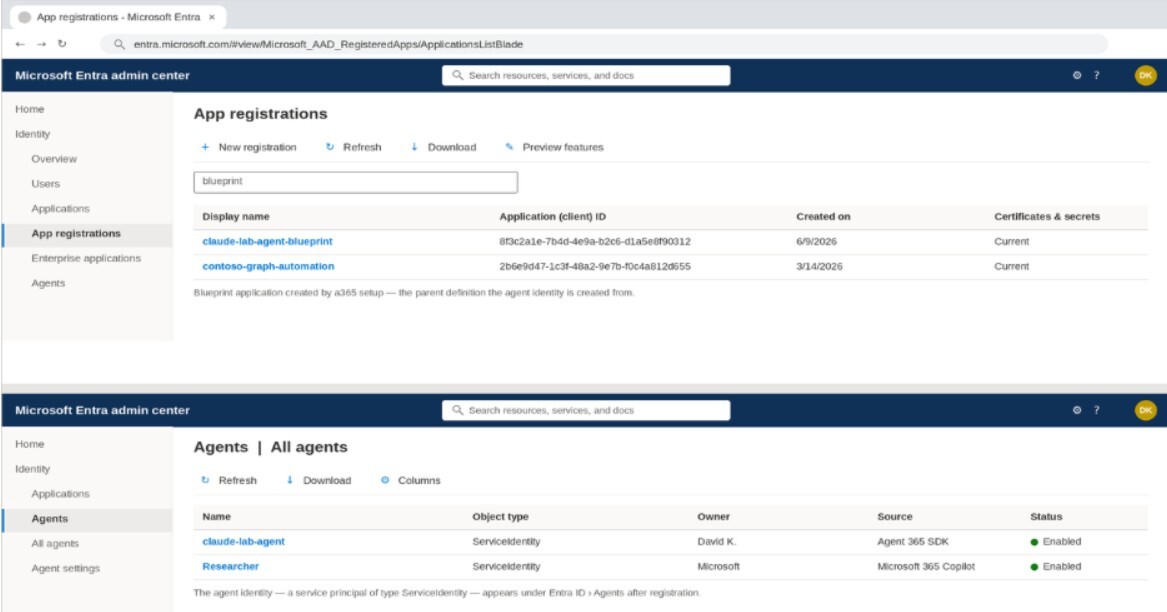
Figure 2. Entra admin center after a registration run: the blueprint under App registrations (top) and the agent identity, a ServiceIdentity service principal, under Entra ID › Agents (bottom). Illustrative recreation.
02 – One-time tenant enablement
Before the SDK can register with the M365 admin center, the Azure tenant must be enabled for Agent 365. This is a separate prerequisite from licensing — a licensed tenant is not automatically an enabled one — and it is done once by the admin:
- The Agent 365 CLI authenticates through the "Agent 365 CLI" public client app, which must exist in the tenant with admin consent for its Graph scopes (agent blueprint, identity, and registration permissions). Running a365 setup requirements creates and consents it.
- Registration creates standard Entra objects — a blueprint application, an agent identity (a service principal of type ServiceIdentity), and the registration record. The agent's observability permission is an app role on the Agent 365 observability resource and needs admin consent like any other application permission.
- The a365 output below comes from the Agent 365 CLI, a .NET global tool (dotnet tool install --global Microsoft.Agents.A365.DevTools.Cli --prerelease).
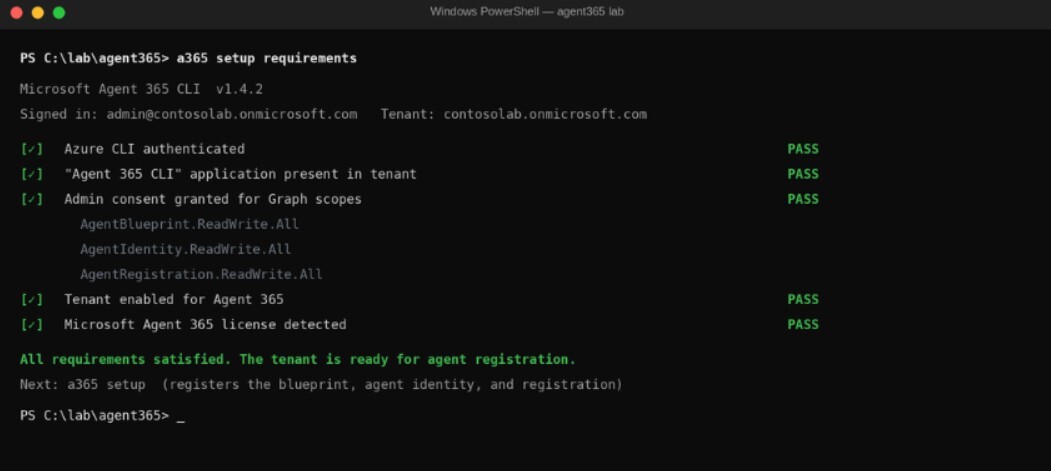
Figure 3. a365 setup requirements with every tenant-enablement check passing: CLI app present, admin consent granted, tenant enabled, license detected. Illustrative recreation.
03 – Registering an Agent with the SDK
The Agent 365 SDK provides two separate capabilities, plus an optional third:
- Register: Creates the agent's directory objects in Entra: a blueprint (the parent definition), an agent identity, and a registration that lists the agent in the M365 admin center inventory. Registration alone produces no activity data. A single CLI command — a365 register — creates all three objects in one run.
- Observability: SDK scopes wrap the agent's work and emit the gen_ai span tree: an invoke_agent root per run, chat spans with model name and token counts, execute_tool spans per tool action.
- AI teammate (optional): Publishing the agent as a teammate lists it in the Teams agent store, where users can request an instance (their own running copy of the agent to chat with). Two tenant conditions apply: the tenant must be enrolled in Microsoft's Frontier early-access program (M365 admin center > Copilot > Settings), and each instance request needs admin approval (M365 admin center > Agents > Requested). Approved-instance invocations are what populate the sessions and active-user columns in the admin center.
The SDK's observability package is vendor-neutral. Microsoft also ships vendor-specific tooling extensions — including one for Anthropic's Claude (npm: @microsoft/agents-a365-tooling-extensions-claude; Claude Enterprise only, standalone Claude accounts are not supported) — that handle the agent's tool/MCP integration; telemetry itself comes from the shared observability package.
Notes from the lab build:
- The agent ran on a local machine behind a dev tunnel, with no Azure compute. Registration and identity live in Entra; the runtime only needs a reachable messaging endpoint.
- The tenant settings from Part 1 apply unchanged: an SDK-instrumented agent in an unlicensed tenant, or behind a disconnected Security-for-AI connector, shows nothing.
For new agent code, the Microsoft OpenTelemetry Distro emits the convention by default, and the get-started guide covers the CLI-driven setup.
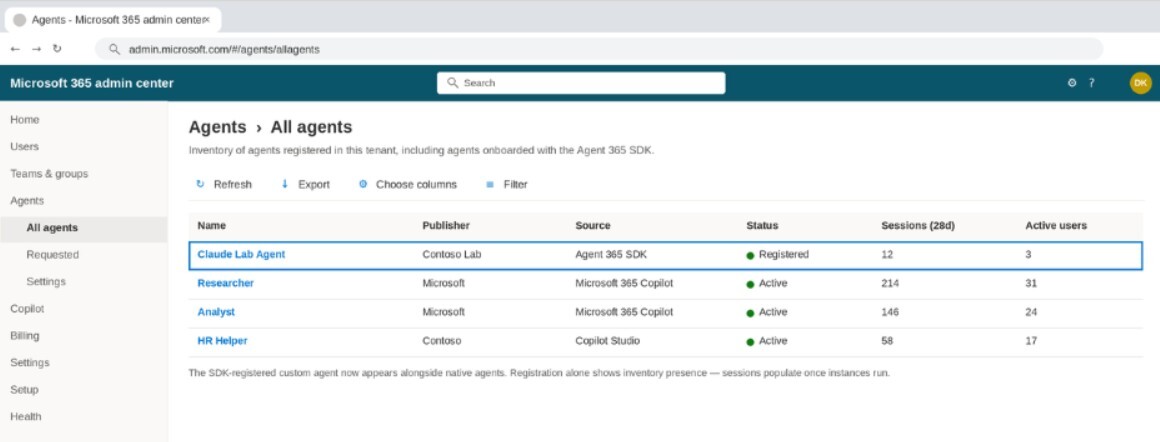
Figure 4. The SDK-registered custom agent listed in M365 admin center › Agents › All agents alongside native agents. Registration shows inventory presence; sessions populate once instances run. Illustrative recreation.
%20and%20its%20instance%20requests%20awaiting%20admin%20approval%20in%20Agents.jpg?width=1162&height=615&name=Figure%205%20%E2%80%94%20The%20published%20AI%20teammate%20in%20the%20Teams%20agent%20store%20(top)%20and%20its%20instance%20requests%20awaiting%20admin%20approval%20in%20Agents.jpg)
Figure 5. The published AI teammate in the Teams agent store (top) and its instance requests awaiting admin approval in Agents › Requested (bottom). Illustrative recreation.
04 – Use case 1: a teams’ AI teammate powered by Claude
Microsoft’s official Claude + Node.js quickstart scaffolds exactly this stack; what follows is the lab experience the docs don’t cover. The SDK does not connect a Claude subscription to Agent 365 by itself. What gets built is one concrete artifact: a small web service — in the lab, a Node.js app of a few hundred lines — that exposes a messaging endpoint. That service is the agent as far as the tenant is concerned: the registration points at its endpoint, Teams delivers user messages to it, and its replies and telemetry come back from it.
Each incoming message follows the same loop: receive the message → authenticate as the agent → call Claude → reply to the user → emit the spans.
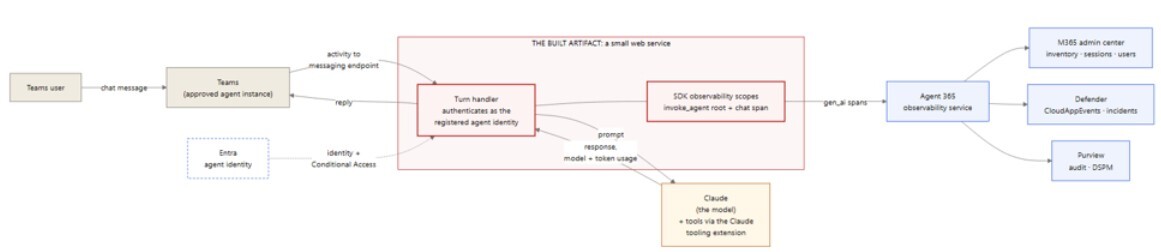
Use case 1. A Teams user chats with the agent instance; the built web service authenticates as the registered agent identity, calls Claude, replies, and emits gen_ai spans to Agent 365.
The building blocks inside that service:
- The wrapper app holds the agent identity: Registered via the CLI, it authenticates as the agent and receives invocations at its messaging endpoint.
- Claude is the model inside: Per invocation, the app calls Claude and returns the response — the model name and token counts in the telemetry come from Claude itself.
- SDK scopes produce the telemetry: The app wraps each Claude call in observability scopes: an invoke_agent root per run, with a chat span carrying the actual Claude model and token usage.
- The Claude tooling extension handles tools, not telemetry: @microsoft/agents-a365-tooling-extensions-claude registers the agent's tools/MCP servers with Claude (Claude Enterprise only).
The service can run anywhere its endpoint is reachable; in the lab it ran on a local machine behind a dev tunnel. This is the pattern the lab verified end to end.
05 – Use case 2: monitoring Claude usage on Windows endpoints
The same SDK pattern supports a different job: a collector agent that watches what users do in the Claude Code application on their Windows devices and feeds that activity into the Microsoft security stack. Here the SDK-built service has no chat surface at all — its input is the local Claude Code usage/audit logs, and it emits two outputs:
- Raw events to Microsoft Sentinel: The collector forwards parsed log events to a Sentinel custom table via the Logs Ingestion API, where analytics rules drive monitoring and alerting. (Agent 365 ingests traces only — raw log lines belong in Sentinel, not in the Agent 365 pipeline.)
- User-attributed gen_ai spans to Agent 365: The collector emits spans under its own registered agent identity. What makes the data useful is attribution — tying each session to the user who actually ran it, not just to the collector. That user (the device’s signed-in account) is read from the Claude Code log records and stamped onto the span as an attribute, so the activity is huntable in Defender with full user context.
A note on identity: stamping the user from the log is straightforward. Cryptographically asserting that user identity — the on-behalf-of (OBO) token flow, where the telemetry is authenticated as the user and not just the agent — requires a one-time interactive sign-in per user to seed a token that then refreshes silently – at least from my observations. For a fully unattended background log reader, the per-event token mechanism may require more work beyond this post’s scope.

Use case 2. The collector reads local Claude Code logs and emits raw events to Sentinel (alerting) and user-attributed gen_ai spans to Agent 365 (inventory, hunting, audit).
How each service uses the telemetry:
|
Service |
What it receives |
How it’s used |
|
Microsoft Sentinel |
Raw Claude usage events (custom table), plus CloudAppEvents via the Defender XDR connector |
Analytics rules, alerting, incident correlation |
|
M365 admin center |
The collector's registration and activity |
Inventory presence, session counts |
|
Defender XDR |
The user-attributed spans as CloudAppEvents rows |
Advanced hunting, custom detections on agent ActionTypes |
|
Entra ID |
The collector's agent identity |
Ownership, Conditional Access, risk scoring — the collector is governed like any agent |
|
Purview |
The collector's interactions via the audit pipeline |
DSPM discovery, audit search |
Caveats: what the local Claude Code application logs (and where) depends on the edition and version deployed — confirm log availability on a reference device before building. And the general rule from Part 1 applies: validate each leg at its destination (a Sentinel query for the custom table, the CloudAppEvents query for the spans), not from send-side success. One more, and it is not technical: a collector that observes what users do in an application on their devices is employee monitoring. Involve privacy and legal (and any works council or equivalent), and disclose the monitoring in line with organizational policy, before deploying it.
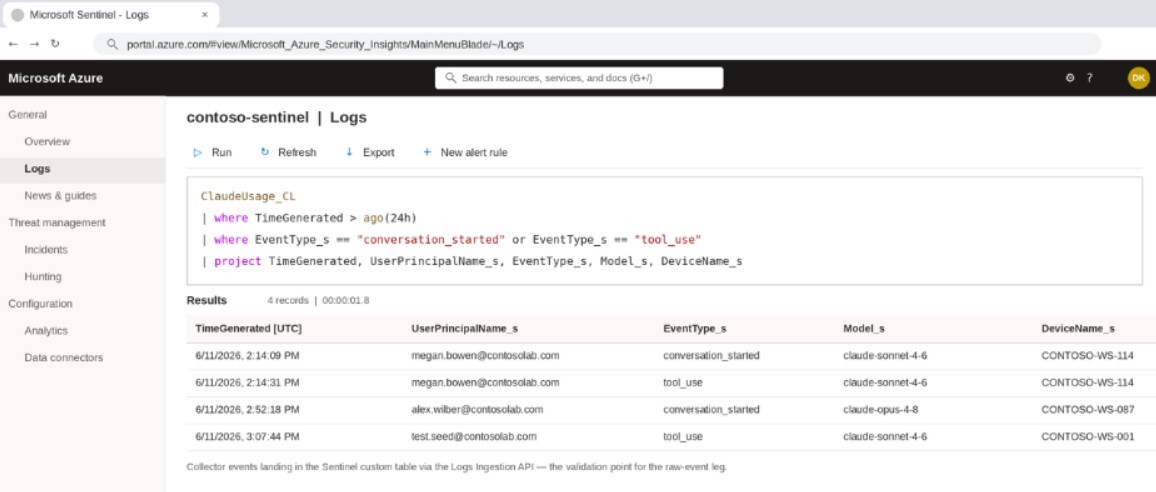
Figure 6. The Sentinel custom table populated with Claude Code usage events delivered through the Logs Ingestion API — the validation point for the raw-event leg. Illustrative recreation.
06 – Agent 365 SDK telemetry requirements
The format rule: Agent 365 ingests OpenTelemetry traces only — no metrics, no logs. Every span must follow Microsoft's gen_ai semantic convention. Spans in any other format are dropped individually, and the request still returns HTTP 200.
A trace is a tree of timed operations called spans. The gen_ai convention defines four span operation types: invoke_agent, chat, execute_tool, and output_messages — the agent’s final response payload, which carries no distinct CloudAppEvents ActionType of its own and so is absent from the table below. The first three cover most agent activity, and each maps to a Defender CloudAppEvents ActionType:
|
Span operation |
Meaning |
CloudAppEvents ActionType |
|
invoke_agent |
One agent run. The required root span — a run without it does not appear in the admin center. |
InvokeAgent |
|
chat |
One LLM call, carrying the model name and input/output token counts. |
InferenceCall |
|
execute_tool |
One tool action (a file read, a command, an API call), carrying the tool name and arguments. |
ExecuteToolBySDK / ByGateway / ByMCPServer |
Ingestion enforces these three rules:
- Convention attributes on every span: Each span must carry a valid operation name, the agent identity, and the tenant ID. Spans that don't are dropped individually, with no error.
- A root invoke_agent span per run: Required for the run to surface in the admin center. Child spans without a root are only reachable through Defender advanced hunting.
- Agent ID match in three places: The ingestion URL, the auth token, and every span must carry the same agent ID. A mismatch returns 403.
A note on the obvious shortcut: some tools (Claude Code among them) can emit OpenTelemetry natively, and pointing that output directly at Agent 365 appears to work — the request returns HTTP 200. Every span is rejected individually, because the names and attributes follow the vendor's convention, not gen_ai. The direct OpenTelemetry integration path is for code you instrument yourself to emit the convention; it does not accept other formats.
The full wire specification is in the observability concepts documentation; read it before writing any integration.
07 – Operational use: validating the custom Agent
Validate in this order, as each step depends on the one before it:
- Inventory: The agent appears in M365 admin center > Agents > All agents (the Register capability worked).
- Telemetry accepted: The run surfaces in the admin center agent-activity views, which key off the invoke_agent root span — the first sign ingestion accepted the telemetry. Confirm at the destination, never from the HTTP response.
- Hunting rows: CloudAppEvents shows the agent's activity, attributed to both the agent and the invoking user (query below).
- Sessions and users: If published as an AI teammate, the instance approval flow works (Agents > Requested) and instance chats populate the sessions/active-user columns after the ingestion lag (minutes to hours).
KQL — Validate Custom Agent Activity (Defender / CloudAppEvents)

CloudAppEvents
| where Timestamp > ago(1d)| where ActionType in ("InvokeAgent", "InferenceCall", "ExecuteToolBySDK", "ExecuteToolByGateway", "ExecuteToolByMCPServer")| extend d = parse_json(RawEventData)| where tostring(d.TargetAgentId) == "<your-agent-id>" or tostring(d.AgentId) == "<your-agent-id>"| project Timestamp, ActionType, UserId = tostring(d.UserId), AgentId = tostring(d.AgentId), TargetAgentId = tostring(d.TargetAgentId), ConversationId = tostring(d.ConversationId)
Remember the field semantics from Part 1: AgentId is the caller (all-zeros for human-initiated runs); the invoked agent is in TargetAgentId; filter on both.
If the hunting query returns zero rows a day after setup, work backward: was the agent invoked; is the license assigned; is the Security-for-AI "Microsoft 365" connector connected; and is the telemetry actually in the gen_ai format.
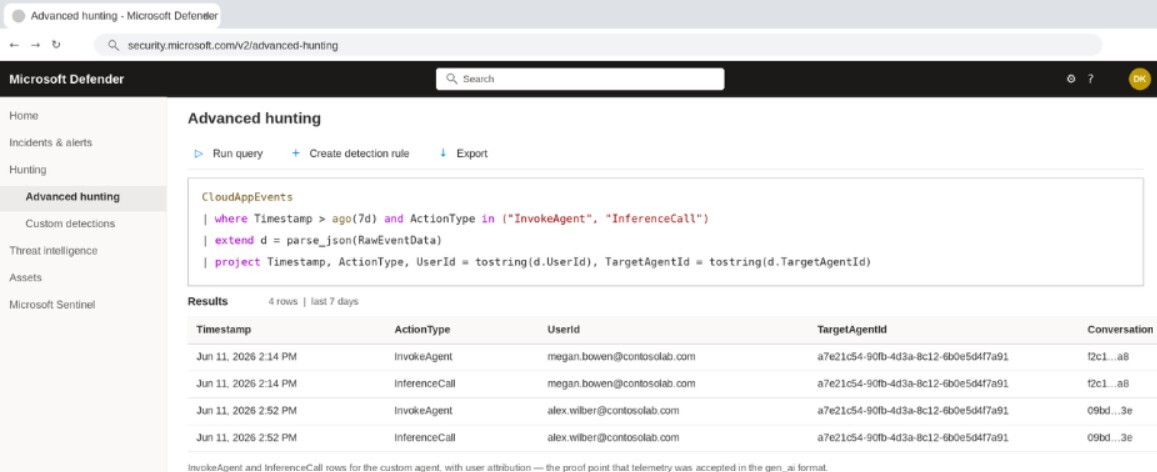
Figure 7. Defender advanced hunting: InvokeAgent and InferenceCall rows for the custom agent with user attribution — proof the telemetry was accepted in the gen_ai format. Illustrative recreation.
08 – Security review checklist for SDK Agents
Before an SDK-onboarded agent goes into production use, review it the way any new workload identity would be reviewed:
- The agent identity has a named owner and sponsor (Entra ID > Agents).
- The blueprint grants enumerated, least-privilege scopes — permissions granted at the blueprint are inherited by every agent created from it.
- The observability app role consent is reviewed and recorded like any other application permission grant.
- Conditional Access covers agent identities (Part 1, Entra section) — including this one.
- Instance requests route through the admin approval queue, with an assigned approver.
- The agent's tool access is restricted to what its job requires — execute_tool telemetry only shows the tools the agent has, and tool access is also its attack surface.
- The messaging endpoint validates inbound service-to-service authentication and is not reachable unauthenticated — dev tunnels are a lab convenience, not a production pattern.
09 – Key takeaways
- Know the identity model before you run the tooling: The SDK creates real Entra objects — blueprint, agent identity, registration — and each one is something the identity team governs afterward.
- Tenant enablement is one-time and separate from licensing: The "Agent 365 CLI" app with admin consent is the marker of an enabled tenant.
- Registration and observability are separate capabilities: Inventory presence produces no activity data; both are required for monitoring.
- The telemetry format is strict: Traces only, gen_ai convention, root invoke_agent span, agent ID matching in URL, token, and span — anything else is silently dropped with HTTP 200.
- Validate in order: Inventory → telemetry accepted → hunting rows → sessions. The CloudAppEvents query is the proof; dashboards lag.
- One SDK, multiple use cases: A Teams teammate and an endpoint log collector follow the same identity + telemetry pattern — only the input changes. Raw logs go to Sentinel; spans go to Agent 365.
- Review SDK agents like workload identities: Owner, sponsor, least-privilege blueprint, consent records, Conditional Access coverage, and tool restriction.
Previous: Part 1 — the building blocks, onboarding Microsoft-native agents and SaaS AI platforms, and verifying agents in Defender.


