
LevelBlue SpiderLabs has been tracking multiple waves of Wazza, a newly observed multi-stage phishing kit that deploys device code phishing targeting Microsoft 365 accounts. In addition to recent reporting by The Hacker News, our analysis examines the kit's evolving techniques and infrastructure, highlighting key changes observed across analyzed variants.
Key findings:
- Campaign timeline: Active since at least early July 2026 and ongoing as of writing.
- Delivery vector: The phishing emails we identified originated from compromised email accounts and contain business-themed PDF lures with malicious links.
- Phishing infrastructure: Campaign leverages Google Sites (sites.google.com), CloudFlare Workers (workers.dev), .COM and .EU top-level domains (TLDs).
- Dynamic kit capabilities: Wazza supports multiple phishing themes, campaign parameters, decoy websites, and subdomain-based routines.
- Device code phishing: The final page impersonates document- and file-sharing services such as Adobe, DocuSign, and Microsoft OneDrive, and abuses Microsoft OAuth device authorization to obtain a verification code and direct the victim through the authentication process.
- Backend monitoring: The phishing page maintains a backend session, retrieves and displays the device code, and continuously monitors the authentication attempt for completion or expiration.
Campaign Overview
The campaign uses a multi-stage phishing infrastructure designed to move victims from an email-based PDF lure through several intermediate layers before reaching the final device code phishing page.
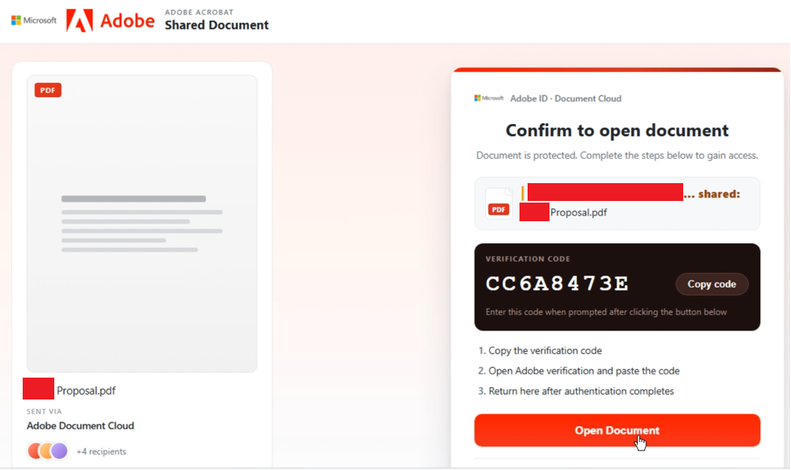
Figure 1. An example of a Wazza device code phishing landing page spoofing Adobe Acrobat.
The infrastructure separates delivery, staging, traffic handling, browser protection, and authentication into distinct stages, allowing the operators to dynamically control the victim's path while presenting legitimate-looking content throughout the process. The succeeding sections trace the campaign from the initial phishing email through the Wazza infrastructure and into the final Microsoft device code authentication workflow.
Through open-source research using urlscan.io, we identified that the campaign has been active since at least early July 2026.

Figure 2. Monthly urlscan.io submissions tied to the Wazza Campaign from July through September 2026.
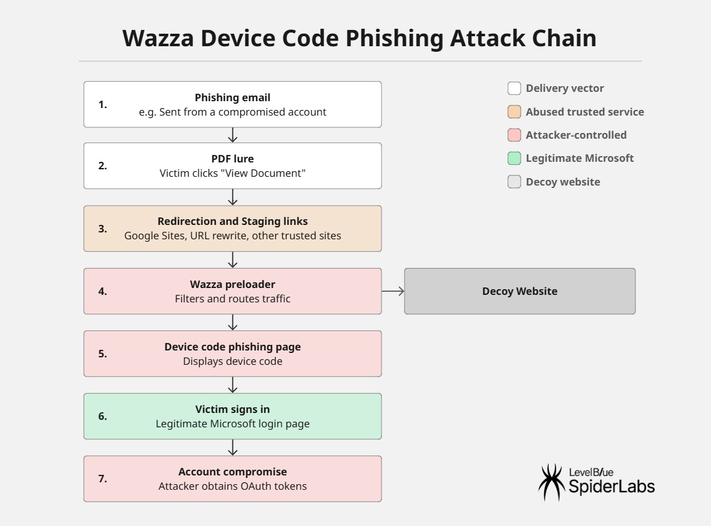
Figure 3. Wazza device code phishing campaign attack chain.
Initial Access
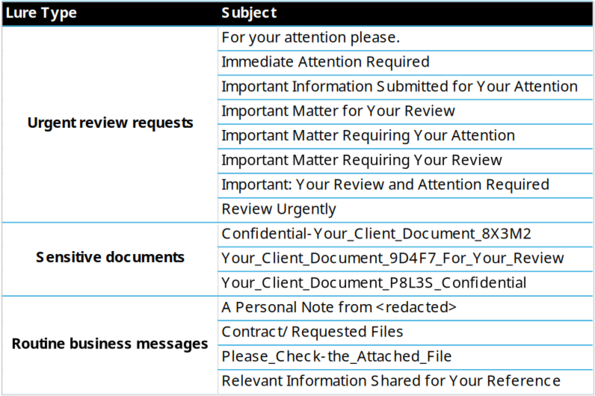
The campaign gains initial access through phishing emails sent from compromised email accounts carrying a malicious PDF attachment. The emails use business-themed lures with subjects centered around invoices, contracts, confidential client documents, and urgent review requests.
Figure 4 shows sample emails detected by MailMarshal from August and September 2026.
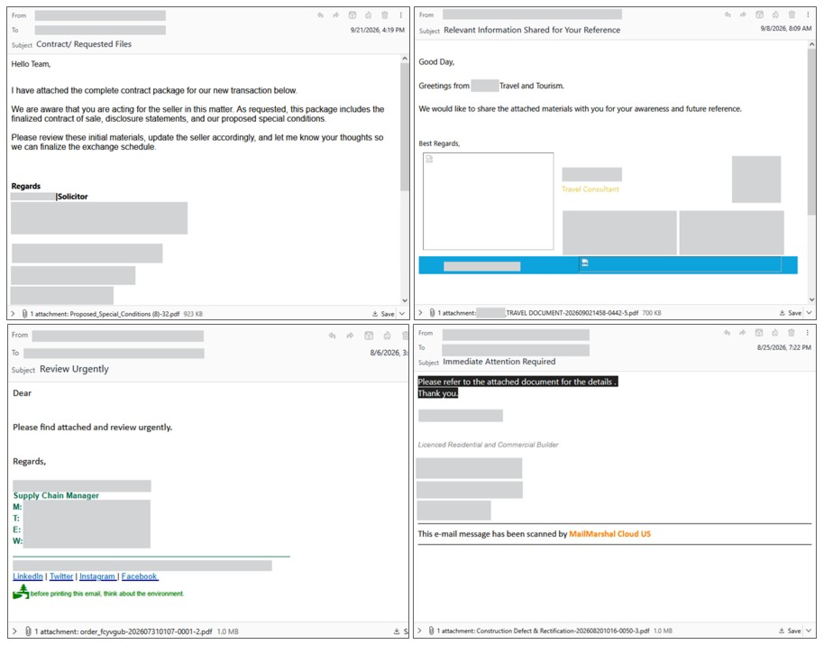
Figure 4. MailMarshal-detected phishing emails with PDF lures.
The PDF attachment functions as a lure document which consists largely of embedded images that use Microsoft SharePoint branding that contain hyperlink annotations that redirect users to phishing pages.
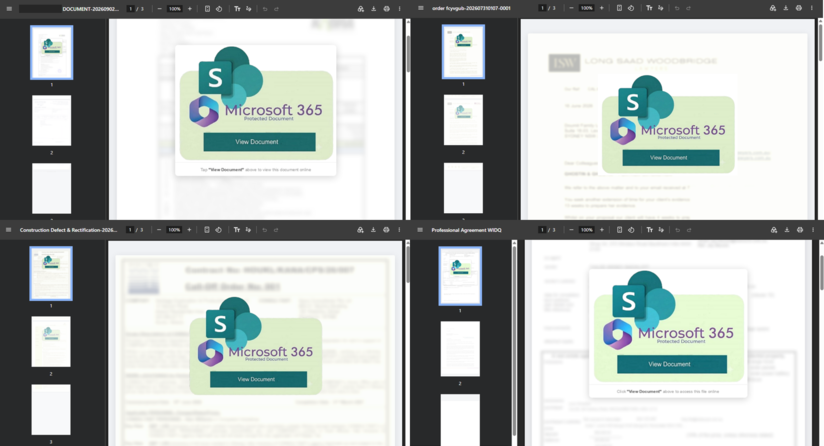
Figure 5. Sample PDF screenshots of a lure that uses Microsoft SharePoint branding.
Filenames and document metadata vary across samples, including different authors, titles, subjects, and creation tools. Some samples also use the compromised sender company names in the file name.
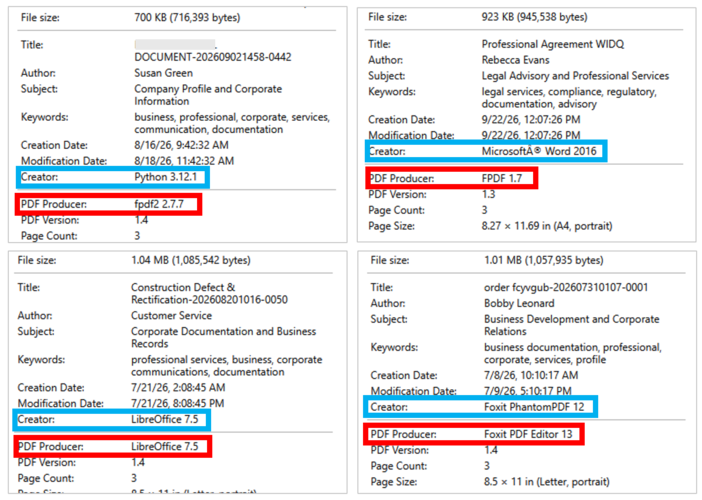
Figure 6. Metadata of PDF lures.
We are currently tracking two delivery chains in this PDF phishing campaign. Both lead to the Wazza phishing kit landing page, which conducts device code phishing and differ only in how the victim reaches it.
-
Chain 1 (Google Sites staging): The PDF links to a Google Sites staging page (sites.google.com) that hosts the phishing infrastructure through an iframe.
-
Chain 2 (Direct): The PDF contains embedded links pointing directly to phishing infrastructure hosted on .eu TLD domains. Some of these links also leverage URL rewriting services and other trusted platforms as redirectors to obscure the landing page and evade detection.
Phishing Page
Stage 1: Wrapper via Google Sites
In our analysis, one observed instance used Google Sites as the initial landing page, which served as a wrapper for the underlying phishing infrastructure:
hxxps://sites[.]google[.]com/view/kjvcfdswqazxcfvghjoplkjmnbvcf/home
Google Sites was observed in only a subset of the campaign's instances. Where used, it served as a trusted and familiar destination for the initial stage of the attack, which may make the URL appear less suspicious to recipients and increase the likelihood of engagement with the phishing lure.
The Google Sites page itself contains little meaningful content. Instead, it functions primarily as a wrapper for the phishing page. Analysis of the page source revealed that the site uses Google Sites' legitimate embedded-content functionality to load content from an attacker-controlled external domain.
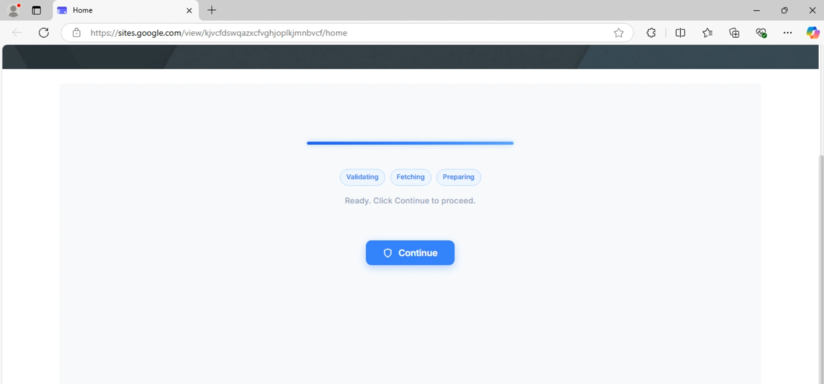
Figure 7. Google Sites hosting the initial landing page.
In the observed instance, the embedded content points to:
hxxps://fgwhjmdaurspxvznk[.]hutspotmaken[.]eu/B4fWRuA
Within the webpage source, the malicious URL is stored in a data-url attribute, while the corresponding iframe loads Google's legitimate intermediate-frame-minified.html framework. As a result, the external content can be displayed through the Google Sites page without directly referencing the malicious URL in the iframe's src attribute.
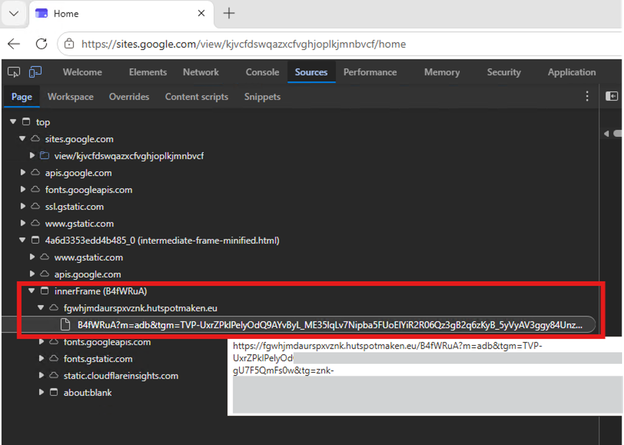
Figure 8. B4fWRuA resource underlying the Google Sites wrapper.
This technique effectively separates the trusted wrapper from the malicious infrastructure. Once loaded, the embedded content (B4fWRuA resource) becomes the next stage of the attack.
Stage 2: Wazza Preloader and Routing Framework
The 56 KB script within B4fWRuA serves as the core staging component of the Wazza phishing infrastructure. It is responsible for configuring the phishing theme, validating routing requirements, displaying the preloader, generating victim-specific tokens, and redirecting users to subsequent phishing stages through dedicated routing subdomains.
Campaign Context Initialization
Before executing the phishing logic, the script initializes server-provided and URL-based variables, including the resource identifier, apex-domain flag, and campaign parameters such as tgm, m, tg, and thm if available. These values control routing, tracking, theme selection, and redirection.
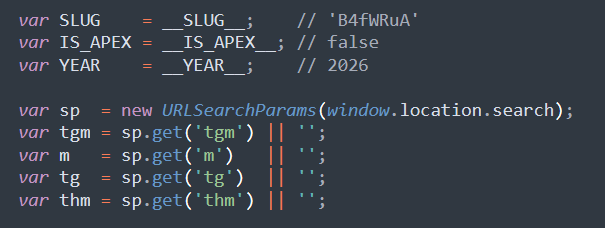
Figure 9. Initialization of campaign parameters.
Multiple Phishing Themes
The phishing kit contains a collection of predefined phishing themes that can be selected dynamically. The observed configuration includes 19 themes covering file-sharing services, banking, document management, payments, human resources, cloud infrastructure, and e-signature services as detailed below:
|
Theme Variable |
Brand |
Target Context |
|
fil1 |
SentinelVault |
Security/File sharing |
|
fil2 |
VaultShare |
File sharing |
|
fil3 |
SecureDrop |
Secure transfer |
|
acc1 |
NordAccount |
Financial/Banking |
|
acc2 |
ClearBank |
Banking |
|
acc3 |
TrustPortal |
Account access |
|
doc1 |
VaultDocs |
Document management |
|
doc2 |
LexPortal |
Legal documents |
|
doc3 |
ComplianceHub |
Compliance/Legal |
|
pay1 |
ClearPay |
Payments |
|
pay2 |
SwiftLedger |
Finance/Payments |
|
pay3 |
PayVault |
Payments |
|
hr1 |
PeopleCore |
HR/Workforce |
|
hr2 |
WorkForce |
HR/Organisation |
|
hr3 |
TalentVault |
HR/Talent |
|
cld1 |
NexusCloud |
Cloud services |
|
cld2 |
CoreStack |
Cloud/Infrastructure |
|
cld3 |
InfraPortal |
Infrastructure |
|
adbe |
AdobeSign |
E-signature |
Each theme defines its own branding, color palette, loading messages, animation style, iconography, and footer content. The multiple themes allow the same Wazza deployment to support different phishing lures without requiring separate infrastructure for each targeted brand.
adbe:{brand:"AdobeSign",brandA:"Adobe",brandB:"Sign",color:"#E8261A",colorDark:"#C41410",colorSoft:"#FFF0EF",colorGlow:"rgba(232,38,26,.18)",colorLit:"#FF5A52",colorBorder:"#FFCFCC",icon:"M12 3L4 22M12 3L20 22M7 15h10",loadingMsg:"Verifying your document…",pill1:"Authenticating",pill2:"Verifying",pill3:"Loading",bannerSide:"left",anim:"A",copyright:"Adobe Inc."}
The thm URL parameter selects the phishing page theme from the predefined THEMES object. If absent or invalid, the page uses the default blue theme. For example, adbe configures an Adobe-branded page with AdobeSign branding and document verification messaging.
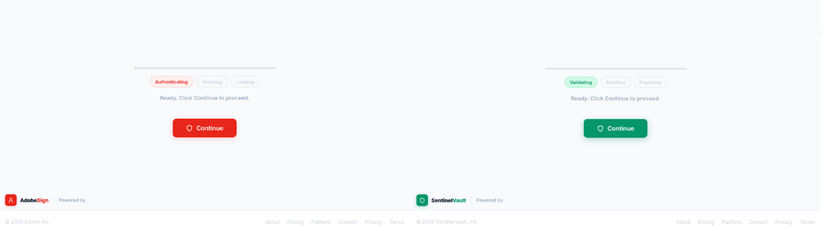
Figure 10. Adobe Sign and Sentinel Vault loading page themes.
Decoy Websites
Wazza also contains functionality for generating a complete corporate-style homepage when the request is handled as an apex or root domain visit.
The renderHomepage() function builds the page dynamically in the browser. Six different corporate personas are defined, resembling businesses or variations of existing names:
|
Decoy Organization |
Industry |
|
Veltmann & Cie. |
Private banking and wealth management |
|
Kellner & Brandt |
Corporate law firm |
|
Praevita Klinik |
Private healthcare |
|
Arenberg Residences |
Luxury real estate |
|
Taktiv |
B2B project management SaaS |
|
Nordlys Energy |
Renewable infrastructure |
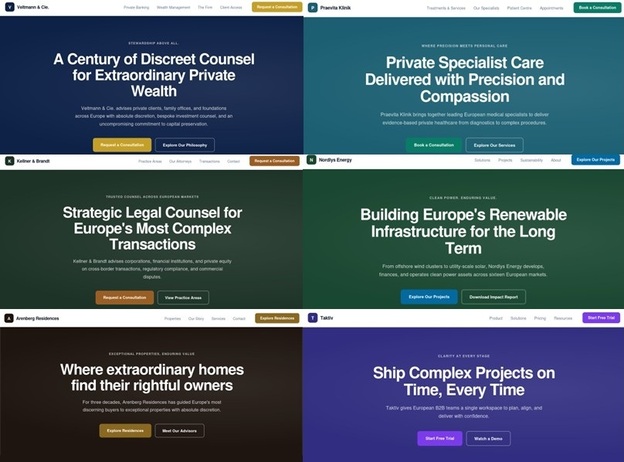
Figure 11. Landing pages of all decoy websites.
The selected persona changes according to the current hour:
var hpT = HT[Math.floor(Date.now() / 3600000) % HT.length];
As a result, the same infrastructure can present different legitimate-looking organizations at different times. The kit generates fully populated websites containing branding, navigation menus, service descriptions, business statistics, and footer content designed to resemble legitimate organizations.
In the second wave of the campaign, the decoy websites observed in the earlier iteration are no longer present. The multiple phishing themes are also not seen in the source code as the theme appears to be selected and configured by the threat actor before the campaign is deployed.
Access Control and Traffic Gating
Wazza first retrieves its routing configuration from /api/wazza-config. The returned configuration defines how requests to the apex domain and subdomains should be handled, including whether legitimate-looking homepage content should be displayed and which subdomains are permitted. The observed contents of the configuration are shown below:
{
"WILDCARD_ROUTING_ACTIVE":true,
"ALLOWED_SUBDOMAIN_PREFIXES":["mine","ask","tun","eln","mkv","luk","orc","znk","ins","dal","hit","buk","hak","swt"],
"SUBDOMAIN_ROOT_TO_HOMEPAGE":false,
"HOMEPAGE_REAL_CONTENT":true
}
The script then parses the requested hostname to identify the first subdomain component, the apex domain, and whether the request targets the apex domain directly. It first checks whether the request uses one of Wazza's dedicated routing subdomains: check, id, or gate. These were then updated to portal, hub, and svc in the second wave. Requests using these subdomains immediately exit the routing function and bypass the subsequent checks.
For requests coming directly from the apex domain, meaning the hostname has no subdomain, the script checks the HOMEPAGE_REAL_CONTENT setting from the wazza-config. When enabled, renderHomepage() is called to display a legitimate-looking corporate decoy website, after which the function exits.
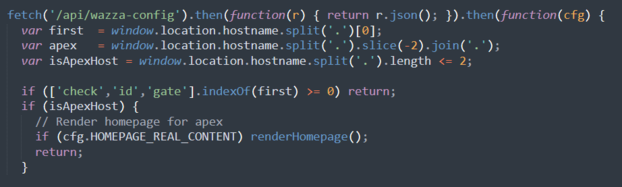
Figure 12. Validation of the URL domain.
For requests that are not directed to the apex domain or a dedicated routing subdomain, Wazza performs an additional domain check. The script extracts the apex domain from the hostname and compares it against a predefined list of legacy Wazza infrastructure domains.

Figure 13. Array containing legacy Wazza domains.
If the apex domain matches an entry in the legacy list, the routing function immediately exits and skips the remaining subdomain configuration checks.
The script next evaluates two routing settings. If SUBDOMAIN_ROOT_TO_HOMEPAGE is enabled, the visitor is redirected to /onlsbdmn on the apex domain. If WILDCARD_ROUTING_ACTIVE is disabled, the visitor is redirected to /onfqdn instead. Both paths lead to Wazza's fake homepage content rather than the phishing workflow.

Figure 14. Domain validation and redirection to decoy websites.
The script then retrieves the ALLOWED_SUBDOMAIN_PREFIXES list. If the list is empty, the visitor is redirected to /eprfx while a subdomain that does not contain any of the configured values is redirected to /prfxmsmach. These paths likewise lead to Wazza's fake homepage content, diverting requests that fail the subdomain checks.

Figure 15. Subdomain checking and redirection to decoy websites.
Together, these checks control which subdomain requests can proceed through the phishing workflow, while redirecting requests that fail the routing conditions to Wazza's fake homepage content. In the latest wave, these routing checks have been removed.
Validation Delay
After passing the routing checks, the Wazza preloader presents a short validation sequence before allowing the victim to continue.
The delay is 1.5 seconds. During this stage, the page presents messages and animations intended to resemble a legitimate security or document-validation process. Observed keywords include Validating, Fetching, Preparing, Authenticating, Verifying, Connecting, Securing, and Ready.
The sequence is more than a visual loading screen. During the validation period, the page performs backend activity and prepares the next stage of the workflow. Once the sequence completes, the Continue action becomes available and the infrastructure can proceed toward token generation.
Beacon Synchronization
During the validation preloader, the script pre-fetches data from workers.dev domain and parses the JSON response.
|
First Wave |
beacon-surge-sync.beacon-surge-sync.workers[.]dev |
|
Second Wave |
beaconoflinenew.lastfightlink.workers[.]dev |
The returned d value is stored in the clientHint variable.
{"d":"R0MDQ1peHABXHVAGUA"}
When the victim clicks Continue, the script sends the collected clientHint to /api/fire-mint in a POST request using the ch variable. The observed response was:
{"ok":true}
This same clientHint value is subsequently included as the ch parameter when the victim is redirected to the next-stage routing subdomain. If no value was obtained from the beacon request, the ch parameter is omitted. This carries the value obtained during the preloader stage into the subsequent Wazza infrastructure.
Token Generation and Routing
After the victim clicks Continue, Wazza obtains a routing token from /api/mint-token. The script can use a token that was pre-fetched during the validation stage. If no token is available, it sends a request to /api/mint-token and extracts the returned token value as shown.
{"token": "1790146486871.9e85d1907024e77e.0581ed<redacted>"}
The token is then passed to buildDest(). As shown in the code snippet, this constructs the next-stage URL using one of three routing subdomains selected at random: check, id, or gate. The script appends the token as the tok parameter along with any available tgm, m, tg, thm, and ch values.
 function buildDest(tok) {
  var apexDomain = window.location.hostname.split('.').slice(-2).join('.');
  var CHECK_SUBS = ['check.', 'id.', 'gate.'];
  var CHECK_PRE = CHECK_SUBS[Math.floor(Math.random() * CHECK_SUBS.length)];
  var dest = new URL('https://' + CHECK_PRE + apexDomain);
dest.searchParams.set('tok', tok);
  if (tgm) dest.searchParams.set('tgm', tgm);
  if (m) dest.searchParams.set('m', m);
  if (tg) dest.searchParams.set('tg', tg);
  if (thm) dest.searchParams.set('thm', thm);
  if (clientHint) dest.searchParams.set('ch', clientHint);
return dest;
 }
The browser is then redirected to the selected routing subdomain, carrying the generated token and previously collected parameters into the next stage of the phishing workflow. An observed example is as follows:
hxxps://check[.]hutspotmaken[.]eu/?tok=1790146486871.9e85d1907024e77e.0581ed<redacted>&tgm=TVP-UxrZPklPelyOdQ9AYvByL_ME35<redacted>&m=adb&tg=znk-uiguCd<redacted>&ch=R0MDQ1peHABXHVAGUA
Stage 3: Client-Side Protection and Browser Interrogation
After the victim is redirected through Wazza's routing infrastructure, the next stage introduces a client-side protection layer consisting primarily of p.js,c.js, with ips.js loaded as part of the KPSDK process. Stage 2 handles routing, tracking, token generation, and presentation while this stage evaluates the victim's browser environment before allowing access to the protected phishing endpoint.
Browser Interrogation
The c.js component performs browser interrogation and anti-automation checks through the window.V_C object. It initializes the object and records the current timestamp:
window.V_C = window.V_C || [];
window.V_C.L = Date.now();
The script checks for indicators associated with Selenium, WebDriver, and other automation-related properties:
function q(I) {
...
return !!I.navigator.seleniumWebdriver ||
!!I.navigator.webdriver ||
!!I.webdriver ||
!!I.driver ||
!!I.selenium;
}
It also checks for additional automation artifacts associated with Puppeteer, Playwright, PhantomJS, Nightmare, and browser automation frameworks:
'p': !!window.domAutomation ||
!!window.domAutomationController ||
!!window._WEBDRIVER_ELEM_CACHE ||
!!window.callPhantom ||
!!window._phantom ||
!!window.__nightmare ||
!!window.cdc_adoQpoasnfa76pfcZLmcfl_Array ||
!!window.cdc_adoQpoasnfa76pfcZLmcfl_Promise ||
!!window.cdc_adoQpoasnfa76pfcZLmcfl_Symbol ||
Function.prototype.toString.toString()
.includes("__puppeteer_evaluation_script__") ||
Function.prototype.toString.toString()
.includes("__playwright_evaluation_script__")
The script additionally checks whether the browser identifies itself as headless:
'h': window.navigator.userAgent
.toLowerCase()
.includes("headless")
Beyond automation indicators, c.js collects WebGL vendor and renderer information and performs additional browser-environment checks, including a DevTools detection mechanism based on window dimensions and a console Error stack inspection.
Encrypted Browser Data
The collected information is serialized and encrypted using PBKDF2-SHA256 with 100,000 iterations and AES-256-GCM. The resulting ciphertext, along with the encryption salt and IV, is Base64-encoded and returned as part of the browser challenge.
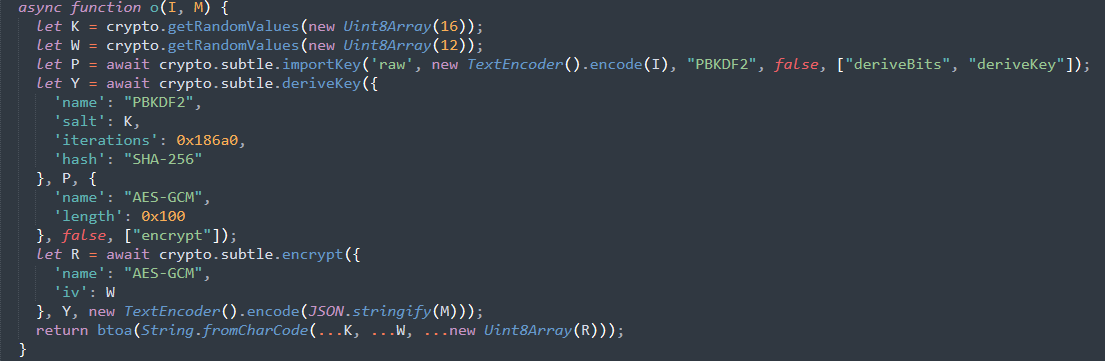
Figure 16. Encryption routine of the collected data.
KPSDK Protection
KPSDK is a client-side protection component used to assess browser environments and protect requests against automated activity.
The p.js component initializes the KPSDK protection layer and provides the application-level request protection wrapper. The wrapper intercepts matching same-origin POST requests to the endpoints shown below and incorporates the generated browser challenge into the request through the x-is-human header.
|
First Wave |
/api/klam-kadity |
|
Second Wave |
/api/queltz-narvik |
The protection workflow performs browser interrogation through c.js and generates an encrypted browser challenge. When the victim's request to either of these endpoints is processed, the endpoint returns a redirectTo URL containing an encoded session value in the key parameter, along with the tgm, m, and tg parameters. The browser then follows the returned URL to begin the next stage of the workflow.
Redirection Chain
The redirectTo value returned points to the first stage of a multi-step redirection chain. Both redirects remain on the same Wazza domain, hutspotmaken[.]eu, while preserving campaign parameters.
The first request is made to /r with a key parameter containing the encoded session value:
hxxps://hutspotmaken[.]eu/r?key=<value>&tgm=<value>&m=adb&tg=<value>
The /r endpoint responds with an HTML message directing the browser to /meline:
Found. Redirecting to /meline?key=<value>&tgm=<value>&m=adb&tg=<value>
The browser then requests /meline, which redirects the victim away from the Wazza infrastructure to a Cloudflare Workers-hosted domain:
hxxps://unhf69e-e0ppo-l0qoo-a12bcfj-ig1sa4v.wndws-pip3ln-sql3-waf3-purv3-gdprsx-dfn-azfn-appsvc-0ffapx.workers.dev/?m=adb&tg=<value>
The Workers-hosted endpoint eventually serves the final device code phishing page, completing the transition from Wazza's routing and protection infrastructure to the phishing stage.
In various Wazza phishing scripts, we observed an alternative routing method that intercepts the Continue button and differs from the /r, /meline, /api/klam-kadity, and /api/queltz-narvik paths observed in other versions. In this variant, an additional function sends a request to a key-specific /<KEY>/bb-landing endpoint, which responds with {"ok":true}. The script then proceeds to a corresponding Gate URL embedded in the function.
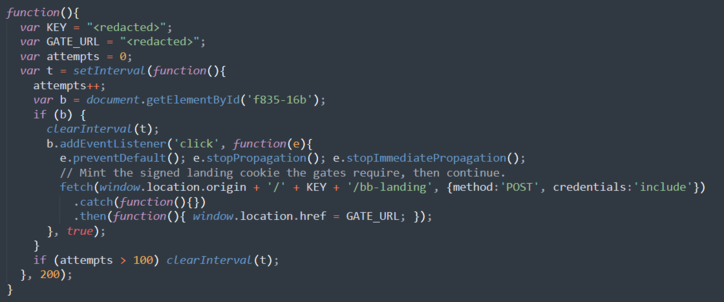
Figure 17. Alternate script leading to the final phishing page.
The Gate URL returns a page containing a script that still performs local browser integrity checks, including checks for WebDriver, headless browsers, browser plugins, and language settings. It also intercepts clicks on buttons or links containing terms such as Continue, Verify, Access, or Proceed, preventing other event handlers from processing the click. It then constructs a URL using the hard-coded key and redirects the browser to /<KEY>/continue from the same domain. The /continue endpoint then redirects the browser to a separate workers.dev URL hosting the final device code phishing page.
Stage 4: Device Code Phishing Page
After the Wazza validation and redirect chain, the victim reaches the final phishing stage. Rather than capturing credentials through a traditional fake login form, the kit uses Microsoft OAuth Device Code phishing to target the victim's Microsoft 365 account and associated cloud resources.
The page presents the device code as a document verification code, instructing the victim to open a separate verification page and enter the code.
The phishing page initially displays an Adobe and Microsoft-branded “Preparing your document” screen with “Generating document access code...” and a simulated progress bar. This creates a document-access pretext before transitioning to the device code authentication workflow.
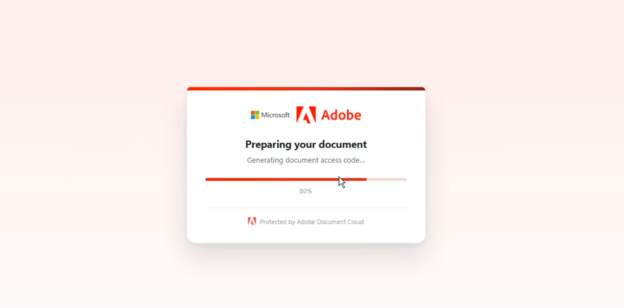
Figure 18. Initial landing page of the final phishing domain.
Once the verification code becomes available, the page displays the document details, verification code, and instructions for completing the authentication process.
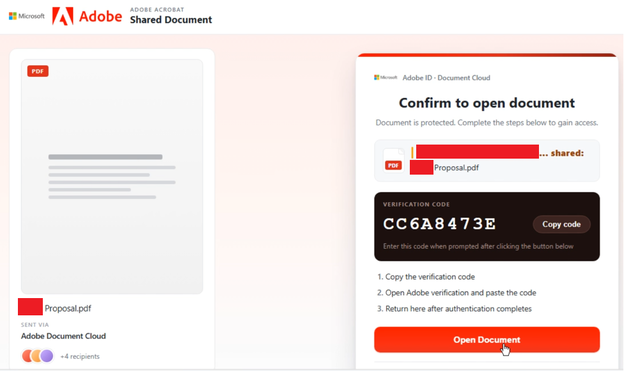
Figure 19. Device code phishing page.
The page also uses data embedded in the tg URL parameter to dynamically populate the document and other victim-facing content.
Dynamic Campaign and Victim Data
The phishing page extracts the tg parameter from the URL and decodes it locally using a hard-coded secret, a four-character salt, Base62-encoding, and an XOR-based keystream. The decoded payload can contain campaign and document-related fields used to personalize the page.
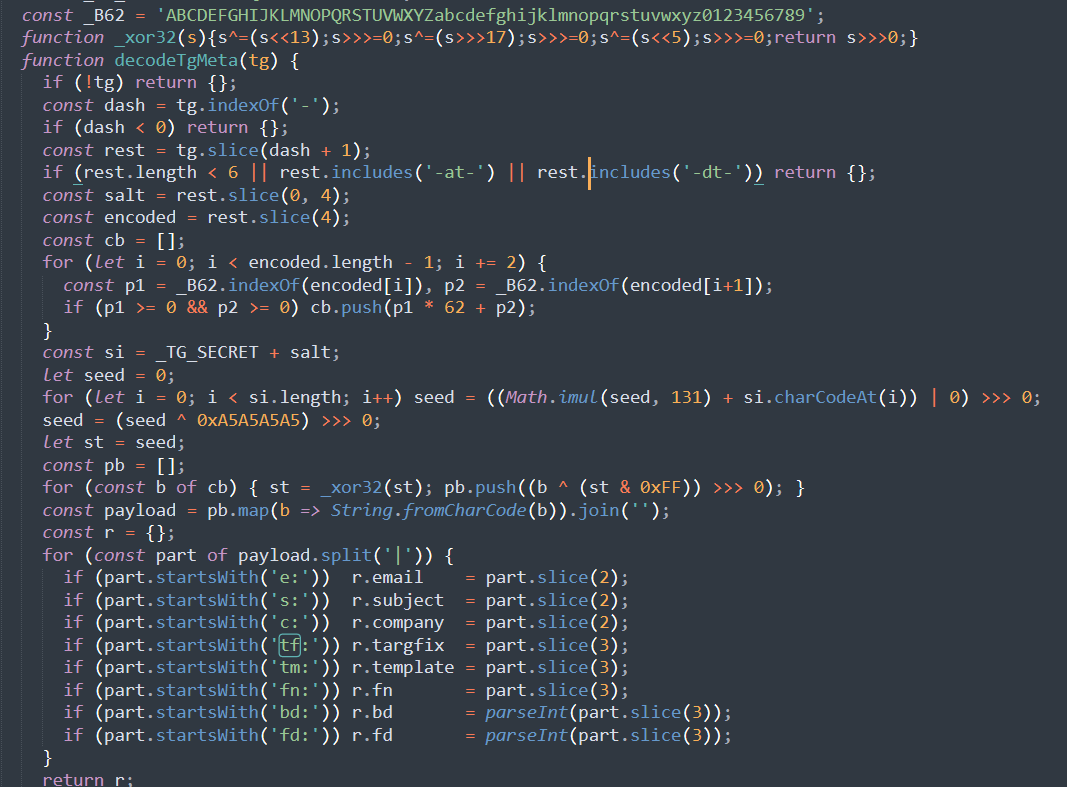
Figure 20. Decryption routine of the tg variable.
|
Field |
Purpose |
|
e |
Victim email address |
|
s |
Email subject |
|
c |
Company name |
|
tf |
One or more targeted filenames |
|
tm |
Template identifier |
|
fn |
Document filename used whentf is not provided |
|
bd |
Integer value extracted from the decoded payload. No client-side use was identified. |
|
fd |
Integer value extracted from the decoded payload. No client-side use was identified. |
In our analysis, we did not observe tf, bd, or fdin the decoded tg values.
The document filename is determined from the decoded campaign data. When an fn: value is provided, the page appends .pdf and displays that filename. If no fn: value is available, the page falls back to generating a random filename in the Document_<8-character-hex>.pdf format.
Backend Session Communication
The phishing page communicates with a backend api.php endpoint throughout the verification process. The API endpoint, service identifier, Cloudflare Turnstile site key, and browser-side storage key are defined at the beginning of the client-side code:
const API = "/api.php";
const SVC = "svcm";
const SITEKEY = "0x4AAAAAADe_teYi5k058t2b";
const LS_KEY = "wzzm_unid";
These constants are reused throughout the authentication workflow. API defines the local backend endpoint used for all Wazza API requests, while SVC supplies the svcm service. SITEKEY is the Cloudflare Turnstile site key used when the page renders its anti-automation challenge. LS_KEY names the browser localStorage entry where the Wazza identifier is saved between page loads.
The API handles several stages:
|
Value |
Description |
|
challenge |
Submits the Cloudflare Turnstile token and obtains a CSRF value. |
|
init |
Initializes the backend session using the CSRF value, browser identifier, campaign metadata, and source-page value. |
|
wait |
Retrieves the verification code, expiration time, and authentication URL when they become available. |
|
allocate |
Records the user interaction with the verification code and allocates the authentication attempt. |
|
status |
Determines whether the process is successful, expired, invalidated, or still processing. |
Cloudflare Turnstile Challenge
The page first renders a Cloudflare Turnstile challenge. The resulting token is submitted to:
/api.php?svc=svcm&action=challenge
The page submits the Turnstile token to the endpoint. The backend responds with a JSON object containing ok:true and a CSRF token. This token is then used in subsequent requests. The observed workflow shows Turnstile being used as an anti-automation check before the backend session is initialized.
Session Initialization
The page next initializes a session through:
/api.php?svc=svcm&action=init
The request contains four values:
|
Value |
Description |
|
csrf |
Returned CSRF value |
|
unid |
Unique identifier (Blank during this request) |
|
tg |
Encoded campaign and victim data |
|
rip |
A value obtained from the source page |
The backend returns three values used by the client:
{"wzzmuid":<unique identifier>,"wzzmsid":<session identifier>,"wzzmrev":<session revision>}
These values are retained by the client and used in subsequent requests to the api.php endpoint.
Verification Code Retrieval
After initialization, the page callswaitForCode(). This function repeatedly sends a wait request using the session values returned during initialization until the backend reports that a verification code is available. Based on our analysis, the request received a ready response in about 9 seconds.
/api.php?svc=svcm&action=wait
The response contains the values required to present the device code workflow to the victim, including the verification code, expiration time, and authentication URL. Part of the response is as follows:
{ "status":"ready",
"wzzmuid":"<redacted>",
"wzzmsid":" <redacted>",
"wzzmrev": <redacted>,
"wzzmtk":" <redacted>",
"wzzmtk_exp":"2026-09-23T03:29:38Z",
"wzzmdev":"<redacted>",
"wzzmurl":"https://login.microsoftonline.com/organisation-<redacted>/oauth2/deviceauth" }
The wzzmtk value is the verification code displayed to the victim, while wzzmtk_exp provides its expiration time. The wzzmurl value points to a Microsoft login endpoint using the OAuth device authorization path, confirming the Microsoft authentication component of the phishing workflow.
The response also contains a large wzzmdev value. Its purpose could not be determined from the analyzed client-side code.
Background Authentication Monitoring
After the victim interacts with the code, the page polls the backend's status endpoint every two seconds using the session values returned during initialization.
If the code expires according towzzmtk_exp it resumes the workflow when a new code becomes available. It stops polling until the backend returns a new code. When the backend provides a new code, the page invalidates the current attempt, displays the One More Step screen, and requests a replacement code after approximately nine seconds.
The client identifies a completed authentication by checking for either wzzmued:"yes" or wzzmstate:"used":
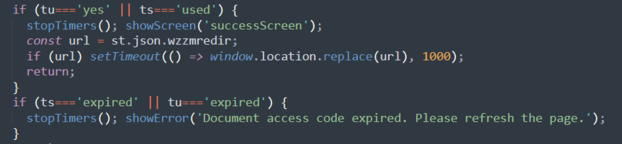
Figure 21. Completed authentication logic.
When either condition is met, the page displays its Access Verified screen and redirects to wzzmredir if provided. This indicates that the backend has marked the device code authentication attempt as completed.
Alternate Final Landing Page
In exploring the Wazza phishing infrastructure, we have observed different behaviors depending on how the URL is accessed. Accessing the domain without a subdomain redirects the visitor to a separate decoy website. If accessed with subdomain and specific parameters, the infrastructure invokes svc=svcm and serves the main Wazza phishing infrastructure. In contrast, accessing a subdomain without a path returns a separate svc=svco template that impersonates Microsoft OneDrive. The page is presented as a “Secure File Access” portal and claims that the recipient has been shared a file requiring identity verification before access is granted.
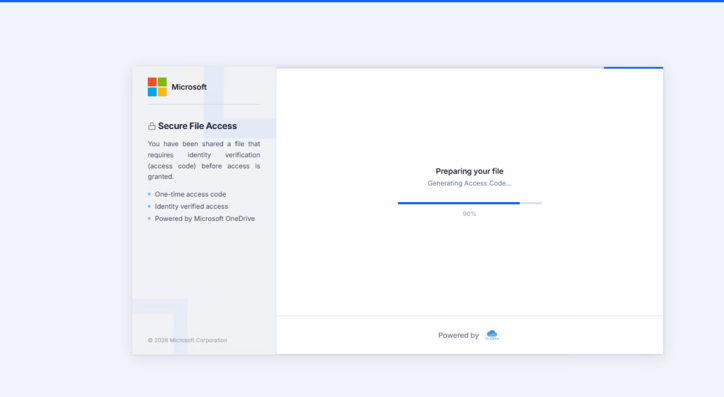
Figure 22. Preparation page of the alternate theme.
The latest one we saw invokes svc=svcd. This time around, it was part of the normal routine, accessing it through the usual workflow of the phishing kit. It uses both Microsoft and Docusign themes.
Regardless of the theme, it still directs the victim through the same Microsoft sign-in. The page uses the same API workflow to initialize the session, obtain the access code, and monitor its state. Minor changes were made in the wzz* values such as wzzo*, wzzd*, and wzzm*, which were used to maintain the session, track the code, and provide the portal URL.
The template contains several elements that support the selected phishing theme as shown in the figures below. The discovery of new svc values also indicates that the phishing kit continues to evolve.
%20theme.png?width=824&height=432&name=Figure%2023.%20Final%20landing%20page%20of%20the%20alternate%20(svco)%20theme.png)
Figure 23. Final landing page of the alternate (svco) theme.
.png?width=623&height=369&name=Figure%2024.%20Another%20version%20of%20the%20final%20landing%20page%20(svcd).png)
Figure 24. Another version of the final landing page (svcd).
Overall, the campaign combines trusted hosting, client-side checks, session-based routing, and device code phishing. Although this phishing kit is relatively new, its modular design allows operators to rotate templates, adapt delivery paths, and tailor victim interactions while pursuing the same goal: to obtain valid OAuth access through the victim’s account. Continued monitoring may reveal additional templates, services, delivery methods, and further improvements to the campaign over time.
Detection Opportunities
- Wazza URL parameters: Search URLs for tok, tgm, m, tg, thm, and ch.
- Decoy websites: Identify Wazza decoy sites such as Veltmann & Cie., Kellner & Brandt, Praevita Klinik, Arenberg Residences, Taktiv, and Nordlys Energy.
- Decoy redirects: Search for /onlsbdmn, /onfqdn, /eprfx, and /prfxmsmach paths associated with redirects to decoy websites.
- Redirect paths: Search for /r?key= and /meline parameters in URL activity.
- Long workers.dev subdomains: Search for unusually long or randomized workers[.]dev subdomains used in redirect chains.
- Wazza endpoints: Monitor requests to /api/wazza-config, /api/mint-token, /api/fire-mint, /api/klam-kadity, /api/queltz-narvik, /bb-landing, and /api.php?svc=
- Beacon infrastructure: Search for beacon-surge-sync.beacon-surge-sync[.]workers[.]dev or beaconoflinenew.lastfightlink.workers[.]dev, which is consistent with beacon infrastructure observed in other cases.
Indicators of Compromise (IOCs)
|
Type |
Value |
Description |
|
Domain |
beacon-surge-sync[.]workers[.]dev |
Beacon domain |
|
Domain |
beaconoflinenew.lastfightlink.workers[.]dev |
|
|
URL |
sites[.]google[.]com/view/hgfdsqazxcvhjoswwqq/home |
Initial landing page |
|
URL |
sites[.]google[.]com/view/adobe-docus/home |
|
|
URL |
sites[.]google[.]com/view/miticabo/home |
|
|
URL |
sites[.]google[.]com/view/ctfvygbuhgyftvbgyfpoiuytrftgyh/home |
|
|
URL |
sites[.]google[.]com/view/kjvcfdswqazxcfvghjoplkjmnbvcf/home |
|
|
URL |
sites[.]google[.]com/view/securespdf/home |
|
|
URL |
sites[.]google[.]com/view/onwajuly/home |
|
|
URL |
hxxps://fgwhjmdaurspxvznk[.]hutspotmaken[.]eu/B4fWRuA |
Preloader resource |
|
Domain |
beton-beton[.]eu |
Wazza phishing infrastructure |
|
Domain |
bike-msca[.]eu |
|
|
Domain |
bodi-project[.]eu |
|
|
Domain |
bruoth-family[.]eu |
|
|
Domain |
cardamomo[.]eu |
|
|
Domain |
coppietersrecherche[.]eu |
|
|
Domain |
diabetesnet[.]eu |
|
|
Domain |
dymowski[.]eu |
|
|
Domain |
euniverza[.]eu |
|
|
Domain |
hutspotmaken[.]eu |
|
|
Domain |
illuminatedminds[.]eu |
|
|
Domain |
jetcapital[.]eu |
|
|
Domain |
languagesforwork[.]eu |
|
|
Domain |
lesbolides[.]eu |
|
|
Domain |
mdiament[.]eu |
|
|
Domain |
nbi-training[.]eu |
|
|
Domain |
nellarmonia[.]eu |
|
|
Domain |
originalpizza[.]eu |
|
|
Domain |
polskaprezydencjacsr[.]eu |
|
|
Domain |
robologic[.]eu |
|
|
Domain |
safetystock[.]eu |
|
|
Domain |
electroloys[.]com |
|
|
Domain |
hacsg[.]com |
|
|
Domain |
bodi-project[.]eu |
|
|
Domain |
dv0psh-purv3w-azfn-b2c0-msauth3-m365svc-s3ntln-4zrfn3x-cntnrx[.]workers[.]dev |
Final landing page |
|
Domain |
ssosvc-m365s-kvl-dv0pshb-s3ntln-c0mply-4zrmonx-apimgwx-evnthb[.]workers[.]dev |
|
|
Domain |
wndws-pip3ln-sql3-waf3-purv3-gdprsx-dfn-azfn-appsvc-0ffapx[.]workers[.]dev |
|
|
Domain |
purv3w3-t3ms4pp-certs-intun3-sbussvx-4zredg-siemsv-pip3ln-0ffc3[.]workers[.]dev |
|
|
Domain |
c5id-pc17-fffoub1-bul3-ahv1-r00kubt[.]ondrv-pwrbi3-s3ntln-quesvxs-l0gsvx-entr-m365s-cmplncx-ehubn[.]workers[.]dev |
|
|
Domain |
d3m9a-goo2ns-wx0g-jzhuc2-t9r2b9i.dvps-azbl-fnapp-trc3svc-synpx-quesvxs-purv3-siemsvx-cmplncx[.]workers[.]dev |
|
|
Domain |
unhf69e-e0ppo-l0qoo-a12bcfj-ig1sa4v.wndws-pip3ln-sql3-waf3-purv3-gdprsx-dfn-azfn-appsvc-0ffapx[.]workers[.]dev |
Recommendations
- Disable the device code flow in Microsoft Entra ID where it is not operationally required. If disabling it entirely is not feasible, use Conditional Access policies to restrict the device code grant type to approved users, managed devices or trusted network locations.
- Monitor for device code authentication activity that follows email-based phishing. Investigate cases where users access Microsoft device authentication endpoints shortly after opening an email attachment or visiting an unfamiliar document-sharing page.
- Inspect PDF attachments for embedded links and redirects. Pay particular attention to business-themed documents that use SharePoint, Adobe, or other trusted-service branding and redirect users through multiple external domains.
- Monitor for unusual .EU domains and subdomains. Investigate newly observed or suspicious .EU domains, particularly those using multiple subdomains, unfamiliar naming patterns, or redirecting users through several stages before reaching an authentication page.
- Apply stricter controls to PDF attachments from external senders. Since the initial lure uses a PDF containing an embedded redirect link, consider applying additional security controls to PDF attachments with external links particularly when the message or sender is unusual or unexpected.
- Educate users on device code authentication. Explain that entering a device code can grant an external application access to their account. Users should treat unexpected device code prompts as suspicious and verify the request before proceeding.
- Correlate email, web, and identity telemetry. Linking the initial phishing email with subsequent URL access and Microsoft authentication activity can help identify the complete attack chain rather than treating each event as an isolated alert.


