
With contributions from Cris Tomboc.
TL;DR
-
Device code flow attacks have surged, driven by the emergence of phishing kits supporting the technique. Activity is ongoing and peaking in May 2026.
-
The method has matured into a commodity capability with multiple phishing-as-a-service (PaaS) kits now operationalizing the technique end-to-end.
-
Active kits include EvilTokens, Kali365, Ghost Hub, and Cyb3r, with EvilTokens and Kali365 as the most prevalent landing page kits.
-
Tycoon2FA, an established adversary-in-the-middle (AiTM) PaaS kit, now deploys device code flow phishing.
-
Campaigns feature various evasion techniques, including password-protected PDF attachments, abusing legitimate platforms as sender and as URL redirectors, multi-layered rewriter chains, QR images, multi-stage redirect chains, and delivery from compromised accounts.
-
With activity rising, organizations should prioritize Conditional Access access restrictions on device code flow.
The full mechanics of device code phishing was covered in a previous SpiderLabs blog post, Go with the Flow: Abusing the OAuth Device Code Flow, along with how it gets weaponized, as well as how it is detected and mitigated. This post focuses on a range of tactics observed in the wild: phishing emails and links delivering device code lures and their evasion techniques.
Device Code Phishing
Device code phishing exploits a legitimate Microsoft authentication flow to harvest Microsoft 365 access and refresh tokens without ever capturing a password. The core mechanic is straightforward: whoever initiates the authentication request receives the resulting tokens. Once obtained, the tokens allow attackers to access Microsoft 365 services, maintain persistent access through refresh tokens, and conduct follow-on activities such as further reconnaissance, phishing, and data extraction.

Figure 1. An example of a Microsoft device code phishing attack diagram.
As illustrated in Figure 1, the following summarizes the attack across five stages involving three parties: the threat actor, the victim, and Microsoft.
-
In Stage 1 (Code Request), the threat actor initiates the flow by requesting a device code from Microsoft, which responds by issuing a short alphanumeric user code (e.g., ABCDE1234) tied to a pending authentication session.
-
In Stage 2 (Phish Delivery), the attacker delivers a phishing lure to the victim via email, chat, or other channels, commonly presenting a notification that the victim must authenticate to access a secured file or document.
-
In Stage 3 (Lure Website), following the link takes the victim to an attacker-controlled page that displays the user code and instructs them to copy it and click through to continue.
-
In Stage 4 (Microsoft Login), the link redirects the victim to the real Microsoft device login page (e.g., microsoft.com/devicelogin). The victim enters the code, then their credentials, and approves MFA, unknowingly authenticating on the attacker’s behalf.
-
In Stage 5 (Token to Attacker), Microsoft issues the access and refresh tokens directly to the attacker's device, granting persistent access to the victim's Microsoft 365 environment.
How Device Code Phishing Compares to Traditional and AiTM Phishing
Before describing the real-world phishing cases, it helps to place device code phishing alongside the two other identity attack patterns to further understand why this attack is dangerous.
- Traditional phishing targets usernames and credentials (and sometimes a one-time code) and replays it.
- Adversary-in-the-middle (AiTM) phishing kits such as Tycoon2FA and EvilProxy intercept the connection between a user and a legitimate application by proxying a fake login to steal credentials and session cookies in real time, bypassing MFA.
The following table summarizes the differences across the dimensions that matter for defenders.

Figure 2. Comparison table between traditional, AiTM, and device code phishing.
Phishing Campaigns in the Wild
Device Code Phishing Surge
We tracked multiple device code phishing kits by searching for specific indicator strings in URLScan.io and plotted the results for the two most active campaigns: EvilTokens and Kali365. Both are PhaaS offerings primarily marketed through Telegram. EvilTokens showed consistent growth throughout the period beginning in February, while Kali365 emerged in March, overtaking EvilTokens in observed activity by May 2026.

Figure 3. Monthly volume for EvilTokens and Kali365 between February and May 2026 based on URLScan.io searches.
Overall activity across both kits increased significantly over the four-month period. The majority of the landing pages were hosted on Cloudflare Workers (workers.dev).
Real-World Device Code Phishing Examples
This section describes several email campaigns and links we observed that lead to device code phishing. Like campaigns seen from other major phishing kits, these campaigns employ multi-stage delivery chains, nested redirect links, and other techniques to bypass detections and analysis. The most common lure categories were Microsoft-branded service notifications, document share lures impersonating DocuSign and Adobe, voicemail notifications, and themed lures targeting IT, HR, and payroll functions.
The observed activity was attributed to several active phishing kits, including EvilTokens, Kali365, Ghost Hub, Cyb3r, and Tycoon2FA.
|
# |
Campaign |
Kit attribution |
Evasion technique |
|
1 |
Encrypted PDF document shared from compromised accounts |
EvilTokens and Cyb3r |
Password-protected PDF concealing a staging URL hosted on Google Sites. Compromised accounts as senders |
|
2 |
Docusign-themed legal document signature request |
Tycoon |
Newborn domain that leads to Tycoon2FA antibot and phishing landing page |
|
3 |
Fake Microsoft voicemail notification |
EvilTokens |
Multi-layered URL rewriter chain and WordPress staging |
|
4 |
Fake Adobe Acrobat Sign request |
EvilTokens |
Staging via SVG attachment on Amazon S3 with a redirect to Cloudflare Turnstile CAPTCHA gate |
|
5 |
Phishing via Legitimate Adobe document share |
Ghost Hub |
Legitimate Adobe Cloud sender and Adobe-owned redirect infrastructure |
|
6 |
Multi-layered chain abusing Google services as phishing redirector |
Kali365 |
Abuse of legitimate platforms (Google services) and multi-layered redirection |
Campaign 1: Encrypted PDF Document Shared from Compromised Accounts
We observed an increase in phishing emails delivered with password-protected PDF attachments. The technique prevents automated security scanners from inspecting the document contents, including any embedded malicious links. In the samples we observed, the PDF contains a link to a staging URL hosted on a legitimate platform, which redirects the victim to the device code landing page.
Most emails originated from compromised Microsoft 365 accounts. Subject lines and attachment filenames consistently include the sender's company name, sometimes paired with words such as "New" or "Approved”. Attachment filenames typically followed either <Sender Company Name>.pdf or <Sender Company Name>_protected.pdf. A subset of messages we investigated appeared in non-English languages, which we assess were made to reflect the geographic origin or contact list of the compromised account.
The password is provided in the email body with common phrases including ‘PDF Passcode:’, ‘PDF Password’, ‘Passcode:’ and ‘Code PDF:’
A: EvilTokens phishing kit — Encrypted PDF to device code phishing
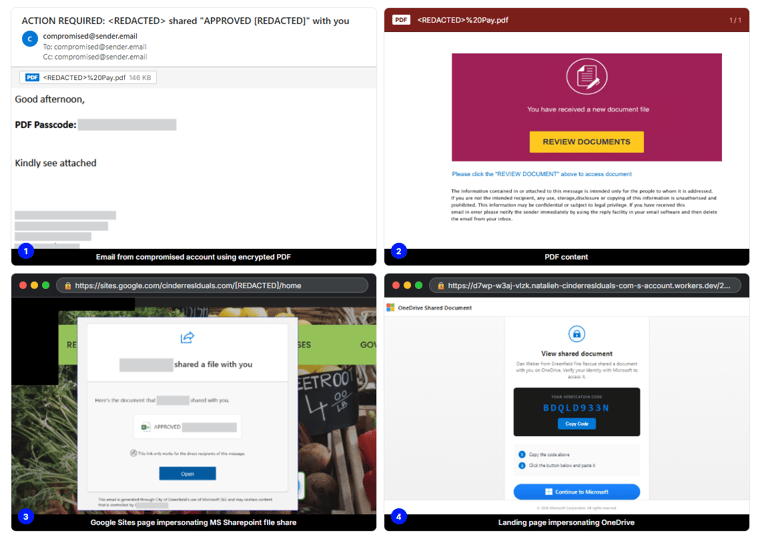
Figure 4. Phishing chain starting via email with an encrypted PDF attachment that leads to an EvilTokens landing page.
B: Cyb3r phishing kit — Funding-themed phishing email with encrypted PDF
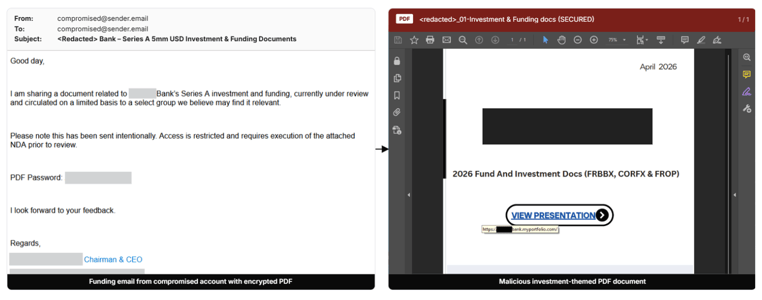
Figure 5. Investment-themed email with an encrypted PDF attachment that leads to a Cyb3r kit device code phishing page.

Figure 6. Cyb3r kit device code phishing page.
Campaign 2. Tycoon2FA — Signature Request Email Campaign Impersonating a Law Firm
Tycoon2FA was one of the most active phishing kits of 2025 and an established AiTM phishing kit targeting Microsoft 365 accounts. In this campaign, Tycoon2FA infrastructure is observed using device code flow payload.
This example impersonates a law firm notifying the recipient of a settlement agreement document that requires their signature. The email link on the “View Document” button points to a newborn domain that spoofs a real law firm. The URL follows the format: https:// <recipient-company-name> \. <spoofed-law-firm-newborn-domain>/.

Figure 7. Phishing email with a signature request lure for a settlement agreement document.
Clicking the link leads to a Tycoon2FA anti-bot page that runs obfuscated anti-analysis JavaScript, anti-debugger timing checks, and browser fingerprinting to filter bots, automated scans, and researcher analysis. Completing this CAPTCHA leads to the device code phishing lure, impersonating Docusign.
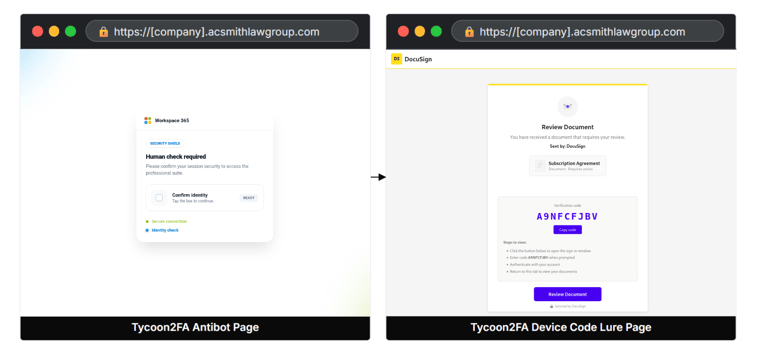
Figure 8. Tycoon2FA antibot page and device code lure page.

Figure 9. Tycoon2FA snippet implementing anti-analysis checks, including automation detection and DevTools/shortcut blocking to hinder inspection.
Campaign 3. EvilTokens — Voicemail Notification with Multi-layered URL Rewriter Abuse
The lure is a Microsoft-branded voicemail notification with a link that is wrapped four times by nested URL rewriting services (Esvalabs, Mimecast, EdgePilot, and Cisco), so the rewritten link that finally appears in the inbox hides the malicious URL.
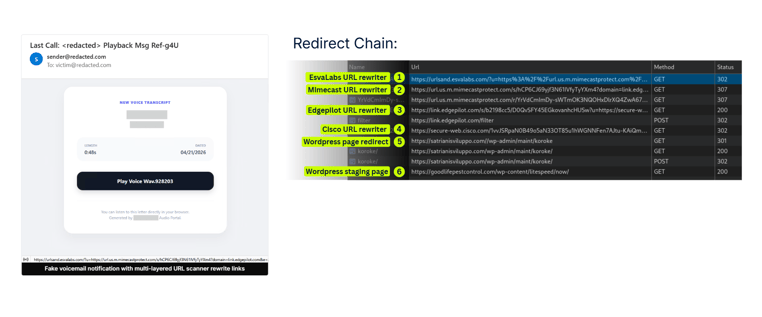
Figure 10. The voicemail notification lure email and the multi-layered URL rewrite chain.
The chain contained 7 hops, ending at a Cloudflare Worker endpoint serving an EvilTokens device code landing page.
• Hop 1: Esvalabs URL rewriter (urlsand.esvalabs.com).
• Hop 2: Mimecast URL rewriter (url.us.m.mimecastprotect.com).
• Hop 3: EdgePilot URL rewriter (link.edgepilot.com).
• Hop 4: Cisco URL rewriter (secure-web.cisco.com)
• Hop 5: satrianisviluppo[.]com WordPress URL as redirector
• Hop 6: goodlifepestcontrol[.]com compromised WordPress URL as staging page
• Hop 7: Cloudflare Worker endpoint device code landing page using the *-s-account.workers[.]dev naming pattern.
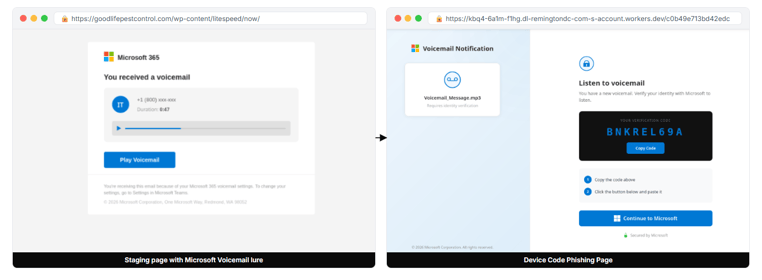
Figure 11. Microsoft voicemail-themed staging page (Hop 6) and the redirected device code lure landing (Hop 7).
Campaign 4. EvilTokens — Fake Adobe Acrobat with SVG Link and CAPTCHA Gate
We also spotted fake Adobe Acrobat Sign emails asking the recipient to sign a financial document. The email action button does not point to a direct landing page; instead, it points to an SVG file hosted on Amazon S3. The SVG renders a page that mirrors the email’s layout and routes the victim to a redirector page that lands on CAPTCHA gate at newanimeseason[.]com.
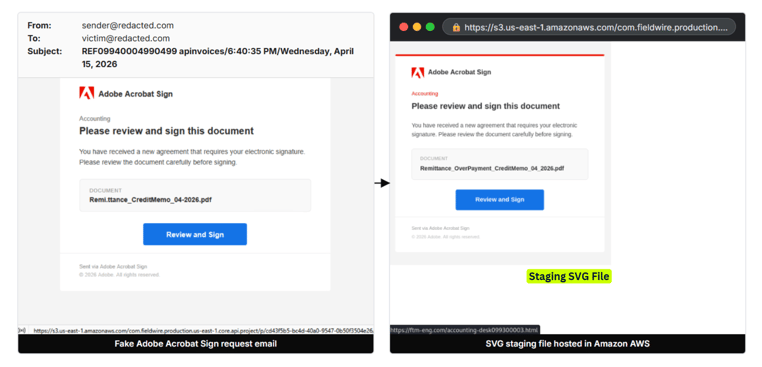
Figure 12. Fake Adobe Acrobat Sign invoice lure email and a malicious SVG file hosted on Amazon AWS.
Completing the Cloudflare Turnstile challenge redirects users to the device code endpoint on workers[.]dev.
• Hop 1: SVG file hosted on s3.us-east-1.amazonaws.com.
• Hop 2: ftm-eng[.]com URL as phishing redirector to CAPTCHA gate.
• Hop 3: CAPTCHA page at newanimeseason[.]com URL - Cloudflare Turnstile.
• Hop 4: Leads to Cloudflare Worker endpoint on workers[.]dev that displays the device code lure.
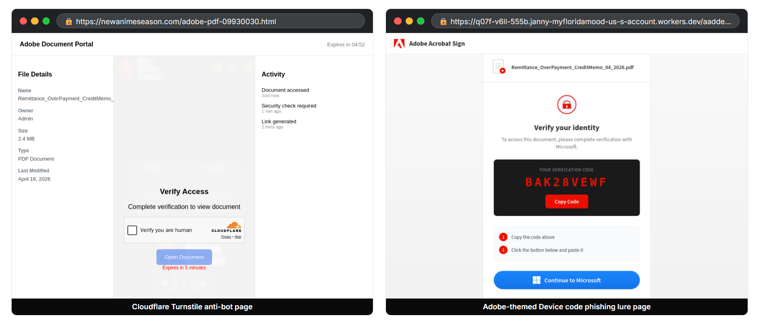
Figure 13. EvilTokens Adobe-themed antibot page and lure page.
Campaign 5. Ghost Hub - Phishing via Legitimate Adobe Document Share
In this campaign, the notification email is a real Adobe Acrobat Cloud document share email sent from message@adobe.com. In this Adobe file share notification, the subject line is the filename of the shared document, and the action link is a long URL hosted on apo-prod.adobe.io domain, which redirects to the Adobe Acrobat Cloud viewer on acrobat.adobe.com. At this stage of the attack chain, both the email sender and all intermediate URLs are hosted on legitimate Adobe infrastructure, allowing the campaign to evade traditional sender- and URL reputation-based security checks.
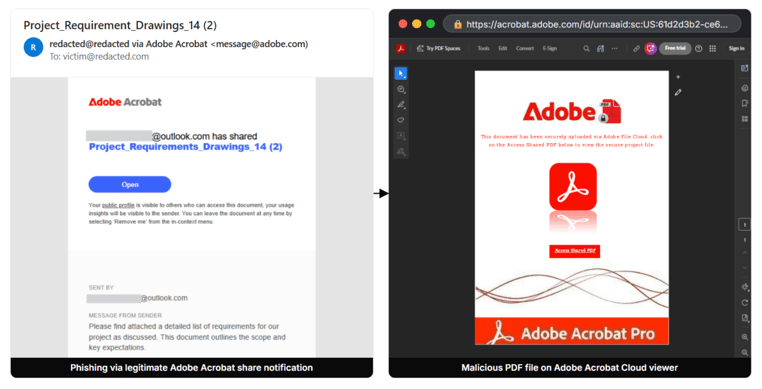
Figure 14. Adobe Acrobat shares notification and malicious PDF on Adobe Acrobat Cloud.
Clicking the PDF link redirects victims to a Ghost Hub device code lure as a Microsoft verification page before the victim can access the supposed document. Ghost Hub is the name of the admin panel within ‘Ghost Hacker Operating System’, a phishing kit that is also advertised on Telegram.
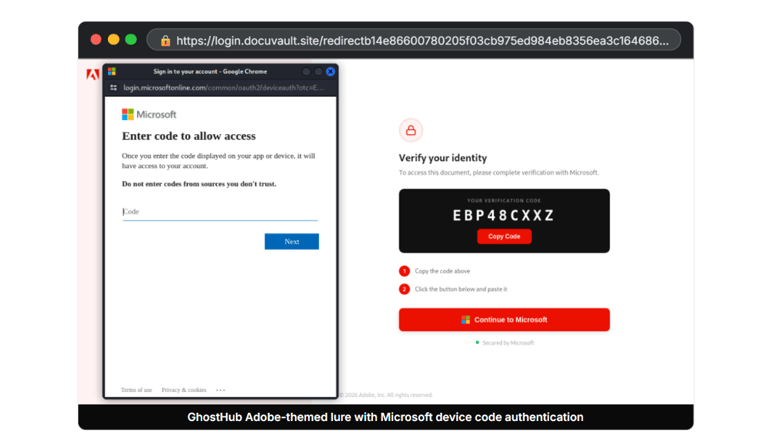
Figure 15. Adobe-themed Ghost Hub device code phishing landing page.
Campaign 6. Kali365 — Multi-layered Chain Abusing Google Services
In this campaign, multiple Google URL services were abused as redirectors, with the final landing page attributed to the Kali365 phishing kit. The phishing link begins with the Google Meet link redirector and chains through Google search redirectors, Google AMP, Google AdService click tracker, and share.google short link service before reaching the operator endpoint on Cloudflare Workers.

Figure 16. Google services redirect chain ending at the Kali365 device code landing page.

Figure 17. Kali365 device code landing page, the subdomain also contains the literal phishing kit name.
Other Observed Delivery Techniques
- QR code phishing: Malicious links embedded inside QR code images to defeat URL inspection, a similar technique used by other major phishing kits.
- Trusted domain redirectors: We observed the following legitimate domains used as redirectors:
- Microsoft OAuth redirect endpoint on login.microsoftonline.com/oauth2/
- Google services: Google OAuth2 redirect, Google image search redirectors such as images.google.fr, Google APIs, and Cloud Storage endpoints under googleapis.com
- Email service providers including *.sendgrid.net, hs-sales-crm-engage.com, sendibm3.com, cymail.io, and exactag.com
- URL shorteners including cutt.ly, tinyurl.com, and short.gy

Figure 18. Example links abusing legitimate services as phishing redirectors.
- Attachment-based delivery: A portion of the samples we analyzed delivered the phishing link inside an attachment. Attachment types we observed included XLSX, PDF, HTML, and SVG. Phishing kits such as Ghost Hub and EvilTokens include built-in attachment builders to generate these lures.

Figure 19. ‘Ghost Hacker OS’ Telegram channel post featuring the Ghost Hub panel's attachment builder, which allows operators to select from multiple templates and generate encrypted HTML attachments with iframe-in-attachment capability.

Figure 20. EvilTokens SVG antibot generator tool for email attachments, supporting AES-256 encrypted and polymorphic SVG generation.
Threat Assessment
Device code flow phishing is accelerating rapidly and shows no signs of slowing. What began as a relatively simple lure has evolved into a sophisticated process that is now easily accessible to threat actors. The affiliate programs offered by PaaS platforms further lower the barrier, enabling both experienced operators and less-skilled actors to launch targeted and opportunistic campaigns against organizations.
Kit Evolution
Tycoon2FA provides the clearest example of how phishing kits mature over time. What began in 2023 as a straightforward AiTM credential harvester evolved into one of the most sophisticated PhaaS platforms documented. Despite a coordinated Europol and Microsoft takedown in March 2026, Tycoon2FA resumed operations within weeks, now with device code flow capability layered on top of its existing AiTM infrastructure. EvilTokens and Kali365 follow a similar trajectory, launching in early 2026 with AI-augmented capabilities already integrated and continuing to improve their functionality since launch. Kits that survive their first year tend to become significantly more dangerous in their second.
Emergence of New Platforms
The current kit landscape includes EvilTokens, Kali365, Ghost Hub, Cyb3r, and Tycoon2FA, but these represent only a portion of what is active in the threat landscape. Now, there are many phishing kits in circulation with new variants being discovered more often. The ease of adoption, aided by AI‑assisted development, allows new operators to launch competitive kits quickly. Some of these kits will disappear after short runs, while others will evolve into mature platforms with significant reach.
Financial Motivation
Across every observed phishing kit and campaign, the objective is consistent: OAuth token theft leading to mailbox access, business email compromise (BEC), and financial extraction. This motivation will not change. AI-augmented post-compromise tooling, such as EvilTokens’ LLaMA-powered (BEC) pipeline, is making financially motivated campaigns more efficient and more damaging. This will reduce the time from token capture to actionable fraud from hours to seconds.
Detection Challenges
Initial access is becoming harder to detect. Current campaigns employ compromised account senders, legitimate platform abuse, multi-layered redirect chains, encrypted attachments, and delivery via SVG or QR codes. These techniques already push the limits of what email and web security controls can reliably identify. As kits mature and operators share tradecraft, these methods will become more polished and consistent. Abuse of trusted platforms such as Adobe, Google, and Microsoft’s own infrastructure is particularly difficult to mitigate without disrupting legitimate workflows, and adversaries are exploiting this advantage. Continued expansion of legitimate platform abuse is expected as defenders adapt.
Increasingly Convincing Phishing Pages
AI-generated lures are already confirmed in Kali365 and EvilTokens. These lures are increasingly personalized and contextually accurate, incorporating role targeting, localized language, and real financial context harvested from compromised accounts. This creates a feedback loop where each compromise improves the quality of subsequent attacks.
Conclusion
Device code phishing has grown rapidly in the broader phishing landscape, driven by multiple active phishing kits including EvilTokens, Kali365, Ghost Hub, Cyb3r and Tycoon2FA that operationalize the technique end-to-end. The adoption of device code lures by established AiTM phishing kits like Tycoon2FA suggests that this attack method is becoming a standard capability within the PaaS ecosystem. As the affiliate ecosystem scales, device code flow phishing will become more automated, evasive, and damaging. Organizations that treat this as a niche or emerging threat risk falling behind the curve.
These kits are particularly dangerous because they integrate various evasion mechanisms designed to bypass detection throughout the email and web security controls. Operators heavily abuse legitimate services as senders, redirectors, and hosting platforms, while leveraging multistage redirect chains and evasive content carriers such as password-protected PDFs, SVG attachments, and QR codes to defeat automated inspection. Combined, these capabilities enable threat actors to streamline the full attack lifecycle, from initial phishing delivery to account compromise and subsequent BEC activity.
Organizations should review and strengthen controls around device code authentication, particularly Conditional Access policies that restrict or govern device code flow usage. As adoption of the technique continues to grow, proactive mitigation will be critical to reducing exposure.
Defensive Recommendations
The detection and mitigation guidance specific to the device code flow itself was covered in the previously mentioned blog. Key actions include:
-
Disable the device code flow in Microsoft Entra ID where it is not operationally required. If disabling it entirely is not feasible, use Conditional Access policies to restrict the device code grant type to approved users, managed devices or trusted network locations.
-
Monitor device code sign-ins for unusual locations, unfamiliar devices, and suspicious authentication activity.
-
Reinforce user awareness on device code prompt attacks. Users should treat any request to enter a Microsoft device code as suspicious unless they initiated the authentication themselves.


